Introduction
The Coleman Cordless, Rechargeable Air Compressor PMC8144 is a versatile and portable device designed for inflating various items such as tires, rafts, and sports equipment. Its cordless and rechargeable design ensures complete portability, making it ideal for emergencies and on-the-go use. It also features a built-in 12-volt port for powering accessories and a swiveling fluorescent worklight for illumination.
Safety Information
Please read and understand all safety instructions before operating this product. Failure to follow these instructions may result in serious injury or property damage.
- Always wear eye protection when operating the air compressor.
- Do not leave the compressor unattended while in use.
- Ensure the compressor is fully charged before use for optimal performance.
- Keep out of reach of children.
- Do not expose the unit to rain or wet conditions.
- Avoid over-inflating items; always refer to the item's recommended pressure.
- Do not operate if the unit or charging cords are damaged.
Package Contents
Verify that all items listed below are included in your package:
- Coleman Cordless, Rechargeable Air Compressor PMC8144 Unit
- Inflator Nozzles
- Sports Equipment Needle
- AC Charging Adaptor
- DC Charging Cord
Product Features
Cordless and Rechargeable Design
Offers complete portability and convenience, allowing use anywhere without the need for an external power source during operation.
220-PSI Air Compressor with Pressure Gauge
Provides powerful inflation capabilities for various items, with an integrated gauge for accurate pressure monitoring.
Swivel Fluorescent Worklight
A twin-tube fluorescent light that swivels to almost any angle, providing illumination where needed, especially useful in low-light conditions or emergencies.
12V Accessory Power Port
A single 12-volt port allows you to power other 12-volt accessories directly from the unit.
Battery Charge Indicator Lights
Visual indicators to show the current battery charge level, helping you know when to recharge.
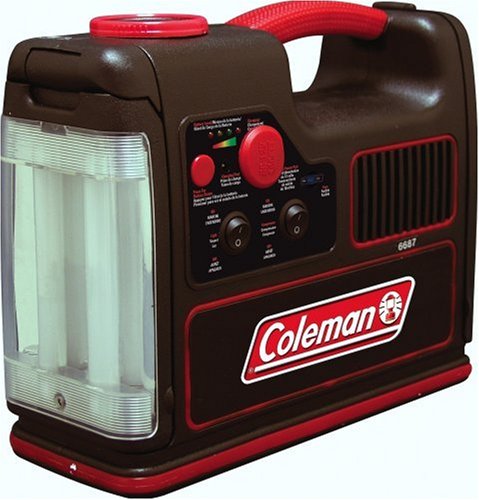
Image: The Coleman Cordless, Rechargeable Air Compressor PMC8144, showcasing its compact design, integrated fluorescent worklight on the left, and control panel with pressure gauge and switches on the right. A red handle is visible on top.
Setup
Initial Charging
Before first use, fully charge the unit. Charging time may vary.
- Connect the AC Charging Adaptor to the unit's charging port.
- Plug the adaptor into a standard wall outlet (120V AC).
- The battery charge indicator lights will show the charging progress. Charge until all indicator lights are solid, indicating a full charge.
- Alternatively, use the DC Charging Cord to charge from a vehicle's 12V DC outlet.
Operating Instructions
Using the Air Compressor
- Ensure the unit is fully charged.
- Select the appropriate inflator nozzle or sports equipment needle for the item you wish to inflate.
- Securely attach the nozzle to the compressor's air hose.
- Connect the nozzle to the item to be inflated.
- Turn on the air compressor using the designated switch on the control panel.
- Monitor the pressure gauge to reach the desired PSI.
- Once the desired pressure is reached, turn off the compressor and disconnect the nozzle.
Using the Fluorescent Worklight
- Locate the worklight switch on the control panel.
- Flip the switch to turn on the fluorescent light.
- Adjust the swivel head of the light to direct illumination as needed.
- Turn off the light when no longer required to conserve battery life.
Using the 12V Accessory Power Port
- Ensure the unit has sufficient charge.
- Plug your 12V accessory into the designated power port on the unit.
- The unit will provide power to the accessory.
- Disconnect the accessory when finished.
Maintenance
- Keep the unit clean and free from dust and debris. Wipe with a dry cloth.
- Store the unit in a cool, dry place when not in use.
- Recharge the battery periodically (every 3-6 months) even if not used, to maintain battery health.
- Inspect the air hose and nozzles for any signs of wear or damage before each use.
Troubleshooting
| Problem | Possible Cause | Solution |
|---|---|---|
| Compressor does not turn on. | Battery is depleted. | Recharge the unit fully using the AC or DC adaptor. |
| Low air pressure output. | Hose or nozzle not securely attached; Battery low. | Check all connections for leaks. Recharge the unit. |
| Worklight does not illuminate. | Battery is depleted; Bulb is faulty. | Recharge the unit. Contact customer support if the bulb is faulty. |
| Unit overheats during use. | Prolonged continuous operation. | Allow the unit to cool down for at least 15-20 minutes before resuming operation. Avoid continuous use for extended periods. |
Specifications
- Model: CPMPMC8144
- Brand: Coleman
- Max Pressure: 220 PSI
- Power Source: Cordless, Rechargeable Battery
- Voltage: 12 Volts
- Item Weight: 10 Pounds (approx. 4.54 kg)
- Unit Dimensions (H x W x L): 11 x 5.75 x 12.75 inches (approx. 27.94 x 14.61 x 32.39 cm)
- Included Components: Nozzles, AC Charging Adaptor, DC Charging Cord
Warranty and Support
For warranty information or technical support, please refer to the warranty card included with your product or visit the official Coleman website. Keep your purchase receipt for warranty claims.
Official Coleman Website: www.coleman.com


