
Introduction
This manual provides detailed instructions for the proper setup, operation, and maintenance of your Vivitar 8x22 Classic Binocular. Designed with traditional porro prism optical construction and multicoated optics, these binoculars offer enhanced resolution and image brightness for a clear viewing experience. Please read this manual thoroughly before using your binoculars to ensure optimal performance and longevity.
Product Overview
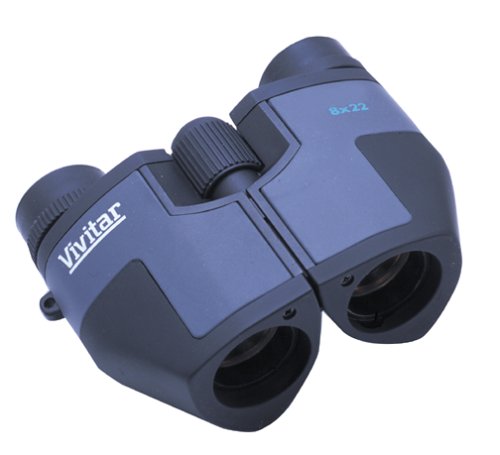
Image: The Vivitar 8x22 Classic Binocular, featuring a compact design with a central focus wheel and adjustable eyepieces. The brand name "Vivitar" is visible on the left barrel, and "8x22" is on the right barrel, indicating its magnification and objective lens diameter.
The Vivitar 8x22 Classic Binocular is a compact and portable optical instrument designed for various viewing activities. Key features include:
- Traditional Porro Prism Optical Construction: Provides a wider field of view and enhanced depth perception.
- Long Eye Relief: Allows for comfortable viewing, especially for eyeglass wearers.
- Large Exit Pupil: Contributes to brighter images, particularly in low-light conditions.
- Multicoated Optics: Reduces glare and light refraction, improving image clarity and brightness.
- Reliable Center-Wheel Focus Design: For quick and precise focusing.
- Ocular Adjustment: Compensates for vision differences between your eyes.
- Accessories: Includes a nylon carry case, shoulder strap, and lens caps for protection and portability.
Setup
1. Unpacking
Carefully remove the binoculars and all accessories from the packaging. Verify that all components are present: Vivitar 8x22 Binocular, nylon carry case, shoulder strap, and lens caps.
2. Attaching the Shoulder Strap
Thread the ends of the shoulder strap through the strap lugs located on the sides of the binocular body. Secure the strap firmly to prevent accidental drops. The shoulder strap allows for convenient carrying and quick access.
3. Adjusting Interpupillary Distance
Hold the binoculars with both hands and look through the eyepieces. Adjust the distance between the two barrels by moving them closer together or further apart until you see a single, clear circular field of view. This adjustment ensures that the binoculars are aligned with your eyes' interpupillary distance.
4. Eyecup Adjustment
If your binoculars have adjustable eyecups (twist-up or fold-down), adjust them for comfortable viewing. If you wear eyeglasses, you may prefer to use the binoculars with the eyecups in the down position to maximize the field of view. If you do not wear eyeglasses, extend the eyecups to the up position.
Operating Instructions
1. Focusing
- Close your right eye and look through the left eyepiece. Rotate the center focus wheel until the image is sharp and clear.
- Close your left eye and look through the right eyepiece. Rotate the diopter adjustment ring (usually located on the right eyepiece) until the image is sharp and clear.
- Now, with both eyes open, the binoculars are adjusted to your vision. For subsequent viewing, you will only need to use the center focus wheel to adjust for different distances.
2. Viewing Techniques
Hold the binoculars steady to minimize image shake. For extended viewing, consider resting your elbows on a stable surface or using a tripod adapter (not included) if available on your model. Scan the area slowly to locate your desired subject.
Maintenance and Care
1. Lens Cleaning
To clean the lenses, first use a soft brush or compressed air to remove any dust or loose particles. Then, apply a small amount of lens cleaning fluid to a clean microfiber cloth and gently wipe the lens surfaces in a circular motion. Avoid using abrasive cloths or harsh chemicals, as these can damage the lens coatings.
2. Storage
When not in use, store your binoculars in the provided nylon carry case to protect them from dust, dirt, and scratches. Keep them in a cool, dry place, away from direct sunlight and extreme temperatures. Ensure lens caps are in place to protect the objective and ocular lenses.
3. General Care
Avoid dropping the binoculars or subjecting them to strong impacts, as this can misalign the optical components. Do not attempt to disassemble the binoculars, as this will void any warranty and may cause irreparable damage.
Troubleshooting
- Blurred Image:
Ensure the center focus wheel and diopter adjustment are correctly set for your vision. Check for dirt or smudges on the lenses and clean them as per the maintenance instructions.
- Double Image or Eye Strain:
Adjust the interpupillary distance (distance between the barrels) until you see a single, merged image. Ensure your eyecups are set correctly for your viewing preference (with or without eyeglasses).
- Dark or Dim Image:
Verify that the lens caps have been removed from both the objective and ocular lenses. Ensure you are viewing in adequate lighting conditions. Multicoated optics help, but extreme low light will still limit visibility.
Specifications
| Feature | Detail |
|---|---|
| Brand | Vivitar |
| Model | 634642L |
| Magnification | 8x |
| Objective Lens Diameter | 25 Millimeters |
| Optical Zoom | 8x |
| Special Features | Lightweight, Portable |
| Product Dimensions (LxWxH) | 11.4 x 7.6 x 3.6 Centimeters |
| Item Weight | 227 g |
| Optical Construction | Traditional Porro Prism |
| Optics Coating | Multicoated |
Warranty and Support
For information regarding warranty coverage, product support, or service inquiries, please refer to the warranty card included with your purchase or contact Vivitar customer service directly. Keep your proof of purchase for warranty claims.
For further assistance, you may visit the official Vivitar website or contact their support channels.