
1. Introduction
The Coast LED Lenser LL7533/2 Camp Light is a versatile and durable lighting solution designed for various applications, including camping and general utility. This manual provides essential information for the safe and effective setup, operation, and maintenance of your camp light.

Figure 1.1: The Coast LED Lenser LL7533/2 Camp Light. This image displays the main flashlight unit, which is silver and cylindrical, featuring a black wrist strap attached to its tail cap. The light source, consisting of three LEDs, is visible at the head of the unit.
2. Safety Information
- Battery Safety: Always insert batteries with correct polarity (+/-). Do not mix old and new batteries, or different types of batteries. Remove batteries if the device will not be used for an extended period to prevent leakage. Dispose of used batteries responsibly.
- LED Light: Do not stare directly into the LED light source. The bright light can cause temporary vision impairment.
- General Handling: Keep the device away from water and extreme temperatures. Do not attempt to disassemble or modify the light, as this may void the warranty and pose a safety risk.
3. Package Contents
Verify that all items are present in the package:
- Coast LED Lenser LL7533/2 Camp Light Unit
- Crystal Reflector Tube System
- Refractor Rod
- 2 x AA Alkaline Batteries
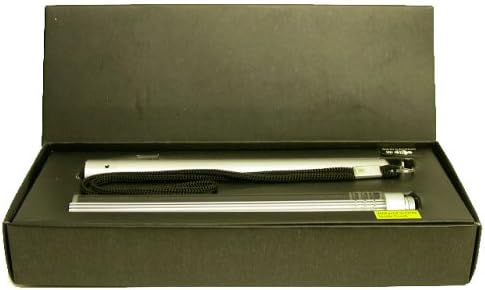
Figure 3.1: Package Contents. This image shows the Coast LL7533/2 Camp Light and its accompanying refractor rod, both silver and cylindrical, resting within a black presentation box. The flashlight unit has a black wrist strap attached.
4. Setup: Battery Installation
The LL7533/2 Camp Light requires two AA alkaline batteries for operation. Follow these steps to install the batteries:
- Unscrew the tail cap of the flashlight by turning it counter-clockwise.
- Insert two AA alkaline batteries into the battery compartment, ensuring the positive (+) and negative (-) ends align with the indicators inside the compartment.
- Screw the tail cap back on clockwise until it is securely tightened. Do not overtighten.
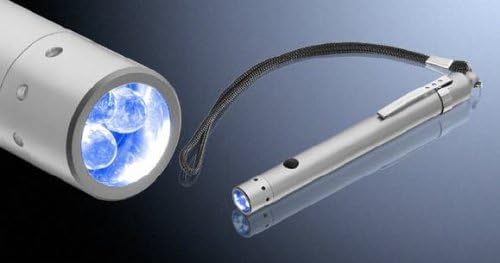
Figure 4.1: LED Head and Power Button. This image provides a close-up view of the flashlight's head, clearly showing the three LED bulbs. The silver cylindrical body of the flashlight is also visible, with a black power button located on its side, indicating the operational interface.
5. Operating Instructions
To use your Coast LL7533/2 Camp Light:
- Turning On/Off: Locate the power button on the side of the flashlight body (refer to Figure 4.1). Press the button once to turn the light ON. Press the button again to turn the light OFF.
- Using the Reflector Tube and Refractor Rod: For broader area illumination, attach the crystal reflector tube system and refractor rod to the flashlight head. These accessories diffuse the LED light, transforming the focused beam into a softer, wider camp light suitable for tents or small areas.
6. Maintenance
- Cleaning: Wipe the exterior of the camp light with a soft, dry cloth. Do not use abrasive cleaners or solvents.
- Battery Replacement: Replace batteries when the light output becomes dim or inconsistent. Always replace both batteries simultaneously with new AA alkaline batteries.
- Storage: If storing the camp light for an extended period, remove the batteries to prevent potential leakage and damage to the device. Store in a cool, dry place.
7. Troubleshooting
- Light does not turn on:
- Check if batteries are inserted with correct polarity.
- Ensure batteries are fresh and fully charged. Replace if necessary.
- Confirm the tail cap is securely tightened.
- Light is dim or flickers:
- Batteries may be low. Replace with new AA alkaline batteries.
- Ensure battery contacts are clean and free of corrosion.
8. Specifications
| Model Number | LL7533/2 |
| Light Source | 3 x High Quality Nichia LEDs |
| Brightness | 50 Lumens (White brightness) |
| Power Source | 2 x AA Alkaline Batteries |
| Material | Aluminium |
| Dimensions (L x W x H) | 18.42 x 6.99 x 3.18 cm (7.25 x 2.75 x 1.25 inches) |
| Weight | 158.76 g |
| Special Features | Crystal reflector tube system, Refractor rod, Advanced Optical System |
9. Warranty Information
For detailed warranty terms and conditions, please refer to the official Coast website or the warranty card included with your product packaging. Keep your proof of purchase for any warranty claims.
10. Customer Support
If you require technical assistance, have questions about your product, or need to report an issue, please visit the official Coast website for support resources, FAQs, and contact information.
Official Website: https://coastportland.com/


