1. Introduction
The Kodak EasyShare DX7630 is a 6.1-megapixel digital camera designed for both automatic and manual control over photography. It features a Schneider-Kreuznach Variogon 3x optical zoom lens, a 2.2-inch LCD display, and various shooting modes to capture high-quality images and video. This manual provides instructions for setting up, operating, and maintaining your camera.
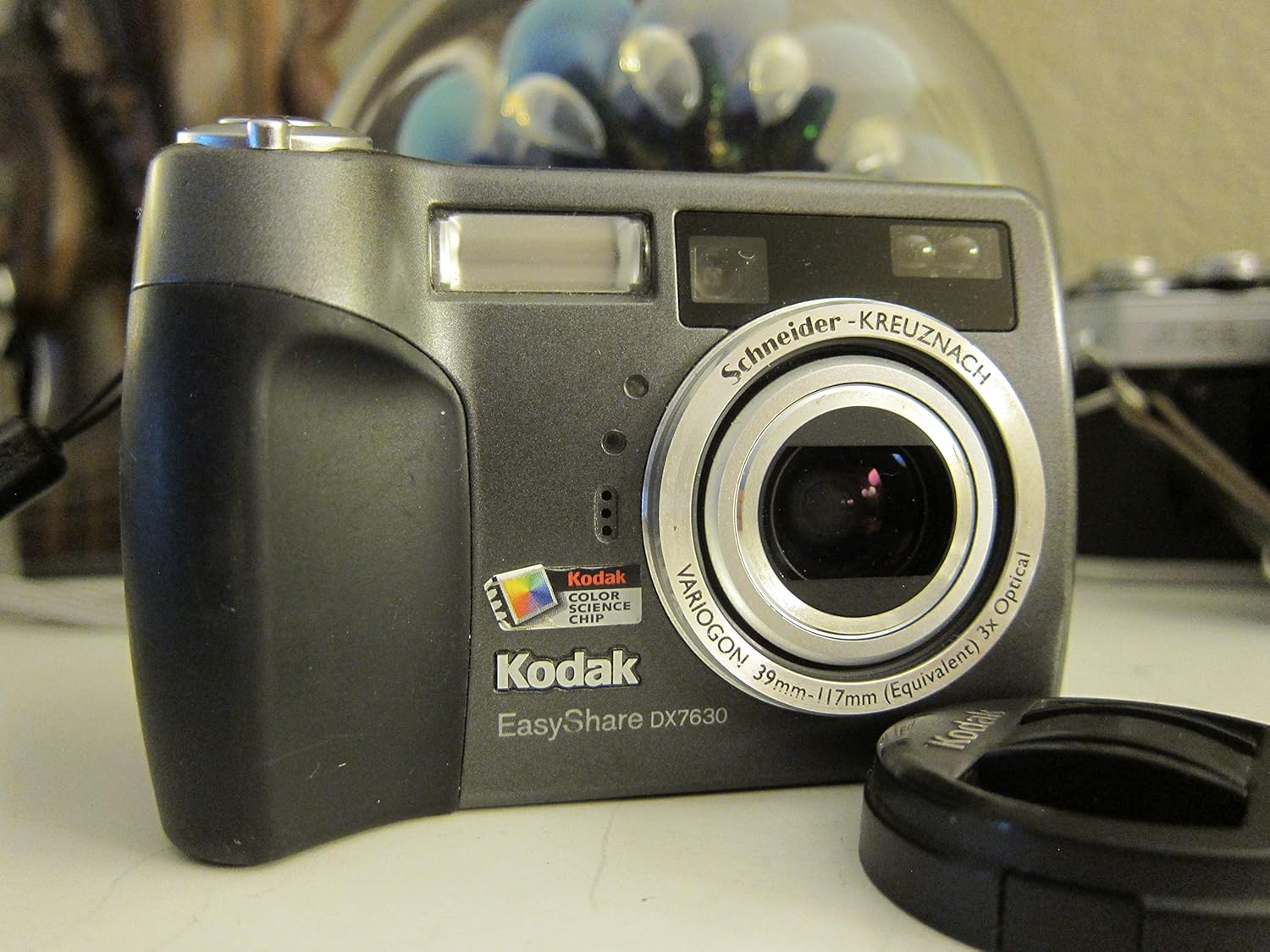
Figure 1.1: Front view of the Kodak EasyShare DX7630 Digital Camera.
2. What's in the Box
Verify that all items are present in your camera package:
- Kodak EasyShare DX7630 Zoom Digital Camera
- Rechargeable Lithium-Ion Battery (KLIC-5001)
- Battery Charger
- USB Cable
- Audio/Video Cables
- Wrist Strap
- Lens Cap
- Kodak EasyShare Software
- Getting Started Kit
3. Setup
3.1 Battery Installation and Charging
The camera uses a rechargeable KLIC-5001 Lithium-Ion battery. Ensure the battery is fully charged before first use.
- Open the battery compartment cover located on the bottom of the camera.
- Insert the KLIC-5001 battery with the contacts facing inward, ensuring correct orientation.
- Close the battery compartment cover securely.
- Connect the battery charger to a power outlet and insert the battery into the charger. The charging indicator will illuminate.
- Charge the battery until the indicator signals a full charge (refer to charger instructions for specific indicator behavior).

Figure 3.1: Battery and memory card compartment on the camera's underside.
3.2 Memory Card Installation
The camera has 32 MB of internal memory. For extended storage, use Secure Digital (SD) or MultiMedia (MMC) memory cards.
- Open the battery/memory card compartment cover.
- Insert the SD or MMC card into the designated slot until it clicks into place. Ensure the card is oriented correctly.
- Close the compartment cover securely.
3.3 Initial Power On
Press the Power button to turn on the camera. The lens will extend, and the LCD display will activate.

Figure 3.2: Camera with the lens extended, ready for use.
4. Operating the Camera
4.1 Basic Photography
The DX7630 captures images at 6.1 megapixels, suitable for prints up to 30x40 inches. It features a Schneider-Kreuznach Variogon 3x optical zoom lens, supplemented by a 4x digital zoom for a total of 12x zoom capability.
- Turn on the camera.
- Select your desired shooting mode using the mode dial (refer to Section 4.2).
- Frame your shot using the 2.2-inch LCD or the optical viewfinder.
- Press the shutter button halfway to focus, then fully to capture the image.

Figure 4.1: Rear view with LCD display and mode dial.
4.2 Shooting Modes
The camera offers a range of modes for various shooting conditions:
- Automatic Mode: The camera automatically adjusts settings for optimal exposure.
- Program Mode (P): Allows some control over settings while the camera manages exposure.
- Aperture Priority (A): You set the aperture, and the camera selects the shutter speed.
- Shutter Priority (S): You set the shutter speed, and the camera selects the aperture.
- Manual Mode (M): Full control over aperture and shutter speed.
- Scene Modes (SCN): 16 pre-set modes for specific situations (e.g., sport, portrait, night, landscape, macro).
- Color Modes: 5 color modes to adjust the color rendition of your images.
4.3 Zoom Functionality
Use the zoom controls located near the shutter button to adjust the focal length. The 3x optical zoom provides clear magnification, while the 4x digital zoom can extend reach, though with potential loss of image quality.

Figure 4.2: Top view with shutter button and zoom controls.
4.4 Flash Settings
The built-in flash features automatic detection for backlit situations and red-eye reduction. Access flash settings through the camera's menu to select modes such as Auto, Fill-Flash, Red-Eye Reduction, or Off.
4.5 Video Mode
The DX7630 can capture full-motion video at 320 x 240 pixels at 20 frames per second with audio. The duration of video capture is limited by available memory. The 32 MB internal memory can store approximately 3.5 minutes of video.
5. Image Management
5.1 Viewing Images
To review captured images, press the Review button. Use the directional pad to navigate through photos. The 2.2-inch high-resolution LCD allows for fast magnification and multi-up viewing.

Figure 5.1: Reviewing an image on the camera's LCD.
5.2 Transferring Images to a Computer
Connect the camera to your computer using the supplied USB cable. The Kodak EasyShare software (included) facilitates effortless digital picture transfer, organization, basic editing, sharing, and printing for both Windows and Macintosh systems.
5.3 Sharing Images
The camera features a dedicated Share button. Pressing this button allows you to:
- Store up to 200 pictures in an on-camera digital album.
- Select photos for printing.
- Select photos for e-mailing, with up to 32 e-mail addresses stored in the camera's memory.
6. Maintenance
6.1 Cleaning the Camera
- Lens: Use a soft, lint-free cloth or a lens brush to gently remove dust. For smudges, use a lens cleaning solution applied to the cloth, not directly to the lens.
- LCD Screen: Wipe gently with a soft, dry cloth. Avoid harsh chemicals.
- Camera Body: Use a soft, dry cloth to wipe the camera body. Do not use solvents or abrasive cleaners.
6.2 Storage
When not in use, store the camera in a cool, dry place away from direct sunlight and extreme temperatures. Remove the battery if the camera will not be used for an extended period.
7. Troubleshooting
| Problem | Possible Cause | Solution |
|---|---|---|
| Camera does not power on. | Battery is depleted or incorrectly inserted. | Charge the battery fully. Ensure the battery is inserted with correct polarity. |
| Images are blurry or out of focus. | Insufficient light, subject too close, or camera movement. Auto-focus unable to lock. | Ensure adequate lighting. Maintain minimum focus distance. Use a tripod or image stabilization. In challenging conditions, try manual focus if available or adjust focus zones. |
| Flash does not fire. | Flash is set to "Off" or battery is low. | Check flash settings in the menu. Recharge the battery. |
| Memory card error. | Card is full, corrupted, or incorrectly inserted. | Delete unnecessary files or insert a new card. Reinsert the card. Format the card (this will erase all data). |
| Cannot transfer photos to computer. | USB cable not connected properly, or software not installed. | Ensure USB cable is securely connected to both camera and computer. Install Kodak EasyShare software. |
8. Specifications
| Feature | Detail |
|---|---|
| Model Name | Kodak EasyShare DX7630 |
| Sensor Resolution | 6.1 Megapixels (2856 x 2142) |
| Optical Zoom | 3x (Schneider-Kreuznach Variogon lens) |
| Digital Zoom | 4x (12x total zoom) |
| Display | 2.2-inch high-resolution indoor/outdoor LCD |
| Internal Memory | 32 MB |
| Memory Card Support | Secure Digital (SD), MultiMedia Card (MMC) |
| Video Capture | 320 x 240 pixels at 20 fps with audio |
| Battery Type | Rechargeable Lithium-Ion (KLIC-5001) |
| Connectivity | USB 1.1 |
| Dimensions (L x W x H) | 3.94 x 1.57 x 2.72 inches |
| Weight (without battery) | 7.9 ounces (0.6 lbs) |
| Min Shutter Speed | 64 seconds |
| Max Shutter Speed | 1/1400 seconds |
| Special Feature | Image Stabilization |
9. Warranty and Support
For warranty information and technical support, please refer to the documentation included with your purchase or visit the official Kodak support website. Keep your proof of purchase for warranty claims.
Note: Product specifications and features are subject to change without notice.


