
1. Product Overview
The Mamiya 645PRO Magnifier FD-401 is an optical accessory designed to enhance focusing precision for your Mamiya 645PRO medium format camera. This convenient magnifying loupe is particularly useful for critical focus adjustments during close-up (macro) or telephoto photography, where precise focus is paramount.
It is engineered to magnify the central portion of the viewfinder image, providing a clearer and more detailed view for accurate focusing. A key feature of the FD-401 is its ability to be flipped up while remaining attached to the camera, allowing users to quickly switch between magnified and unmagnified viewing of the entire viewfinder image.
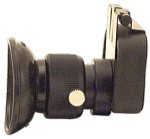
Image of the Mamiya 645PRO Magnifier FD-401, showcasing its design and attachment mechanism.
2. Setup
To attach the Mamiya 645PRO Magnifier FD-401 to your camera:
- Ensure your Mamiya 645PRO camera is powered off.
- Locate the viewfinder eyepiece on your Mamiya 645PRO camera.
- Carefully align the attachment mechanism of the FD-401 magnifier with the camera's viewfinder eyepiece.
- Gently push and secure the magnifier onto the eyepiece until it clicks or feels firmly seated. Ensure there is no wobble, indicating a secure connection.
- Once attached, the magnifier should be stable and ready for use.
Note: Always handle optical components with care to avoid scratches or damage.
3. Operating Instructions
Using the Mamiya 645PRO Magnifier FD-401 is straightforward:
- For Magnified Focusing: Look through the FD-401 magnifier. The central area of your camera's viewfinder image will be optically magnified. This enhanced view allows for extremely precise focus adjustments, which is crucial for subjects requiring critical sharpness, such as macro photography or when using long telephoto lenses.
- For Full Viewfinder Check: When you need to observe the entire viewfinder image without magnification (e.g., for composition or checking the overall scene), the FD-401 can be flipped up. While still attached to the camera, simply pivot the magnifier upwards. This allows you to view the standard, unmagnified viewfinder image.
- Returning to Magnified View: To return to magnified viewing, simply pivot the magnifier back down into its original position over the viewfinder eyepiece.
Ensure the magnifier is clean for optimal viewing clarity.
4. Maintenance
Proper maintenance ensures the longevity and performance of your Mamiya 645PRO Magnifier FD-401:
- Cleaning the Lens: Use a soft, lint-free microfiber cloth specifically designed for optical lenses to gently wipe any dust or smudges from the magnifier's glass surfaces. For stubborn marks, a small amount of lens cleaning fluid applied to the cloth (not directly to the lens) can be used.
- Avoid Abrasives: Never use abrasive materials, harsh chemicals, or solvents, as these can damage the optical coatings and plastic components.
- Storage: When not in use, store the magnifier in a clean, dry place, preferably in a protective pouch or case, to prevent dust accumulation and accidental scratches.
- Handling: Always handle the magnifier by its body, avoiding direct contact with the optical surfaces.
5. Troubleshooting
If you encounter issues with your Mamiya 645PRO Magnifier FD-401, consider the following:
- Blurry Image:
- Ensure the magnifier's lens surfaces are clean and free of dust or smudges.
- Verify that the magnifier is securely and correctly attached to the camera's viewfinder.
- Check your camera's diopter adjustment (if applicable) to ensure it is set correctly for your vision.
- Magnifier Feels Loose:
- Re-attach the magnifier, ensuring it is fully seated and locked into place on the viewfinder eyepiece.
If problems persist, consult a qualified camera technician.
6. Specifications
| Brand | Mamiya |
| Model | FD-401 |
| Product Type | Viewfinder Magnifier |
| Compatibility | Mamiya 645PRO Medium Format Camera |
| Batteries Required | No |
7. Warranty and Support
Specific warranty information for the Mamiya 645PRO Magnifier FD-401 is typically provided at the point of purchase or within the original product packaging. Please refer to your purchase documentation or contact the retailer for details regarding warranty coverage and support services.
For technical assistance or inquiries, it is recommended to contact Mamiya customer support or an authorized Mamiya service center.


