1. Introduction
This manual provides essential instructions for the proper installation, operation, and maintenance of your Uflex RackTech Rack and Pinion Steering System 16'. Adhering to these guidelines will ensure optimal performance, longevity, and safe operation of your marine steering system. Please read all instructions carefully before proceeding with installation or maintenance.
2. Components Overview
The Uflex RackTech Rack and Pinion Steering System 16' package includes the following primary components:
- M86 Helm: Preassembled helm unit for steering control.
- G86 Shaft Assembly: The main shaft component of the steering system.
- X34 90° Bezel: A bezel designed for a 90-degree mounting angle.
- 16' Steering Cable: An armor-wrapped stainless steel core cable for efficient power transfer.
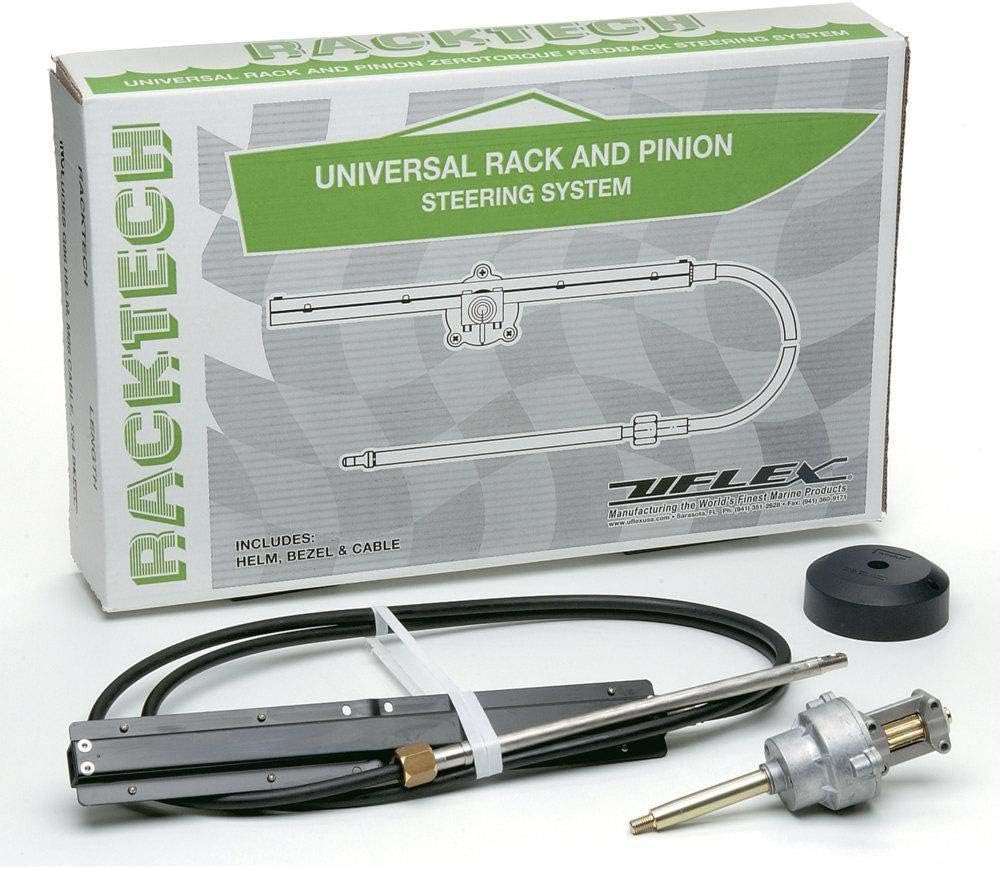

3. Setup and Installation
Proper installation is crucial for the safe and effective operation of your steering system. It is recommended that installation be performed by a qualified marine technician.
3.1 General Installation Notes
The installation process requires precise alignment. For example, when installing the mount, ensure the hole positions are exact. Typically, only four screws are needed to secure the mount.
3.2 Measuring Steering Cables
Accurate cable measurement is vital for correct replacement or new installation. Always measure twice to ensure accuracy.
- Replacement of Existing Cable: If possible, locate the part number stamped on the plastic jacket of the old cable. If the old cable is removed, measure as follows:
- For Rotary Steering Cable Replacement: Measure the plastic cable jacket ('Y' dimension as shown in Figure 3.2) in inches, add 18 inches, and round up to the next foot.
- For Rack Steering Cable Replacement: Measure the plastic cable jacket ('Y' dimension as shown in Figure 3.2) in inches, add 30 inches, and round up to the next foot.
- New Installation: Measure the cable routing path from the wheel center line to the engine connection.
- A = Center line of wheel to gunwale (or deck, if routed downward).
- B = Dash to transom.
- C = Gunwale to centerline of cable connection at center tiller.
- For Cable Installations through the Engine Tilt Tube: Add A, B & C + 6", and round up to the next foot.
- For Cables Mounted to Transom, Splashwell or Stringer: Add A, B & C, then subtract 6" and round up to the next foot.


4. Operating Instructions
Once properly installed, the Uflex RackTech steering system provides smooth and responsive control. Operate the steering wheel to turn the boat's rudder or outboard motor. Ensure the steering moves freely and without excessive play or binding before and during each use.
5. Maintenance
Regular inspection and maintenance are crucial for the longevity and safe operation of your steering system. It is recommended to perform this maintenance at least twice a year.
5.1 Inspection
- Inspect the complete steering system for any loose or corroded hardware at both the helm and engine ends.
- Check the outer plastic jacket of the steering cable for any deep gouges, cracks, cuts, or corrosion, especially at the crimped ends.
- If any damage or corrosion is observed on the cable jacket, or if the cable is hard to move when removed from the engine tilt tube or support tube, the cable must be replaced. Steering cables cannot be repaired.
5.2 Cleaning and Lubrication
To maintain smooth operation, clean and grease the engine tilt tube or cable support tube and the steering cable's telescopic output ram.
- Remove the steering cable's telescoping ram from the tilt tube. This requires loosening the locknut at the end of the cable's plastic jacket and removing the link arm from the end of the steering cable.
- Pull the cable by its plastic jacket until the ram is completely free of the tilt/support tube.
- Clean the tilt/support tube's inside diameter thoroughly. Remove all corrosion with a wire brush and wipe until all loose material is removed.
- Lubricate the tilt tube with a good water-resistant marine grease.
- Clean the steering cable's telescopic ram with a brass wire brush and wipe until clean.
- Lubricate the sliding parts of the telescopic ram with a high-quality, water-resistant marine grease.
- Reassemble all components, ensuring all correct fasteners are tight and there is no binding or excessive free play in the moving parts.
Important: Where locking fasteners are used, DO NOT use non-locking fasteners. Vibration can loosen them, causing steering failure.
6. Troubleshooting
If you experience issues with your Uflex RackTech steering system, consider the following:
- Stiff or Hard Steering: This is often an indication of corrosion or lack of lubrication in the steering cable or tilt tube. Refer to the maintenance section (Section 5) for cleaning and lubrication procedures. If the cable remains stiff after cleaning and lubrication, it likely needs replacement.
- Excessive Play in Steering: Check all fasteners at the helm and engine ends for tightness. Ensure all components are securely mounted.
- Unresponsive Steering: Inspect the steering cable for any damage to the outer jacket or crimped ends. A damaged cable must be replaced immediately.
7. Specifications
| Attribute | Value |
|---|---|
| Manufacturer | Uflex |
| Brand | uflex |
| Model | RACKTECH16 |
| Item Weight | 1 pounds |
| Product Dimensions | 29 x 5 x 18 inches |
| Manufacturer Part Number | RACKTECH16 |
| ASIN | B0000AXSQL |
| First Available | September 15, 2003 |
8. Warranty Information
For detailed warranty information regarding your Uflex RackTech Rack and Pinion Steering System, please refer to the official Uflex product warranty documentation provided at the time of purchase or visit the manufacturer's official website.
9. Technical Support
If you have any questions or require further assistance with your Uflex RackTech steering system, please contact SeaStar Solutions Technical Support.
Technical Support: 610-495-7011