
1. Setup
Attaching the Lens
- Ensure both the camera and the lens are clean and free of dust.
- Align the mounting index marks on the lens with those on the camera body.
- Rotate the lens clockwise (for Canon EF mount) until it clicks into place. Do not force the lens.
- Remove the front lens cap and rear dust cap.
Detaching the Lens
- Press the lens release button on the camera body.
- Rotate the lens counter-clockwise until it detaches from the camera body.
- Immediately attach the front lens cap and rear dust cap to protect the lens elements.

Figure 1: Tamron AF 28-75mm f/2.8 SP XR Di LD Aspherical (IF) Lens, showing its compact design.
2. Operating the Lens
Focusing Modes (AF/MF)
The Tamron AF 28-75mm f/2.8 lens supports both autofocus (AF) and manual focus (MF). A switch on the lens barrel allows you to select the desired mode.
- AF (Autofocus): For automatic focusing. The camera will attempt to focus on the subject.
- MF (Manual Focus): For manual focusing. Rotate the focus ring on the lens barrel to adjust focus.
Focal Length and Zoom
This is a zoom lens with a focal length range of 28mm to 75mm. Rotate the zoom ring on the lens barrel to adjust the focal length. The lens features a Zoom Lock (ZL) mechanism to prevent unwanted extension of the lens barrel when carrying the camera.
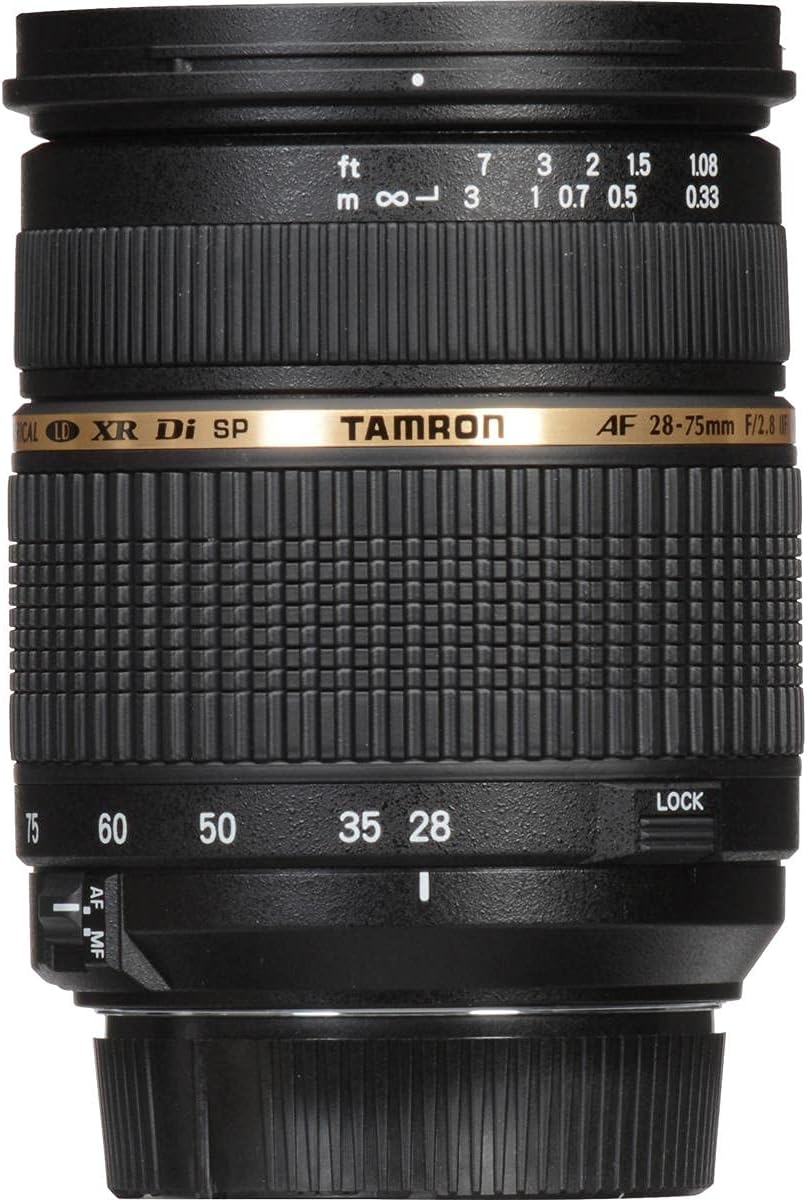
Figure 2: Tamron AF 28-75mm lens showing the focus and zoom rings, along with the AF/MF switch and Zoom Lock.
Aperture
This lens features a constant maximum aperture of f/2.8 across its entire zoom range, allowing for excellent low-light performance and shallow depth of field.
Flash Photography
When using flash, ensure your camera is set to Program, Aperture Priority, Shutter Priority, or Manual mode. Avoid Full Auto or Green Box modes for flash control. Common flash modes include:
- Forced On: The camera uses flash for every shot, useful for 'fill flash' to brighten shadow areas in high-contrast scenes.
- Slow Sync: The camera keeps the shutter open longer to capture ambient light, then adds flash. This can create motion blur in low light while freezing the subject with flash.
- Automatic: The camera uses flash only when low light conditions are detected, adding light for proper exposure without extending shutter speed for ambient light.
White Balance
White balance settings on your camera compensate for different color temperatures of light sources, ensuring accurate color reproduction. While 'Auto' is the default, your camera offers presets like Cloudy, Shady, Tungsten, Daylight, and Fluorescent. Adjusting white balance is crucial, especially when shooting JPEG, as it offers fewer post-processing options than RAW.
Night Photography
For night photography, a tripod and cable release are recommended to prevent blurry images due to long exposures. Manual focus is often necessary as autofocus systems may struggle in very low light. You can estimate focus distance or use a flashlight to temporarily illuminate your subject for focusing.
3. Maintenance and Care
Cleaning the Lens
- Use a blower brush to remove dust and loose particles from the lens surface.
- For smudges or fingerprints, use a clean, soft microfiber cloth specifically designed for optics, along with a small amount of lens cleaning solution. Apply solution to the cloth, not directly to the lens.
- Clean the lens in a circular motion from the center outwards.
- Avoid touching the lens elements with your fingers.
Storage
- Always attach the front and rear lens caps when the lens is not in use.
- Store the lens in a dry, cool place, away from direct sunlight and extreme temperatures.
- If storing for extended periods, consider using a desiccant to prevent mold growth.
4. Troubleshooting
Image is Blurry/Out of Focus
- Check the AF/MF switch on the lens. Ensure it is set to AF for autofocus or MF if you intend to focus manually.
- Verify the camera's focus mode settings. For moving subjects, 'Continuous' or 'Servo' AF mode may be more appropriate.
- In low light, autofocus may struggle. Switch to manual focus (MF) and adjust carefully.
- Ensure the shutter speed is fast enough to prevent camera shake, especially in low light or with moving subjects. Use a tripod if necessary.
Lens Not Attaching/Detaching Smoothly
- Ensure the lens and camera mounts are clean and free of debris.
- Align the mounting index marks correctly before rotating. Do not force the lens.
- When detaching, ensure the lens release button is fully depressed.
5. Specifications
| Feature | Detail |
|---|---|
| Brand | Tamron |
| Model Name | AF09 (Model A09E) |
| Focal Length | 28-75mm |
| Maximum Aperture | f/2.8 (Constant) |
| Minimum Aperture | 32 |
| Lens Type | Standard Zoom |
| Compatible Mountings | Canon EF |
| Focus Type | Micromotor (Autofocus) |
| Minimum Focusing Distance | 0.33m (13 inches) |
| Filter Size | 67mm |
| Weight | Approximately 18 ounces (510g) |
| Dimensions (Diameter x Length) | 2.9 x 3.6 inches (73 x 92mm) |
| Special Features | XR (Extra Refractive Index) Glass, LD (Low Dispersion) Glass, Aspherical Elements, IF (Internal Focusing), Di (Digitally Integrated Design), SP (Super Performance), Zoom Lock (ZL) |
6. Warranty & Support
Warranty Information
This Tamron lens comes with a 6-year limited warranty. Please retain your proof of purchase for warranty claims. For specific terms and conditions, refer to the warranty card included with your product or visit the official Tamron website.
Customer Support
For further assistance, technical support, or service inquiries, please visit the official Tamron Store or contact Tamron customer service directly.


