
Introduction
This manual provides essential information for the proper use, care, and maintenance of your Contax Zeiss 28mm f/2.8 Distagon T* MM Lens. Please read these instructions carefully before using the lens to ensure optimal performance and longevity.
Setup
Attaching the Lens to Your Camera
- Ensure both the camera body and the lens mount are clean and free of dust or debris.
- Align the red dot on the lens mount with the corresponding red dot on your camera's lens mount.
- Gently insert the lens into the camera mount.
- Rotate the lens clockwise until it clicks into place, indicating it is securely locked. Do not force the lens.

Figure 1: Rear view of the lens mount, showing the red alignment dot for camera attachment.
Removing the Lens
- Press and hold the lens release button on your camera body.
- Rotate the lens counter-clockwise until it detaches from the camera mount.
- Immediately place the rear lens cap on the lens and the body cap on the camera to protect the sensors and optics from dust.
Operating the Lens
Manual Focus
This is a manual focus lens. To achieve sharp focus:
- Look through your camera's viewfinder or use Live View on your camera's LCD screen.
- Rotate the focus ring (the wider ring closer to the camera body) until your subject appears sharp.
- Utilize your camera's focus aids, such as focus peaking or magnification, if available, for precise focusing.
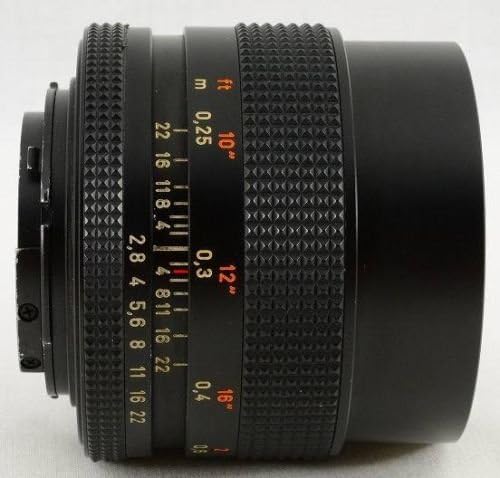
Figure 2: Side view of the lens, highlighting the focus and aperture rings.
Aperture Control
The aperture controls the amount of light entering the lens and affects the depth of field. To adjust the aperture:
- Locate the aperture ring (the narrower ring with f-stop numbers) on the lens barrel.
- Rotate the ring to select your desired aperture value (e.g., f/2.8 for a wide-open aperture, f/22 for a smaller aperture).
- The 'MM' designation indicates that this lens supports program and shutter-priority auto exposure modes on compatible Contax cameras, allowing the camera to control the aperture when set to the smallest aperture (green '22' marking).
Depth of Field Scale
The lens features a depth of field scale, which helps estimate the range of acceptable sharpness at different apertures and focus distances. Consult the markings on the lens barrel for this information.
Maintenance
Cleaning the Lens
- Lens Elements: Use a blower brush to remove loose dust. For smudges or fingerprints, use a clean, soft microfiber cloth specifically designed for optics and a small amount of lens cleaning solution. Apply the solution to the cloth, not directly to the lens.
- Lens Barrel: Wipe the exterior with a soft, dry cloth. Avoid using harsh chemicals or solvents.
Storage
- Always attach front and rear lens caps when the lens is not in use.
- Store the lens in a cool, dry place, away from direct sunlight and extreme temperatures.
- If storing for extended periods, consider using a dehumidifying cabinet or silica gel packets to prevent mold growth.
Handling Precautions
- Avoid dropping or subjecting the lens to strong impacts.
- Do not expose the lens to water or excessive humidity.
- Keep the lens away from strong magnetic fields.
Troubleshooting
Lens Not Mounting Correctly
- Ensure the red alignment dots on both the lens and camera body are correctly matched.
- Check for any obstructions or debris on the lens mount or camera mount.
- Do not force the lens; if it does not click into place easily, re-align and try again.
Dust or Smudges on Images
- Clean the front and rear lens elements as described in the Maintenance section.
- If the issue persists, check your camera's sensor for dust. Refer to your camera's manual for sensor cleaning procedures.
Difficulty Focusing
- Ensure the focus ring is rotating smoothly.
- Verify that your camera's viewfinder or Live View display is clear and properly adjusted for your vision.
- Practice manual focusing techniques, especially in challenging lighting conditions.
Specifications
| Feature | Specification |
|---|---|
| Brand | Contax |
| Model Number | 622460 |
| Focal Length | 28 mm |
| Maximum Aperture | f/2.8 |
| Lens Design | Prime |
| Focus Type | Manual Focus |
| Item Weight | 9.92 ounces (approximately 281 grams) |
| UPC | 067215004285 |
Warranty and Support
Warranty Information
This Contax Zeiss lens is a precision optical instrument. For specific warranty details, please refer to the warranty card included with your purchase or contact the original retailer. Warranty terms typically cover manufacturing defects under normal use.
Customer Support
For technical assistance, service, or inquiries regarding your lens, please contact Contax customer support or an authorized service center. Contact information can usually be found on the manufacturer's official website or in your product packaging.