Introduction
Thank you for choosing the GEFU 14700 Trica Meat Grinder, Size 5. This versatile kitchen appliance is designed for efficient grinding of meat, preparing pastries, and processing various vegetables. Constructed with durable materials, including stainless steel components, it ensures reliable performance and ease of use. Please read this manual carefully before initial use to ensure proper operation, maintenance, and longevity of your appliance.
Product Overview and Components
Familiarize yourself with the main parts of your GEFU Trica Meat Grinder:
- Grinder Body: The main housing of the unit.
- Hopper: Where ingredients are fed into the grinder.
- Auger (Feeding Screw): Transports ingredients through the body.
- Cutting Blade: Cuts ingredients against the perforated disc.
- Perforated Disc (4.5mm): Shapes the ground ingredients.
- Locking Ring: Secures the blade and disc to the grinder body.
- Handle: For manual operation of the auger.
- Table Clamp: Secures the grinder to a countertop.
- Plastic Pad: Protects surfaces when clamping.

Image 1: Fully assembled GEFU 14700 Trica Meat Grinder. This image displays the main components including the hopper, grinder body, handle, and table clamp, ready for use.
Setup
- Unpack and Clean: Carefully unpack all components. Before first use, wash all parts that will come into contact with food in warm soapy water, then rinse thoroughly and dry completely.
- Assemble the Grinder:
- Insert the auger into the grinder body.
- Place the cutting blade onto the auger shaft, ensuring the sharp edges face outwards towards the perforated disc.
- Position the perforated disc against the cutting blade.
- Screw on the locking ring firmly to secure the blade and disc. Do not overtighten.
- Attach the handle to the auger shaft and secure it with the provided screw/nut.
- Secure to a Surface:
- Choose a stable countertop or table edge.
- Place the plastic pad on the surface to protect it.
- Position the grinder's clamp over the plastic pad and countertop edge.
- Tighten the screw of the table clamp until the grinder is securely fastened and does not wobble.
Operating Instructions
Grinding Meat:
- Prepare Meat: Cut meat into small pieces (approximately 2-3 cm) that fit easily into the hopper. Remove any bones, gristle, or tough connective tissue. For best results, chill the meat and grinder components before grinding.
- Place Receptacle: Position a bowl or plate under the grinder's output to collect the ground meat.
- Feed Meat: Place the prepared meat into the hopper. Use the food pusher (if included, or a suitable non-metallic tool) to gently guide the meat towards the auger. Never use your fingers or hands to push meat into the grinder.
- Grind: Turn the handle steadily in a clockwise direction. The auger will draw the meat through the cutting blade and perforated disc, producing ground meat.

Image 2: The GEFU 14700 Trica Meat Grinder actively grinding meat into a white dish. This demonstrates the grinder's primary function and how to collect the processed food.
Using Pastry Attachments (Sold Separately):
The GEFU Trica Meat Grinder can be adapted for pastry making with a separately available attachment. This attachment typically replaces the standard perforated disc and cutting blade.
- Install Attachment: Remove the cutting blade and perforated disc. Install the pastry attachment according to its specific instructions, usually by placing it on the auger shaft and securing it with the locking ring.
- Prepare Dough: Ensure your dough is of the correct consistency for extrusion.
- Extrude Pastries: Feed the dough into the hopper and turn the handle. The attachment will extrude dough in various shapes.
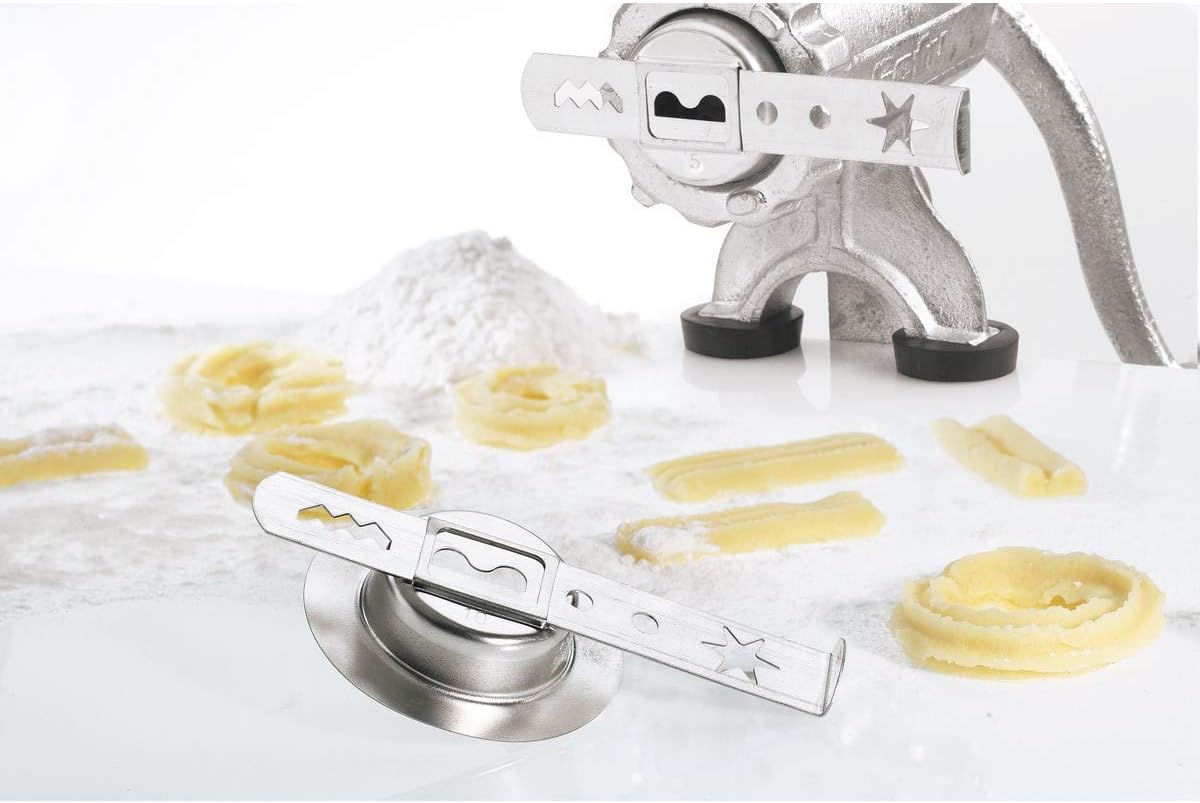
Image 3: A pastry attachment for the GEFU Trica Meat Grinder, shown with various extruded dough shapes. This illustrates the versatility of the grinder with optional accessories.
Maintenance and Cleaning
Regular cleaning is essential to maintain hygiene and the performance of your meat grinder. The grinder is designed for easy disassembly for thorough cleaning.
- Disassembly:
- Unclamp the grinder from the countertop.
- Remove the handle.
- Unscrew the locking ring.
- Carefully remove the perforated disc, cutting blade, and auger from the grinder body.
- Cleaning:
- Wash all disassembled parts immediately after use in warm, soapy water. This prevents food particles from drying and becoming difficult to remove.
- Use a brush to clean crevices and remove any remaining food residue.
- Rinse all parts thoroughly under running water.
- Important: Dry all metal parts completely to prevent rust. Air drying is not sufficient. Use a clean cloth.
- Storage: Store all dry components in a clean, dry place. Reassemble the grinder loosely or store parts separately to ensure air circulation.
Troubleshooting
| Problem | Possible Cause | Solution |
|---|---|---|
| Grinder is difficult to turn. |
|
|
| Meat is not grinding properly (mashing). |
|
|
| Rust spots appear on metal parts. |
|
|
Specifications
- Brand: GEFU
- Model: GF14700 (Trica Meat Grinder, Size 5)
- Material: Stainless Steel (cutting blade, perforated disc), other metals (body), wood (handle)
- Color: Silver
- Dimensions: Approximately 29.3 x 9.7 x 17.3 cm
- Perforated Disc Size: 4.5 mm
- Special Features: Disassembles for easy cleaning, plastic pad for surface protection.
Warranty and Support
For warranty information, product support, or to purchase replacement parts and accessories (such as the pastry attachment), please refer to the GEFU official website or contact their customer service department. Keep your purchase receipt as proof of purchase.
GEFU Customer Service: Please visit www.gefu.com for contact details and further assistance.


