
1. Introduction
The Jabra GN1000 Remote Handset Lifter (RHL) is an accessory designed to enable remote call control with a Jabra wireless headset system. It allows users to answer and end calls away from their desk phone, providing enhanced mobility.
This manual provides instructions for the proper setup, operation, and maintenance of your Jabra GN1000 RHL.
2. Package Contents
Verify that your package contains the following items:
- Jabra GN1000 Remote Handset Lifter unit
- Mounting accessories (e.g., adhesive tape, handset bar)
- Ringer sensor microphone
- Connection cables
Note: Specific contents may vary slightly.
3. Setup and Installation
Proper installation of the Jabra GN1000 is crucial for optimal performance. Follow these steps carefully:
3.1 Positioning the Lifter
The GN1000 unit should be placed on your desk phone in a position that allows the lifter arm to raise and lower the handset effectively. Ensure it does not obstruct any phone buttons or display.
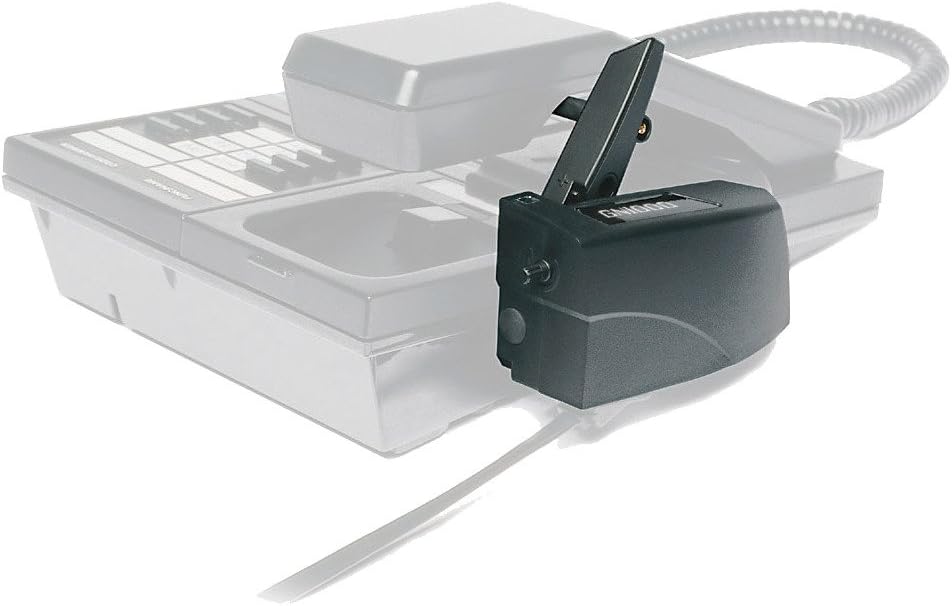
Image 1: The Jabra GN1000 Remote Handset Lifter positioned alongside a typical desk phone. The lifter is designed to sit adjacent to the phone's handset cradle, allowing its arm to engage with the handset.
3.2 Attaching the Lifter to the Phone
- Clean the surface of your desk phone where the lifter will be attached.
- Remove the protective backing from the adhesive tape on the bottom of the GN1000 unit.
- Carefully position the lifter so that the lifting arm aligns with the handset. Press firmly to secure it.
- Attach the handset bar (if applicable) to the underside of your phone's handset, ensuring it aligns with the lifter's arm. This bar provides a stable point for the lifter to engage.

Image 2: Side view of the Jabra GN1000 RHL securely attached to a desk phone. The lifter's arm is visible, positioned to raise the handset from its cradle.

Image 3: Top-down view of the Jabra GN1000 RHL installed on a desk phone. This perspective shows the alignment of the lifter mechanism with the handset.
3.3 Connecting the Ringer Sensor
The ringer sensor detects incoming calls and signals your wireless headset. It typically attaches to the phone's speaker or a location where the ring tone is clearly audible.
- Locate the small microphone on the GN1000 unit or its cable.
- Attach this microphone to the speaker area of your desk phone using its adhesive backing.
- Connect the ringer sensor cable to the designated port on the GN1000 unit or your Jabra wireless headset base.
3.4 Connecting to the Headset Base
Connect the GN1000 unit to your Jabra wireless headset base station using the provided cable. Refer to your specific Jabra wireless headset manual for the correct port on the base unit.
3.5 Adjusting Lift Height and Ringer Sensitivity
The GN1000 features adjustments for optimal performance:
- Lift Height Adjustment: A control slide or dial on the unit allows you to adjust how high the handset is lifted. Adjust this so the handset is fully off the hook but not excessively high.
- Ringer Sensitivity: A dial on the unit controls the sensitivity of the ringer sensor. Adjust this to ensure reliable detection of incoming calls without false triggers.

Image 4: A detailed view of the Jabra GN1000 RHL's lifting mechanism, showing the arm that engages with the phone's handset and potential adjustment points.
4. Operating Instructions
Once installed and configured, operating the Jabra GN1000 RHL is straightforward:
- Answering a Call: When an incoming call is detected, your Jabra wireless headset will signal you (e.g., with a tone). Press the call control button on your headset. The GN1000 will automatically lift the desk phone's handset, connecting the call to your headset.
- Ending a Call: To end a call, press the call control button on your headset again. The GN1000 will automatically lower the desk phone's handset, hanging up the call.
- Manual Operation: In case of power loss or system malfunction, the handset can still be manually lifted and placed back on the cradle.
5. Maintenance
The Jabra GN1000 RHL requires minimal maintenance to ensure continued performance:
- Cleaning: Use a soft, dry cloth to clean the exterior of the unit. Avoid using liquid cleaners or solvents, as these can damage the device.
- Adhesive Check: Periodically check the adhesive attachment to ensure the unit remains securely fastened to your desk phone. Re-secure if necessary.
- Cable Integrity: Inspect all cables for any signs of wear or damage. Replace damaged cables immediately.
6. Troubleshooting
If you encounter issues with your Jabra GN1000 RHL, refer to the following troubleshooting guide:
| Problem | Possible Cause | Solution |
|---|---|---|
| Lifter does not raise/lower handset |
|
|
| Headset does not ring for incoming calls |
|
|
| Handset not hanging up completely |
|
|
7. Specifications
| Feature | Detail |
|---|---|
| Product Dimensions | 7.4 x 5.6 x 2.75 inches |
| Item Weight | 8 ounces |
| Model Number | GN1000 |
| Part Number | 01-0369 |
| Manufacturer | Jabra |
| Material | Plastic |
| Power Source | Corded Electric |
| Compatible Devices | Universal (with Jabra wireless headset systems) |
| Telephone Type Compatibility | Corded desk phones |
| Multiline Operation | Single-Line Operation |
8. Warranty Information
For detailed warranty information regarding your Jabra GN1000 Remote Handset Lifter, please refer to the official Jabra website or contact Jabra customer support directly. Warranty terms and conditions may vary by region and purchase date.
9. Support
If you require further assistance with setup, operation, or troubleshooting, please contact Jabra customer support:
- Jabra Official Website: Visit www.jabra.com for product information, FAQs, and support resources.
- Customer Service: Refer to the contact information provided on the Jabra website for your specific region.