
Sony CCD-TRV118
Sony CCDTRV118 Hi8 Camcorder
User Manual
Model: CCD-TRV118
1. Introduction
This manual provides detailed instructions for the proper use and care of your Sony CCDTRV118 Hi8 Camcorder. Designed for ease of use, this camcorder allows you to capture high-quality video on affordable Hi8 and 8mm tapes. Please read this manual thoroughly before operating your camcorder to ensure optimal performance and longevity.
Key features include a 2.5-inch SwivelScreen LCD for flexible viewing, a powerful 20x optical zoom (560x digital zoom), and the NightShot infrared system for recording in low-light conditions. The camcorder also features a built-in light, various auto exposure modes, and creative picture effects to enhance your video recordings.

Figure 1.1: Front view of the Sony CCDTRV118 Hi8 Camcorder with its 2.5-inch LCD screen open, displaying a recorded image.
2. Setup
Before using your camcorder, ensure it is properly set up and charged.
2.1. Charging the Battery
- Connect the AC-L15 power adapter to the camcorder's DC IN jack.
- Plug the power adapter into a wall outlet.
- The InfoLithium NP-FM30 rechargeable battery will begin charging. The charging indicator will illuminate.
- Charging time varies. The InfoLithium battery can be recharged at any time without developing a "memory effect."
2.2. Inserting a Tape
- Open the tape compartment cover.
- Insert a Hi8 or 8mm video cassette with the window facing outwards, ensuring it clicks into place.
- Close the tape compartment cover firmly.
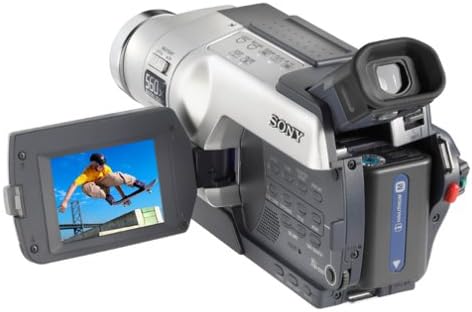
Figure 2.1: Rear view of the camcorder, showing the battery compartment and the open LCD screen.
3. Operating Your Camcorder
3.1. Basic Recording
- Power On: Open the 2.5-inch SwivelScreen LCD or pull out the black and white viewfinder to power on the camcorder.
- Framing Your Shot: Use the SwivelScreen LCD for easy viewing and framing, or the black and white viewfinder for enhanced precision, especially in bright conditions.
- Zoom: Use the zoom lever to adjust between 20x optical zoom for clear magnification and up to 560x digital zoom for extreme close-ups.
- Focus: The camcorder features manual focusing capabilities for precise control over your image clarity.
- Recording: Press the RECORD button to start and stop recording.
3.2. Special Recording Features
- Built-in Light: Activate the built-in light to brighten poorly lit areas, ensuring your subjects are well-illuminated.
- NightShot Infrared System: For recording in total darkness, engage the NightShot system. It captures images up to 10 feet away using infrared light.
- Auto Exposure Modes: Select from various scene modes to optimize exposure for specific environments:
- Portrait: Ideal for close-ups of people.
- Beach & Ski: Compensates for bright, reflective surfaces.
- Sports Lesson: Captures fast-moving subjects clearly.
- Landscape: Enhances distant scenery.
- Spotlight: Prevents overexposure of brightly lit subjects.
- Sunset & Moon: Preserves the mood of low-light scenes.
- Picture Effect Modes: Apply creative visual effects directly during recording or playback:
- Negative Art, Sepia, Black & White: For artistic color alterations.
- Solarize, Slim, Stretch, Pastel, Mosaic: For unique visual distortions and textures.
- Fader Effects: Transition smoothly between scenes with various fader options:
- Black, Mosaic, Black & White, Bounce, Stripe.
- Titles: Utilize eight selectable preset titles or create two customized titles with up to 22 characters each.
3.3. Playback and Dubbing
- Playback: Switch the camcorder to PLAY/VCR mode and use the playback controls (Play, Rewind, Fast Forward) to review your recordings on the LCD screen or a connected monitor.
- Direct Dubbing to VCR: The camcorder connects directly to a VCR for easy dubbing of your video tapes. Use the mono A/V cable provided.
- End Search: This feature automatically advances the tape to the last 5 seconds of a recorded scene, preventing accidental recording over previous videos.

Figure 3.1: Side view of the camcorder, highlighting the branding and zoom controls.
4. Maintenance
Proper maintenance ensures the longevity and optimal performance of your camcorder.
- Cleaning the Lens: Use a soft, lint-free cloth specifically designed for optical lenses to gently wipe the lens. Avoid using abrasive materials or harsh chemicals.
- Cleaning the Camcorder Body: Wipe the exterior of the camcorder with a soft, dry cloth. For stubborn dirt, slightly dampen the cloth with water. Do not use solvents or alcohol.
- Battery Care: Store the InfoLithium battery in a cool, dry place when not in use. Although it is not subject to memory effect, prolonged storage in extreme temperatures can affect its lifespan.
- Tape Head Cleaning: If you notice degradation in picture quality (e.g., static, dropouts), the tape heads may need cleaning. Refer to specialized cleaning tapes or consult a service professional.
- Storage: When storing the camcorder for extended periods, remove the battery and store it separately. Keep the camcorder in a dust-free environment, ideally in its original packaging or a padded case.
5. Troubleshooting
This section addresses common issues you might encounter with your camcorder. If the problem persists after trying these solutions, please contact Sony customer support.
| Problem | Possible Cause | Solution |
|---|---|---|
| Camcorder does not power on. | Battery is depleted or not inserted correctly. Power adapter is not connected or faulty. | Charge the battery fully. Ensure the battery is inserted correctly. Check power adapter connection to camcorder and wall outlet. |
| No picture on LCD/viewfinder. | Lens cap is on. Mode dial is not set to CAMERA. | Remove the lens cap. Set the mode dial to CAMERA. |
| Tape does not record or play. | Tape is write-protected. Tape is damaged or incorrectly inserted. | Check the write-protect tab on the cassette. Ensure the tape is inserted correctly. Try a different tape. |
| Poor picture quality (static, distorted). | Tape heads are dirty. Tape is old or damaged. | Use a head cleaning cassette. Try a new tape. |
| Zoom not functioning. | Camcorder is in a mode that restricts zoom. | Ensure camcorder is in recording mode. Check if any specific settings are limiting zoom functionality. |
6. Specifications
Technical specifications for the Sony CCDTRV118 Hi8 Camcorder.
| Brand | Sony |
| Model Number | CCD-TRV118 |
| Product Dimensions | 19.81 x 9.14 x 10.16 cm; 816.47 g |
| ASIN | B000086G06 |
| Batteries | 1 Lithium Ion battery required (NP-FM30 InfoLithium) |
| Photo Sensor Technology | CCD (1/6" CCD imager with 200K effective/320 gross pixels) |
| Video Capture Resolution | 480p (up to 400 lines of horizontal resolution) |
| Maximum Aperture | 2.5 f |
| Screen Size | 2.5 Inches (SwivelScreen LCD) |
| Connectivity Technology | Infrared (NightShot system), Mono A/V cable output |
| Colour | Black / Silver |
| Special Feature | Infrared (NightShot), Built-in Light, 20x Optical / 560x Digital Zoom |
| Supported Audio Format | PCM (Hi-fi sound) |
7. Warranty and Support
For detailed warranty information, please refer to the warranty card included with your product or visit the official Sony support website. Warranty terms and conditions may vary by region and purchase date.
If you require technical assistance, service, or have questions not covered in this manual, please contact Sony customer support. You can find contact information on the Sony official website or through the documentation provided with your camcorder.
Sony Official Website: www.sony.com
Related Documents - CCD-TRV118
 |
Sony CCD-TRV Series Camcorder Service Manual Comprehensive service manual for Sony CCD-TRV series camcorders, including models CCD-TRV15, TRV15E, TRV15EP, TRV15PK, TRV25, TRV25PK, TRV35, TRV35E, TRV65, TRV65PK, TRV85, TRV93, TRV215, TRV615, and TRV815. Covers specifications, disassembly, block diagrams, circuit board details, and detailed adjustment procedures for camera, mechanical, and video sections. |
 |
Sony Handycam Hi8 Video Camera Recorder CCD-TR2300/TR3300 Operating Instructions Comprehensive operating instructions and user manual for the Sony Handycam Hi8 Video Camera Recorder models CCD-TR2300 and CCD-TR3300. Covers setup, basic and advanced operations, features, maintenance, and troubleshooting. |
 |
Sony CCD-TRV108 Analog Handycam Camcorder: Features and Specifications Detailed overview of the Sony CCD-TRV108 Analog Handycam Camcorder, including its key features like Video Hi8 recording, 20x optical zoom, NightShot infrared, and comprehensive technical specifications. |
 |
دليل تشغيل كاميرات SONY HANDYCAM (CCD-TRV238E/TRV438E, DCR-TRV270E/TRV285E) دليل شامل لتشغيل كاميرات الفيديو SONY HANDYCAM، بما في ذلك موديلات CCD-TRV238E/TRV438E و DCR-TRV270E/TRV285E. تعلم كيفية التسجيل، العرض، والإعدادات الأساسية والمتقدمة. |
 |
Sony Handycam Vision Video Camera Recorder Operating Instructions Comprehensive operating instructions for Sony Handycam Vision video camera recorders, covering models CCD-TRV37, TRV47, TRV57, TRV67, and TRV87. Learn setup, recording, playback, and advanced features. |
 |
Sony Handycam Vision 비디오 카메라 레코더 사용 설명서 Sony Handycam Vision 비디오 카메라 레코더 (모델 CCD-TRV37, CCD-TRV47, CCD-TRV57, CCD-TRV67, CCD-TRV87) 사용 설명서. 제품 사용법, 촬영, 재생, 고급 기능 및 문제 해결에 대한 자세한 정보를 제공합니다. |