
Honeywell 50250-S
Honeywell True HEPA Air Purifier User Manual
Model: 50250-S
Introduction
This manual provides essential information for the safe and efficient operation, maintenance, and troubleshooting of your Honeywell True HEPA Air Purifier, Model 50250-S. This air purifier is designed to help improve indoor air quality by capturing airborne particles.
Important Safety Instructions
Please read and save these important safety instructions before using this air purifier.
- Always place the air purifier on a firm, level surface.
- Do not block air openings. Ensure proper airflow around the unit.
- Do not use the air purifier in wet environments or near water.
- Unplug the unit before moving, cleaning, or replacing filters.
- Keep the power cord away from heated surfaces.
- Do not operate any air purifier with a damaged cord or plug.
- This product does not reduce or absorb carbon monoxide gas. Ensure gas appliances are well ventilated.
Product Overview
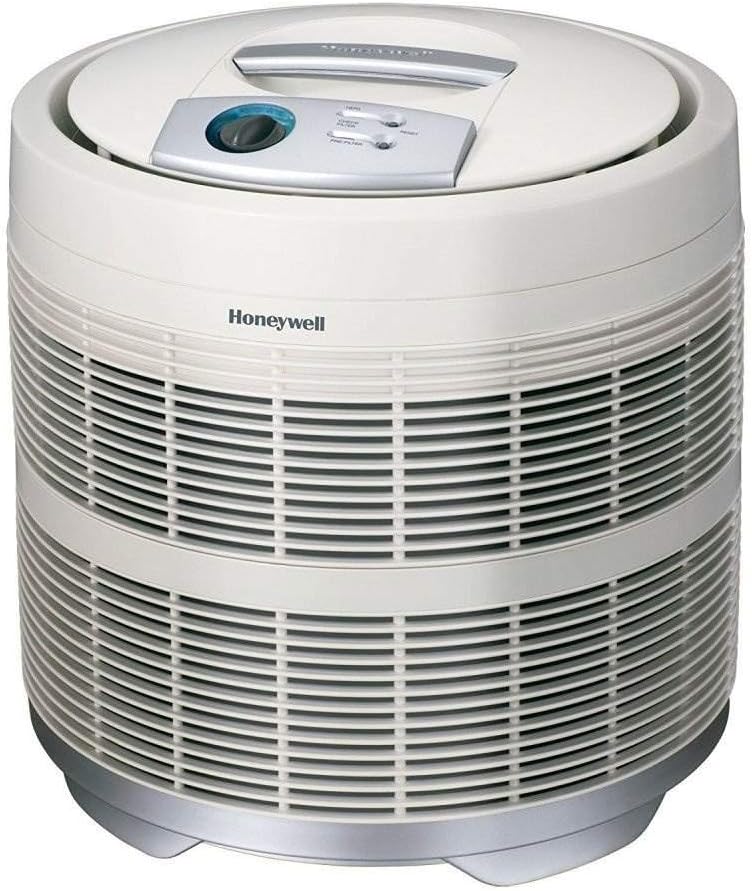


Setup
- Unpacking: Carefully remove the air purifier from its packaging. Retain packaging for future storage or transport.
- Filter Installation:
- Open the filter compartment according to the instructions in the user guide (refer to the PDF link in the product details for detailed diagrams).
- Ensure the True HEPA filter and activated carbon pre-filter are correctly installed. The pre-filter wraps around the HEPA filter.
- Close the filter compartment securely.
- Placement: Place the air purifier on a firm, level, and stable surface. For optimal performance, ensure there is at least 6-12 inches of space around the unit to allow for proper air circulation.
- Power Connection: Plug the power cord into a grounded electrical outlet.
Operating Instructions
The Honeywell True HEPA Air Purifier features a simple control panel for ease of use.
- Power On/Off and Fan Speed:
- Rotate the control knob clockwise to turn the unit on and select your desired fan speed.
- Available settings typically include Low, Medium, and High (or Turbo).
- Rotate the knob counter-clockwise to turn the unit off.
- Recommended Operation: For continuous air purification, it is recommended to operate the unit 24 hours a day on a low or medium setting. Use the high setting for rapid air cleaning, such as after cooking or during peak allergy seasons.
- Filter Check Indicators: The control panel includes indicator lights for "Check Filter" (HEPA) and "Pre-Filter". These lights illuminate when it's time to inspect or replace the respective filters.
- Resetting Filter Indicators: After cleaning or replacing a filter, press and hold the corresponding "Reset" button for approximately 5 seconds until the indicator light turns off.
Maintenance
Regular maintenance ensures optimal performance and extends the life of your air purifier.
Filter Replacement
- True HEPA Filter (HRF-AP1): The HEPA filter should be replaced approximately every 3-5 years, depending on usage and air quality. The "Check Filter" light will indicate when replacement is due.
- Activated Carbon Pre-Filter: The pre-filter should be replaced approximately every 3 months to effectively reduce common household odors and capture larger particles. The "Pre-Filter" light will indicate when replacement is due.
- Replacement Procedure:
- Unplug the air purifier from the power outlet.
- Open the filter access cover.
- Remove the old filters.
- Install new genuine Honeywell filters, ensuring the pre-filter wraps around the HEPA filter.
- Close the filter access cover.
- Plug in the unit and reset the filter indicator lights by pressing the respective reset buttons.
- Note: While the HEPA filter can be vacuumed to extend its life, the pre-filter should not be washed and must be replaced. For best performance, use only genuine Honeywell air purifier filters.
Cleaning the Unit
- Exterior: Wipe the exterior surfaces of the air purifier with a soft, damp cloth. Do not use abrasive cleaners or solvents.
- Air Intake Grilles: Periodically vacuum the air intake grilles to remove dust and debris.
- Internal Components: Do not attempt to clean internal electrical components.
Troubleshooting
| Problem | Possible Cause | Solution |
|---|---|---|
| Unit does not turn on. | Not plugged in; power outage; control knob not set to a speed. | Ensure unit is securely plugged in. Check power outlet. Rotate control knob to a fan speed setting. |
| Reduced airflow or poor air cleaning. | Filters are dirty or clogged; air intake/output blocked. | Check and replace pre-filter and HEPA filter as needed. Ensure nothing is blocking the air intake or output grilles. |
| Increased noise level. | Filters are dirty; unit not on a level surface; foreign object inside. | Check and replace filters. Ensure unit is on a stable, level surface. Unplug and inspect for any obstructions. |
| Odor coming from unit. | Pre-filter needs replacement; new unit odor. | Replace the activated carbon pre-filter. New units may emit a slight odor initially, which should dissipate with use. |
| Filter indicator light remains on after filter change. | Indicator not reset. | Press and hold the corresponding "Reset" button for approximately 5 seconds until the light turns off. |
Specifications
| Feature | Detail |
|---|---|
| Model Number | 50250-S (or 50250N) |
| Brand | Honeywell |
| Color | White |
| Product Dimensions (D x W x H) | 18"D x 18"W x 19"H |
| Item Weight | 21 pounds |
| Floor Area Coverage | Up to 390 Square Feet (AHAM Certified) / 465 sq. ft. (Manufacturer stated) |
| Noise Level | 60 dB |
| Particle Retention Size | 0.3 Micron (captures up to 99.97% of airborne particles) |
| Controller Type | Button Control / Rotary Knob |
| Filter Type | True HEPA with Activated Carbon Pre-filter |
| UPC | 090271502501, 881110020566, 666671380263 |
| Manufacturer | Kaz |
Warranty and Support
Warranty: This Honeywell True HEPA Air Purifier comes with a 5-year limited warranty. Please refer to the warranty card included with your product for full terms and conditions.
User Guide: A comprehensive user guide in PDF format is available for download. You can access it via this link: Honeywell 50250-S User Guide (PDF)
Customer Support: For further assistance, replacement parts, or warranty claims, please contact Honeywell customer support or visit their official website. Contact information can typically be found in the product packaging or on the manufacturer's website.
Ask a question about this manual
Ask about setup, troubleshooting, compatibility, parts, safety, or missing instructions. Manuals+ will review the question and use this page’s manual context to help answer it.