
Introduction
Thank you for purchasing the AIWA CS-P700 Portable Stereo Cassette and Radio. This manual provides essential information for the safe and efficient operation of your device. Please read it thoroughly before use and retain it for future reference.
Important Safety Information
- Do not expose the unit to rain or moisture.
- Avoid extreme temperatures.
- Do not open the casing; refer servicing to qualified personnel.
- Use only specified power sources.
- Keep away from strong magnetic fields.
Package Contents
Ensure all items are present:
- AIWA CS-P700 Portable Stereo Cassette and Radio unit
- AC Power Cord (if applicable)
- User Manual (this document)
Product Overview
The AIWA CS-P700 is a portable stereo system featuring an AM/FM radio tuner and a cassette recorder/player. It offers full-range stereo sound through two built-in speakers and includes a headphone jack for private listening.
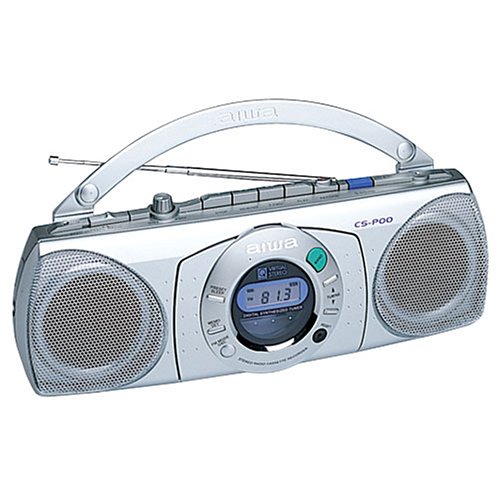
Figure 1: Front view of the AIWA CS-P700 Portable Stereo Cassette and Radio. This image shows the main unit with its controls, cassette deck, and speaker grilles.
Setup
Powering the Unit
The CS-P700 can be powered by AC power or batteries.
- AC Power: Connect the AC power cord to the AC inlet on the unit and then to a standard wall outlet.
- Battery Power: Open the battery compartment and insert the required number of batteries, ensuring correct polarity.
Connecting Headphones
For private listening, plug a standard 3.5mm stereo headphone jack into the headphone port located on the unit.
Operating Instructions
Radio Operation
The unit features a digitally synthesized AM/FM radio tuner with up to 20 programmable stations.
- Turn On: Press the Power button.
- Select Band: Press the AM/FM button to switch between AM and FM bands.
- Tune Stations: Use the Tuning Up/Down buttons to manually tune to a station. For automatic scanning, press and hold the Tuning Up/Down button.
- Program Presets: To store a station, tune to the desired frequency, then press the "Memory" or "Program" button followed by a preset number button (1-20).
- Recall Presets: Press the desired preset number button to recall a stored station.
- Adjust Volume: Use the Volume control knob or buttons.
Cassette Player/Recorder Operation
The CS-P700 includes a cassette deck with recording and auto-stop functions.
- Insert Cassette: Press the "Eject" button to open the cassette compartment. Insert a cassette tape with the open edge facing upwards and the tape side facing the heads. Close the compartment firmly.
- Playback: Press the "Play" button.
- Fast Forward/Rewind: Press the "FF" (Fast Forward) or "REW" (Rewind) buttons. Press "Stop" to halt.
- Stop: Press the "Stop" button. The auto-stop feature will automatically stop playback or recording at the end of the tape.
- Recording:
- Ensure a blank or recordable cassette is inserted.
- Select the desired audio source (e.g., radio, built-in microphone).
- Press the "Record" button (usually red) simultaneously with the "Play" button.
- To record from the built-in microphone, ensure the microphone is facing the sound source.
- Press "Stop" to end recording.
Maintenance
Cleaning the Unit
- Wipe the exterior with a soft, dry cloth.
- Do not use abrasive cleaners or solvents.
Cassette Deck Maintenance
- Periodically clean the tape heads, pinch roller, and capstan with a cotton swab lightly dampened with isopropyl alcohol.
- Demagnetize the tape heads regularly to ensure optimal sound quality.
Troubleshooting
| Problem | Possible Cause | Solution |
|---|---|---|
| No power | AC cord not connected; Batteries depleted or incorrectly inserted. | Check AC connection; Replace batteries or ensure correct polarity. |
| No sound from speakers | Volume too low; Headphones connected; Mute function active. | Increase volume; Disconnect headphones; Check for mute button. |
| Poor radio reception | Antenna not extended; Weak signal; Interference. | Extend and adjust the telescopic antenna; Move unit to a better location; Avoid sources of interference. |
| Cassette tape not playing/recording | Tape incorrectly inserted; Tape jammed; Heads dirty. | Re-insert tape correctly; Check for tape damage; Clean tape heads. |
Specifications
| Brand | Aiwa |
| Model Number | CSP700 |
| Speaker Type | Stereo |
| Color | Silver |
| Item Weight | 1.36 kg |
| Package Dimensions | 25.4 x 25.4 x 12.7 cm |
| Tuner | Digitally synthesized AM/FM |
| Cassette Deck | Recorder and Player with Built-in Microphone and Auto-stop |
| Headphone Jack | Yes |
Warranty and Support
For warranty information and technical support, please refer to the warranty card included with your product or visit the official Aiwa website. Keep your purchase receipt as proof of purchase.


