1. Introduction
The PHAROS PF022 Pocket GPS Portable Navigator Kit is designed to provide navigation capabilities for most Pocket PCs equipped with a CompactFlash slot. This kit integrates a CompactFlash GPS receiver with the Ostia street routing and navigation software, enabling users to determine their current location, find destinations, and navigate through cities across the United States. The system offers automated voice prompts for turn-by-turn directions and automatic rerouting if you deviate from the planned route. The included MobilePak provides essential accessories for in-vehicle use.
2. Product Overview
The PF022 kit enhances your Pocket PC with robust GPS navigation features.
Key Features:
- Portable voice-prompted, turn-by-turn navigation with detailed street-level maps for all 50 U.S. states.
- Ability to find locations by address, cross street, Microsoft Outlook contacts, or Points of Interest.
- Display shows next turn direction, street name, distance to turn, and distance to destination.
- Option to display a highlighted route map or written text directions.
- Shows active satellites and signal strengths for GPS reception.
- Route calculation options: shortest distance, fastest route, or by avoiding freeways.
Components:
- CompactFlash GPS Receiver
- Ostia Navigation Software
- MobilePak (includes vent-mounted PDA holder, universal car adapter, auxiliary external antenna)
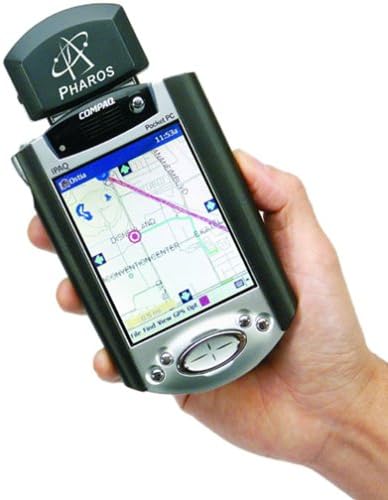
Figure 2.1: The PHAROS PF022 CompactFlash GPS receiver inserted into the top slot of a Pocket PC device. The Pocket PC screen displays a map with a highlighted route and navigation information, indicating the device's primary function as a portable navigation system. A hand is holding the Pocket PC.
3. Setup
- Compatibility Check: Ensure your Pocket PC has a CompactFlash (CF) slot. The PF022 GPS receiver is designed to plug directly into this slot.
- Hardware Installation:
- Insert the CompactFlash GPS receiver into your Pocket PC's CF slot.
- If using in a vehicle, attach the vent-mounted PDA holder to a suitable air vent.
- Connect the universal car adapter to power your Pocket PC and the GPS receiver.
- For improved signal reception, connect the auxiliary external antenna to the GPS receiver and position it with a clear view of the sky.
- Software Installation: Install the Ostia navigation software onto your Pocket PC. This typically involves syncing the software from your desktop PC to the Pocket PC. Refer to the software's specific installation guide for detailed steps.
- Map Loading: Load the necessary regional map data onto your Pocket PC. Maps can be large, so ensure sufficient memory (e.g., a 256MB flash memory module is recommended). Map loading is usually managed through the desktop PC software.
4. Operating Instructions
4.1. Acquiring a GPS Signal
Upon initial startup, the GPS receiver may take some time to acquire a satellite fix. For best results, ensure the device has a clear view of the sky and remain stationary until a fix is established. Moving while attempting to acquire a fix can significantly prolong the process.
4.2. Setting a Destination
You can set your destination using several methods:
- Address: Enter the street number, street name, and city.
- Cross Street: Specify two intersecting street names. If the city is unknown, you may need to try different cities until the correct intersection is found.
- Outlook Contacts: Select an address directly from your Pocket PC's Microsoft Outlook contacts.
- Points of Interest (POI): Search for major venues such as stadiums or large shopping centers. Note that smaller businesses or gas stations may not be listed.
4.3. Route Calculation and Navigation
Once a destination is set, the software will calculate a route based on your preferences:
- Route Options: Choose between shortest distance, fastest route, or a route that avoids freeways.
- Voice Prompts: The system provides automated voice prompts for turn-by-turn directions. These prompts typically announce turns approximately 0.1 miles before street turns and 0.5 miles before highway exits.
- On-Screen Display: The display shows the next turn direction, street name, distance to the next turn, and total distance to your destination. You can view the route as a highlighted map or as written text directions.
- Off-Route Rerouting: If you deviate from the planned route, the system will issue an "off-route" warning and automatically recalculate a new route from your current position to the destination.
4.4. Map Management
The navigation software uses regional map data.
- Regional Maps: Maps are typically regional. For extended travel, you may need to load different map sets as you move between regions.
- Memory Considerations: Larger map files require significant memory. It is advisable to use a high-capacity memory card (e.g., 256MB) to store multiple maps.
- Loading Limitations: The system may have limitations on the number of maps that can be open simultaneously. Loading new maps may reset current start/end points and routes, requiring re-entry of information.
5. Maintenance
- Cleaning: Keep the CompactFlash GPS receiver and your Pocket PC clean and free from dust and debris. Use a soft, dry cloth for cleaning.
- Power Management: The GPS unit and navigation software can significantly drain your Pocket PC's battery. Always use the included car adapter or ensure your Pocket PC is fully charged for extended use.
- Software Updates: Periodically check the PHAROS website or software provider for any available updates to the Ostia navigation software or map data.
- Storage: Store the GPS receiver and accessories in a cool, dry place when not in use.
6. Troubleshooting
6.1. GPS Signal Issues
- No Signal/Slow Fix: Ensure the device has a clear view of the sky. Initial fixes are faster when stationary. Signal can be weakened by being inside a car, in mountainous areas, or in urban environments with tall buildings. Use the auxiliary external antenna for improved reception.
- "Off-Route" Warnings: If the device frequently reports "off-route" when you are on the correct path, it may be due to a weak signal or a delay in updating your position. This is more common in areas with obstructed views of the sky.
6.2. Navigation and Routing Problems
- Incorrect Rerouting: If the system fails to automatically reroute after going off-course, you may need to manually initiate a new route calculation through the software interface.
- Turn Announcements: Be aware that turn announcements are given at specific distances (0.1 miles for streets, 0.5 miles for highways). Pay attention to the on-screen display for precise timing, especially for highway exits which may be named differently on the map than on physical signs.
- Destination Address Detail: The navigation may guide you to the correct block but not the exact address. Keep your destination address handy for final approach.
6.3. Software and Compatibility
- PC Software Clunkiness: The desktop PC software used for syncing maps may have a less intuitive interface. Ensure you follow its instructions carefully for map management.
- Device Compatibility: Some Pocket PC models, such as the iPaq 5400/5500 series, may have antenna designs that physically interfere with the CompactFlash GPS receiver when using a standard CF sleeve. A dual CF sleeve might be required for these specific models.
- Memory Issues: If the system is slow or crashes, ensure you have enough free memory on your Pocket PC and that map files are not excessively large for the available RAM.
7. Specifications
| Feature | Detail |
|---|---|
| Model Number | PF022 |
| Brand | PHAROS |
| Connectivity Technology | Auxiliary (CompactFlash) |
| Map Type | Street (United States including Alaska and Hawaii) |
| Audio Output Mode | AUX (via Pocket PC) |
| Mounting Type | Vent (via MobilePak) |
| Control Method | Voice, Touchscreen (via Pocket PC) |
| Resolution | 480 x 272 (Pocket PC display dependent) |
| Item Weight | 13.6 ounces |
| Package Dimensions | 8.5 x 5.9 x 2 inches |
| Batteries Included | No (relies on Pocket PC power) |
8. Warranty and Support
Specific warranty information for the PHAROS PF022 Pocket GPS Portable Navigator Kit is not provided in this manual. Please refer to the product packaging or contact PHAROS directly for details regarding warranty coverage and technical support.
Manufacturer: PHAROS


