
1. Introduction
Thank you for choosing the Harman Kardon Infinity HCS1 Home Cinema Speaker System. This manual provides essential information for the proper setup, operation, and maintenance of your new speaker system. Please read this manual thoroughly before using the product to ensure optimal performance and safety.
2. Safety Information
Always observe the following safety precautions to prevent electric shock, fire, or damage to the unit:
- Power Source: Connect the system only to the specified power supply voltage.
- Ventilation: Ensure adequate ventilation around the speakers. Do not block any ventilation openings.
- Water and Moisture: Do not expose the system to rain, moisture, or excessive humidity.
- Heat Sources: Keep the speakers away from heat sources such as radiators, heat registers, stoves, or other heat-producing appliances.
- Cleaning: Disconnect the power cord before cleaning. Use a dry cloth only.
- Servicing: Do not attempt to service this product yourself. Refer all servicing to qualified service personnel.
3. Package Contents
Please check that all items are present in the package:
- Infinity HCS1 Satellite Speakers (quantity may vary based on system configuration)
- Infinity HCS1 Subwoofer
- Power Cable for Subwoofer
- Speaker Cables (for satellite speakers)
- User Manual (this document)
4. Setup
4.1 Speaker Placement
Proper placement of your speakers is crucial for optimal sound quality. Consider the following guidelines:
- Satellite Speakers: Place the satellite speakers at ear level when seated, equidistant from the primary listening position. For a stereo setup, position them to form an equilateral triangle with the listener.
- Subwoofer: The subwoofer can be placed almost anywhere in the room, but typically performs best in a corner or along a wall to enhance bass response. Experiment with different positions to find the best sound for your room.
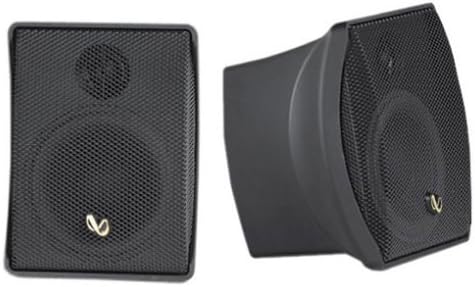
This image shows two views of a single Infinity HCS1 satellite speaker. On the left, the speaker is shown from the front, revealing its black mesh grille and the Infinity logo. On the right, the speaker is shown from a side angle, highlighting its curved design and compact form factor.
4.2 Connecting the Speakers
- Connect Satellite Speakers: Use the provided speaker cables to connect the satellite speakers to the corresponding speaker outputs on your amplifier or AV receiver. Ensure that the positive (+) terminal on the speaker connects to the positive (+) terminal on the amplifier, and the negative (-) terminal on the speaker connects to the negative (-) terminal on the amplifier.
- Connect Subwoofer: Connect the subwoofer to the LFE (Low-Frequency Effects) or Subwoofer output of your AV receiver using an RCA cable (not included).
- Power the Subwoofer: Plug the subwoofer's power cable into a wall outlet.
- Power the Amplifier/Receiver: Connect your amplifier or AV receiver to a power source.
5. Operating Instructions
5.1 Basic Operation
- Power On: Turn on your AV receiver/amplifier first, then ensure the subwoofer is powered on (it may have an auto-on feature).
- Volume Control: Adjust the overall system volume using your AV receiver/amplifier's master volume control.
- Subwoofer Level: The subwoofer typically has a dedicated volume or level control. Adjust this to blend the bass seamlessly with the satellite speakers. Start with a moderate level and fine-tune to your preference.
5.2 Sound Adjustments
Refer to your AV receiver/amplifier's manual for detailed instructions on adjusting sound settings such as crossover frequency, channel levels, and equalization (EQ). Proper calibration will optimize the performance of your Infinity HCS1 system.
6. Maintenance
6.1 Cleaning
To clean your speakers, ensure they are powered off and disconnected from the power source. Use a soft, dry cloth to wipe down the cabinets. Do not use liquid cleaners, aerosol sprays, or harsh chemicals, as these can damage the finish or internal components.
6.2 Storage
If storing the speakers for an extended period, keep them in a cool, dry place, away from direct sunlight and extreme temperatures. It is recommended to use the original packaging for protection.
7. Troubleshooting
If you experience issues with your Infinity HCS1 system, consult the following table:
| Problem | Possible Cause | Solution |
|---|---|---|
| No sound from speakers | Incorrect connections, amplifier off, source not selected, speaker wires loose. | Check all cable connections, ensure amplifier is on and correct input is selected. Verify speaker wire polarity. |
| No bass from subwoofer | Subwoofer not powered, RCA cable loose, subwoofer level too low, LFE output disabled. | Check subwoofer power, RCA connection, increase subwoofer level, check AV receiver settings for LFE output. |
| Distorted sound | Volume too high, damaged speaker, incorrect impedance. | Reduce volume. If distortion persists, disconnect speakers one by one to identify the faulty unit. Ensure amplifier impedance matches speakers. |
| Humming or buzzing noise | Ground loop, interference from other electronics, faulty cable. | Try plugging components into different outlets. Move cables away from power cords. Replace suspect cables. |
8. Specifications
The following specifications apply to the Harman Kardon Infinity HCS1 Home Cinema Speaker System:
- Brand: Harman Kardon
- Model Name: HCS1
- Maximum Speaker Output Power: 75 Watts
- Audio Output Mode: Mono (for individual speakers, system is multi-channel)
- Mounting Type: Tabletop Mount
- Speaker Type: Subwoofer (system includes satellite speakers)
- Recommended Uses: For televisions, music players, game consoles
- Compatible Devices: Home cinema, television, projector
- Surround Sound Configuration: 2 (referring to the number of main channels, system includes subwoofer)
- Color: Black
- Control Method: Touch (likely referring to controls on the subwoofer or associated amplifier)
- Subwoofer Dimensions: 20 Centimeters (driver size)
- Audio Driver Type: Dynamic Driver
- Number of Audio Channels: 2 (referring to the main channels, system includes subwoofer)
- Power Source: Corded Electric
- Manufacturer: Harman Deutschland GmbH & Co. KG
- ASIN: B000066TF3
- GTIN: 05705458151339
9. Warranty and Support
This product comes with a limited warranty. For detailed warranty information, please refer to the warranty card included with your purchase or visit the official Harman Kardon website. For technical support, service, or replacement parts, please contact Harman Kardon customer service through their official support channels.


