
Introduction
Bicycle Card Games for PC offers a collection of 15 classic card games designed for entertainment and skill development. This software package allows users to play popular card games such as Bridge, Canasta, Cribbage, Gin Rummy, Hearts, Spades, Solitaire (15 variations), Pinochle, Card Match, Crazy Eights, Spite and Malice, Whist, Oh Hell!, Old Maid, and Go Fish. The game features animated characters and customizable options to enhance the playing experience.

Image: The software box art for Bicycle Card Games for PC, featuring a classic Bicycle playing card design.
System Requirements
To ensure optimal performance, verify your computer meets the following minimum requirements:
- Operating System: Compatible with PC platforms (e.g., Windows 98/ME/2000/XP, as per typical software from 2001).
- Processor: Pentium II 233 MHz or higher.
- Memory (RAM): 32 MB RAM minimum.
- Hard Disk Space: Approximately 100 MB of free space.
- Graphics: 800x600 resolution, 16-bit color depth.
- Sound: DirectX compatible sound card.
- Input Devices: Keyboard and mouse.
- Optical Drive: CD-ROM drive for installation.
Setup and Installation
- Insert the CD: Place the Bicycle Card Games CD into your computer's CD-ROM drive.
- AutoPlay: If AutoPlay is enabled, the installation program should start automatically. Follow the on-screen prompts.
- Manual Installation: If the installation does not start automatically:
- Open "My Computer" or "This PC".
- Locate your CD-ROM drive (e.g., D:).
- Double-click the drive icon to open it.
- Locate and double-click the "Setup.exe" or "Install.exe" file.
- Follow Prompts: Proceed through the installation wizard, accepting the license agreement and choosing the installation directory.
- Completion: Once installation is complete, you may be prompted to restart your computer. It is recommended to do so.
Operating Instructions
Launching the Game
After installation, you can launch Bicycle Card Games from the Start Menu (Programs/All Programs > Microsoft Games > Bicycle Card Games) or by double-clicking the desktop shortcut, if one was created during installation.
Main Menu Navigation
Upon launching, you will be presented with the main menu. Use your mouse to click on options such as:
- New Game: Start a new game from the available list.
- Options: Adjust game settings, sound, graphics, and player preferences.
- Help: Access in-game help and rules for each card game.
- Exit: Close the application.
Selecting a Game
From the "New Game" menu, select your desired card game from the list of 15 available options. Each game may have its own specific setup options before play begins.
Gameplay Basics
- Mouse Control: Use the mouse to select cards, make moves, and interact with game elements.
- Animated Characters: The game features 12 unique animated characters as opponents. You can choose to play against them and adjust their skill levels.
- Game Options: Customize rules, difficulty, and visual settings for individual games through the in-game options menu.
- Tutorials: Some games may include interactive tutorials or rule explanations to assist new players.
Included Card Games
Bicycle Card Games for PC includes the following classic card games:
Bridge
A trick-taking game played by four players in two competing partnerships. The game involves bidding and strategic card play.
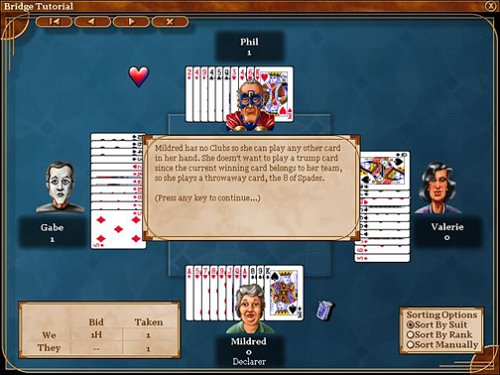
Image: A screenshot of the Bridge game interface, showing four players, cards on the table, and a tutorial message box.
Canasta
A rummy-like game played with two decks of cards by four players in two partnerships. The goal is to score points by melding cards of same rank and making canastas (at least seven cards of the same rank).
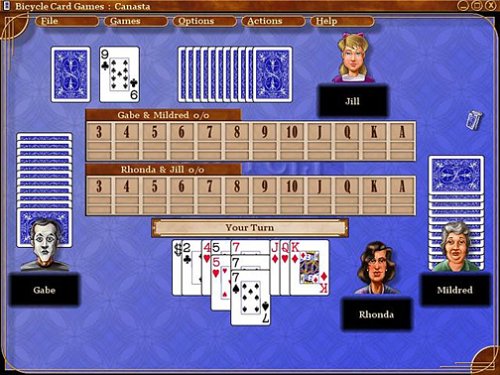
Image: A screenshot of the Canasta game interface, displaying player hands, melds, and the discard pile.
Cribbage
A card game, traditionally for two players, that involves playing and grouping cards in combinations which gain points. Points are scored for combinations of cards that add up to 15, pairs, runs, and flushes.
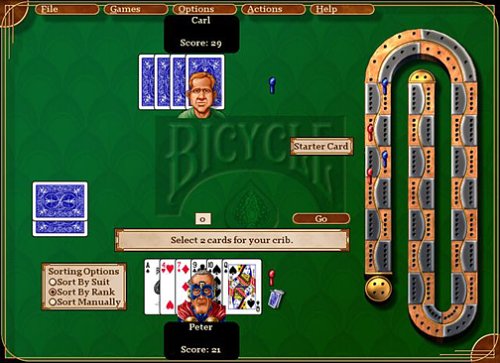
Image: A screenshot of the Cribbage game interface, showing a player's hand, the cribbage board, and options for sorting cards.
Gin Rummy
A two-player card game where players form sets and runs of cards to reduce their deadwood count. The game ends when a player "knocks" or goes "gin".
Hearts
A trick-taking card game where the objective is to avoid scoring points. Points are scored for taking tricks containing hearts and the queen of spades.
Spades
A trick-taking card game played by four players in two partnerships. Spades are always trump, and players bid on the number of tricks they expect to take.
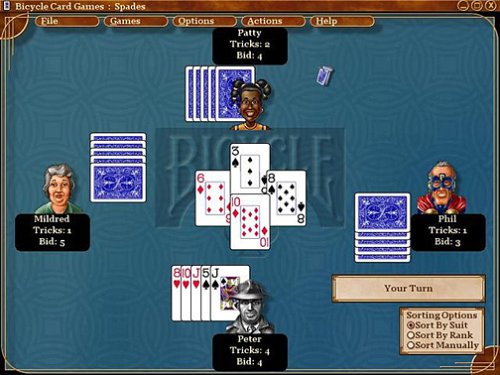
Image: A screenshot of the Spades game interface, showing four players, their bids, and cards in play.
Solitaire (15 versions)
A collection of single-player card games, including popular variations like Klondike, FreeCell, and Spider. The goal is typically to arrange cards in a specific order or pattern.
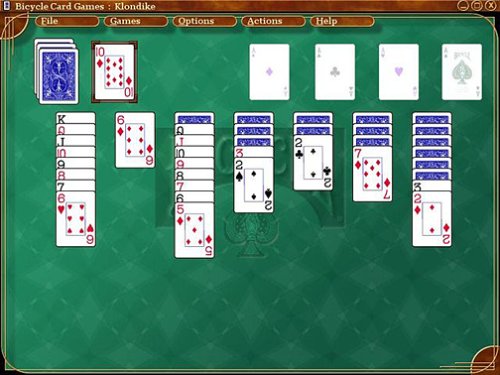
Image: A screenshot of the Klondike Solitaire game interface, showing the tableau, foundation piles, and stock/waste piles.
Pinochle
A trick-taking game played with a 48-card deck (two decks of 9s through Aces). Players score points by melding combinations of cards, particularly for aces, tens, and kings.

Image: A screenshot of the Pinochle game interface, showing player hands, melds, and the discard pile.
Card Match
A memory game where players turn over two cards at a time to find matching pairs.
Crazy Eights
A shedding-type card game where players aim to be the first to empty their hands of all their cards by matching the rank or suit of the previous card played on the discard pile.
Spite and Malice
A competitive solitaire-style game where players race to be the first to play all the cards from their personal pile by building up common piles in sequence.
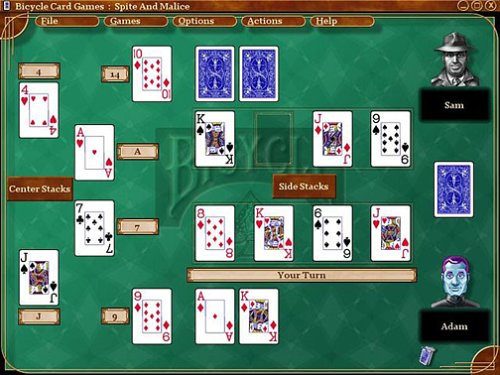
Image: A screenshot of the Spite and Malice game interface, showing player piles and central build piles.
Whist
A classic trick-taking card game for four players in two partnerships. The objective is to win tricks.
Oh Hell!
A trick-taking card game where players must accurately bid on the exact number of tricks they will take in each round.
Old Maid
A simple card game where players avoid being left with the single "Old Maid" card at the end of the game.
Go Fish
A card game where players ask opponents for cards to complete sets (books) of four cards of the same rank.

Image: A screenshot of the Go Fish game interface, featuring an underwater theme and player characters.
Troubleshooting
- Game Does Not Start:
Ensure your system meets the minimum requirements. Try running the game in compatibility mode for an older Windows version (e.g., Windows XP) if you are on a newer operating system. Reinstall the game if necessary.
- Graphical Issues:
Update your graphics card drivers. Adjust the game's display settings to a lower resolution or color depth if available in the options menu.
- Sound Problems:
Check your computer's sound settings and ensure speakers are connected and turned on. Verify that your sound card drivers are up to date. Check in-game sound options.
- Game Bugs/Incorrect Rules:
Some users have reported specific game rule inconsistencies (e.g., in Bridge or Canasta). While software updates are unlikely for older titles, try searching online forums for community-driven workarounds or patches if available. Adjusting game options might sometimes mitigate these issues.
- Installation Errors:
Clean the game CD for smudges or scratches. Try copying the contents of the CD to your hard drive and running the installer from there. Ensure you have administrator privileges during installation.
Specifications
| Feature | Detail |
|---|---|
| Product Title | Bicycle Card Games - PC |
| Brand | Microsoft |
| Model Number (ASIN) | B00005QI6P |
| Computer Platform | PC |
| Release Date | November 15, 2001 |
| UPC / GTIN | 659556912079, 659556739027 |
| Item Weight (Disc/Packaging) | 4 ounces |
| Rated | Everyone 10+ |
| Number of Games | 15 classic card games (including 15 Solitaire variations) |
Warranty and Support
This product is an older software title. Specific warranty information may no longer be available or applicable. For technical support, it is recommended to consult the original product packaging or any included documentation for contact details. Online resources and community forums dedicated to classic PC games may also offer assistance for common issues.