
Denon RCD-100 gold
Denon RCD-100 CD Receiver
User Manual
Introduction
The Denon RCD-100 is a high-quality CD receiver designed to deliver excellent audio performance. It integrates a powerful amplifier, a versatile CD player, and an RDS FM/MW tuner into a single, compact unit. This manual provides essential information for setting up, operating, and maintaining your RCD-100 to ensure optimal performance and longevity.

Figure 1: Front view of the Denon RCD-100 CD Receiver.
This image displays the front panel of the Denon RCD-100, highlighting its sleek gold finish. Visible components include the CD tray on the left, a central digital display, various function buttons for playback and tuner control, and a prominent volume knob on the right. A power button is located on the bottom left.
Setup
Follow these steps to properly set up your Denon RCD-100 CD Receiver.
1. Unpacking and Inspection
- Carefully remove the RCD-100 from its packaging.
- Verify that all accessories, including the remote control, are present.
- Inspect the unit for any signs of damage during transit.
2. Speaker Connections
The RCD-100 supports two pairs of front speakers. Ensure correct polarity (+ to + and - to -) for optimal sound quality.
- Connect your main speakers to the "SPEAKER SYSTEMS" terminals on the rear panel. The unit provides 2 x 45 watts of output power.
- If using a second pair of speakers, connect them to the additional speaker terminals.
3. Audio Input/Output Connections
The RCD-100 offers various connectivity options for external audio devices.
- Analog Inputs: Connect external audio sources (e.g., tape deck, auxiliary device) to the two pairs of analog input jacks (MD/AUX, TAPE).
- Analog Outputs: Use the two pairs of analog output jacks (MD/AUX REC, TAPE REC) to connect to recording devices.
- Optical Digital Output: For digital audio connection to a compatible device, use the optical digital output.
4. Antenna Connections
- Connect the supplied FM antenna to the FM antenna terminal.
- Connect the supplied AM (MW) loop antenna to the AM antenna terminals.
5. Power Connection
Once all audio and antenna connections are made, plug the power cord into a suitable AC outlet.

Figure 2: Rear panel connections of the Denon RCD-100.
This image illustrates the rear panel of the Denon RCD-100, detailing the various connection ports. Key areas include the speaker terminals on the left, analog audio input/output jacks (RCA) in the center, antenna connections, an optical digital output, and the AC power inlet on the right. Labels clearly indicate the function of each port.
Operating Instructions
This section details the basic operation of your Denon RCD-100 CD Receiver.
1. Power On/Off
- Press the POWER button on the front panel or the remote control to turn the unit on or off.
2. Source Selection
- Press the FUNCTION button on the front panel or the corresponding source buttons (CD, TUNER, MD/AUX, TAPE) on the remote control to select your desired audio source.
3. CD Player Operation
- Loading a CD: Press the OPEN/CLOSE button to open the CD tray. Place a CD with the label side up and press OPEN/CLOSE again to close the tray.
- Playback: Press the PLAY button to start playback.
- Pause: Press the PAUSE button to temporarily stop playback. Press again to resume.
- Stop: Press the STOP button to end playback.
- Skip Tracks: Use the SKIP buttons (▶▶| or |◀◀) to move to the next or previous track.
- Program Play: The CD player features a versatile programmable function. Refer to the detailed remote control section for programming specific track orders. The unit utilizes an 8x oversampling digital filter for enhanced audio fidelity.
4. Tuner (Radio) Operation
- Band Selection: Press the BAND button to switch between FM and MW (AM) bands.
- Tuning: Use the TUNING buttons (▶ or ◀) to manually tune to a station.
- Preset Stations: The tuner features 30 station presets. Use the PRESET buttons (▶ or ◀) to recall stored stations. Refer to the remote control section for instructions on storing presets.
- RDS Function: The RDS (Radio Data System) feature provides station information (e.g., station name, program type) on the display when available.
5. Volume Control
- Rotate the large VOLUME knob on the front panel clockwise to increase volume and counter-clockwise to decrease.
- Alternatively, use the VOLUME +/- buttons on the remote control.
6. Remote Control
A versatile system remote control is included for convenient operation of all functions from a distance.
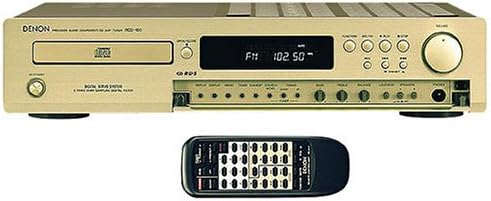
Figure 3: Denon RCD-100 with its system remote control.
This image shows the Denon RCD-100 unit from the front, with its accompanying black system remote control positioned directly in front of it. The remote control features numerous buttons for comprehensive control over the receiver's functions, including power, source selection, CD playback, and tuner operations.
Maintenance
Proper care and maintenance will ensure the longevity and optimal performance of your Denon RCD-100.
- Cleaning: Use a soft, dry cloth to wipe the exterior of the unit. For stubborn marks, slightly dampen the cloth with water. Avoid using abrasive cleaners, solvents, or chemical sprays, as these can damage the finish.
- CD Tray: Keep the CD tray free of dust and debris. Do not force the tray open or closed.
- Ventilation: Ensure that the ventilation slots on the top and sides of the unit are not obstructed. Adequate airflow is crucial to prevent overheating.
- Storage: If storing the unit for an extended period, disconnect it from the power outlet and store it in a cool, dry place away from direct sunlight and extreme temperatures.
Troubleshooting
If you encounter any issues with your Denon RCD-100, refer to the following common problems and solutions before seeking professional service.
| Problem | Possible Cause | Solution |
|---|---|---|
| No power | Power cord not connected; Power outlet faulty; Unit in standby mode. | Ensure power cord is securely plugged in. Try a different outlet. Press the POWER button. |
| No sound | Volume too low; Incorrect source selected; Speaker wires disconnected or incorrectly connected. | Increase volume. Select the correct input source. Check speaker connections for proper polarity and secure fit. |
| CD not playing | CD inserted incorrectly; CD is dirty or scratched; CD player lens dirty. | Insert CD with label side up. Clean CD with a soft cloth. Try a different CD. Consult a service center if lens cleaning is suspected. |
| Poor radio reception | Antenna not connected or poorly positioned; Interference from other electronic devices. | Ensure antennas are properly connected and extended. Adjust antenna position. Move unit away from other electronics. |
| Remote control not working | Batteries are dead or inserted incorrectly; Obstruction between remote and unit. | Replace batteries, ensuring correct polarity. Remove any obstructions. Point remote directly at the unit's sensor. |
Specifications
Below are the key technical specifications for the Denon RCD-100 CD Receiver.
- Output Power: 2 x 45 Watts
- CD Player: Versatile programmable, 8x oversampling digital filter
- Tuner: RDS FM Stereo / MW (AM) tuner with 30 station presets
- Analog Inputs: 2 pairs (RCA)
- Analog Outputs: 2 pairs (RCA)
- Digital Output: 1 Optical Digital Output
- Included Components: Versatile system remote control
- Color: Gold (also available in black)
- Dimensions (Approx. Package): 53 x 41 x 21 cm (L x W x H)
- Weight (Approx. Package): 5.5 kg
- Channels: 2
- Connectivity Technology: Analog audio connections, digital audio outputs
Warranty and Support
For warranty information and technical support, please refer to the documentation provided at the time of purchase or contact your retailer. Denon, the manufacturer, can also provide support for their products.
Manufacturer: Denon
For further assistance, visit the official Denon website or contact their customer service department.
Related documentsRCD-100 gold


Ask a question about this manual
Ask about setup, troubleshooting, compatibility, parts, safety, or missing instructions. Manuals+ will review the question and use this page’s manual context to help answer it.