
Product Overview
The Aiwa NSX-AJ800 is a compact stereo system designed for audio playback and enjoyment. It features a powerful 280 watts total power output, a convenient 3-disc CD changer compatible with CD-R/RW discs, and a 4-speaker stereo configuration for rich sound. The system includes a stylish flip-down panel that conceals secondary controls and comes with a full-function remote control for ease of use.
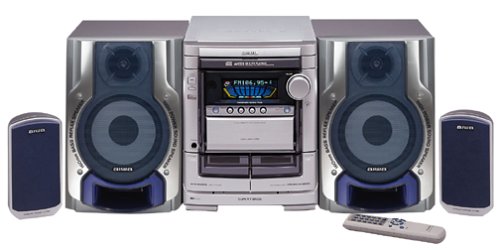
Image: The Aiwa NSX-AJ800 Compact Stereo System, featuring the central unit with a display, two large main speakers, two smaller satellite speakers, and a remote control. The system components are silver and dark blue.
Setup
- Unpacking: Carefully remove all components from the packaging. Ensure all parts, including the main unit, speakers, remote control, and power cord, are present.
- Speaker Connection: Connect the four speakers to the corresponding speaker terminals on the main unit. Ensure correct polarity (positive to positive, negative to negative) for optimal sound quality. The system includes two main stereo speakers and two smaller satellite speakers.
- Antenna Connection: For radio reception, connect the supplied FM antenna to the FM antenna terminal and the AM loop antenna to the AM antenna terminals on the rear of the main unit. Position the antennas for best reception.
- Auxiliary Input Connection: If connecting an external audio device (e.g., smartphone, MP3 player), use an appropriate audio cable to connect its output to the AUX IN jacks on the stereo system.
- Power Connection: Plug the power cord securely into the AC inlet on the main unit, then plug the other end into a standard AC wall outlet.
Operating Instructions
- Power On/Off: Press the POWER button on the main unit or remote control to turn the system on or off.
- CD Playback:
- Press the CD button to select the CD function.
- Press the OPEN/CLOSE button to open the CD tray.
- Place up to three CDs on the trays, label side up.
- Press OPEN/CLOSE again to close the tray.
- Press PLAY to start playback. Use the SKIP buttons to navigate tracks and the STOP button to halt playback. The system supports CD-R/RW discs.
- Radio Tuner:
- Press the TUNER/BAND button to select FM or AM band.
- Use the TUNING buttons to manually tune to a station or press and hold to auto-scan for the next available station.
- Save favorite stations using the preset memory functions (refer to the full manual for detailed steps).
- Auxiliary Input: Press the AUX button to switch to the auxiliary input. Audio from the connected external device will now play through the system's speakers.
- Volume Control: Rotate the VOLUME knob on the main unit or use the VOLUME +/- buttons on the remote control to adjust the sound level.
- Remote Control: The full-function remote control allows access to all primary features from a distance. Ensure batteries are correctly inserted.
Maintenance
- Cleaning the Unit: Wipe the exterior of the system with a soft, dry cloth. For stubborn dirt, slightly dampen the cloth with water. Avoid using abrasive cleaners, solvents, or alcohol, as these can damage the finish.
- CD Care: Handle CDs by their edges. Keep them clean and free from scratches. Store them in their cases when not in use. Do not use cleaning sprays or abrasive materials on CDs.
- Ventilation: Ensure the system has adequate ventilation. Do not block ventilation openings on the unit.
- Power Cord: Regularly inspect the power cord for any damage. If damaged, discontinue use and seek professional repair.
Troubleshooting
| Problem | Possible Cause | Solution |
|---|---|---|
| No power | Power cord not connected; Power outlet not active | Ensure power cord is securely plugged in; Check power outlet with another device |
| No sound | Volume too low; Speakers not connected; Incorrect input selected | Increase volume; Check speaker connections; Select correct input source (CD, Tuner, AUX) |
| CD not playing | CD inserted incorrectly; CD dirty or scratched; CD function not selected | Insert CD label side up; Clean or replace CD; Select CD function |
| Poor radio reception | Antenna not positioned correctly; Interference | Adjust antenna position; Move system away from other electronic devices |
| Remote control not working | Batteries depleted or inserted incorrectly; Obstruction between remote and unit | Replace batteries; Ensure correct polarity; Remove obstructions; Point remote directly at the unit's sensor |
Specifications
- Model Number: NSX-AJ800
- Brand: Aiwa
- Total Power Output: 280 Watts
- CD Changer: 3-disc, CD-R/RW compatible
- Speaker Type: Stereo, 4 speakers
- Connectivity Technology: Auxiliary
- Package Dimensions: 72.39 x 72.39 x 41.91 cm
- Item Weight: 24 kg 900 g
Warranty and Support
This Aiwa NSX-AJ800 Compact Stereo System is covered by a manufacturer's warranty. Please refer to the warranty card included with your product for specific terms, conditions, and duration. For technical assistance, service, or further inquiries, please contact Aiwa customer support through their official website or the contact information provided in your product documentation.