
1. Introduction
This manual provides essential instructions for the proper use and care of your Nikon AF FX NIKKOR 80-200mm f/2.8D ED Zoom Lens. This high-performance telephoto zoom lens is designed for Nikon DSLR cameras, offering a fast f/2.8 maximum aperture across its focal range, making it suitable for various photographic applications including sports, portraits, and nature photography.
The lens incorporates Nikon's advanced optical technologies, such as ED (Extra-low Dispersion) glass elements and Super Integrated Coating, to deliver high-resolution images with excellent contrast and color fidelity.
2. Key Features
- Versatile Telephoto Zoom: A 2.5x telephoto zoom range (80-200mm) suitable for sports, portraits, and nature photography.
- Fast Constant Aperture: A constant f/2.8 maximum aperture throughout the entire focal range ensures bright images and excellent low-light performance.
- ED Glass Elements: Extra-low Dispersion glass elements minimize chromatic aberration, providing high-resolution and high-contrast images, even at maximum aperture.
- Precise Zoom Operation: Features a rotating zoom ring for smooth and accurate focal length adjustments.
- Nikon Super Integrated Coating: An exclusive multilayer lens coating that reduces ghosting and flare, ensuring superior color balance and reproduction.
- Distance Information (D-type): Relays subject-to-camera distance information to compatible AF Nikon camera bodies, enabling advanced metering and flash control features.
3. Setup
3.1. Unpacking and Contents
Carefully unpack your lens and verify that all components are present. The package should contain the following items:
- Nikon AF FX NIKKOR 80-200mm f/2.8D ED Zoom Lens
- LC-77 Snap-on Front Lens Cap (77mm)
- LF-4 Rear Lens Cap
- CL-43A Hard Case
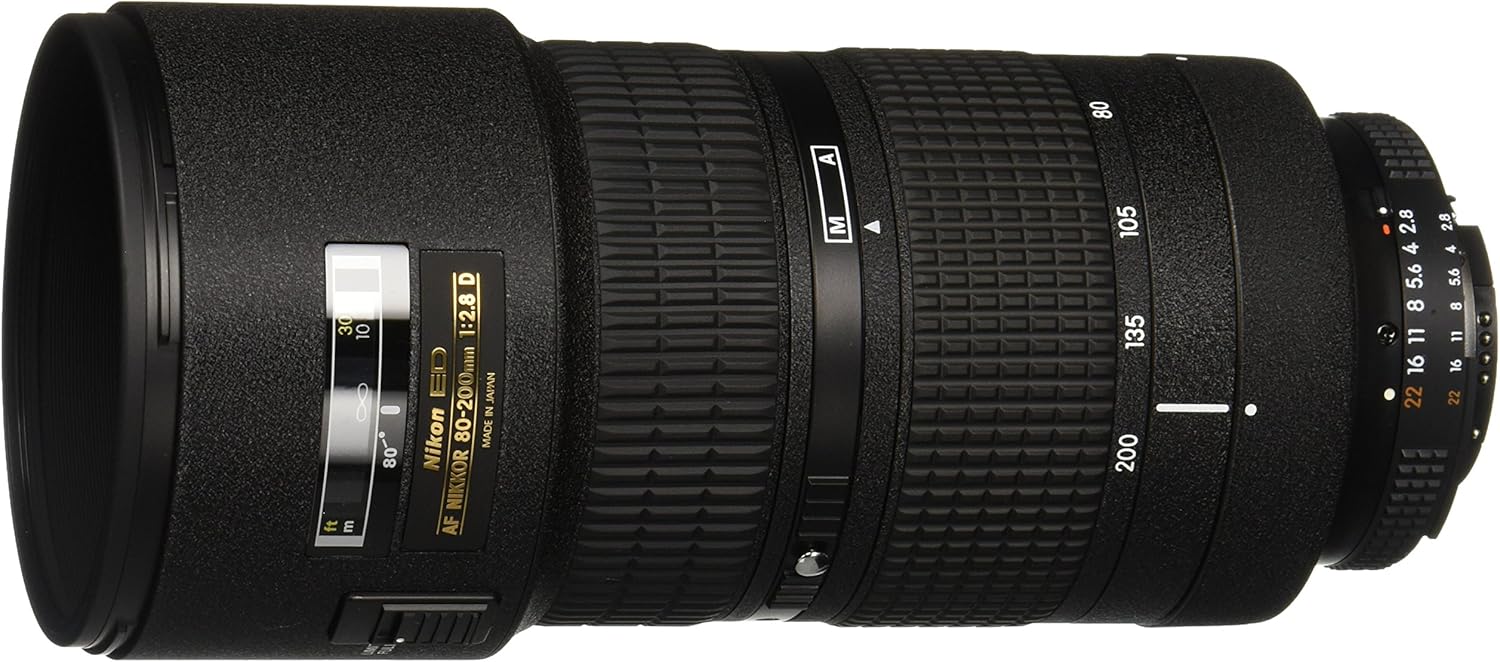
Image 1: Nikon AF FX NIKKOR 80-200mm f/2.8D ED Zoom Lens. This image shows the lens from the side, highlighting its zoom and focus rings, and the aperture scale.

Image 2: Nikon CL-43A Hard Case. This image displays the protective hard case included with the lens, designed for safe transport and storage.
3.2. Attaching the Lens to Your Camera
- Ensure both the camera and lens are powered off.
- Remove the rear lens cap from the lens and the body cap from the camera.
- Align the mounting mark on the lens with the mounting mark on the camera body.
- Rotate the lens counter-clockwise until it clicks into place. Do not force the lens.
- To detach, press the lens release button on the camera body and rotate the lens clockwise.
3.3. Lens Compatibility
This lens is compatible with a wide range of Nikon DSLR cameras. Refer to the compatibility chart below to understand the functionality with your specific camera model. This lens is an AF (Autofocus) type, meaning it requires a camera body with an internal focus motor for autofocus functionality.

Image 3: NIKKOR Lens Compatibility Chart. This chart details the compatibility of various NIKKOR lens types (AI, AF, AF-S, AF-P, E-Type) with different Nikon camera bodies, indicating full, limited, or no compatibility for features like autofocus.
Note: For cameras without an internal focus motor (e.g., D40, D3100, D5100 series), this lens will operate in manual focus mode only. Refer to your camera's manual for specific details on lens compatibility and operation.
4. Operation
4.1. Focus Modes (Auto Focus / Manual Focus)
The Nikon AF FX NIKKOR 80-200mm f/2.8D ED lens supports both autofocus (AF) and manual focus (M).
- Autofocus (AF): To use autofocus, ensure your camera body has an internal focus motor and is set to an AF mode. The lens will automatically adjust focus when the shutter button is half-pressed.
- Manual Focus (M): For manual focusing, set your camera to manual focus mode. Rotate the focus ring on the lens to achieve sharp focus. This mode is particularly useful for precise control or when autofocus struggles in challenging conditions.
This lens is a D-type NIKKOR, meaning it relays subject-to-camera distance information to compatible Nikon AF camera bodies. This enables advanced features such as 3D Matrix Metering and 3D Multi-Sensor Balanced Fill-Flash, enhancing exposure accuracy and flash control.
4.2. Zooming
To adjust the focal length, rotate the zoom ring located on the lens barrel. The focal lengths (80mm, 105mm, 135mm, 200mm) are marked on the ring. Rotate the ring to select your desired focal length within the 80-200mm range.
4.3. Aperture Control
The lens features a constant maximum aperture of f/2.8 across its entire zoom range. Aperture settings are controlled via the camera body. For optimal performance, ensure the lens's aperture ring is locked at its minimum aperture (usually f/22 or f/32, indicated in orange or green) when using modern Nikon DSLRs, allowing the camera to control the aperture electronically.
4.4. ED Glass Technology
Nikon's ED (Extra-low Dispersion) glass is crucial for telephoto lenses. It corrects chromatic aberration, which is the dispersion of light into different colors as it passes through optical glass. By minimizing this effect, ED glass ensures superior sharpness and color correction, resulting in high-resolution and high-contrast images, even when shooting at the widest aperture.
4.5. Nikon Super Integrated Coating
This lens features Nikon's Super Integrated Coating, an exclusive multilayer lens coating. This coating significantly reduces ghosting and flare, which can occur when light reflects off internal lens elements. It also contributes to superior color balance and accurate color reproduction, especially beneficial in lenses with multiple elements like zoom lenses.
5. Maintenance
Proper maintenance ensures the longevity and optimal performance of your lens.
- Cleaning the Lens: Use a soft, lint-free cloth or a lens brush to remove dust. For smudges or fingerprints, use a specialized lens cleaning solution and a clean microfiber cloth. Apply solution to the cloth, not directly to the lens.
- Storage: When not in use, attach both the front and rear lens caps. Store the lens in its provided CL-43A hard case in a cool, dry place away from direct sunlight and extreme temperatures. Avoid storing in areas with high humidity to prevent mold growth.
- Handling: Avoid dropping or subjecting the lens to strong impacts. Do not attempt to disassemble the lens, as this can void the warranty and cause damage.
- Moisture: Protect the lens from rain, snow, and excessive moisture. If the lens gets wet, wipe it dry immediately with a soft cloth.
6. Troubleshooting
This section addresses common issues you might encounter with your lens.
- Autofocus Not Working:
- Ensure your camera body has an internal focus motor (refer to the compatibility chart).
- Check that both the camera and lens are set to autofocus mode.
- Verify that the lens is securely attached to the camera body.
- In very low light or with low-contrast subjects, autofocus may struggle. Try switching to manual focus or using your camera's AF-assist illuminator.
- Soft Images / Lack of Sharpness:
- Ensure proper focus. If using autofocus, confirm the camera is focusing on your intended subject.
- Check shutter speed. At longer focal lengths (e.g., 200mm), a faster shutter speed is often required to prevent camera shake, especially without Vibration Reduction (VR).
- Use a sturdy tripod or monopod for critical sharpness, especially in lower light.
- Clean the front and rear lens elements.
- While the lens performs well at f/2.8, some lenses exhibit slightly improved sharpness when stopped down by one or two stops (e.g., to f/4 or f/5.6).
- Dust or Debris Inside Lens:
Minor dust particles inside the lens are common and rarely affect image quality. If you notice significant debris affecting your images, contact Nikon service for professional cleaning. Do not attempt to disassemble the lens yourself.
7. Specifications
| Feature | Detail |
|---|---|
| Model Number | 1986 |
| Focal Length | 80-200mm |
| Maximum Aperture | f/2.8 |
| Minimum Aperture | f/22 |
| Lens Type | Telephoto Zoom Lens |
| Compatible Mountings | Nikon F (DX), Nikon F (FX) |
| Minimum Focus Distance | 4.9 ft (1.5m) |
| Diaphragm Blades | 9 |
| Filter Size | 77mm |
| Dimensions (Diameter x Length) | Approximately 3.43 x 7.36 inches (87 x 187 mm) |
| Weight | Approximately 2.87 pounds (1.3 kg) |
| Included Accessories | LC-77 Front Lens Cap, LF-4 Rear Lens Cap, CL-43A Hard Case |
8. Support and Warranty
For technical assistance, service, or warranty information regarding your Nikon AF FX NIKKOR 80-200mm f/2.8D ED Zoom Lens, please contact Nikon customer support or visit the official Nikon website.
Nikon Official Website: www.nikonusa.com
Please retain your proof of purchase for warranty claims.


