Welcome
Thank you for choosing the Jensen JS800 8-Inch 100W Subwoofer. This manual provides essential information for the proper setup, operation, and maintenance of your new audio equipment. Please read this manual thoroughly before using the subwoofer to ensure optimal performance and safety.
Keep this manual for future reference.
Important Safety Instructions
To reduce the risk of electric shock, fire, or damage to the unit, always follow these basic safety precautions:
- Power Source: Connect the subwoofer only to the type of power source indicated on the marking label.
- Ventilation: Ensure adequate ventilation. Do not block any ventilation openings. Install in accordance with the manufacturer's instructions.
- Heat: Do not install near any heat sources such as radiators, heat registers, stoves, or other apparatus (including amplifiers) that produce heat.
- Water and Moisture: Do not use this apparatus near water. Do not expose to dripping or splashing.
- Cleaning: Clean only with a dry cloth. Unplug the unit from the wall outlet before cleaning.
- Object and Liquid Entry: Never push objects of any kind into this product through openings as they may touch dangerous voltage points or short-out parts that could result in a fire or electric shock.
- Servicing: Do not attempt to service this product yourself as opening or removing covers may expose you to dangerous voltage or other hazards. Refer all servicing to qualified service personnel.
- Power Cord Protection: Protect the power cord from being walked on or pinched, particularly at plugs, convenience receptacles, and the point where they exit from the apparatus.
Product Overview
The Jensen JS800 is a powerful 8-inch 100W powered subwoofer designed to enhance the low-frequency response of your home audio or home theater system. Its sealed acoustic suspension enclosure delivers tight and dynamic bass.
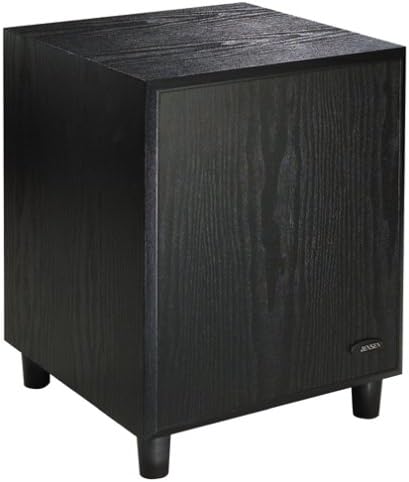
Image: Front-side view of the Jensen JS800 8-inch 100W Subwoofer. The unit is a black, cube-shaped enclosure with a textured wood-grain finish. It stands on four short, black cylindrical feet. The front panel is a flat surface, and a small "JENSEN" logo is visible on the lower right side.
Setup and Installation
Unpacking
Carefully remove the subwoofer from its packaging. Check for any signs of damage during transit. Retain the packaging materials for future use or if the unit needs to be transported.
Verify that all components are present:
- Jensen JS800 Subwoofer Unit
- Power Cord
- This User Manual
Placement
The placement of your subwoofer significantly affects its performance. Consider the following:
- Room Acoustics: Bass response can vary greatly depending on room size, shape, and furnishings. Experiment with different locations.
- Corner Placement: Placing the subwoofer in a corner often maximizes bass output, but can sometimes lead to "boomy" or exaggerated bass.
- Wall Placement: Placing it along a wall, away from corners, can provide a more balanced bass response.
- Listening Position: The ideal placement often involves finding a spot where the bass sounds balanced from your primary listening position.
- Proximity to Main Speakers: For seamless integration, try placing the subwoofer relatively close to your main front speakers.
Connections
The JS800 offers both speaker-level and line-level inputs for versatile connection options.
- Power Off: Ensure your amplifier/receiver and the subwoofer are turned off before making any connections.
- Line-Level Connection (Recommended for Receivers with Subwoofer Output):
- Connect an RCA cable from the "SUBWOOFER OUT" or "LFE OUT" jack on your receiver/amplifier to the "LINE IN" (L/R) input on the JS800. If your receiver has a single LFE output, you can connect it to either the left or right "LINE IN" on the subwoofer.
- Speaker-Level Connection (For Receivers without Subwoofer Output):
- Connect the speaker wires from your amplifier's main left and right speaker outputs to the "SPEAKER LEVEL INPUTS" on the JS800.
- Then, connect speaker wires from the "SPEAKER LEVEL OUTPUTS" on the JS800 to your main left and right speakers. Ensure correct polarity (+ to + and - to -).
- Power Connection: Once all audio connections are made, plug the subwoofer's power cord into a suitable AC outlet.
Operation
Powering On/Off
The JS800 typically has a power switch on the rear panel. Turn it to the "ON" position to power on the subwoofer. Some models may feature an auto-on/standby mode that activates the subwoofer when an audio signal is detected and puts it into standby when no signal is present for a period.
Adjusting Controls
The JS800 features controls on its rear panel to fine-tune its performance with your system:
- Volume/Gain Control: Adjusts the overall output level of the subwoofer. Start with a low setting and gradually increase until the bass blends seamlessly with your main speakers.
- Crossover Frequency Control: This control determines the highest frequency the subwoofer will reproduce. Set it to blend with the low-frequency capabilities of your main speakers. A common starting point is 80 Hz, but adjust based on your speakers and room acoustics.
- Phase Switch (0°/180°): This switch helps to ensure that the subwoofer's output is in phase with your main speakers. Experiment with both settings to find the one that produces the strongest and most coherent bass at your listening position.
Tip: Play a familiar piece of music or movie scene with strong bass and adjust the controls until the bass sounds natural and integrated, not overpowering or disconnected from the rest of the sound.
Maintenance and Care
Proper care will ensure the longevity and performance of your Jensen JS800 Subwoofer:
- Cleaning: Use a soft, dry cloth to clean the exterior surfaces. Do not use liquid cleaners, aerosols, or abrasive chemicals, as they may damage the finish.
- Ventilation: Ensure that the ventilation openings are not blocked by dust or debris. Periodically check and gently clean if necessary.
- Placement: Avoid placing the subwoofer in direct sunlight or near sources of excessive heat or moisture.
- Power: Unplug the subwoofer from the power outlet if it will not be used for an extended period.
Troubleshooting
If you experience issues with your Jensen JS800 Subwoofer, refer to the following table for common problems and solutions:
| Problem | Possible Cause | Solution |
|---|---|---|
| No sound from subwoofer |
|
|
| Weak or distorted bass |
|
|
| Humming or buzzing noise |
|
|
Technical Specifications
| Feature | Specification |
|---|---|
| Model | JS800 |
| Manufacturer | Jensen |
| Speaker Type | Subwoofer |
| Subwoofer Diameter | 8 Inches |
| Output Wattage | 100 Watts |
| Maximum Speaker Output Power | 100 Watts |
| Noise Level | 88 dB |
| Audio Output Mode | Stereo |
| Product Dimensions (W x H x D) | 33.02 x 39.7 x 30 cm (13 x 15.6 x 11.8 inches approx.) |
| Product Weight | 9.07 kg (20 Pounds approx.) |
| Enclosure Type | Sealed Acoustic Suspension |
| Frequency Response | 30 to 150 Hz |
Warranty and Support
Jensen products are designed and manufactured to the highest quality standards. For information regarding warranty coverage, please refer to the warranty card included with your purchase or visit the official Jensen website.
For technical support, troubleshooting assistance, or service inquiries, please contact Jensen customer support through their official channels. Have your model number (JS800) and purchase information ready when contacting support.


