
Vivitar 430842
Vivitar V3800N 35mm SLR Camera User Manual
Model: V3800N (430842)
Introduction
This manual provides comprehensive instructions for the operation and maintenance of your Vivitar V3800N 35mm SLR Camera. Designed for both aspiring and experienced photographers, this manual camera offers robust features for creative control. Please read this manual thoroughly to ensure proper use and to maximize your photographic experience.
Setup
1. Unpacking and Initial Inspection
Carefully remove all components from the packaging. Verify that the following items are present:
- Vivitar V3800N Camera Body
- 28-70mm f/3.4-4.8 Multicoated Lens
- Camera Strap (if included)
- Lens Cap

Figure 1: Front view of the Vivitar V3800N camera with the 28-70mm zoom lens attached. The camera body is black, and the lens features focus and zoom rings.
2. Battery Installation
The Vivitar V3800N requires two 1.5V LR44 or SR44 batteries to power the light meter and LED display. The camera can operate mechanically without batteries for basic functions, but accurate exposure metering requires them.
- Locate the battery compartment on the bottom of the camera body.
- Use a coin to unscrew the battery compartment cover counter-clockwise.
- Insert two LR44 or SR44 batteries, ensuring the positive (+) side faces outwards as indicated inside the compartment.
- Replace the cover and screw it clockwise until secure.

Figure 2: The bottom of the Vivitar V3800N camera, highlighting the circular battery compartment cover on the right and the tripod mount in the center.
3. Film Loading
The Vivitar V3800N uses standard 35mm film cartridges.
- Open the camera back by pulling up the film rewind knob located on the top left of the camera.
- Place the film cartridge into the film chamber on the left side, ensuring the film leader points towards the take-up spool on the right.
- Insert the tip of the film leader into one of the slots on the take-up spool.
- Advance the film slightly using the film advance lever until the sprocket teeth engage with the film perforations.
- Close the camera back firmly until it clicks shut.
- Advance the film two frames by pressing the shutter button and winding the film advance lever. The film rewind knob should rotate as the film advances, indicating proper loading.
- Set the ISO (film speed) on the camera's ISO dial to match your film. Refer to the ISO chart on the camera back for common settings.
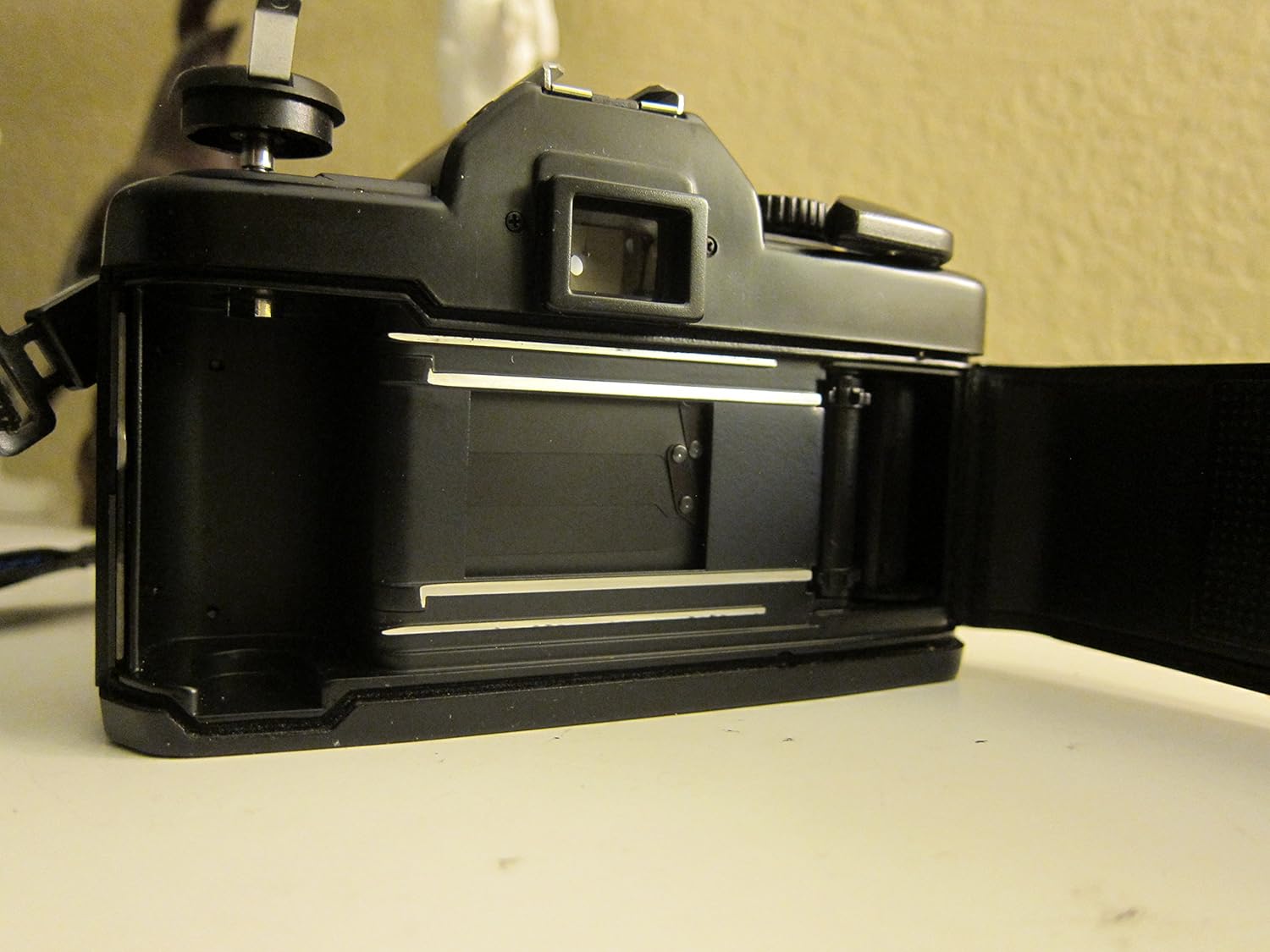
Figure 3: The Vivitar V3800N camera with its back open, revealing the film loading area. The film chamber is on the left, and the take-up spool with film guides is on the right.

Figure 4: The back of the Vivitar V3800N camera, displaying a helpful ISO (DIN/ASA) conversion chart for various film speeds.
4. Lens Attachment
The Vivitar V3800N uses a Nikon F-mount (PK mount compatible). To attach the 28-70mm lens:
- Remove the rear lens cap and the camera body cap.
- Align the red dot on the lens barrel with the red dot on the camera's lens mount.
- Insert the lens into the mount and rotate it clockwise until it clicks into place.
- To remove the lens, press the lens release button on the camera body and rotate the lens counter-clockwise.

Figure 5: Side view of the Vivitar V3800N camera, illustrating the attached 28-70mm lens with its focus and zoom rings clearly visible. The camera's V3800N model designation is also visible.
Operating the Camera
1. Basic Controls Overview
Familiarize yourself with the main controls:
- Shutter Speed Dial: Located on the top right, controls the duration the shutter remains open (e.g., 1/125s, 1/500s).
- Aperture Ring: On the lens, controls the size of the lens opening (e.g., f/3.4, f/8).
- Focus Ring: On the lens, used to adjust focus for sharp images.
- Film Advance Lever: Winds the film and cocks the shutter.
- Shutter Release Button: Activates the shutter to take a picture.

Figure 6: Top view of the Vivitar V3800N camera, clearly showing the shutter speed dial with various settings, the hot shoe for external flash, and the film advance lever.

Figure 7: Front view of the Vivitar 28-70mm lens, displaying the focal length range (28-70mm), aperture range (1:3.4-4.8), and filter thread size (ø52).

Figure 8: Close-up side view of the Vivitar 28-70mm lens, providing a detailed look at the textured rings for zoom and manual focus, along with distance markings.
2. Focusing
The V3800N features a bright viewfinder with a split-image focusing screen and microprism collar for precise manual focusing.
- Look through the viewfinder.
- Rotate the focus ring on the lens until the image in the split-image circle appears as a single, unbroken image.
- For fine-tuning, the microprism collar will shimmer or break up if the image is out of focus, and clear up when in focus.
3. Exposure Control (Manual)
The V3800N is a manual exposure camera. You control both shutter speed and aperture to achieve correct exposure. The built-in light meter assists in determining the correct settings.
- Set the desired shutter speed using the dial on top of the camera.
- Set the desired aperture using the ring on the lens.
- Look through the viewfinder and half-press the shutter button to activate the light meter.
- LED indicators (typically +, -, O) in the viewfinder will guide you:
- O: Correct exposure.
- +: Overexposure. Decrease aperture (larger f-number) or increase shutter speed.
- -: Underexposure. Increase aperture (smaller f-number) or decrease shutter speed.
- Adjust either shutter speed or aperture until the 'O' indicator lights up.
4. Flash Photography
The camera features a hot shoe with X-contact for external flash units. The flash synchronization speed is 1/125 second or slower.
- Mount a compatible external flash unit onto the hot shoe.
- Set the camera's shutter speed to 1/125s or a slower speed (e.g., 1/60s, 1/30s).
- Follow the instructions for your specific flash unit to determine the correct aperture setting based on flash power and subject distance.
5. Depth of Field Preview
The depth of field preview lever (if present, typically near the lens mount) allows you to temporarily stop down the lens to the selected aperture, letting you visually inspect the depth of field in the viewfinder before taking the shot.
6. Multiple Exposure Capability
The V3800N allows for multiple exposures on a single frame. Consult your camera's specific mechanism for this feature, often involving a small lever or button near the film advance lever that disengages the film advance while re-cocking the shutter.
Maintenance
1. Cleaning the Camera and Lens
- Camera Body: Use a soft, lint-free cloth to wipe the camera body. For stubborn dirt, slightly dampen the cloth with water. Avoid harsh chemicals.
- Lens Elements: Use a lens blower brush to remove dust. For smudges, use a specialized lens cleaning solution and a microfiber lens cloth. Never use abrasive materials or household cleaners.
- Viewfinder/Mirror: Use a blower brush to remove dust. Avoid touching the mirror or viewfinder screen directly.
2. Storage
When not in use, store your camera in a cool, dry place, away from direct sunlight and extreme temperatures. Use lens caps and a body cap to protect the lens and camera sensor/mirror box from dust and damage. If storing for extended periods, remove the batteries to prevent leakage.
Troubleshooting
| Problem | Possible Cause | Solution |
|---|---|---|
| Camera does not fire. | Shutter not cocked; film not advanced. | Advance the film using the film advance lever until it stops. |
| Light meter LEDs do not light up. | Dead or incorrectly installed batteries. | Check battery installation or replace batteries. |
| Images are blurry. | Incorrect focus; camera shake; slow shutter speed. | Ensure proper focusing. Use a faster shutter speed or tripod in low light. Hold camera steady. |
| Images are too dark (underexposed). | Insufficient light; incorrect exposure settings. | Adjust aperture to a smaller f-number (larger opening) or decrease shutter speed. Use flash if necessary. |
| Images are too bright (overexposed). | Too much light; incorrect exposure settings. | Adjust aperture to a larger f-number (smaller opening) or increase shutter speed. |
| Film advance lever is stuck. | Film end reached; film jammed. | Rewind film if roll is finished. Do not force the lever; check for film jam in a darkroom if necessary. |
Specifications
| Feature | Detail |
|---|---|
| Model Name | Vivitar V3800N |
| Item Model Number | 430842 |
| Camera Type | 35mm SLR (Single Lens Reflex) Film Camera |
| Lens Mount | Nikon F (PK compatible) |
| Included Lens | 28-70mm f/3.4-4.8 Multicoated Zoom Lens |
| Focusing System | Manual Focus with Split Image and Microprism Viewfinder |
| Exposure Control | Manual Exposure with 3-LED Display Light Meter |
| Flash Sync Speed | 1/125 second or slower |
| Flash Compatibility | Hot Shoe with X-contact |
| Special Features | Depth of Field Preview, Multiple Exposure Capability |
| Power Source | 2 x 1.5V LR44/SR44 batteries (for light meter) |
| Product Dimensions | 5.4 x 3.5 x 2.3 inches |
| Item Weight | 2 pounds |
| Manufacturer | Vivitar |
| Date First Available | September 14, 2006 |
Warranty and Support
Warranty information for the Vivitar V3800N camera is not provided within this manual. Please refer to the original purchase documentation, packaging, or contact Vivitar customer support for details regarding warranty coverage and service options.
For further assistance or technical support, please visit the official Vivitar website or contact their customer service department. Keep your proof of purchase for any warranty claims.