
Makita 2012NB
Makita 2012NB 12-Inch Portable Planer Instruction Manual
Model: 2012NB
Product Overview
The Makita 2012NB 12-Inch Portable Planer is engineered for precision woodworking tasks, offering a balance of portability and productivity. Its design focuses on quiet operation, compact size, and user-friendly features such as simplified blade changes.
Key Features
- Compact and lightweight design for easy transport to job sites.
- Features Makita's exclusive Interna-Lok automated head clamp to minimize snipe.
- Capable of planing material up to 12 inches wide, 1/8 inch deep, and 6-3/32 inches thick.
- Adjustable depth stop for consistent and repeatable cuts.
- Fast and easy blade change system utilizing disposable double-edge blades.
- Equipped with a 15 AMP motor, delivering a no-load speed of 8,500 RPM.
- Operates with a low noise level of 83 dB, enhancing operator comfort.
- Four-post design with diagonal cross supports ensures stability during operation.
- Large table extensions provide ample support for workpieces.
- An L.E.D. light indicates when the planer is connected to a power source.
- Features a large paddle on/off switch for easy operation.
- Includes a detachable tool box for convenient storage of standard accessories.
- An optional dust hood allows connection to a dust collection system for efficient chip removal.
Safety Information
WARNING: This product can expose you to chemicals including lead, which is known to the State of California to cause cancer and birth defects or other reproductive harm. For more information go to www.P65Warnings.ca.gov.
Always read and fully understand the entire instruction manual before operating the planer. Failure to follow all instructions may result in electric shock, fire, and/or serious injury. Keep this manual for future reference.
- Personal Protective Equipment: Always wear appropriate personal protective equipment, including safety glasses or goggles, hearing protection, and a dust mask, especially when planing wood.
- Work Area Safety: Ensure your work area is clean, well-lit, and free from clutter. Keep children and bystanders away while operating the planer.
- Electrical Safety: Do not expose power tools to rain or wet conditions. Avoid body contact with earthed or grounded surfaces. Do not abuse the cord; never use it for carrying, pulling, or unplugging the power tool.
- Tool Maintenance: Disconnect the power tool from the power source before making any adjustments, changing accessories, or storing the tool.
- Material Safety: Ensure the workpiece is free of nails, screws, or other foreign objects that could damage the blades or cause kickback.
What's in the Box
The following items are typically included with your Makita 2012NB Portable Planer:
- Makita 2012NB 12-Inch Planer Unit
- Planer Blade Set (installed or separate)
- Two Magnetic Holders (for blade changes)
- Wrenches (for adjustments and maintenance)
- Tool Box (detachable, for accessory storage)
Setup
Unpacking and Inspection
Carefully remove all components from the packaging. Inspect the planer for any signs of damage that may have occurred during shipping. If any damage is found, do not operate the tool and contact your dealer or Makita service center. Retain packaging materials for future transport or storage.
Power Connection
Ensure the planer is connected to a suitable 120 Volt, 15 Amp power source. The L.E.D. light on the control panel will illuminate to indicate a successful power connection.
Table Extensions
Extend the large table extensions on both the in-feed and out-feed sides to provide adequate support for your workpiece. Ensure they are securely locked in place to prevent movement during operation.
Blade Installation/Inspection
The planer uses disposable double-edge blades. Before first use, or if changing blades, ensure they are correctly installed and sharp. Refer to the 'Maintenance' section for detailed instructions on blade replacement. Always disconnect power before performing any blade-related tasks.

Image: Close-up view of the planer's blades and internal mechanism, showing the cutting head and feed rollers.
Operating Instructions
Adjusting Cutting Depth
To set the desired cutting depth, use the adjustment knob located on the top of the planer. Rotate the knob to raise or lower the cutter head. The depth scale on the side of the planer indicates the current cutting depth. The maximum thickness capacity for a workpiece is 6-3/32 inches.

Image: A hand adjusting the depth setting knob on the top of the planer, which controls the height of the cutter head and thus the cutting depth.
Powering On and Off
To start the planer, press the green 'ON' button on the large paddle switch. To stop the planer, press the red 'OFF' button. Always ensure the planer has come to a complete stop before leaving the machine or performing any adjustments.
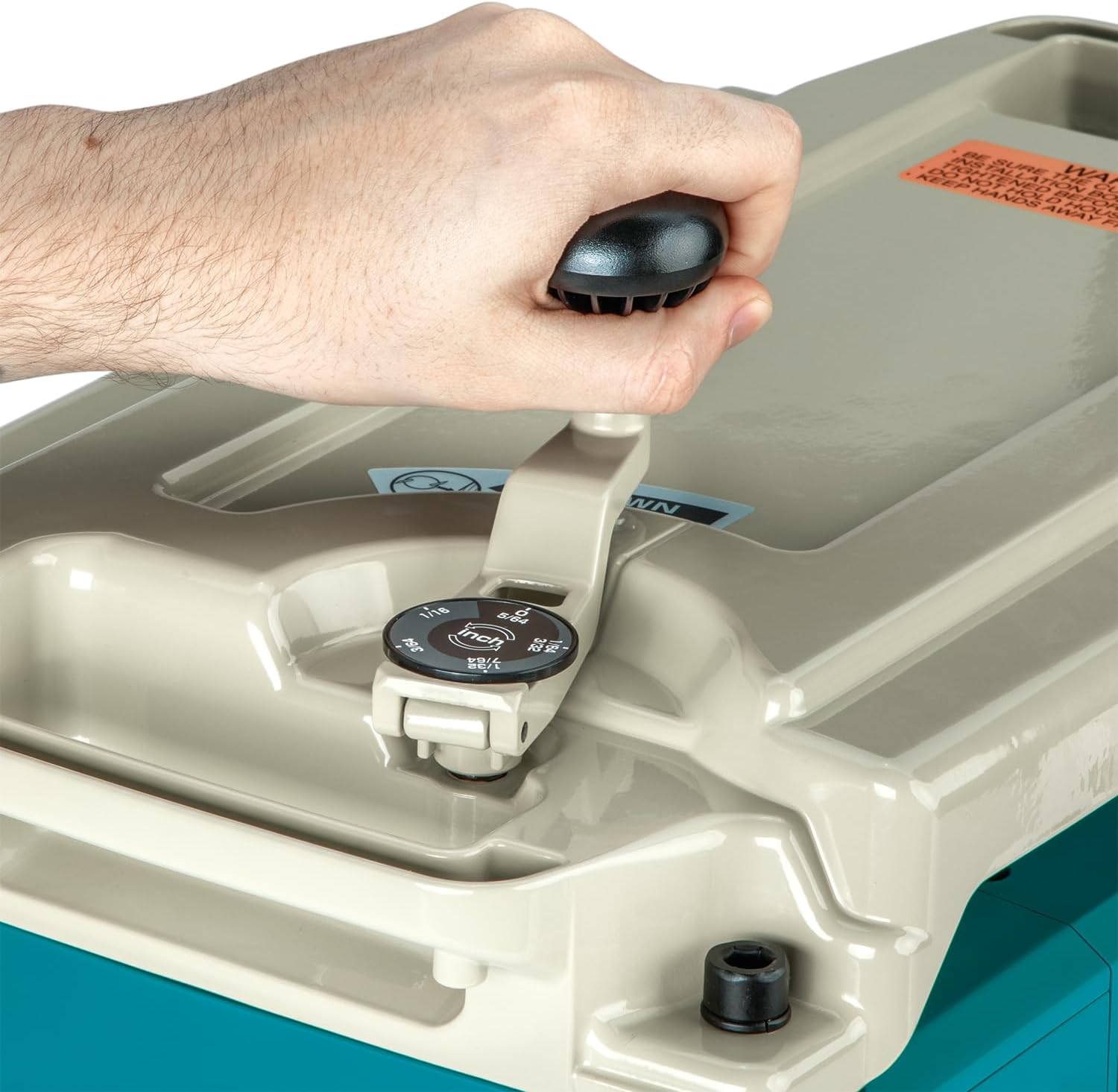
Image: Close-up of the power switch panel on the planer, clearly showing the green 'ON' button and red 'OFF' button for operation.
Planing Operation
With the planer running, carefully feed the workpiece into the in-feed side. The planer's feed rate is approximately 28 feet-per-minute. The Interna-Lok automated head clamp is designed to minimize snipe, which is the slight depression at the beginning or end of a board. For optimal results, especially with longer workpieces, provide additional support at both the in-feed and out-feed ends.

Image: The Makita 2012NB planer in operation, with a piece of wood being fed through it. Wood shavings are visible around the machine, indicating active planing.
Maintenance
Regular maintenance ensures the longevity and optimal performance of your Makita 2012NB planer. Always disconnect the planer from the power source before performing any maintenance.
Blade Changes
The 2012NB features a system for fast and easy blade changes using disposable double-edge planer blades. When blades become dull, they should be replaced to ensure a smooth finish and prevent strain on the motor. Refer to the detailed instructions in the full product manual for the exact blade replacement procedure, utilizing the included magnetic holders and wrenches.
Cleaning
After each use, clean the planer to remove sawdust, chips, and resin buildup. Use a brush or compressed air to clear debris from the cutter head area, feed rollers, and table surfaces. An optional dust hood can be connected to a dust collection system for more efficient chip removal during operation, significantly reducing cleanup.
General Inspection
Periodically inspect all moving parts, fasteners, and the power cord for signs of wear, damage, or looseness. Ensure all guards and safety features are in place and functioning correctly. Lubricate moving parts as recommended in the comprehensive manual to ensure smooth operation.
Troubleshooting
This section addresses common issues you might encounter with your Makita 2012NB planer.
Common Issues and Solutions
- Excessive Snipe: While the Interna-Lok system is designed to minimize snipe, ensure proper in-feed and out-feed support for long workpieces. Adjust the depth of cut to a shallower pass if snipe persists.
- Poor Surface Finish (Roughness, Tear-out): This often indicates dull or damaged blades. Inspect the blades and replace them if necessary. Ensure blades are installed correctly and are clean.
- Planer Not Powering On: Verify the power cord is securely plugged into a functional outlet. Check that the L.E.D. light is illuminated. Ensure the paddle switch is fully engaged to the 'ON' position. Check for tripped circuit breakers.
- Workpiece Stalling or Not Feeding: Ensure the feed rollers are clean and free of resin buildup. Adjust the cutting depth to a lighter pass, especially for hard or wide materials.
For more complex issues or problems not listed here, consult the comprehensive troubleshooting guide in the full product manual or contact Makita customer support for assistance.
Specifications
| Feature | Specification |
|---|---|
| Brand | Makita |
| Model | 2012NB |
| Cutting Capacity (Width) | 12 inches (304mm) |
| Cutting Capacity (Depth) | 1/8 inch |
| Cutting Capacity (Thickness) | 6-3/32 inches |
| Number of Knives | 2 |
| Table Size (W x L) | 13 inches x 30-3/8 inches |
| No Load Speed | 8,500 RPM |
| Amperage | 15.0 Amps |
| Voltage | 120 Volts |
| Wattage | 1650 watts |
| Item Weight | 61.8 pounds (28.07 Kilograms) |
| Product Dimensions (L x W x H) | 30.35 inches x 19.02 inches x 15.79 inches |
| Power Source | Corded Electric |
| Material | Metal, Aluminum |
| UPC | 088381032858 |
Warranty and Support
Warranty Information
Every Makita tool undergoes thorough inspection and testing before leaving the factory. If you are not satisfied with any Makita tool within 30 days of purchase, you may return it for a replacement or refund. Each Makita tool is warranted to be free of defects from workmanship and materials for a period of ONE YEAR from the date of original purchase.
Should any trouble develop during this one-year period, return the COMPLETE tool, freight prepaid, to one of Makita's Factory or Authorized Service Centers. For complete details regarding warranty terms and conditions, please visit the official Makita website or refer to the warranty card included with your product.
Customer Support
For technical assistance, service inquiries, or warranty claims, please contact Makita customer service:
- Website: makitatools.com
- Phone: 800/4-MAKITA (800/462-5482)
Ask a question about this manual
Ask about setup, troubleshooting, compatibility, parts, safety, or missing instructions. Manuals+ will review the question and use this page’s manual context to help answer it.