1. Introduction and Overview
The Tripp Lite ISOBAR6ULTRA Isobar 6 Outlet Heavy Duty Power Strip Surge Protector is designed to provide robust power protection for your valuable electronic equipment. This device safeguards against damaging power surges, spikes, and line noise, ensuring optimal performance and longevity for connected electronics.
Featuring high-quality components, a durable metal case, and a unique noise filtration system, the ISOBAR6ULTRA offers top-tier protection for a variety of applications, including A/V components, network hardware, industrial equipment, and general home or office electronics.
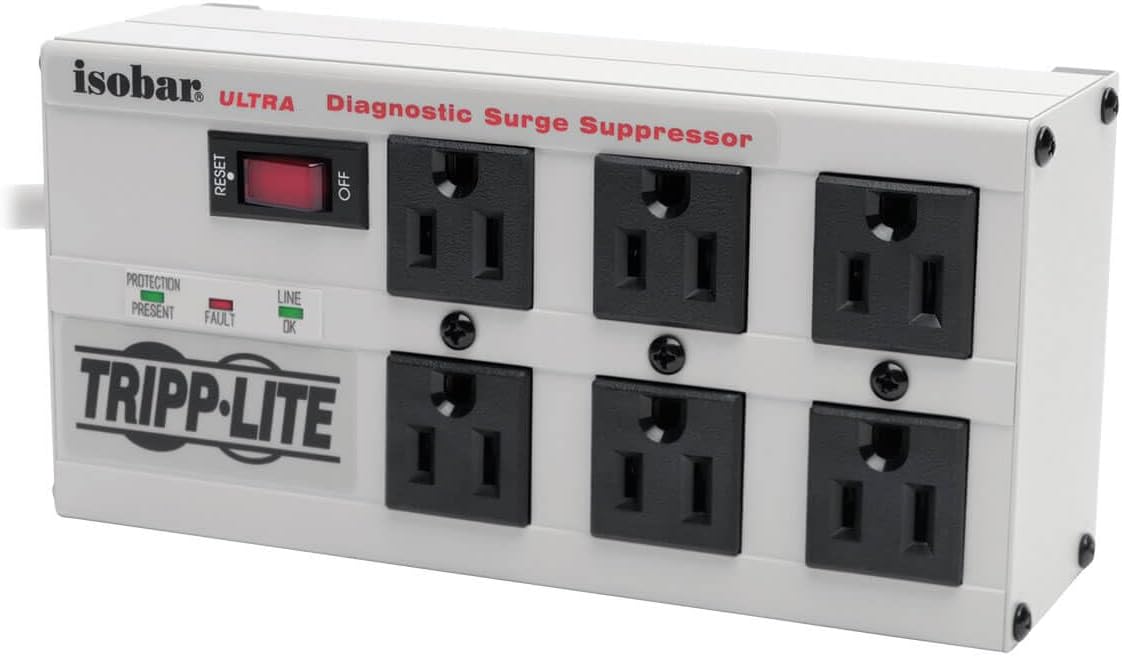
Figure 1: Front view of the Tripp Lite ISOBAR6ULTRA surge protector, highlighting its six outlets, power switch, and diagnostic indicators.
2. Important Safety Information
WARNING: To reduce the risk of electrical shock, use only indoors. Do not install this device if there is not at least 10 meters (30 feet) or more of wire between the electrical outlet and the electrical service panel.
This surge protector is designed with multiple safety features to protect both your equipment and the device itself. Please read and adhere to the following safety guidelines:
- Indoor Use Only: This device is intended for indoor use in dry locations. Do not expose to moisture or extreme temperatures.
- Proper Grounding: Ensure the wall outlet is properly grounded. The surge protector must be plugged into a grounded 3-prong outlet.
- Overload Protection: The unit features a 12A circuit breaker. Do not exceed the maximum load capacity of 12 Amps. If an overload occurs, the circuit breaker will trip, cutting power to the outlets.
- Automatic Shutoff: The ISOBAR6ULTRA includes an automatic shutoff feature that cuts power if the protection circuit becomes incapacitated, preventing damage to connected equipment.
- Compliance: This product conforms to UL 1449 3rd Edition safety standards and exceeds IEEE 587 Category A and B surge suppression specifications.
- Proposition 65 Warning: This product may contain chemicals known to the State of California to cause cancer and birth defects or other reproductive harm. For more information, visit www.P65Warnings.ca.gov.
3. Key Features
The Tripp Lite ISOBAR6ULTRA is engineered with advanced features for superior power protection and performance:
- Network-Grade Surge Protection: Provides 3330 Joules of surge suppression, safeguarding sensitive electronics from powerful surges and spikes.
- Isolated Filter Banks: Features three exclusive isolated filter banks that limit noise interaction among connected devices. This patented design blocks up to 80 dB of EMI/RFI line noise, ensuring clean power for optimal performance of audio/video equipment and other sensitive electronics.
- 6 Widely Spaced Outlets: Six NEMA 5-15R AC outlets are widely spaced to accommodate bulky power adapters without blocking adjacent outlets.
- Durable Metal Housing: The robust all-metal housing ensures long-lasting durability, making it suitable for industrial, garage, workshop, or office environments.
- 6 ft. AC Power Cord with Right-Angle Plug: A long power cord provides flexibility in placement, and the space-saving right-angle plug allows furniture and equipment to be placed flush against the wall.
- Diagnostic LEDs: Indicators for "Protection Present," "Line Fault," and "Line OK" provide immediate status updates on power and protection.
- Child Safety Covers: Includes safety covers for unused outlets to prevent accidental contact.

Figure 2: Detailed view of the power switch, reset button, and diagnostic LEDs.

Figure 3: The space-saving right-angle flat plug.
4. Setup and Installation
Follow these steps to set up your Tripp Lite ISOBAR6ULTRA surge protector:
- Unpack the Unit: Carefully remove the surge protector and any included accessories (such as child safety covers) from its packaging.
- Placement: Position the surge protector in a location where it can safely reach your wall outlet and the devices you intend to protect. Ensure adequate ventilation around the unit.
- Plug In: Insert the surge protector's right-angle plug into a standard, grounded 3-prong AC wall outlet.
- Power On: Flip the red ON/OFF switch to the "ON" position. The "Protection Present" and "Line OK" LEDs should illuminate, indicating that the unit is receiving power and providing surge protection.
- Connect Devices: Plug your electronic devices into the six NEMA 5-15R outlets on the surge protector. Utilize the widely spaced outlets for bulky power adapters.
- Mounting (Optional): The surge protector features keyhole slots on the bottom panel for convenient wall or desk mounting. Use appropriate screws (not included) to secure the unit.

Figure 4: Devices connected to the surge protector.

Figure 5: Example of under-desk installation.
5. Operation
Operating the Tripp Lite ISOBAR6ULTRA is straightforward:
- Power Switch: The red ON/OFF switch controls power to all connected outlets. Flip it to "ON" to supply power and "OFF" to cut power.
- Diagnostic LEDs:
- Protection Present (Green): Illuminates when the surge protection circuitry is active and functioning correctly. If this LED is off, the surge protection has been consumed, and the unit should be replaced.
- Line OK (Green): Illuminates when the incoming power line is correctly wired and grounded.
- Fault (Red): Illuminates if there is a wiring fault in the wall outlet (e.g., missing ground, reversed polarity). If this LED is on, consult a qualified electrician to inspect your wiring.
- Reset Button: If the 12A circuit breaker trips due to an overload, the red ON/OFF switch will pop out. Disconnect some devices, then push the switch back in to reset the breaker and restore power.
6. Maintenance
The Tripp Lite ISOBAR6ULTRA surge protector requires minimal maintenance. Follow these general guidelines:
- Cleaning: Disconnect the unit from the wall outlet before cleaning. Use a soft, dry cloth to wipe the exterior. Do not use liquid or aerosol cleaners.
- Inspection: Periodically inspect the power cord and the unit for any signs of damage. If damage is found, discontinue use and contact Tripp Lite support.
- Protection Present LED: Regularly check the "Protection Present" LED. If it is off, the surge protection components have absorbed a significant surge and are no longer providing protection. The unit should be replaced to ensure continued safety for your equipment.
7. Troubleshooting
If you encounter issues with your ISOBAR6ULTRA, refer to the following troubleshooting tips:
| Problem | Possible Cause | Solution |
|---|---|---|
| No power to connected devices. |
|
|
| "Protection Present" LED is off. | Surge protection components have been consumed by a power surge. | The unit is no longer providing surge protection. Replace the surge protector. |
| "Fault" LED is illuminated. | Wiring fault in the wall outlet (e.g., missing ground, reversed polarity). | Do not use the outlet. Consult a qualified electrician to inspect and correct the wiring. |
| Excessive noise or interference with audio/video equipment. | External EMI/RFI interference or ground loop issues. | Ensure all components are plugged into the surge protector. While the Isobar provides excellent noise filtration, severe external interference may still occur. Check for other sources of interference. |
8. Specifications
Detailed technical specifications for the Tripp Lite ISOBAR6ULTRA:
- Model Number: ISOBAR6ULTRA
- Product Dimensions: 3.5 x 7.01 x 0.1 inches
- Item Weight: 2.8 pounds
- Input Voltage: 120 Volts AC
- Frequency: 50/60 Hz
- Total Power Outlets: 6 (NEMA 5-15R)
- Maximum Load: 12 Amps
- Surge Suppression Rating: 3330 Joules
- EMI/RFI Noise Reduction: Up to 80 dB
- Voltage Protection Rating (VPR): 330 L-N, 330 L-G, 330 N-G
- Cord Length: 6 feet
- Plug Type: NEMA 5-15P (Right-Angle Flat Plug)
- Housing Material: Metal
- Special Features: Mountable, On/Off Switch, Surge Protection, Isolated Filter Banks
- Certifications: UL 1449 3rd Edition, IEEE 587 Category A & B
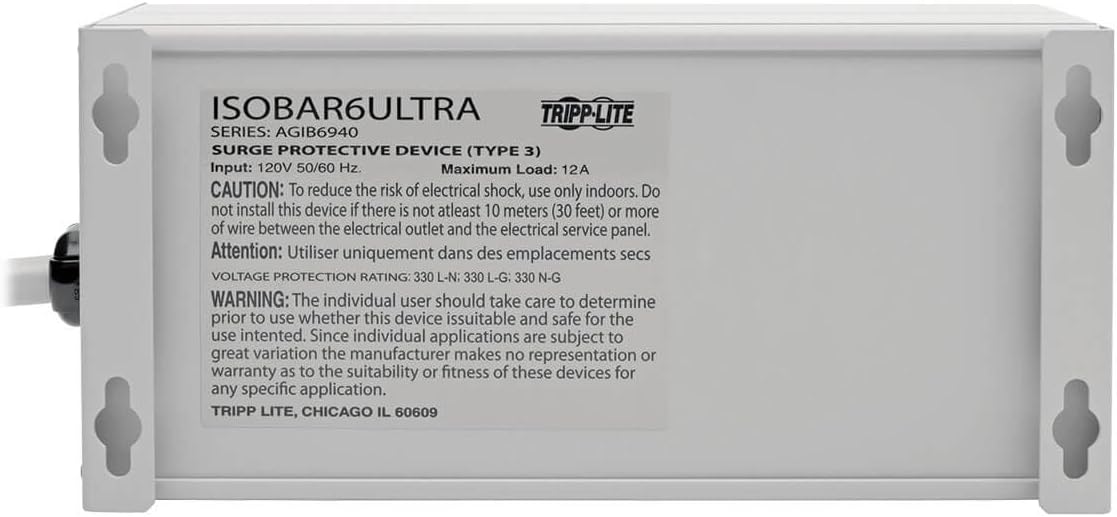
Figure 6: Product label with specifications and warnings.
9. Warranty and Support
Tripp Lite stands behind the quality and performance of the ISOBAR6ULTRA surge protector:
- Lifetime Limited Manufacturer's Warranty: This product is protected by a Lifetime Limited Manufacturer's Warranty, covering defects in materials and workmanship.
- Ultimate Connected Equipment Insurance: The ISOBAR6ULTRA includes $50,000 Ultimate Connected Equipment insurance, providing financial protection for equipment properly connected to the surge protector that is damaged by a power surge.
- Technical Support: Eaton's expert technical support team is available to assist you with any questions or issues regarding your Tripp Lite product. You can reach them via phone, web, or email.
- Official User Manual: For a comprehensive guide and additional details, you can download the official user manual in PDF format: Download User Manual (PDF).
For warranty claims or technical assistance, please visit the official Tripp Lite website or contact their customer service directly.