
Telex M-40
Telex M-40 Microphone User Manual
Model: M-40
1. Introduction
This manual provides essential instructions for the proper setup, operation, and maintenance of your Telex M-40 microphone. Please read this guide thoroughly before using the product to ensure optimal performance and longevity. The Telex M-40 is a handheld, unidirectional microphone designed for various audio applications including singing, video conferencing, video recording, and voice recording.
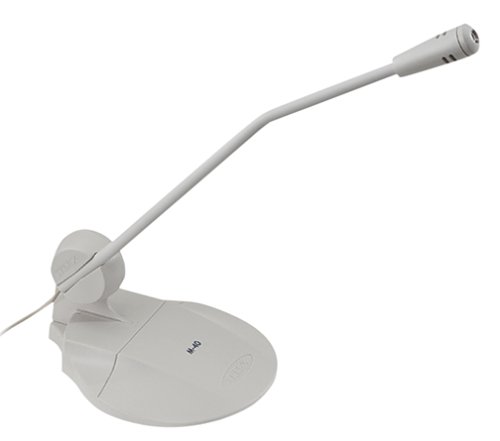
Figure 1: The Telex M-40 microphone. This image displays the microphone unit, which is handheld and features a stand for stable placement during use.
2. Setup
Follow these steps to set up your Telex M-40 microphone:
- Unpacking: Carefully remove the microphone from its packaging. Verify that all included components are present: the M-40 microphone unit.
- Connection: The M-40 microphone uses an XLR connector for audio output. Connect one end of an XLR cable (not included) to the XLR port on the base of the microphone.
- Device Connection: Connect the other end of the XLR cable to an appropriate input on your compatible device, such as a personal computer, audio interface, or mixer. Ensure the connection is secure.
- Placement: Position the microphone using its integrated stand. For optimal sound capture, place the microphone close to the sound source. The unidirectional polar pattern means it primarily picks up sound from the front, reducing background noise.
3. Operating Instructions
To operate your Telex M-40 microphone effectively:
- Power: The M-40 is a corded electric microphone and does not require batteries. It draws power through the connected device. Ensure your connected device is powered on.
- Audio Input Selection: On your connected device (e.g., computer, audio interface), select the correct input channel where the microphone is connected.
- Gain Adjustment: Adjust the input gain or volume level on your connected device. Start with a low gain setting and gradually increase it until the desired audio level is achieved without distortion.
- Microphone Technique: For best results, speak or sing directly into the front of the microphone. Maintain a consistent distance to ensure even sound capture. The unidirectional pattern helps isolate your voice from ambient sounds.
- Monitoring: If your setup allows, monitor the audio output through headphones to ensure clear sound and proper levels.
4. Maintenance
Proper care will extend the life of your Telex M-40 microphone:
- Cleaning: Use a soft, dry cloth to wipe the exterior of the microphone. Do not use liquid cleaners or solvents, as these can damage the microphone's components.
- Storage: When not in use, store the microphone in a clean, dry place away from extreme temperatures and humidity.
- Handling: Avoid dropping or subjecting the microphone to strong impacts, which can damage internal components.
- Cable Care: Always grasp the connector, not the cable, when plugging or unplugging. Avoid kinking or sharply bending the XLR cable.
5. Troubleshooting
If you encounter issues with your Telex M-40 microphone, refer to the following common problems and solutions:
| Problem | Possible Cause | Solution |
|---|---|---|
| No sound output |
|
|
| Low volume or weak signal |
|
|
| Distorted audio |
|
|
6. Specifications
Detailed technical specifications for the Telex M-40 microphone:
- Model Number: M-40
- Brand: Telex
- Microphone Form Factor: Handheld
- Polar Pattern: Unidirectional
- Connectivity Technology: XLR
- Connector Type: XLR
- Power Source: Corded Electric
- Frequency Response: 16000 Hz (Upper limit, typical for voice)
- Signal-to-Noise Ratio: 72 dB
- Item Weight: 0.4 Pounds (approximately 181 grams)
- Item Dimensions: 13.5 x 7.4 x 0.5 inches (approximate packaging/shipping dimensions, actual microphone dimensions may vary slightly)
- Compatible Devices: Personal Computer
- Included Components: Microphone
- Special Feature: Stand
- Recommended Uses: Singing, Video Conference, Video Recording, Voice Recording
7. Warranty and Support
For warranty information or technical support regarding your Telex M-40 microphone, please refer to the documentation provided at the point of purchase or visit the official Telex website. Keep your purchase receipt as proof of purchase for any warranty claims.
Manufacturer: TELEX
Related Documents - M-40
 |
TELEX MS-4002 Master Station User Manual Comprehensive user manual for the TELEX MS-4002 Master Station, detailing its features, installation, operation, and specifications for professional audio and intercom systems. |
 |
Telex Audiocom ES4000A Intercom Expansion Station User Instructions User manual for the Telex Audiocom ES4000A Intercom Expansion Station, detailing its features, installation, operation, and specifications for professional communication systems. |
 |
Telex MS-4002 Master Station User Manual User manual for the Telex MS-4002 Master Station, a 4-channel intercom system and power supply. This document details its features, installation, operation, programming, and technical specifications for professional audio communication. |
 |
TELEX MS-4002 Master Station User Manual User manual for the TELEX MS-4002 Master Station, detailing its features, installation, operation, and specifications for professional audio communication systems. |
 |
Telex MS-4002 Master Station User Manual Comprehensive user manual for the Telex MS-4002 Master Station, detailing its features, installation, operation, programming, and specifications for professional intercom systems. |
 |
Telex Audiocom PS-4001 Power Supply - Technical Specifications and Features Detailed information on the Telex Audiocom PS-4001 power supply, including its features, specifications, connectivity, and operational modes for intercom systems. |
Ask a question about this manual
Ask about setup, troubleshooting, compatibility, parts, safety, or missing instructions. Manuals+ will review the question and use this page’s manual context to help answer it.