
KODAK KE60
Kodak KE60 Easy Load 35mm Camera User Manual
Model: KE60
1. Introduction
Thank you for choosing the Kodak KE60 Easy Load 35mm Camera. This manual provides essential information for setting up, operating, and maintaining your camera to ensure optimal performance and longevity. The KE60 is designed for ease of use, featuring a unique Easy Load film system and a reliable 3-zone autofocus system.
Please read this manual thoroughly before using your camera and keep it for future reference.
2. Safety Information
- Do not expose the camera to extreme temperatures, humidity, or direct sunlight for extended periods.
- Avoid dropping the camera or subjecting it to strong impacts.
- Keep the camera away from water and other liquids.
- Do not attempt to disassemble or repair the camera yourself. Refer to qualified service personnel.
- Keep batteries out of reach of children. If swallowed, seek immediate medical attention.
- Dispose of batteries and film cartridges according to local regulations.
3. Package Contents
Verify that your package contains the following items:
- Kodak KE60 Easy Load 35mm Camera Body
- User Manual (this document)
- Wrist Strap (may vary by region)
Note: Batteries and 35mm film are typically sold separately.
4. Camera Overview
Familiarize yourself with the main components of your Kodak KE60 camera.
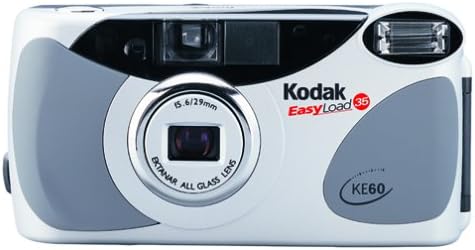
Figure 4.1: Front view of the Kodak KE60 Easy Load 35mm Camera. This image displays the camera's lens, viewfinder, built-in flash, and the prominent 'Kodak EasyLoad 35 KE60' branding on its white and gray body.
Key Components:
- Lens: EKTANAR ALL GLASS LENS, 5.6/29mm.
- Viewfinder: For composing your shots.
- Built-in Flash: Provides illumination in low-light conditions.
- Shutter Button: To take photographs.
- Film Door Latch: To open the film compartment.
- Film Counter/Display: Shows the number of exposures taken and other camera status.
- Self-Timer Indicator/Red Light: Flashes during self-timer operation and indicates potential poor focus.
- "In the Picture Indicator" (IPI): A red indicator light on the front of the camera.
5. Setup
5.1 Inserting Batteries
The Kodak KE60 requires [insert battery type, e.g., two AA batteries] for operation. Ensure correct polarity when inserting.
- Locate the battery compartment cover, usually on the bottom or side of the camera.
- Open the cover by sliding or lifting it.
- Insert the batteries according to the polarity indicators (+/-) inside the compartment.
- Close the battery compartment cover securely.
Note: The specific battery type is not provided in the product data. Please refer to the camera body or original packaging for this information.
5.2 Loading Film (Easy Load System)
The KE60 features an Easy Load system for simplified film installation.
- Open the film door by sliding the film door latch.
- Place the 35mm film cartridge into the film chamber.
- Extend the film leader slightly and slide the film tip into the designated slot on the take-up spool. You do not need to pull the leader across the entire camera.
- Close the film door firmly. The camera will automatically advance the film to the first frame.
- An indicator will change color to verify the door is locked and the film is loaded properly. The camera will not allow you to take pictures if the film is not loaded correctly.
- The film door automatically locks after loading and cannot be reopened until the film is rewound.
6. Operating the Camera
6.1 Taking Pictures
- Power On: Turn on the camera (if applicable, specific power button not detailed in input).
- Compose Your Shot: Look through the viewfinder and frame your subject.
- Autofocus: The KE60 features a 3-zone autofocus system. Press the shutter button halfway down to activate autofocus. The camera will focus on your subject.
- Focus Lock: Once focused, you can keep the shutter button halfway down to lock the focus, allowing you to recompose your shot before fully pressing the button.
- Close-up Photography: The camera can focus on subjects as close as 1.5 feet (approximately 45 cm).
- Poor Focus Alert: If you are more than 3 feet from the subject and there's a possibility of poor focus, a red light will alert you.
- Capture: Press the shutter button fully down to take the picture. The camera will automatically advance the film to the next frame.
6.2 Using the Built-in Flash
The KE60 has a built-in flash with red-eye reduction for low-light situations.
- The flash will typically activate automatically in low light.
- For red-eye reduction, the flash may fire a pre-flash before the main flash to constrict the subject's pupils.
- Ensure your subject is within the effective range of the flash.
6.3 Special Exposure Modes
The camera offers special modes to optimize your photos in various conditions.
- Portrait Mode: Switch to portrait mode for enhanced close-up shots of individuals. This mode helps ensure sharp focus and appropriate exposure for portraits.
- Night Mode: For shooting in low-light environments without flash, often involving longer shutter speeds.
- Infinity Mode: Ideal for landscapes or distant subjects where everything beyond a certain distance needs to be in sharp focus.
Note: The method for selecting these modes (e.g., dial, button) is not specified in the provided data. Refer to the camera's physical controls.
6.4 Using the Self-Timer
The 10-second self-timer allows you to include yourself in group photos or take steady shots without touching the shutter button.
- Activate the self-timer function (specific button not detailed).
- Press the shutter button. The self-timer indicator light will begin to flash.
- After approximately 10 seconds, the camera will automatically take the picture.
6.5 "In the Picture Indicator" (IPI)
The IPI is a red indicator light on the front of the camera, useful when using the self-timer or photographing large groups.
- If the red indicator light on the front of the camera is visible to you, it means you are within the frame of the picture.
6.6 Rewinding Film
Once all exposures on the film roll have been used, the camera will automatically rewind the film into its cartridge. The film door cannot be opened until the film is fully rewound.
- Wait for the camera to complete the automatic rewind process.
- Once rewound, the film door can be opened, and the cartridge removed for development.
7. Maintenance
7.1 Cleaning the Camera
- Use a soft, lint-free cloth to gently wipe the camera body.
- For the lens, use a specialized lens cleaning cloth and lens cleaning solution. Avoid touching the lens surface with your fingers.
- Never use abrasive cleaners, solvents, or strong chemicals on the camera.
- Use a blower brush to remove dust from the lens and viewfinder.
7.2 Storage
- When not in use for extended periods, remove the batteries to prevent leakage.
- Store the camera in a cool, dry place, away from direct sunlight and extreme temperatures.
- Use a camera bag or case to protect it from dust and scratches.
8. Troubleshooting
If you encounter issues with your Kodak KE60, refer to the following common problems and solutions:
| Problem | Possible Cause | Solution |
|---|---|---|
| Camera does not power on. | Dead or incorrectly inserted batteries. | Replace batteries with fresh ones, ensuring correct polarity. |
| Film not loading or advancing. | Film not inserted correctly; film door not closed securely. | Re-open film door, ensure film tip is properly seated, and close door firmly until indicator changes color. |
| Film stuck in camera / will not rewind. | Mechanical issue; camera malfunction. | Do not force the film door open. If automatic rewind fails, consult a camera repair specialist. |
| Pictures are blurry. | Subject too close/far for autofocus; camera shake; poor lighting. | Ensure subject is within 1.5 feet to infinity. Hold camera steady. Use flash in low light. Check for poor focus alert light. |
| Flash not firing. | Insufficient battery power; flash charging. | Replace batteries. Wait for the flash ready indicator (if present) to light up. |
| Display flashing continuously. | Internal error; film loading issue. | Remove and reinsert batteries. Check film loading. If issue persists, seek professional service. |
9. Specifications
| Feature | Detail |
|---|---|
| Model Name | KE60 |
| Brand | KODAK |
| Film Format Type | 35mm |
| Lens | EKTANAR ALL GLASS LENS, 5.6/29mm |
| Autofocus System | 3-zone autofocus |
| Minimum Focus Distance | 1.5 feet (approx. 45 cm) |
| Shutter Type | Focal Plane Shutter |
| Special Feature | Built In Flash (with red-eye reduction) |
| Self-Timer | 10-second delay |
| "In the Picture Indicator" (IPI) | Yes |
| Item Weight | 6.4 ounces (181 Grams) |
| Package Dimensions | 5.8 x 3 x 2.5 inches |
| UPC | 041778871539 |
10. Warranty and Support
For warranty information and technical support, please refer to the documentation included with your purchase or visit the official Kodak website. Keep your proof of purchase for any warranty claims.
Online Support: For additional resources and frequently asked questions, you may visit the KODAK Store on Amazon or the official Kodak support portal.
Related Documents - KE60
 |
Podręcznik użytkownika skanerów Kodak i24x0 / i26x0 / i28x0 Instrukcja obsługi dla skanerów dokumentów Kodak serii i24x0, i26x0 i i28x0. Zawiera informacje o instalacji, obsłudze, konserwacji i rozwiązywaniu problemów. |
 |
Kodak Signet 50 Camera: User Manual and Guide Comprehensive guide to operating the Kodak Signet 50 camera, covering film loading, exposure settings, focusing, flash photography, and photo aids. Learn to take great pictures with your Kodak Signet 50. |
 |
Kodak Snapic A1 35mm Film Camera Quick Start Guide A quick start guide for the Kodak Snapic A1 35mm film camera, covering setup, operation, battery, and flash controls. |
 |
Kodak Medalist II Camera User Manual A comprehensive user manual for the Kodak Medalist II camera, detailing its features, operation, loading and unloading film, focusing, shutter speeds, lens openings, accessories, and photographic techniques. Includes information on various Kodak films, lenses, filters, and papers. |
 |
Kodak Signet 30 Camera User Manual and Guide Comprehensive user manual for the Kodak Signet 30 35mm film camera, covering loading, operation, exposure settings, flash photography, accessories, and maintenance. |
 |
Kodak Motormatic 35F Camera Service Manual Comprehensive service manual for the Kodak Motormatic 35F camera (September 1962, No. 1313). Provides detailed instructions for servicing the film transport mechanism, housing, shutter, and exposure meter, including specifications and service hints. |