1. Introduction
This manual provides essential information for the proper setup, operation, and maintenance of your Panasonic DVD-RV30 DVD Player. Please read these instructions thoroughly before using the unit to ensure optimal performance and safety.
2. Safety Information
To reduce the risk of electric shock, do not remove the cover. Refer servicing to qualified service personnel. Do not expose this appliance to rain or moisture. Ensure proper ventilation and avoid placing the unit in enclosed spaces or near heat sources. Disconnect the power cord from the wall outlet if the unit will not be used for an extended period.
3. What's in the Box
Upon opening the package, verify that all items are present:
- Panasonic DVD-RV30 DVD Player Unit
- Remote Control
- Power Cord
- Audio/Video Cables (RCA type, typically yellow for video, red/white for audio)
4. Setup
4.1 Connecting to a Television and Audio System
The DVD-RV30 offers various connection options for video and audio output. Choose the connection type that best suits your television and audio receiver.
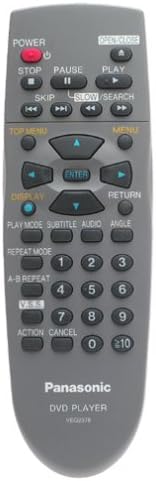
Image: Rear panel of the Panasonic DVD-RV30 DVD Player. This view displays the power input, optical digital audio output, RCA audio/video outputs, S-video output, and component video outputs (Y, Pb, Pr).
Video Connections:
- Component Video Output (Y, Pb, Pr): For the highest quality analog video connection. Connect these three cables to the corresponding component video input jacks on your television.
- S-Video Output: Provides a higher quality video signal than composite video. Connect an S-video cable from the player to your television's S-video input.
- Composite Video Output (Yellow RCA): A standard video connection. Connect a yellow RCA cable from the player to the video input on your television.
Audio Connections:
- Optical Digital Audio Output: For connecting to a home theater receiver with a digital optical input, providing multi-channel audio (Dolby Digital, DTS).
- Analog Audio Output (Red/White RCA): For connecting to your television or stereo receiver's analog audio inputs.
4.2 Initial Power On
- After making all necessary connections, plug the power cord into an AC outlet.
- Press the POWER button on the front panel or the remote control to turn on the unit.
- Select the correct input on your television (e.g., Video 1, Component, S-Video) to view the DVD player's output.
5. Operating Instructions
5.1 Basic Disc Playback
- Press the OPEN/CLOSE button to open the disc tray.
- Place a DVD disc onto the tray with the label side facing up.
- Press the OPEN/CLOSE button again to close the tray.
- The player will automatically begin playback or display the disc menu.
- Use the PLAY, PAUSE, and STOP buttons on the remote control for playback control.
5.2 Advanced Features
- Advanced Virtual Surround Sound (VSS): This feature simulates a surround sound experience using only two speakers. Activate VSS through the audio settings menu to enhance your listening experience without a multi-speaker setup.
- 2-Channel Plus Bass: When combined with Advanced VSS, this feature optimizes audio output for a two-speaker system, providing enhanced bass response for a more immersive virtual theater experience.
- Dialogue Enhancement: For Dolby Digital 5.1 discs, this feature boosts the volume of the center channel by 6 dB, making dialogue clearer and preventing it from being overshadowed by other audio elements.
- Cinema Mode: This selectable video mode enhances picture quality by reducing glare, softening resolution, and improving visibility of details in dark scenes, aiming for a more film-like visual experience.
- High-Speed Smooth-Motion Scan: The player supports five speeds for crystal-clear forward and reverse scanning, up to 100 times normal speed, allowing for quick navigation through disc content.
6. Remote Control
The included remote control provides full functionality for operating your DVD-RV30 player. Familiarize yourself with the button layout for convenient control.
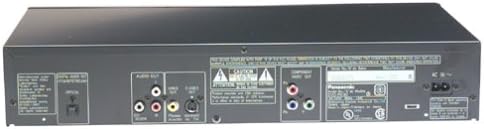
Image: Panasonic DVD-RV30 Remote Control. Key buttons include POWER, OPEN/CLOSE, PLAY, PAUSE, STOP, SKIP, SLOW/SEARCH, TOP MENU, MENU, DISPLAY, RETURN, navigation arrows, ENTER, SUBTITLE, AUDIO, ANGLE, REPEAT MODE, A-B REPEAT, and numerical input buttons.
Key Remote Functions:
- POWER: Turns the player on or off.
- OPEN/CLOSE: Opens and closes the disc tray.
- PLAY/PAUSE/STOP: Controls disc playback.
- SKIP (<< / >>): Skips to the previous or next track/chapter.
- SLOW/SEARCH: Controls slow motion playback and high-speed search.
- TOP MENU/MENU: Accesses the disc's main menu or title menu.
- Navigation Arrows (Up/Down/Left/Right) & ENTER: Used for menu navigation and selection.
- DISPLAY: Shows disc information on screen.
- SUBTITLE/AUDIO/ANGLE: Selects subtitle tracks, audio tracks, or camera angles (if available on the disc).
- Numerical Buttons (0-9): Direct input for track/chapter numbers.
7. Maintenance
- Cleaning the Unit: Wipe the exterior of the player with a soft, dry cloth. Do not use liquid or aerosol cleaners, as they may damage the finish.
- Cleaning Discs: Handle discs by their edges. If a disc is dirty, wipe it gently with a soft, lint-free cloth from the center outwards. Do not use solvents or abrasive cleaners.
- Ventilation: Ensure the player has adequate ventilation. Do not block ventilation openings on the top or sides of the unit.
8. Troubleshooting
If you experience issues with your DVD-RV30, consult the following common solutions before seeking service.
| Problem | Possible Cause / Solution |
|---|---|
| No Power |
|
| No Picture |
|
| No Sound |
|
| Disc Does Not Play |
|
| Remote Control Not Working |
|
9. Specifications
- Model: DVD-RV30
- Brand: Panasonic
- Dimensions (W x D x H): Approximately 17 x 10.74 x 3.2 inches (43.2 x 27.3 x 8.1 cm)
- Weight: Approximately 6.4 pounds (2.9 kg)
- Video Output: Component Video (Y, Pb, Pr), S-Video, Composite Video
- Audio Output: Optical Digital Audio, Analog Audio (RCA L/R)
- Audio DAC: 24-bit, 96 kHz
- Special Features: Advanced Virtual Surround Sound (VSS), 2-Channel Plus Bass, Dialogue Enhancement, Cinema Mode, High-Speed Smooth-Motion Scan
- Power Consumption: Energy Star compliant (reduced power in standby mode)
10. Warranty and Support
This Panasonic DVD-RV30 DVD Player comes with a limited warranty:
- Parts: 1 year
- Labor: 90 days
For technical support, service inquiries, or to obtain replacement parts, please contact Panasonic customer service. Keep your purchase receipt as proof of purchase for warranty claims.
Note: Warranty terms may vary by region. Refer to the warranty card included with your product for specific details.


