
1. Introduction to Armored Fist 3
Armored Fist 3 is a tank combat simulation game developed by NovaLogic. This manual provides essential information for installing, operating, and understanding the features of the game. Players command M1A2 Abrams tanks through various campaigns and missions, engaging in tactical combat scenarios.
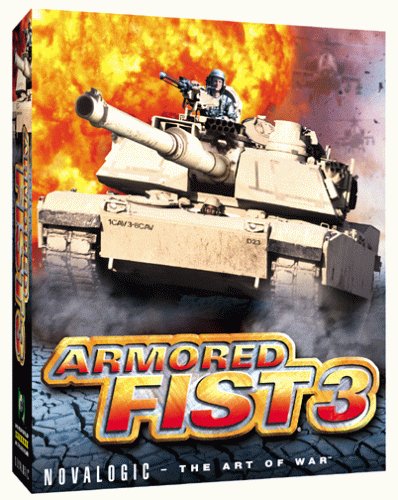
Figure 1: Armored Fist 3 Product Packaging
2. System Requirements and Setup
2.1 Minimum System Specifications
- Operating System: Windows 95, Windows 98, Windows Me
- Processor: Pentium III 450 MHz or equivalent (for optimal performance)
- Graphics: Voxel Space 32 engine (supports 16 million colors, does not utilize 3D hardware acceleration)
- Display Resolution: Maximum 640 x 480 pixels
- Memory: Sufficient RAM for the operating system and game (higher is recommended for smooth gameplay)
- Storage: Required space for game installation
- Sound Card: Full duplex sound card for Voice-Over-Net functionality
2.2 Installation Procedure
- Insert the Armored Fist 3 game disc into your computer's CD-ROM drive.
- The installer should launch automatically. If not, navigate to the CD-ROM drive in "My Computer" and run the setup executable (e.g., setup.exe).
- Follow the on-screen prompts to complete the installation. This typically involves accepting the license agreement, choosing an installation directory, and selecting components.
- Once installation is complete, you may be prompted to restart your computer.
Note: For operating systems newer than Windows Me (e.g., Windows XP, Vista, 7, 10), compatibility issues may arise. Running the game in compatibility mode for Windows 98/Me or utilizing community patches may be necessary.
3. Operating the Game
3.1 Basic Controls and Interface
Armored Fist 3 features a detailed M1A2 Abrams tank simulation. The interface is designed to simplify complex combat situations, though familiarity with keyboard commands is crucial for effective operation. Key functions include:
- Movement: Control tank movement (forward, reverse, turn) using designated keys.
- Turret Control: Aim the main gun and machine gun.
- Firing: Engage targets with various ammunition types (e.g., Sabot, HEAT).
- Smoke Grenades: Deploy smoke to obscure your tank from enemy view.
- Air Support: Call for aerial assistance during missions.
- GPS: Utilize the in-game GPS for navigation and tactical awareness.
- Targeting: The game features an autotargeting system, and a manual gunnery option is also available for precise targeting.
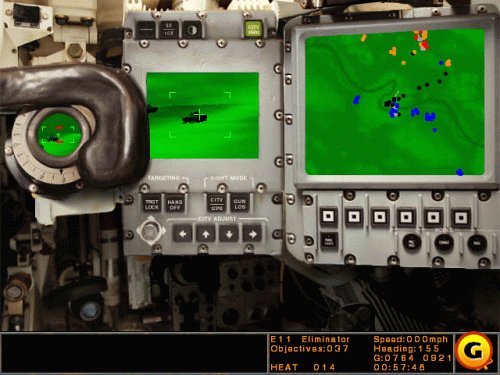
Figure 2: Tank Cockpit Interface
3.2 Single-Player Campaigns and Missions
The single-player experience includes four distinct campaigns, comprising over 50 missions. These missions involve various objectives, from engaging enemy armor to supporting infantry and coordinating with air assets.

Figure 3: In-Game Tank Formation
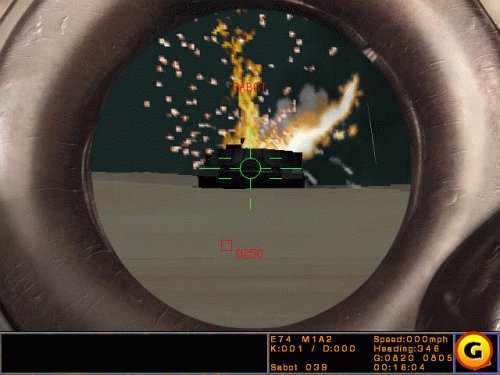
Figure 4: Engaging an Enemy Target
4. Multiplayer Gameplay via NovaWorld
Armored Fist 3 supports online multiplayer combat exclusively through NovaLogic's NovaWorld service. Up to 32 players can participate in a single mission. There is no support for LAN, modem, or direct IP connections for multiplayer.
4.1 Connecting to NovaWorld
- Launch Armored Fist 3.
- Select the "Multiplayer" option from the main menu.
- Choose "NovaWorld" to connect to the online service. An internet connection is required.
- Follow the prompts to create an account or log in.
4.2 Multiplayer Modes and Features
- Player Capacity: Supports up to 32 players simultaneously.
- Game Modes: Includes Deathmatch, Team Deathmatch, Platoon-versus-Platoon battles, and Capture the Flag.
- Voice-Over-Net Technology: Players with a headset and full duplex sound card can communicate with teammates using voice commands. Ensure microphone levels are properly adjusted for clear communication.
- Hosting Games: Players can host public or password-protected games.
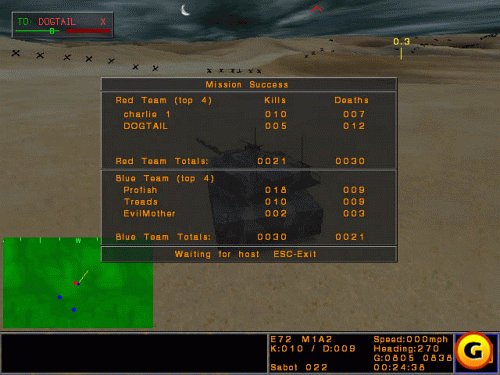
Figure 5: Multiplayer Mission Results Screen
5. Mission Editor
Armored Fist 3 includes a full-featured mission editor, allowing players to create custom battles. This tool enables the design of unique scenarios, placement of units, and definition of objectives. Custom missions can be shared with other Armored Fist 3 players.
6. Maintenance and Performance Tips
- Driver Updates: Ensure your graphics and sound card drivers are up to date for optimal performance, especially on older systems.
- System Resources: Close unnecessary background applications to free up system resources while playing.
- Graphical Settings: If experiencing slow frame rates, reduce in-game graphical detail settings. The Voxel Space 32 engine can be demanding on older hardware at maximum settings.
- Disk Space: Ensure sufficient free disk space for game operation and temporary files.
7. Troubleshooting Common Issues
7.1 Installation and Compatibility
- Newer Operating Systems: If installing on Windows XP, Vista, 7, or later, right-click the game's executable (or installer) and select "Properties" > "Compatibility" tab. Try running in compatibility mode for Windows 98/Me.
- Installer Errors: Ensure your CD-ROM drive is clean and the disc is not scratched. Try copying the contents of the disc to your hard drive and running the setup from there.
7.2 In-Game Performance
- Lagging/Slow Frame Rate: Reduce graphical settings (e.g., texture detail, view distance). Ensure your system meets or exceeds the minimum requirements.
- Smoke Generator Lag: Deploying smoke grenades, especially in multiplayer, can cause temporary slowdowns. This is a known characteristic of the game engine.
7.3 Multiplayer and Voice-Over-Net
- Connection Issues: Verify your internet connection. NovaWorld servers may experience occasional lagging or warping.
- Voice Communication:
- Ensure your headset and microphone are properly connected and configured in your operating system's sound settings.
- Verify that your sound card supports full duplex audio.
- Adjust microphone input levels within your system settings and potentially within the game's audio options to prevent unintelligible audio.
8. Product Specifications
| Feature | Detail |
|---|---|
| Product Title | Armored Fist 3 - PC |
| Brand | NovaLogic |
| Model Number | 9763 |
| UPC | 753799097637 |
| Format | Windows 98, Windows Me, Windows 95 |
| Rated | Teen |
| Item Weight | 14.4 ounces |
| Package Dimensions | 9.7 x 7.9 x 2.1 inches |
| Date First Available | October 24, 1999 |
9. Warranty and Support
For information regarding product warranty, technical support, or customer service, please refer to the documentation included with your game purchase or visit the official NovaLogic website (if available). Specific warranty terms and support channels may vary based on region and purchase date.


