
Philips 422 918-2
Oper Audio CD User Manual
Model: 422 918-2 | Brand: Philips
Introduction
This manual provides instructions for the proper use and care of the "Oper" Audio CD. This compact disc features a selection of classical opera recordings, designed for playback on standard CD players.
Setup
To begin using your "Oper" Audio CD, follow these steps:
- Unpack the CD: Carefully remove the Audio CD from its jewel case. Hold the disc by its edges to avoid touching the playing surface.
- Prepare your CD Player: Ensure your CD player is connected to a power source and audio output devices (e.g., speakers, headphones).
- Insert the CD: Open the CD tray or slot on your player. Place the "Oper" Audio CD into the tray with the label side facing upwards. Ensure it is seated correctly.
- Close the Tray: Gently close the CD tray or allow the player to draw the disc in. The player should recognize the disc and display track information.
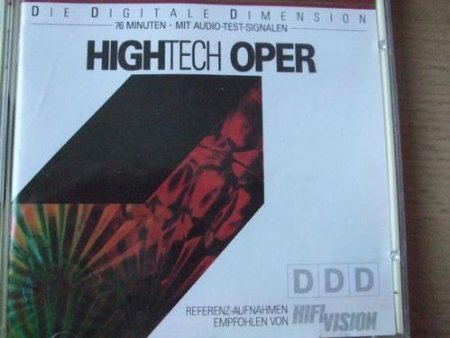
Image: Front cover of the "Oper" Audio CD. This image displays the album title "HIGHTECH OPER" and features a modern, geometric design on the cover art. It is the primary visual identifier for the product.
Operating
Once the CD is loaded, you can control playback using your CD player's functions:
- Play/Pause: Press the Play button to start playback. Press again to pause.
- Skip Tracks: Use the "Next Track" or "Previous Track" buttons to navigate between individual opera selections.
- Fast Forward/Rewind: Hold down the "Next Track" or "Previous Track" buttons to fast forward or rewind within a track.
- Stop: Press the Stop button to end playback and reset the disc to the beginning.
The CD contains various opera excerpts and an audio test signal section. The tracklist is detailed on the back cover of the jewel case.
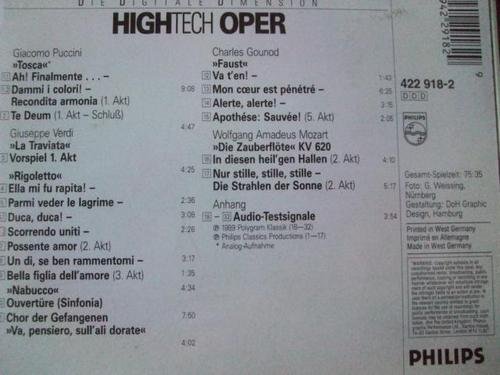
Image: Back cover of the "Oper" Audio CD. This image provides a comprehensive list of all tracks included on the disc, specifying composers such as Giacomo Puccini, Charles Gounod, and Giuseppe Verdi, along with the titles of the opera excerpts and their durations. It also shows the catalog number "422 918-2" and the Philips logo.
Maintenance
Proper care will extend the life of your Audio CD and ensure optimal sound quality:
- Handling: Always hold the CD by its outer edge or the center hole. Avoid touching the shiny playing surface.
- Cleaning: If the disc becomes dirty, gently wipe it with a soft, lint-free cloth in a straight line from the center to the outer edge. Do not wipe in a circular motion. Use a specialized CD cleaning solution if necessary, but avoid abrasive cleaners.
- Storage: Store the CD in its original jewel case when not in use. Keep it away from direct sunlight, high temperatures, and excessive humidity.
- Avoid Scratches: Do not place the CD on rough surfaces or expose it to sharp objects that could scratch the playing surface.
Troubleshooting
If you encounter issues with your "Oper" Audio CD, consider the following:
- Disc Not Playing:
- Ensure the disc is inserted correctly with the label side up.
- Check if the disc surface is clean and free of smudges or scratches. Clean if necessary.
- Verify that your CD player is functioning correctly with other discs.
- Skipping or Stuttering:
- Clean the disc surface as described in the Maintenance section.
- Check for visible scratches or damage on the playing surface.
- Ensure the CD player is on a stable surface to prevent vibrations.
- No Sound:
- Check the volume level on your CD player and connected audio system.
- Verify all audio cables are securely connected.
- Ensure the correct input source is selected on your amplifier or receiver.
Specifications
| Attribute | Value |
|---|---|
| Format | Audio CD |
| Number of Discs | 1 |
| ASIN | B000024H4W |
| Catalog Number | 422 918-2 |
| Package Dimensions | 5.59 x 4.96 x 0.39 inches |
| Item Weight | 4.23 ounces |
| Date First Available | November 16, 2010 |
Warranty and Support
This Audio CD is produced to high-quality standards. For issues related to manufacturing defects, please refer to the return policy of your retailer. As this is an audio recording, specific technical support beyond general playback issues is typically not provided by the manufacturer for individual discs.
For further assistance with your CD player or audio equipment, please consult the respective manuals for those devices or contact their manufacturers.
Ask a question about this manual
Ask about setup, troubleshooting, compatibility, parts, safety, or missing instructions. Manuals+ will review the question and use this page’s manual context to help answer it.