
Elektor International Media BV 9053812768
Elektor 2011: All Articles in Elektor Volume 2011 on DVD-ROM User Manual
Comprehensive Guide for Your Elektor 2011 DVD-ROM
Product Overview
The Elektor 2011 DVD-ROM is a digital compilation containing all articles published in Elektor magazine during the year 2011. This resource provides a convenient way to access a full year's worth of electronics projects, tutorials, and technical insights in a searchable format.
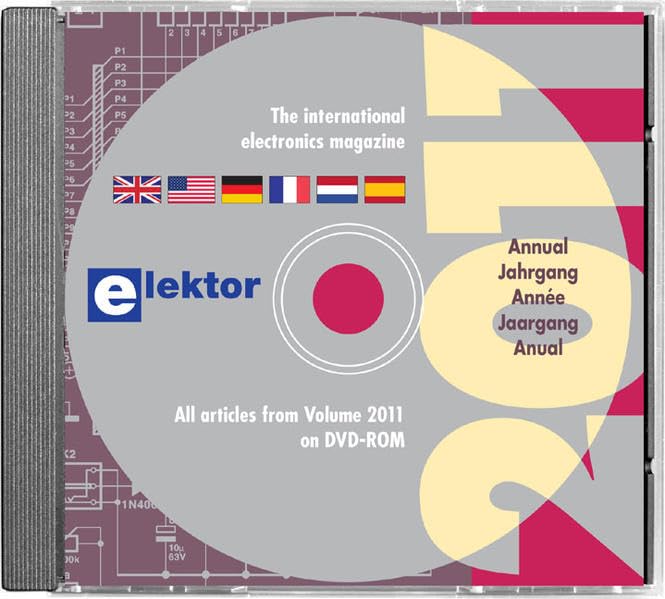
This image displays the Elektor 2011 DVD-ROM, housed within a standard jewel case. The disc itself is gray with the Elektor logo prominently featured. Text on the disc indicates it contains 'All articles from Volume 2011 on DVD-ROM' and identifies it as 'The international electronics magazine'. Flags representing the UK, USA, Germany, France, Netherlands, and Spain are visible, indicating multilingual content. The background of the disc label features abstract electronic circuit patterns.
Setup and Installation
To access the content on your Elektor 2011 DVD-ROM, follow these steps:
- Insert the DVD: Gently insert the Elektor 2011 DVD-ROM into your computer's DVD-ROM drive. Ensure the label side is facing up.
- AutoPlay (Windows): If AutoPlay is enabled, a dialog box may appear asking what you want to do. Select "Open folder to view files" or "Run setup.exe" if prompted.
- Manual Access: If AutoPlay does not initiate, open "My Computer" or "This PC" (Windows) or "Finder" (macOS), locate your DVD-ROM drive (often labeled with the disc title or a drive letter like D: or E:), and double-click on it.
- Launch Application: Look for an executable file (e.g., start.exe, index.html, or a similar application file) and double-click it to launch the Elektor 2011 interface.
- System Requirements: Ensure your computer meets the minimum system requirements for viewing PDF files and running the interactive interface (typically a modern web browser and PDF reader).
Operating Instructions
Once the Elektor 2011 interface is launched, you can navigate and utilize the content:
- Navigation: The interface typically provides a menu or navigation bar to browse articles by issue, topic, or author. Click on the desired category to explore.
- Searching: Utilize the built-in search function to find specific articles, keywords, or phrases across the entire 2011 volume. Enter your search query into the search bar and press Enter or click the search button.
- Viewing Articles: Articles are usually presented in PDF format. Clicking on an article title will open it in your default PDF viewer or an integrated viewer within the application.
- Printing: Most PDF viewers allow you to print articles. Refer to your PDF viewer's documentation for printing options.
- Copying Content: Text and images may be copied from the PDF files, subject to copyright restrictions.
Maintenance and Care
Proper care of your Elektor 2011 DVD-ROM will ensure its longevity and continued readability:
- Handling: Always hold the DVD by its edges or by inserting a finger through the center hole. Avoid touching the shiny data surface.
- Cleaning: If the disc becomes dirty or smudged, gently wipe it with a soft, lint-free cloth (e.g., a microfiber cloth) from the center outwards. Do not use abrasive materials or harsh chemicals.
- Storage: Store the DVD in its original jewel case or a protective sleeve when not in use. Keep it away from direct sunlight, extreme temperatures, and high humidity.
- Scratches: Avoid scratching the disc surface, as deep scratches can render the data unreadable.
Troubleshooting
If you encounter issues with your Elektor 2011 DVD-ROM, consider the following troubleshooting steps:
- Disc Not Reading:
- Ensure the disc is clean and free of smudges or scratches.
- Try inserting the disc into a different DVD-ROM drive or computer to rule out a drive issue.
- Restart your computer.
- Application Not Launching:
- Verify you are running the correct executable file (e.g., start.exe or index.html).
- Check if your operating system or antivirus software is blocking the application. Temporarily disable antivirus if necessary (at your own risk).
- Ensure your system has an up-to-date PDF reader installed.
- Content Not Displaying Correctly:
- Update your web browser or PDF reader to the latest version.
- Clear your browser's cache if the interface is web-based.
Specifications
| Feature | Detail |
|---|---|
| Publisher | Elektor International Media BV |
| Language | English (and other languages as indicated on disc) |
| ISBN-10 | 9053812768 |
| ISBN-13 | 978-9053812761 |
| Item Weight | 3.17 ounces |
| Dimensions | 4.88 x 0.16 x 4.88 inches |
| Format | Multimedia CD (DVD-ROM) |
Warranty and Support
This Elektor 2011 DVD-ROM is produced by Elektor International Media BV. For any issues related to manufacturing defects or content accessibility, please refer to the publisher's official website or contact their customer support channels.
Please note that technical support for your computer's operating system, DVD-ROM drive, or PDF reader software is typically provided by the respective manufacturers of those products.
For further information or updates, visit the official Elektor website: www.elektor.com
Ask a question about this manual
Ask about setup, troubleshooting, compatibility, parts, safety, or missing instructions. Manuals+ will review the question and use this page’s manual context to help answer it.