Introduction to LOGO! 8 Programming
This practical guide serves as a comprehensive introduction to the Siemens LOGO! 8 logic module, designed for students, engineers, and hobbyists. It provides detailed instructions and examples for implementing technical solutions in various applications, including home automation, installation technology, and small-scale industrial automation.
The book focuses on illustrating how to effectively plan LOGO! 8 projects, develop robust programs, and select appropriate hardware components. It demonstrates standard control technology scenarios by building upon the fundamentals of modern information technology and utilizing several real-life sample switches. Readers will find practice-oriented descriptions of both basic and specialized LOGO! 8 modules, enabling flexible implementation of specific tasks.
LOGO! 8, compared to its predecessors and competing products, features an integrated Ethernet interface, simplified Internet control capabilities, a space-saving design, and enhanced digital and analog output options. Its basic and special functions can replace multiple traditional switching devices. Equipped with an Ethernet interface and a Web server, LOGO! 8 devices offer extended functionalities for remote access via smartphones or other devices. The accompanying LOGO! Soft Comfort V8 software facilitates convenient programming and simulation of programs and communication functions for up to 16 network users.

Image 1: Front cover of the LOGO! 8 instruction book.
Getting Started with the Book
To maximize your learning experience with this guide, it is recommended to:
- Review Fundamentals: Begin by reading the introductory sections to understand the core concepts of LOGO! 8 and its capabilities.
- Follow Examples: Work through the provided real-life sample switches and programming examples. Hands-on application is crucial for comprehension.
- Utilize Software: If available, use the LOGO! Soft Comfort V8 software to simulate and test the programs discussed in the book.
- Understand Hardware: Pay attention to the descriptions of various basic and special LOGO! 8 modules to understand their functions and applications.
The book is structured to guide you from basic understanding to practical implementation, ensuring a solid foundation in LOGO! 8 programming.
Understanding and Applying LOGO! 8 Concepts
This section outlines how the book facilitates the application of LOGO! 8 principles:
- Project Planning: Learn methodologies for planning LOGO! 8 projects, including defining requirements and system architecture.
- Program Development: Detailed steps and examples guide you through developing programs using LOGO! Soft Comfort V8, covering both basic and advanced functions.
- Hardware Selection: Understand the criteria for selecting appropriate LOGO! 8 hardware, including modules for digital and analog inputs/outputs, and communication interfaces.
- Remote Access: Explore the functionalities for remote access via the integrated Ethernet interface and Web server, enabling control from smartphones or other devices.
The book emphasizes practical application, ensuring that readers can translate theoretical knowledge into functional LOGO! 8 solutions.
Continued Learning and Reference
This book is designed to be a valuable long-term reference for your LOGO! 8 endeavors. To maintain and expand your knowledge:
- Revisit Examples: Periodically review the sample programs and circuit solutions to reinforce your understanding and discover new applications.
- Explore Advanced Topics: Use the book as a foundation to delve into more complex LOGO! 8 functionalities and integration with other systems.
- Stay Updated: While this book covers LOGO! 8 comprehensively, technology evolves. Consider consulting official Siemens documentation for the latest updates and product enhancements.
The detailed descriptions of LOGO! 8 modules and software functions make this guide an essential tool for ongoing learning and problem-solving.
Addressing Programming Challenges
When encountering difficulties in LOGO! 8 programming or implementation, consider the following troubleshooting steps, referencing the book's content:
- Review Logic: Carefully re-examine your program logic against the examples provided in the book. Ensure all conditions and outputs are correctly defined.
- Check Wiring: For hardware implementations, verify all wiring connections according to the circuit solutions presented. Incorrect wiring is a common source of issues.
- Software Simulation: Utilize LOGO! Soft Comfort V8's simulation features to test your program step-by-step and identify where the logic deviates from expected behavior.
- Module Configuration: Confirm that all LOGO! 8 modules are correctly configured as described in the book, especially for special functions or communication settings.
- Error Messages: If the LOGO! Soft Comfort V8 software or the LOGO! 8 device displays error messages, consult the book for explanations related to common programming or hardware faults.
The book's practical examples are designed to help you diagnose and resolve typical programming and implementation challenges.
Specifications
| Attribute | Detail |
|---|---|
| Title | LOGO! 8: A Practical Introduction, with Circuit Solutions and Example Programs |
| Author | Stefan Kruse |
| Publisher | Publicis |
| Publication Date | October 24, 2016 |
| Edition | 1st |
| Language | English |
| Print Length | 157 pages |
| ISBN-10 | 3895784451 |
| ISBN-13 | 978-3895784453 |
| Item Weight | 7.4 ounces |
| Dimensions | 6.9 x 0.4 x 9.9 inches |
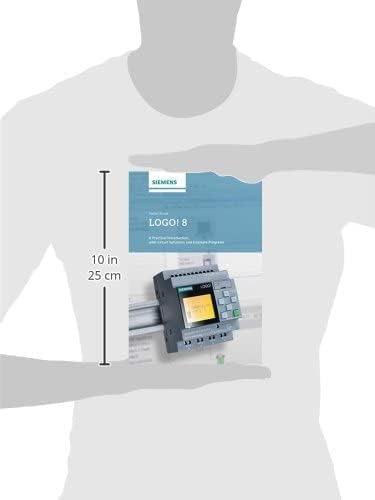
Image 2: Physical dimensions of the LOGO! 8 instruction book.
Information Regarding This Publication
This document pertains to an instructional book, LOGO! 8: A Practical Introduction, with Circuit Solutions and Example Programs. As an informational and educational publication, it does not come with a traditional product warranty for hardware or software. The content is provided for educational purposes to guide users in understanding and applying LOGO! 8 principles.
Any warranties related to the LOGO! 8 hardware or software itself would be provided by the manufacturer, Siemens, and not by this instructional book or its publisher.
Further Resources and Assistance
For additional support or information related to LOGO! 8, consider the following resources:
- Siemens Official Documentation: Refer to the official Siemens website and documentation for the latest specifications, software updates, and technical support for LOGO! 8 hardware and LOGO! Soft Comfort V8 software.
- Online Forums and Communities: Engage with online communities and forums dedicated to Siemens PLCs and automation for peer support and shared knowledge.
- Publisher Contact: For inquiries specifically about the content of this book, you may contact the publisher, Publicis. Contact details are typically found on the publisher's website or within the book itself.
No official product videos are available for this specific instructional book.