Introduction
Welcome to "Drones: The Complete Manual," your comprehensive guide to understanding, operating, and maintaining unmanned aerial vehicles (UAVs). This manual is designed for both beginners and experienced pilots, offering insights into drone technology, safe operation practices, and advanced applications. Whether you're interested in aerial photography, racing, or simply recreational flying, this guide provides the foundational knowledge you need to navigate the world of drones responsibly and effectively.
The information contained within this manual is based on general principles of drone operation and best practices. Always refer to the specific manufacturer's instructions for your particular drone model and adhere to all local aviation regulations.
Understanding Drone Components
Before operating a drone, it is crucial to familiarize yourself with its primary components and their functions. A typical drone consists of several key parts working in conjunction to enable flight and data capture.
- Frame: The structural body of the drone, housing all components.
- Motors: Provide the thrust necessary for lift and movement.
- Propellers: Blades that rotate to generate thrust.
- Flight Controller: The "brain" of the drone, processing inputs and stabilizing flight.
- Battery: Powers the drone's systems.
- Remote Controller (Transmitter): Used by the pilot to send commands to the drone.
- Camera/Gimbal: For capturing aerial footage (if equipped).
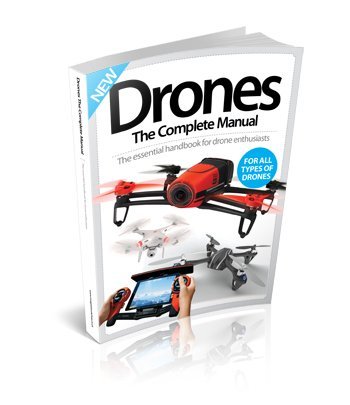
Image: The cover of "Drones: The Complete Manual," illustrating the diverse range of topics covered within the book, from recreational to professional drone applications.
Pre-Flight Checks and Safety Guidelines
Safety is paramount when operating drones. Adhering to a pre-flight checklist and understanding safety guidelines can prevent accidents and ensure a smooth flight experience.
Pre-Flight Checklist:
- Inspect propellers for damage (cracks, bends).
- Ensure battery is fully charged and securely installed.
- Check remote controller battery level.
- Verify GPS signal (if applicable) and compass calibration.
- Confirm sufficient clear space for takeoff and landing.
- Check weather conditions (wind, rain).
Safety Guidelines:
- Always maintain line of sight with your drone.
- Avoid flying over crowds or private property without permission.
- Respect no-fly zones (e.g., airports, government facilities).
- Be aware of local regulations and obtain necessary permits if required.
- Do not fly under the influence of alcohol or drugs.
Operating Your Drone: Basic Flight
Mastering basic flight controls is essential for safe and enjoyable drone operation. Most drones use a similar control scheme, often referred to as Mode 2.
Common Controls:
- Throttle (Left Stick Up/Down): Controls altitude.
- Yaw (Left Stick Left/Right): Rotates the drone horizontally.
- Pitch (Right Stick Up/Down): Tilts the drone forward/backward.
- Roll (Right Stick Left/Right): Tilts the drone left/right.
Practice these controls in an open, safe area until you are comfortable with each movement. Start with gentle inputs and gradually increase your confidence.
Advanced Applications: Photography & Filming
Drones have revolutionized aerial photography and videography, offering unique perspectives and dynamic shots. This section delves into techniques for capturing stunning visuals.
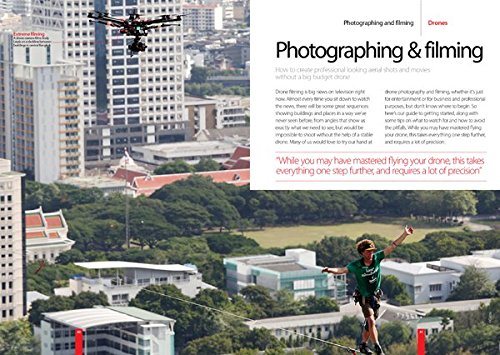
Image: An internal page from the manual, highlighting content related to aerial photography and filming, demonstrating the practical applications of drones in media production.
Key aspects include understanding camera settings (ISO, aperture, shutter speed), composition rules (rule of thirds, leading lines), and flight paths for smooth footage. Gimbals play a crucial role in stabilizing the camera, ensuring professional-looking results even during dynamic maneuvers.
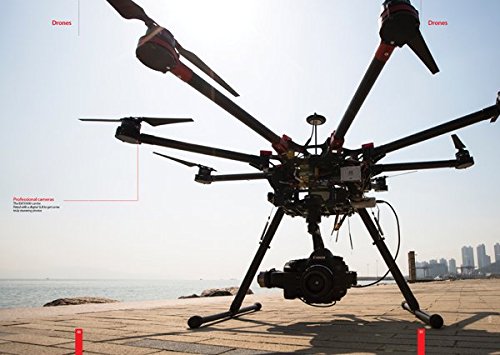
Image: A detailed view of a professional-grade drone equipped with an advanced camera system, illustrating the capabilities for high-quality aerial imaging discussed in the manual.
Post-production is equally important, involving editing software to enhance footage, add effects, and compile clips into a cohesive narrative. Experimentation and practice are key to developing your aerial cinematography skills.
Maintenance and Care
Regular maintenance extends the lifespan of your drone and ensures optimal performance. A well-maintained drone is a safer drone.
- Cleaning: Regularly wipe down the drone body and propellers to remove dust and debris.
- Propeller Inspection: Check for nicks, cracks, or bends before each flight. Replace damaged propellers immediately.
- Battery Care: Store batteries at recommended charge levels (usually 50-60% for LiPo batteries) when not in use for extended periods. Avoid overcharging or deep discharging.
- Motor Inspection: Listen for unusual noises during operation. Ensure motors spin freely and are free of obstructions.
- Firmware Updates: Keep your drone's firmware and remote controller software updated to benefit from performance improvements and bug fixes.
Troubleshooting Common Issues
Even with proper care, you may encounter issues. Here are some common problems and their potential solutions:
| Problem | Possible Cause | Solution |
|---|---|---|
| Drone not powering on | Dead battery, loose connection | Charge battery, check connections |
| Unstable flight | Damaged propeller, uncalibrated compass/IMU | Replace propellers, recalibrate sensors |
| Loss of signal | Interference, drone out of range | Fly in open areas, stay within range |
| Camera not recording | Full SD card, incorrect settings | Format/replace SD card, check camera settings |
For more complex issues, consult your drone's specific user manual or contact the manufacturer's support.
Specifications and Terminology
Understanding common drone specifications and terminology is vital for making informed decisions and communicating effectively within the drone community.
Key Specifications:
- Flight Time: Duration a drone can stay airborne on a single charge.
- Range: Maximum distance the drone can fly from the controller while maintaining signal.
- Camera Resolution: Quality of images/videos captured (e.g., 4K, 1080p).
- GPS: Global Positioning System for stable hovering and navigation.
- Weight: Important for portability and regulatory compliance.
Common Terminology:
- FPV
- First Person View; flying the drone using a live video feed from its camera.
- Gimbal
- A pivoted support that allows rotation of an object (like a camera) about a single axis, used for stabilization.
- LiPo Battery
- Lithium Polymer battery; a common type of rechargeable battery used in drones.
- Waypoint Navigation
- Pre-programming a flight path for the drone to follow autonomously.
Further Resources and Support
For additional information, regulatory updates, or specific product support, consider the following resources:
- Manufacturer Websites: Visit the official website of your drone's manufacturer for model-specific manuals, FAQs, and firmware downloads.
- Aviation Authorities: Consult your national aviation authority (e.g., FAA in the US, CAA in the UK) for the latest drone regulations and licensing requirements.
- Online Forums and Communities: Engage with other drone enthusiasts for tips, troubleshooting advice, and shared experiences.
- Specialized Training Courses: Consider enrolling in certified drone pilot training programs for advanced skills and certifications.
This manual serves as a general guide. Always prioritize safety and compliance with local laws when operating drones.