
مقدمة
This manual provides comprehensive instructions for the installation, operation, and maintenance of your Uniter 4K Dual Lens Solar Security Camera. Please read this manual carefully before using the product to ensure proper functionality and safety.
المنتج انتهىview
The Uniter 4K Dual Lens Solar Security Camera is an advanced outdoor surveillance solution featuring dual lenses for comprehensive coverage, solar power for continuous operation, and smart detection capabilities.
المميزات الرئيسية:
- نظام العدسة المزدوجة: Includes a panoramic camera for fixed monitoring and a tracking camera with 355° horizontal and 90° vertical rotation.
- فيديو عالي الدقة 4K: Delivers ultra-clear images and videos.
- رؤية ليلية ملونة: Built-in CMOS sensor and IR light for clear color images up to 33 feet, even in low light.
- تعمل بالطاقة الشمسية: Equipped with a solar panel for 365 days of uninterrupted power, eliminating the need for frequent charging.
- اتصال واي فاي بتردد 2.4 جيجاهرتز: Supports wireless connection to your home network (2.4GHz only).
- صوت ثنائي الاتجاه: Built-in microphone and speaker for communication with visitors or deterring intruders.
- كشف الحركة PIR: High-sensitivity sensor triggers alerts, recording, siren, and spotlight upon detecting motion.
- IP66 مقاوم للماء: مصمم لتحمل مختلف الظروف الجوية، بما في ذلك المطر والثلج.
- خيارات التخزين: Supports local storage via Micro SD card (up to 128GB, not included) and optional cloud storage.
محتويات الحزمة:
- هيكل كاميرا واحد
- 1x لوحة للطاقة الشمسية
- 1x USB Cable (9.8ft)
- 1x تصاعد قوس

Image: The Uniter 4K Dual Lens Solar Security Camera, showcasing its main components including the camera body and solar panel.
دليل الإعداد
Follow these steps to set up your Uniter 4K Dual Lens Solar Security Camera.
1. شحن الكاميرا
Before initial use, ensure the camera's internal battery is sufficiently charged. Connect the camera to the solar panel and place the solar panel in direct sunlight. Alternatively, you can use the provided USB cable to charge the camera via a standard USB power adapter (not included).

Image: The Uniter solar security camera connected to its solar panel, illustrating solar charging in a sunny outdoor environment.
2. تثبيت التطبيق وإنشاء الحساب
تنزيل Yuicam app from your smartphone's app store (iOS or Android). Follow the on-screen instructions to create an account and log in.
3. الاتصال بشبكة Wi-Fi
- Open the Yuicam app and tap to add a new device.
- Follow the in-app prompts to connect the camera to your 2.4GHz Wi-Fi network. Note: This camera only supports 2.4GHz Wi-Fi. 5GHz networks are not supported.
- Ensure the camera is within range of your Wi-Fi router during the setup process.
4. تركيب الكاميرا
Select a suitable outdoor location for mounting. The camera should be positioned to provide optimal surveillance coverage, and the solar panel should receive maximum direct sunlight. Use the provided mounting bracket and hardware to securely attach the camera and solar panel to a wall or other stable surface.
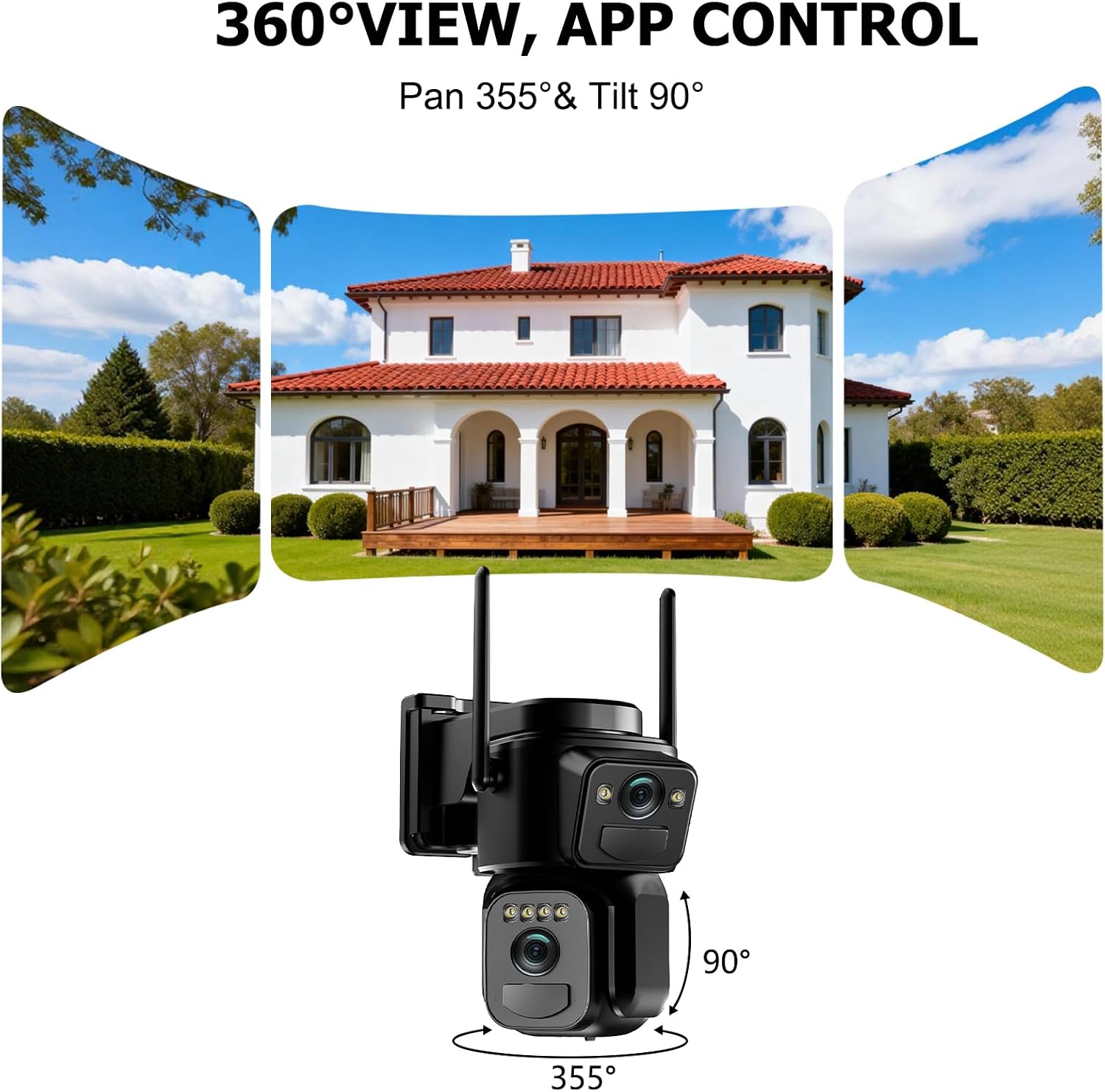
Image: The Uniter security camera mounted on an exterior wall, demonstrating its 360-degree pan and tilt capabilities for wide area monitoring.
تعليمات التشغيل
Once your camera is set up, use the Yuicam app to access and control its features.
1. حي View والتحكم في الدوران/الإمالة
Open the Yuicam app and select your camera to view the live feed. Use the on-screen controls to pan (355° horizontal) and tilt (90° vertical) the tracking camera to adjust its viewing angle. The panoramic camera provides a fixed, wider view.
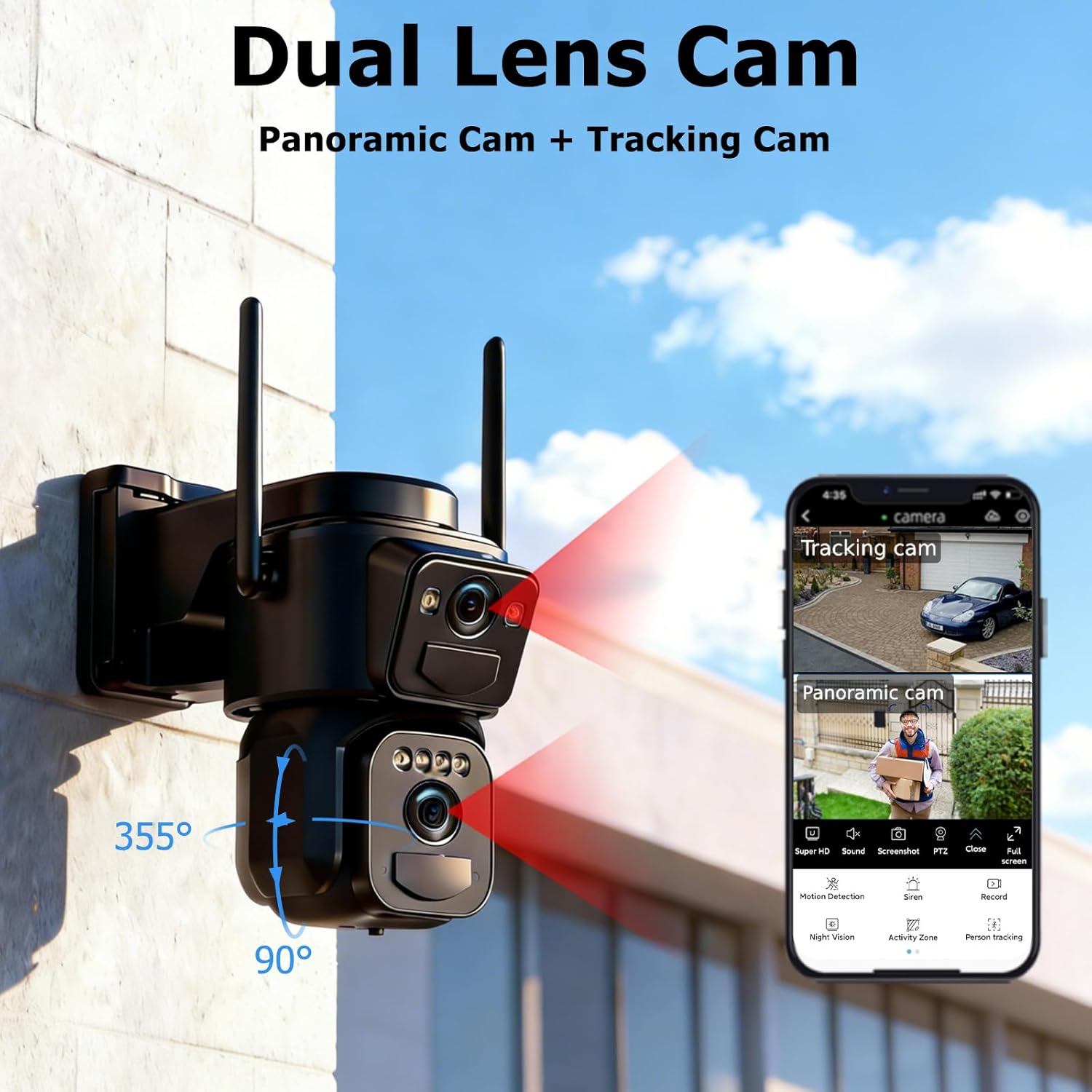
Image: A close-up of the dual-lens camera and a smartphone screen displaying the Yuicam app interface with both panoramic and tracking camera views.
2. الصوت ثنائي الاتجاه
To use the two-way audio feature, tap the microphone icon in the app. You can speak through your phone, and your voice will be broadcast through the camera's speaker. Similarly, you can hear audio from the camera's vicinity through your phone.
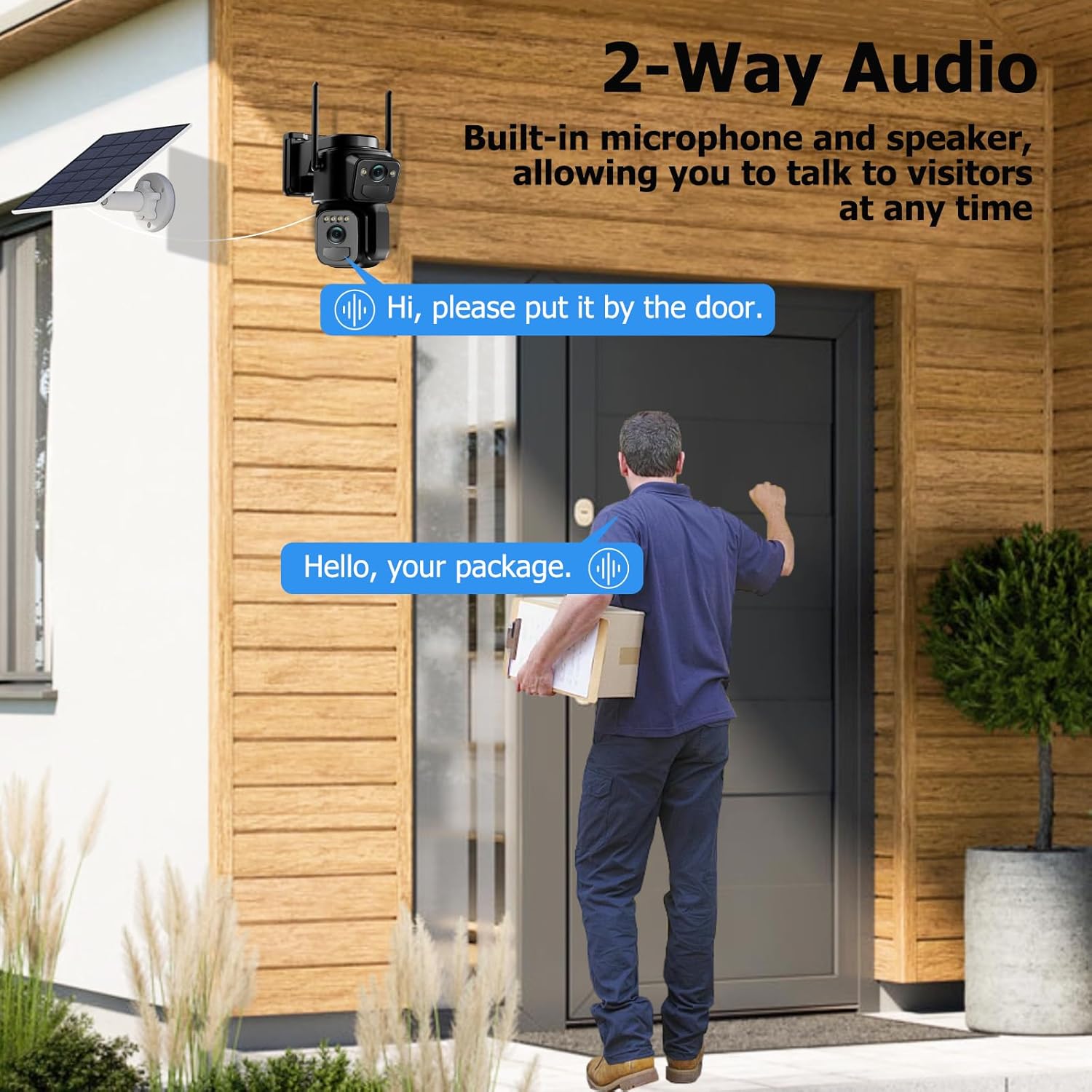
Image: A delivery person at a door, with a speech bubble indicating communication via the camera's two-way audio feature.
3. أوضاع الرؤية الليلية
The camera automatically switches between infrared and color night vision modes based on ambient light conditions. You can also manually select your preferred night vision mode within the app settings.
4. كشف الحركة والتنبيهات
The camera's PIR motion sensor detects movement and can trigger various actions:
- إشعارات التطبيق الفورية: استقبل تنبيهات فورية على هاتفك الذكي.
- صفارة إنذار: A loud siren can be activated to deter intruders.
- التركيز على: The built-in spotlight illuminates the area upon detection.
- تسجيل الفيديو: The camera will automatically record a 5-30 second video clip of the event.
You can customize motion detection sensitivity and alert settings in the Yuicam app.

Image: An illustration of the camera's motion detection features, showing a detected intruder, an app notification, and icons for siren and spotlight.
5. إدارة التخزين
Recorded videos can be stored in two ways:
- بطاقة مايكرو التنمية المستدامة: أدخل بطاقة Micro SD (حتى 128 جيجابايت، غير مرفقة) في الفتحة المخصصة على الكاميرا للتخزين المحلي.
- التخزين السحابي: An optional cloud storage service (3-day cycle) is available for secure backup of your recordings. Refer to the Yuicam app for subscription details.
6. المشاركة بين عدة مستخدمين
You can share access to your camera's live feed and recordings with family members or trusted individuals through the Yuicam app. This allows multiple users to monitor the property simultaneously.
صيانة
تضمن الصيانة الدورية الأداء الأمثل وطول عمر كاميرا المراقبة الخاصة بك.
1. تنظيف الألواح الشمسية
Periodically clean the surface of the solar panel to remove dust, dirt, or debris that may obstruct sunlight and reduce charging efficiency. Use a soft, damp قطعة قماش للتنظيف.
2. إدارة البطارية
While the solar panel provides continuous power, extreme weather conditions or prolonged periods of low sunlight may affect battery levels. Monitor the battery status in the Yuicam app. If the battery level is consistently low, consider temporarily repositioning the solar panel for better sun exposure or manually charging the camera via USB.
3. مقاومة الطقس
The camera has an IP66 waterproof rating, making it resistant to rain, snow, and dust. However, avoid submerging the camera in water or exposing it to high-pressure water jets.

Image: The Uniter security camera shown operating effectively in rainy, hot, and snowy conditions, highlighting its IP66 waterproof and weather-resistant design.
استكشاف الأخطاء وإصلاحها
If you encounter issues with your Uniter 4K Dual Lens Solar Security Camera, refer to the following common solutions.
| مشكلة | السبب المحتمل | حل |
|---|---|---|
| الكاميرا غير متصلة بشبكة Wi-Fi | كلمة مرور الواي فاي غير صحيحة؛ شبكة واي فاي بتردد 5 جيجاهرتز؛ الكاميرا بعيدة جدًا عن جهاز التوجيه. | Ensure correct 2.4GHz Wi-Fi password. Verify your router is broadcasting a 2.4GHz signal. Move the camera closer to the router. |
| جودة الفيديو رديئة | إشارة واي فاي ضعيفة؛ عدسة متسخة. | Improve Wi-Fi signal strength. Clean the camera lenses with a soft cloth. |
| كشف الحركة لا يعمل | Incorrect sensitivity settings; obstructions in detection zone. | Adjust PIR sensitivity in the Yuicam app. Ensure no objects are blocking the sensor's view. |
| البطارية لا تشحن | Solar panel not receiving enough sunlight; faulty connection. | Relocate the solar panel to an area with direct sunlight. Check cable connections between the camera and solar panel. |
| No audio from two-way communication | Microphone/speaker muted in app; low volume on phone. | Check app settings to ensure audio is enabled. Adjust volume on your smartphone. |
Important Note: This camera is designed for mobile phone connection only. It does not support desktop computers, tablets, NVRs, or DVRs.
تحديد
Detailed technical specifications for the Uniter 4K Dual Lens Solar Security Camera.
| ميزة | التفاصيل |
|---|---|
| اسم الموديل | Dual Lens Solar Security Camera |
| ماركة | موحد |
| تكنولوجيا الاتصال | واي فاي 2.4 جيجا هرتز فقط |
| المميزات الخاصة | Dual Lens, Color Night Vision, Motion Detection, Spotlight Siren, 2-Way Audio, IP66 Waterproof |
| الاستخدام الداخلي والخارجي | في الهواء الطلق |
| الأجهزة المتوافقة | الهاتف الذكي |
| مصدر الطاقة | تعمل بالطاقة الشمسية |
| نوع وحدة التحكم | Yuicam App |
| نوع التركيب | حامل الحائط |
| لون | أسود |
| مستوى مقاومة الماء | IP66 مقاوم للماء |
| دقة ثابتة فعالة | 8 ميجا بكسل |
| دقة التقاط الفيديو | 4K |
| Viewزاوية جي | 360 درجة (دوران أفقي 355 درجة، دوران رأسي 90 درجة) |
| تقريب رقمي | 8x |
| تقنية مستشعر الصور | سيموس |
| أبعاد العنصر | 10.2 × 7.6 × 10.2 سنتيمترًا |
| واتtage | 3 واط |
| نطاق الرؤية الليلية | 33 أقدام |
| الحد الأقصى لحجم ذاكرة الفلاش المدعومة | 128 جيجابايت (Micro SD) |
الضمان والدعم
The Uniter 4K Dual Lens Solar Security Camera comes with a ضمان الشركة المصنعة لمدة سنة واحدة.
For technical support or warranty claims, please contact Uniter customer service. Refer to the product packaging or the Yuicam app for specific contact information.