
1. المقدمة
This manual provides essential information for setting up, operating, and maintaining your HP OmniDesk Slim Desktop PC, Model S03-0006. This desktop PC is designed for daily tasks, offering an Intel Core i3-14100 processor, ample memory, and various connectivity options for productivity and entertainment.
2. محتويات العبوة
تأكد من وجود جميع العناصر في العبوة:
- HP S03-000 OmniDesk Slim Desktop PC
- مزود الطاقة
- USB Black Wired Keyboard (if included with specific bundle)
- USB Wired Mouse (if included with specific bundle)
ملحوظة: قد يتم بيع الملحقات الإضافية بشكل منفصل.
3. انتهى المنتجview
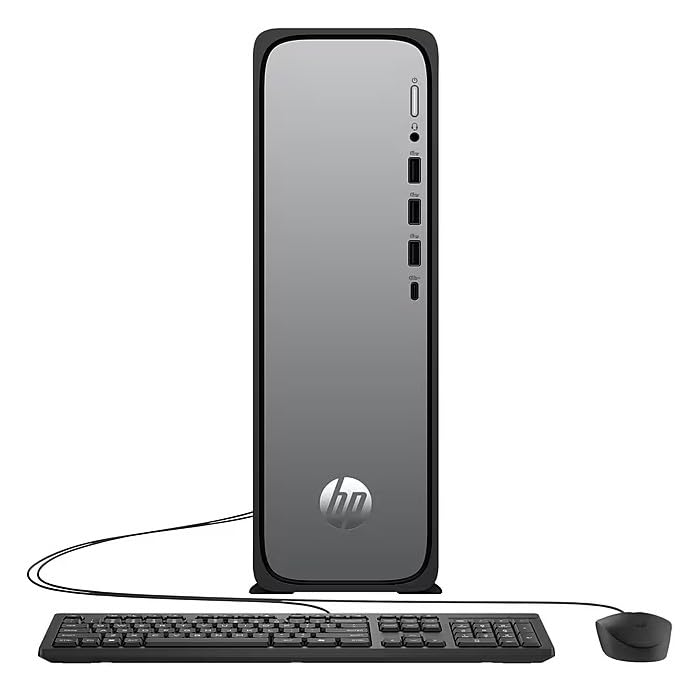
The HP OmniDesk Slim Desktop PC features a compact design with essential components for efficient computing.

الشكل 3.1: HP OmniDesk Slim Desktop PC showcasinجي إس سليم بروfile, Intel Core i3-14100 processor, 8GB DDR5 RAM, 256GB SSD, Intel UHD Graphics 710, Wi-Fi 6, Bluetooth 5.4, Windows 11, and dual display support.
3.1. المنافذ والموصلات
Familiarize yourself with the various ports on your desktop PC for connecting peripherals and displays.
الشكل 3.2: Front and rear port layout of the HP OmniDesk Slim Desktop PC. Front ports include a headphone/microphone combo jack, USB Type-A 5Gbps ports, and a USB Type-C 10Gbps port. Additional ports (typically rear) include 4 USB 2.0 Type-A, 1 RJ-45 (Ethernet), 1 HDMI Out, and 1 DisplayPort 1.4.
- المنافذ الأمامية:
- التحرير والسرد سماعة الرأس / الميكروفون
- USB Type-A 5Gbps signaling rate (3 ports)
- USB Type-C 10Gbps signaling rate (1 port)
- المنافذ الخلفية:
- USB 2.0 Type-A (4 ports)
- RJ-45 (إيثرنت)
- HDMI 1.4b (1 port)
- DisplayPort 1.4a (1 port)
4. دليل الإعداد
Follow these steps to set up your HP OmniDesk Slim Desktop PC:
- توصيل الشاشة: Connect your monitor to the PC using an HDMI or DisplayPort cable. Ensure the cable is securely plugged into both the PC and the monitor.
- توصيل الأجهزة الطرفية: Plug in your USB keyboard and mouse into the available USB ports on the PC.
- توصيل الطاقة: Connect the power supply cable to the PC's power input, then plug the other end into a wall outlet or surge protector.
- تشغيل الطاقة: Press the power button on the front of the PC. The system will boot up, and you will see the Windows 11 setup screen.
- الإعداد الأولي لنظام التشغيل Windows: اتبع التعليمات التي تظهر على الشاشة لإكمال إعداد نظام التشغيل Windows 11، بما في ذلك اللغة والمنطقة واتصال الشبكة وإنشاء حساب المستخدم.
5. تعليمات التشغيل
5.1. التشغيل الأساسي
- تشغيل/إيقاف التشغيل: Press the power button to turn on the PC. To shut down, click the Start button, then Power > Shut down.
- إعادة تشغيل: انقر فوق زر البدء، ثم الطاقة > إعادة التشغيل.
- وضع السكون: انقر فوق زر البدء، ثم الطاقة > السكون.
5.2. الاتصال بشبكة
Your PC supports both wired (Ethernet) and wireless (Wi-Fi) network connections.
- الاتصال السلكي: Connect an Ethernet cable from your router or modem to the RJ-45 port on the back of the PC.
- الاتصال اللاسلكي (واي فاي 6):
- انقر على أيقونة الواي فاي في شريط المهام.
- حدد شبكة Wi-Fi المطلوبة من القائمة.
- أدخل مفتاح أمان الشبكة (كلمة المرور) إذا طُلب منك ذلك، ثم انقر فوق يتصل.
5.3. Dual Display Support
To extend your desktop to a second monitor:
- Connect the second monitor to an available video output port (HDMI or DisplayPort) on your PC.
- انقر بزر الماوس الأيمن على سطح المكتب وحدد إعدادات العرض.
- Under "Multiple displays," select how you want the displays to behave (e.g., Extend these displays, Duplicate these displays).
6. الصيانة
- تحديثات البرامج: تحقق بانتظام من تحديثات Windows وثبّتها لضمان استقرار النظام وأمانه. انتقل إلى الإعدادات > تحديث Windows.
- تحديثات برنامج التشغيل: Keep your device drivers updated. HP Support Assistant (MyHP) can help manage these updates.
- تنظيف: Use a soft, dry cloth to clean the exterior of the PC. Avoid liquid cleaners directly on components. Ensure ventilation openings are clear of dust.
- النسخ الاحتياطي للبيانات: النسخ الاحتياطي بانتظام مهم fileقم بنقل بياناتك إلى محرك أقراص خارجي أو تخزين سحابي لمنع فقدان البيانات.
7. استكشاف الأخطاء وإصلاحها
| مشكلة | الحل المحتمل |
|---|---|
| لا يتم تشغيل الكمبيوتر. |
|
| لا يوجد عرض على الشاشة. |
|
| لا يوجد اتصال بالإنترنت. |
|
| Peripherals (keyboard/mouse) not working. |
|
8. المواصفات
| اسم الموديل | HP OmniDesk Desktop HP S03-000 PC |
| رقم الموديل | OmniDesk Slim S03-0006 |
| المعالج | Intel Core i3-14100 (3.5 GHz, 6 MB Cache) |
| الرسومات | Intel UHD Graphics 710 (متكامل) |
| كبش | 8 GB DDR5 (4800 MT/s), Max 64 GB |
| تخزين | 256 جيجابايت SSD (محرك الحالة الصلبة) |
| نظام التشغيل | ويندوز 11 هوم |
| الاتصال | Realtek Wi-Fi 6 (2x2), Bluetooth 5.4, Gigabit Ethernet (RJ-45) |
| الموانئ |
|
| الأبعاد (الارتفاع × العرض × العمق) | 11.61 × 3.94 × 11.97 بوصة |
| وزن | 8.38 رطل |
| الشهادات | ENERGY STAR certified, EPEAT Gold with Climate+ |
9. الضمان والدعم
9.1. معلومات الضمان
This HP OmniDesk Slim Desktop PC comes with a ضمان محدود لمدة 90 يومًايرجى الرجوع إلى وثائق الضمان المرفقة مع المنتج للاطلاع على الشروط والأحكام المحددة.
9.2. الدعم الفني
للحصول على المساعدة الفنية أو تنزيلات برامج التشغيل أو مزيد من المعلومات، يرجى زيارة موقع دعم HP الرسمي website. You can also utilize the pre-installed MyHP application for device customization, optimization, and access to helpful messages and settings.
Always provide your product model number (S03-0006) and serial number when contacting support.