
مقدمة
This manual provides essential information for setting up, operating, maintaining, and troubleshooting your Apple iPhone 17. This device is a renewed, unlocked US Version with 256GB storage and eSIM capability. Please read these instructions carefully to ensure optimal performance and longevity of your device.
انتهى الجهازview
The Apple iPhone 17 features a sleek design and powerful capabilities. Below are images highlighting key aspects of the device.
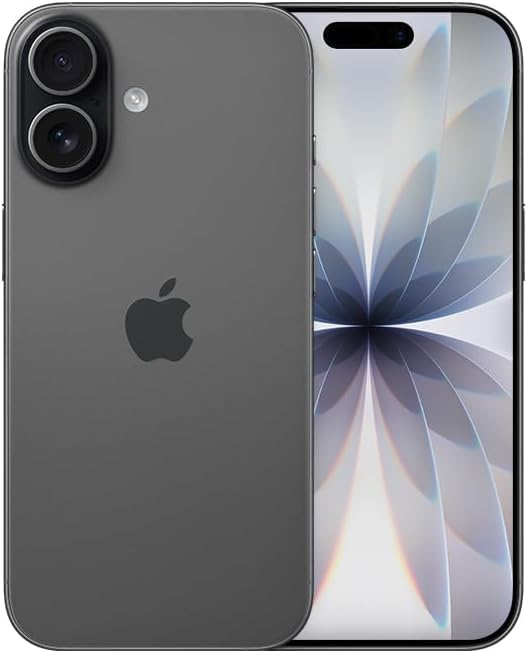
الصورة: الجبهة view of the Apple iPhone 17 in Black. This image displays the device's screen and overall form factor.

Image: Close-up of the dual camera system on the rear of the Apple iPhone 17. This highlights the camera lenses and flash module.

الصورة: الجانب المحترفfile of the Apple iPhone 17, showing the power button and volume controls. This view emphasizes the device's slim design.
يثبت
Follow these steps to set up your renewed Apple iPhone 17:
- التوافق مع الناقل: This phone is unlocked and compatible with GSM and CDMA networks (e.g., AT&T, T-Mobile, Sprint, Verizon, US Cellular, Cricket, Metro, Tracfone, Mint Mobile). Before proceeding, verify compatibility with your chosen carrier.
- تفعيل الشريحة الإلكترونية (eSIM): The iPhone 17 uses an eSIM. Your carrier will provide instructions for activating the eSIM. Often, this involves scanning a QR code. Important: Do not discard any QR stickers provided with your device, as they may be essential for eSIM activation.
- تشغيل الطاقة: Press and hold the power button on the side of the device until the Apple logo appears.
- الإعداد الأولي: Follow the on-screen prompts to select your language, region, connect to a Wi-Fi network, and transfer data from a previous device if applicable.
- مُكَمِّلات: The device includes a generic (Mfi certified) charger and charging cable. Headphones and a physical SIM card are not included.
تشغيل جهاز iPhone 17 الخاص بك
Your iPhone 17 runs on iOS 18, offering a user-friendly interface and a wide range of features.
الملاحة الأساسية
- الشاشة الرئيسية: Swipe up from the bottom of the screen to return to the Home Screen.
- محوّل التطبيقات: Swipe up from the bottom and pause in the middle of the screen to view افتح التطبيقات.
- مركز التحكم: اسحب لأسفل من الزاوية العلوية اليمنى للوصول إلى الإعدادات السريعة.
- إشعارات: Swipe down from the top-center to view إشعارات.
مميزات الكاميرا
The iPhone 17 is equipped with a powerful camera system:
- الكاميرا الخلفية: 48 MP sensor with LED flash and 10x digital zoom for high-quality photos and videos.
- الكاميرا الأمامية: Single front-facing camera for selfies and video calls.
- التقاط الفيديو: Supports 1080p and 4k video recording.
العرض والاتصال
- عرض: 6.3-inch OLED display with 2622 x 1206 resolution and a 120Hz refresh rate, providing vibrant visuals and smooth scrolling.
- الاتصال: Supports 5G cellular technology, Bluetooth, NFC, USB Type C, and Wi-Fi for seamless communication and data transfer.
Security and Additional Features
- الأمن البيومتري: Face Recognition for secure unlocking and authentication.
- الميزات الإضافية: Includes Always On Display, Built-In GPS, Dual SIM capability (via eSIM), and Wireless Charging.
مقاطع فيديو مفيدة
Video: A comparison between the iPhone 17 and another phone model, highlighting design and features. This video is provided by Ersbit.
فيديو: رد صادقview of the Apple iPhone 17, discussing its performance and user experience. This video is provided by Dimitri.
فيديو: تقرير مفصلview of the Apple iPhone 17, covering various aspects of the device. This video is provided by Bonfashion.
فيديو: مقطع قصير يوضحasing the Lavender color variant of the iPhone 17. This video is provided by Veronika.
Video: Demonstrating the Apple iPhone 17 in daily use scenarios. This video is provided by Ericka Garcia Garcia.
Video: A design comparison between the iPhone 17 Pro and the standard iPhone 17. This video is provided by Ersbit.
فيديو: أكثر منview of the iPhone Air and iPhone 17's overall design. This video is provided by Ersbit.
صيانة
Proper maintenance ensures the longevity and performance of your iPhone 17.
- صحة البطارية: Your renewed iPhone 17 is guaranteed to have a minimum battery capacity of 80%. To preserve battery life, avoid extreme temperatures and excessive charging cycles.
- تنظيف: استخدم قطعة قماش ناعمة وخالية من الوبر لتنظيف الشاشة والسطح الخارجي. تجنب استخدام المواد الكاشطة أو المواد الكيميائية القاسية.
- تحديثات البرامج: Regularly update your iOS to the latest version to benefit from security patches, new features, and performance improvements.
- ادارة التخزين: إعادة بشكل دوريview وحذف غير الضروري files, apps, and media to optimize storage and performance.
استكشاف الأخطاء وإصلاحها
If you encounter issues with your iPhone 17, consider the following common solutions:
- مشاكل الاتصال بالشبكة: If you experience problems with calls, texts, or data, first ensure your eSIM is properly activated with your carrier. Some carriers may have specific requirements or known compatibility issues. Contact your carrier's support for assistance.
- الجهاز لا يستجيب: Perform a force restart. The exact steps may vary slightly by iOS version, but typically involve pressing and quickly releasing the Volume Up button, then the Volume Down button, then pressing and holding the Side button until the Apple logo appears.
- استنزاف البطارية: Check battery usage in Settings to identify apps consuming significant power. Adjust settings like screen brightness, background app refresh, and location services to optimize battery life.
- مشاكل التطبيق: If an app is not functioning correctly, try closing and reopening it. If the issue persists, delete and reinstall the app, or check for app updates in the App Store.
- مواطن الخلل في البرنامج: Ensure your device is running the latest iOS version. If problems persist, consider backing up your data and performing a factory reset.
تحديد
Detailed technical specifications for the Apple iPhone 17 (256GB, Unlocked, Renewed):
| ميزة | مواصفة |
|---|---|
| ماركة | تفاحة |
| اسم الموديل | آيفون 17 |
| نظام التشغيل | اي او اس 18 |
| سعة تخزين الذاكرة | 256 جيجا بايت |
| حجم ذاكرة الوصول العشوائي المثبتة | 8 جيجا بايت |
| نموذج وحدة المعالجة المركزية | سلسلة A |
| سرعة وحدة المعالجة المركزية | 3.7 جيجاهرتز |
| حجم الشاشة | 6.3 بوصة |
| نوع العرض | شاشة OLED |
| دقة | 2622 × 1206 بكسل |
| معدل التحديث | 120 هرتز |
| Display Pixel Density | 460 Pixels Per Inch (PPI) |
| مزود خدمة الاتصالات اللاسلكية | مفتوح |
| تكنولوجيا الخلوية | 5G |
| تكنولوجيا الاتصال | بلوتوث، تقنية الاتصال قريب المدى (NFC)، منفذ USB، واي فاي |
| عدد فتحات بطاقة SIM | E Sim |
| نوع الموصل | يو اس بي نوع سي |
| Rear Facing Camera Photo Sensor Resolution | 48 ميجا بكسل |
| Number of Rear Facing Cameras | 1 |
| Number of Front Cameras | 1 |
| فلاش الكاميرا | قاد |
| تقريب رقمي | 10.0 |
| دقة التقاط الفيديو | 1080p, 4k |
| سعة البطارية | 3600 مليamp ساعات |
| وصف البطارية | ليثيوم أيون |
| Biometric Security Feature | التعرف على الوجه |
| مميزات اضافية | Always On Display, Built-In GPS, Dual SIM, Factory Unlocked, Wireless Charging |
| مستوى مقاومة الماء | غير مقاوم للماء |
| وزن العنصر | 14.88 أونصات |
| أبعاد العنصر | 6 × 4 × 2 بوصة |
| سنة الموديل | 2025 |
| رمز المنتج الموحد | 756613503987 |
الضمان والدعم
Your renewed Apple iPhone 17 is covered by a 90-Day Amazon Renewed Guarantee. This warranty ensures that your device is in excellent working condition and provides options for replacement or refund if issues arise within the warranty period.
For further assistance, please refer to the following:
- دعم أمازون المتجدد: Visit the Amazon Renewed Store for information regarding your purchase and warranty claims.
- دعم أبل: For general iOS and device functionality questions, visit the official Apple Support webموقع.
- دعم شركات الاتصالات: Contact your mobile carrier for any network-related issues, eSIM activation, or service plan inquiries.