
1. المقدمة
Thank you for choosing the DazzlingStage 60W 9LED RGBW Stage Wall Wash Bar Light. This manual provides essential information for the safe and effective operation of your lighting fixture. Please read it thoroughly before installation and use, and retain it for future reference.
هذهtage light bar features 9 high-power RGBW LEDs, offering a wide spectrum of colors and dynamic lighting effects suitable for various events and venues.

الصورة 1.1: انتهىview of the DazzlingStage 60W 9LED RGBW Stage Wall Wash Bar Lights in various colors.
2. تعليمات السلامة
- السلامة الكهربائية: تأكد من حجم امدادات الطاقةtage matches the specifications of the fixture. Always disconnect power before cleaning, servicing, or moving the unit.
- تثبيت: Install the fixture in a well-ventilated area, away from heat sources. Ensure secure mounting to prevent accidental falls.
- عملية: Do not look directly into the light source when the fixture is operating, as it can cause eye damage. Avoid operating the unit in wet or damp شروط.
- صيانة: يُرجى إحالة جميع أعمال الصيانة إلى فنيين مؤهلين. لا تحاول إصلاح الجهاز بنفسك.
- أطفال: احتفظ بالجهاز بعيدًا عن متناول الأطفال.
3. محتويات العبوة
عند فتح العبوة، يرجى التأكد من أن جميع العناصر المدرجة أدناه موجودة وفي حالة جيدة:
- DazzlingStage 60W 9LED RGBW Stage Wall Wash Bar Light (x1 per pack)
- Power Cord (x1 per pack)
- Remote Control (x1 per pack)
- Mounting Bracket (x1 per pack)
- Knobs (x2 per pack)
- Black Gaskets (x2 per pack)
- Instruction Manual (x1 per pack)

الصورة 3.1: المحتويات المضمنة في عبوة المنتج.
4. مكونات المنتج
تعرّف على المكونات الرئيسية لشريط الإضاءة:
- LED Array: 9 RGBW LEDs for color mixing.
- لوحة التحكم: Features a 4-digit LED display and control buttons (MENU, UP, DOWN, ENTER) for mode selection and parameter adjustment.
- DMX IN/OUT Ports: For connecting to a DMX controller or linking multiple units.
- مدخل/مخرج الطاقة: For power connection and daisy-chaining power to other units.
- شريحة متزايدة: Adjustable bracket for floor standing or truss mounting.
- تقليل الحرارة: Integrated cooling system to maintain optimal operating temperature.

Image 4.1: Key components and dimensions of the light bar.
5. الإعداد والتثبيت
The DazzlingStage Wall Wash Bar Light offers flexible installation options:
5.1 تركيب الحامل
Attach the included mounting bracket to the light bar using the provided knobs and gaskets. Ensure the bracket is securely fastened.
5.2 خيارات التنسيب
- الوقوف على الأرض: The bracket allows the light bar to stand upright on a flat surface. Adjust the angle as needed.
- تركيب العوارض: استخدم clamps (not included) to attach the bracket to a lighting truss. Ensure the truss and clamps can support the weight of the fixture.
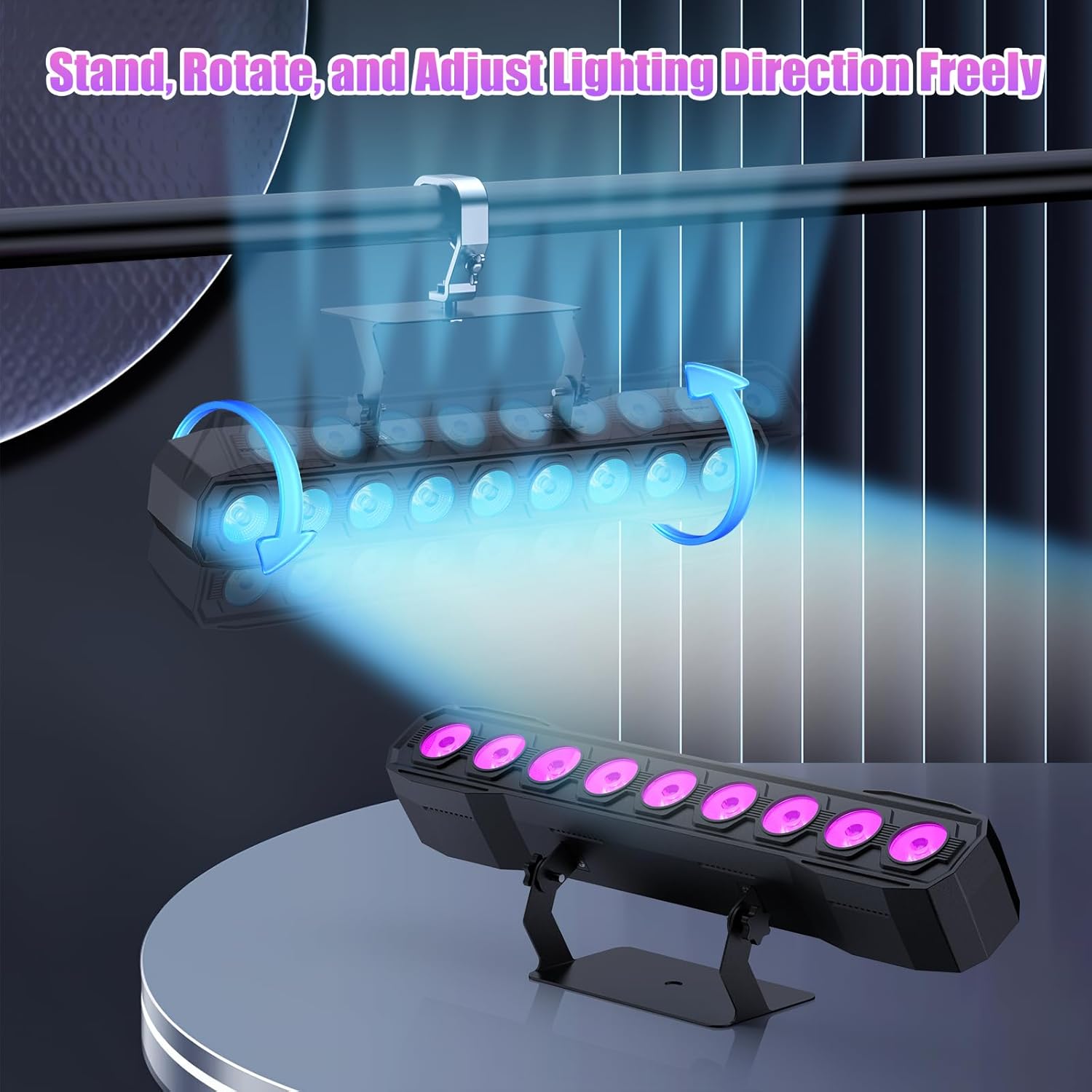
Image 5.1: Illustration of mounting and angle adjustment options.
5.3 توصيل الطاقة
Connect the power cord to the Power IN port on the back of the fixture and then to a suitable power outlet. Multiple units can be daisy-chained using the Power OUT port to simplify wiring for larger setups.
6. أوضاع التشغيل
The DazzlingStage Wall Wash Bar Light supports several control modes:
- التحكم DMX512: For professional control via a DMX console.
- نظام آلي: Pre-programmed lighting sequences.
- Sound-Activated Control: Lights react to ambient sound.
- جهاز التحكم عن بعد: Convenient wireless control using the included remote.
- وضع السيد والعبد: Link multiple units where one acts as a master and others as slaves, synchronizing effects.
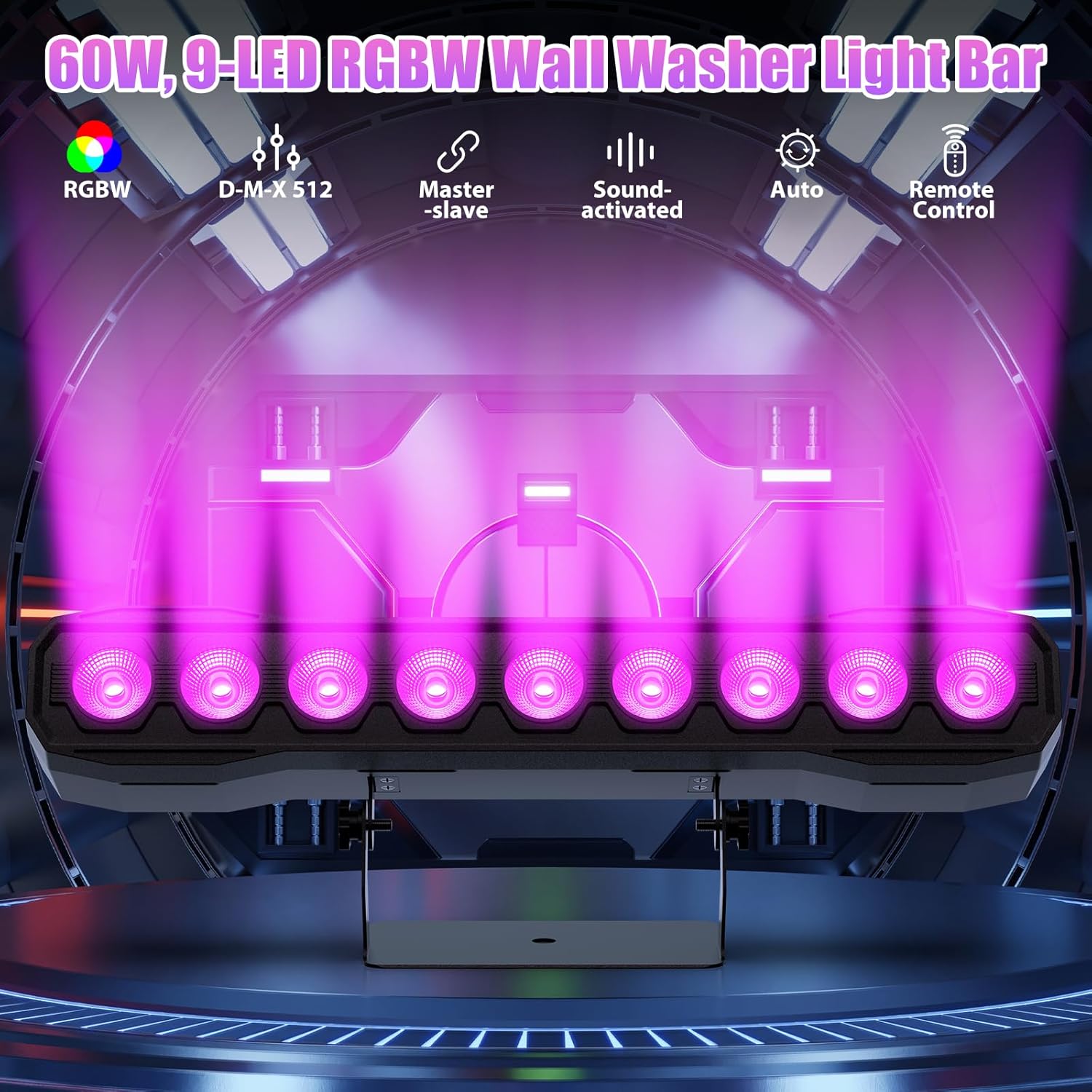
الصورة 6.1: انتهىview of available control modes.
6.1 Display Panel Operation
Use the buttons on the back of the fixture to navigate the menu and select modes:
- MENU: يتنقل من خلال خيارات القائمة الرئيسية.
- فوق تحت: Adjusts values or navigates sub-menus.
- أدخل: يؤكد الاختيار.
6.2 تأثيرات الإضاءة
The fixture supports various dynamic effects:
- خلط الألوان: Over 16.7 million color combinations with 0-100% linear dimming.
- ستروب: تأثير الوميض.
- القفز: تغييرات فورية في اللون.
- تتلاشى: انتقالات سلسة بين الألوان.
- نبض: Gradual changing effects.
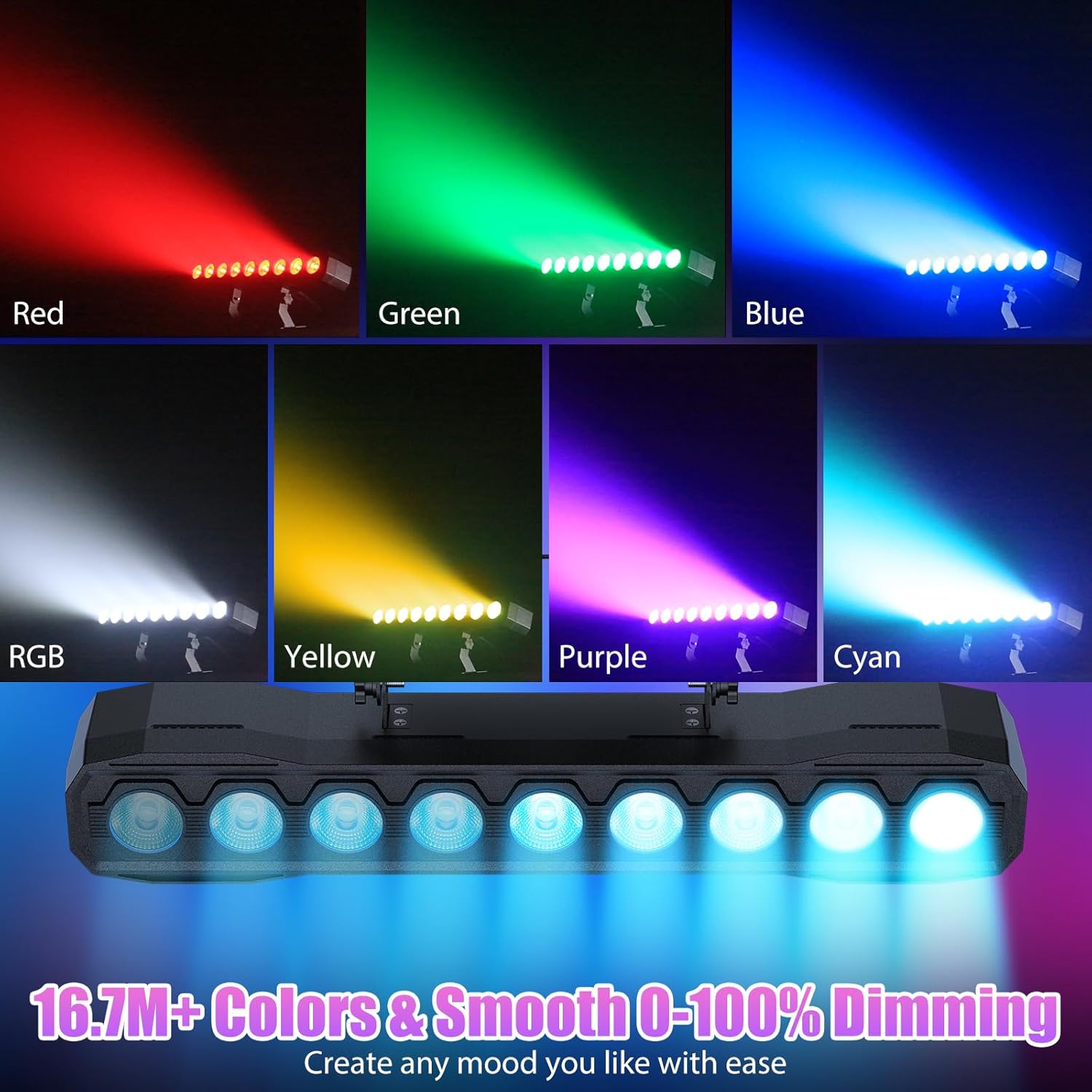
الصورة 6.2: مثالamples of color mixing and dimming capabilities.

Image 6.3: Visual representation of Strobe, Jump, Fade, and Pulse effects.
7. وظائف التحكم عن بعد
يوفر جهاز التحكم عن بعد المرفق وصولاً سهلاً إلى وظائف متنوعة:
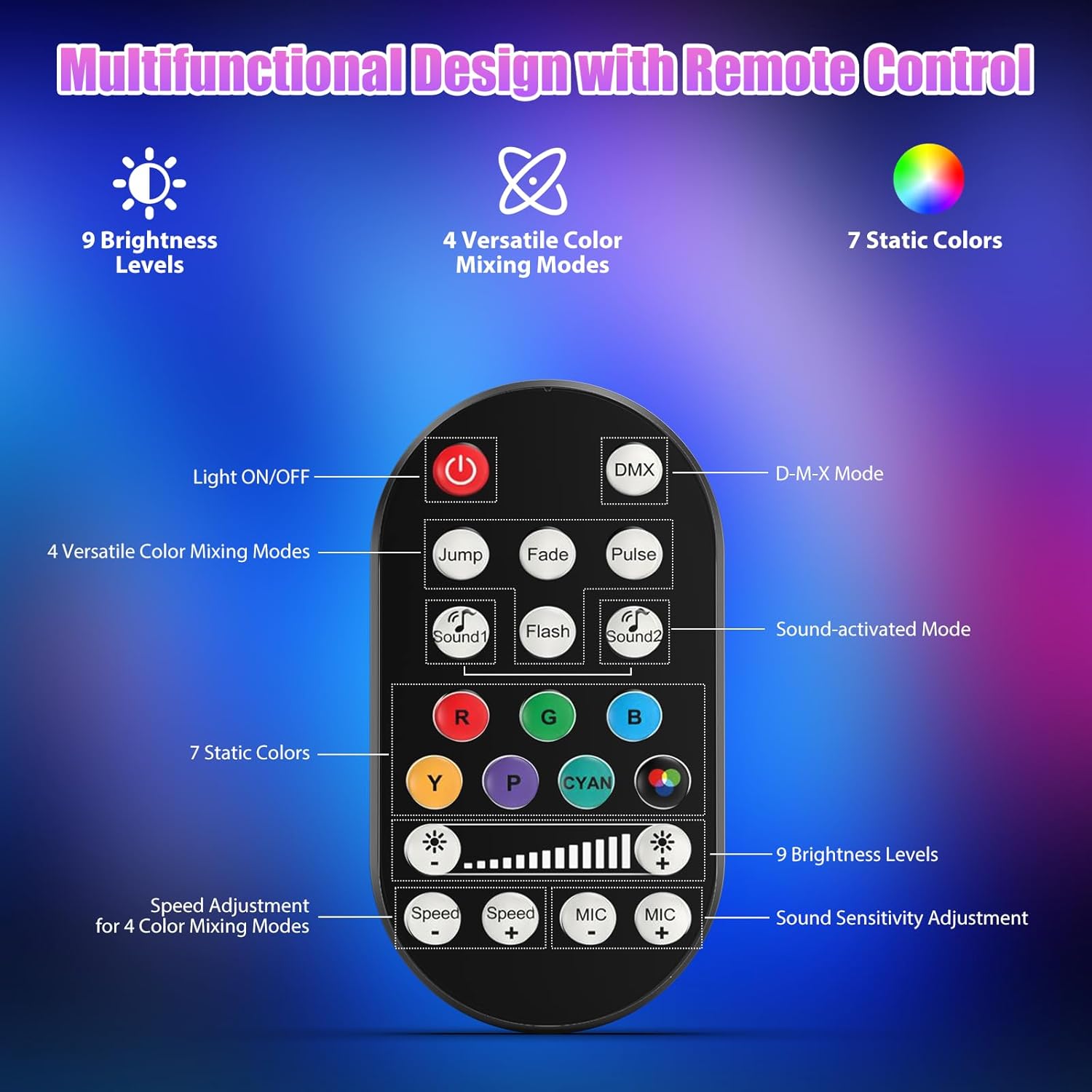
الصورة 7.1: تصميم ووظائف جهاز التحكم عن بعد.
- تشغيل / إيقاف الضوء: يقوم بتشغيل الوحدة أو إيقاف تشغيلها.
- دمكس: يقوم بتفعيل وضع التحكم DMX.
- Jump, Fade, Pulse, Flash: Selects different color mixing modes.
- Sound1, Sound2: Activates sound-activated modes with different sensitivities.
- R, G, B, Y, P, Cyan, White: Selects static colors.
- مستويات السطوع: Adjusts the overall intensity of the light (9 levels).
- السرعة +/-: Adjusts the speed of dynamic effects.
- MIC +/-: Adjusts the sound sensitivity for sound-activated modes (15 levels).
8. التحكم عبر DMX512
For advanced control, connect the fixture to a DMX512 controller. The light bar typically uses 4 or 8 DMX channels. Refer to the display panel for DMX address setting and channel assignments.
8.1 DMX Address Setting
Use the MENU, UP, DOWN, and ENTER buttons on the fixture's display panel to set the DMX starting address. The display will show 'AXXX' where XXX is the address (e.g., A001).
8.2 DMX Channel Functions (Example - 8 Channel Mode)
| قناة | وظيفة | نطاق القيمة | وصف |
|---|---|---|---|
| CH1 | سيد الخافت | 0-255 | السطوع الإجمالي (0% إلى 100%) |
| CH2 | كثافة حمراء | 0-255 | Red LED brightness (0% to 100%) |
| CH3 | كثافة خضراء | 0-255 | Green LED brightness (0% to 100%) |
| CH4 | كثافة اللون الأزرق | 0-255 | Blue LED brightness (0% to 100%) |
| CH5 | كثافة الأبيض | 0-255 | White LED brightness (0% to 100%) |
| CH6 | Strobe/Effect | 0-255 | 0-10: No function; 11-255: Strobe speed (slow to fast) |
| CH7 | برنامج السيارات | 0-255 | Selects and controls speed of built-in auto programs |
| CH8 | صوت نشط | 0-255 | Activates sound mode and adjusts sensitivity |
الجدول 8.1: على سبيل المثالample DMX Channel Functions (may vary slightly by firmware version).
9. الصيانة
تضمن الصيانة الدورية الأداء الأمثل وتطيل عمر جهازك.
- تنظيف: Periodically clean the lens and housing with a soft, lint-free cloth. Do not use abrasive cleaners or solvents. Ensure the fixture is powered off and cool before cleaning.
- تقتيش: Regularly check power cables, DMX cables, and mounting hardware for any signs of wear or damage. Replace damaged components immediately.
- تخزين: When not in use for extended periods, store the fixture in a dry, dust-free environment.
10. استكشاف الأخطاء وإصلاحها
إذا واجهت أي مشكلات، راجع المشكلات والحلول الشائعة التالية:
| مشكلة | السبب المحتمل | حل |
|---|---|---|
| لا يوجد طاقة | Power cable disconnected; No power from outlet; Blown fuse | Check power cable connection; Test outlet with another device; Replace fuse if necessary |
| لا يوجد خرج ضوء | Dimmer channel at 0%; Incorrect mode selected; DMX signal issue | Increase dimmer level; Select desired operating mode; Check DMX cable and address settings |
| Incorrect colors/effects | Incorrect DMX channel values; Remote control interference | Verify DMX channel settings; Ensure remote is pointed directly at the sensor; Check for other IR interference |
| وضع التنشيط الصوتي لا يعمل | Microphone sensitivity too low; No sound input | Increase MIC sensitivity via remote or display; Ensure sufficient sound is present near the fixture |
| ارتفاع درجة حرارة التركيبات | Poor ventilation; Blocked heat sink | Ensure adequate airflow around the unit; Clean any dust or debris from the heat sink fins |
11. المواصفات
| ميزة | التفاصيل |
|---|---|
| ماركة | DazzlingStage |
| رقم الموديل | زد كيو 06190 |
| مصدر الضوء | 9 × 60 واط RGBW المصابيح |
| خلط الألوان | RGBW 4-in-1, 16.7 million colors |
| تعتيم | تعتيم إلكتروني خطي من 0 إلى 100% |
| زاوية الشعاع | زاوية واسعة 35 درجة |
| أوضاع التحكم | DMX512, Auto, Sound-Activated, Remote Control, Master-Slave |
| قنوات دي ام اكس | 4 or 8 Channels (selectable) |
| عرض | شاشة LED 4 أرقام |
| مادة | أكريلونيتريل بوتادين ستايرين (ABS) |
| أبعاد المنتج | 18.1 × 5.5 × 5.1 بوصة (46 × 14 × 13 سم) |
| وزن العنصر | حوالي 1.98 رطل (0.9 كجم) |
| مدخلات الطاقة | تيار متردد 100-240 فولت، 50/60 هرتز |
| الشركة المصنعة | شنتشن Zhuoqiong التكنولوجيا المحدودة |
12. الضمان والدعم
DazzlingStage products are designed for reliability and performance. For warranty information, please refer to the terms and conditions provided at the time of purchase or contact your retailer.
If you require technical assistance or have questions not covered in this manual, please contact DazzlingStage customer support through the retailer's platform or the official brand website. Please have your model number (ZQ06190) and purchase details ready when contacting support.