
1. المقدمة
This manual provides essential information for setting up, operating, maintaining, and troubleshooting your HP Chromebook 14a-ne1013dx. This device is designed for productivity and entertainment, featuring a reliable Intel Celeron N4500 processor, a 14-inch HD display, and the Chrome OS operating system.
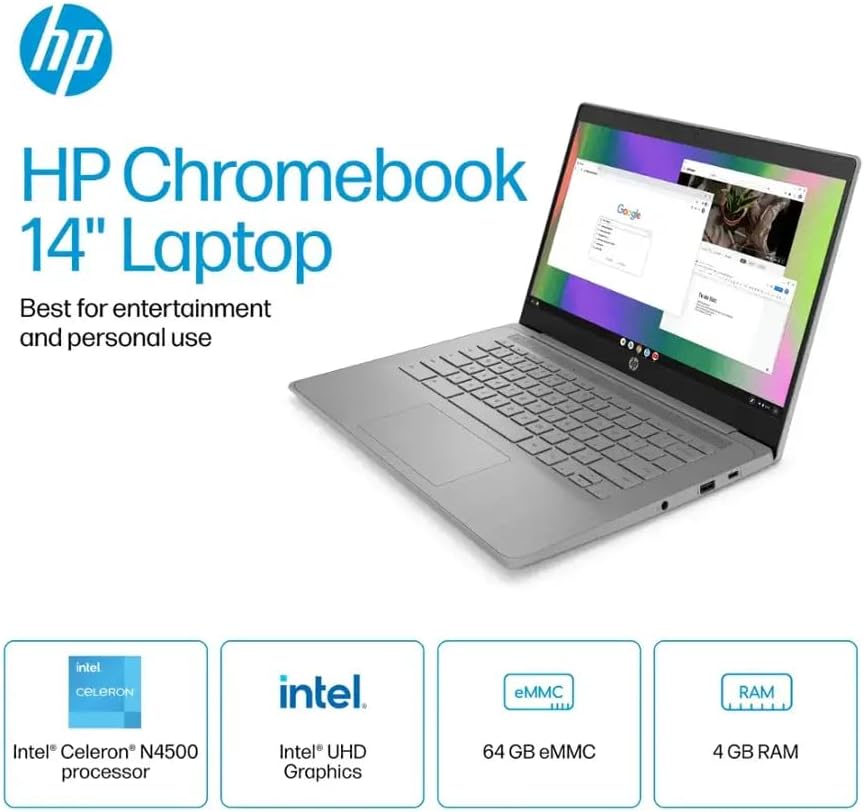
الشكل 1.1: HP Chromebook 14a-ne1013dx overview, highlighting its core components: Intel Celeron N4500 processor, Intel UHD Graphics, 64GB eMMC storage, and 4GB RAM.
2. الإعداد
2.1 فك العبوة والفحص الأولي
أزل جميع المكونات من العبوة بعناية. تأكد من وجود جميع العناصر المذكورة أدناه وسلامتها.

الشكل 2.1: Items included in the box: HP Chromebook 14-inch Laptop, 45W USB Type-C power adapter, and setup instructions.
ماذا يوجد في الصندوق:
- HP Chromebook 14-inch Laptop (Model: 14a-ne1013dx)
- 45W USB Type-C Power Adapter
- تعليمات الإعداد
- مدمج Webكاميرا
2.2 التشغيل والتكوين الأولي
- Connect the 45W USB Type-C power adapter to the Chromebook and a power outlet.
- Open the laptop lid. The Chromebook should power on automatically. If not, press the power button located on the keyboard.
- Follow the on-screen prompts to select your language, connect to a Wi-Fi network, and sign in with your Google account. A Google account is required to use Chrome OS.
3. تشغيل جهاز Chromebook
3.1 Chrome OS Basics
Your HP Chromebook runs on Chrome OS, a lightweight operating system designed for speed, simplicity, and security. It integrates seamlessly with Google services and provides access to a wide range of web-based applications and Android apps.

الشكل 3.1: Chrome OS security features, including built-in virus protection and automatic updates, ensuring a secure and efficient user experience.
3.2 العرض والوسائط المتعددة
The 14-inch HD (1366 x 768) micro-edge, anti-glare display provides clear visuals for work and entertainment. Dual speakers enhance the audio experience.

الشكل 3.2: The 14-inch micro-edge display is ideal for streaming and multimedia consumption, allowing multiple applications to be viewإد في وقت واحد.
3.3 المنافذ والاتصال
Your Chromebook is equipped with various ports for connecting peripherals and external displays.

الشكل 3.3: Port layout of the HP Chromebook 14a-ne1013dx, including HDMI 1.4b, USB Type-A, USB Type-C, and a headphone/microphone combo jack.
- 1x SuperSpeed USB 3.1 Type-C: لنقل البيانات، وتوصيل الطاقة، وإخراج العرض.
- 2x SuperSpeed USB 3.0 Type-A: لتوصيل أجهزة USB مثل الفئران ولوحات المفاتيح وأجهزة التخزين الخارجية.
- 1x HDMI 1.4: للاتصال بالشاشات الخارجية أو أجهزة التلفاز.
- 1x Headphone/microphone combo: لإدخال وإخراج الصوت.
Wireless connectivity includes Wi-Fi (802.11a/b/g/n/ac) and Bluetooth for connecting to wireless networks and accessories.
4. الصيانة
4.1 Cleaning Your Chromebook
- شاشة: استخدم قطعة قماش ناعمة وخالية من الوبر برفق دampنظف الشاشة بالماء أو بمنظف مخصص للشاشات الإلكترونية. لا ترش المنظف مباشرة على الشاشة.
- لوحة المفاتيح والهيكل: استخدم قطعة قماش ناعمة وجافة. بالنسبة للأوساخ العنيدة، امسحها برفق.amp يمكن استخدام القماش. تجنب استخدام المواد الكيميائية القاسية أو المواد الكاشطة.
- الموانئ: Ensure ports are free of dust and debris. Use compressed air if necessary, holding the can upright to prevent liquid propellant from spraying.
4.2 العناية بالبطارية
- لزيادة عمر البطارية إلى أقصى حد، تجنب درجات الحرارة القصوى.
- يوصى بتفريغ البطارية من حين لآخر إلى أقل من 20% ثم إعادة شحنها بالكامل.
- The Chromebook supports HP Fast Charge for quick recharging.
5. استكشاف الأخطاء وإصلاحها
5.1 المشكلات والحلول الشائعة
| مشكلة | الحل المحتمل |
|---|---|
| جهاز Chromebook لا يعمل. | Ensure the power adapter is securely connected to both the Chromebook and a working power outlet. Try a different outlet. If the battery is completely drained, it may take a few minutes to show signs of charging. |
| لا يمكن الاتصال بشبكة Wi-Fi. | Check if Wi-Fi is enabled in Chrome OS settings. Restart your router and modem. Verify the Wi-Fi password. Try connecting to a different network if available. |
| External display not detected. | Ensure the HDMI cable is securely connected to both the Chromebook and the external display. Check the input source on your external display. Try a different HDMI cable or port if available. |
| الأداء بطيء. | Close unnecessary browser tabs and applications. Clear browser cache and cookies. Ensure Chrome OS is up to date. Consider a powerwash (factory reset) as a last resort, backing up your data first. |
| Webالكاميرا لا تعمل. | Ensure no physical cover is obstructing the webcam. Check privacy settings in Chrome OS to ensure applications have permission to access the camera. Restart the Chromebook. |
6. المواصفات
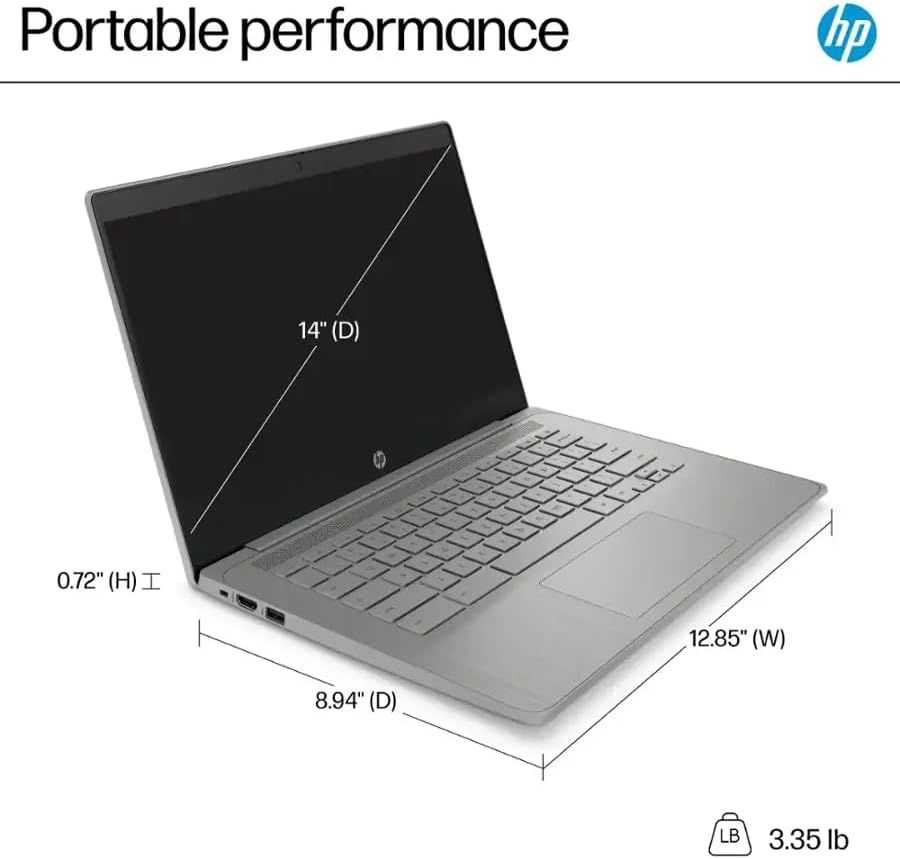
الشكل 6.1: Physical dimensions and weight of the HP Chromebook 14a-ne1013dx.
| ميزة | التفاصيل |
|---|---|
| اسم الموديل | 14a-ne1013dx |
| المعالج | Intel Celeron N4500 (1.1 GHz, up to 2.8 GHz burst) |
| الرسومات | رسومات Intel UHD (متكاملة) |
| عرض | 14-inch diagonal, HD (1366 x 768), micro-edge, anti-glare, 250 nits, 60Hz LCD |
| كبش | ذاكرة عشوائية 4 جيجا بايت DDR4 SDRAM |
| تخزين | 64 جيجابايت من ذاكرة إي إم إم سي |
| نظام التشغيل | نظام التشغيل كروم |
| الاتصال اللاسلكي | واي فاي 802.11a/b/g/n/ac، بلوتوث |
| الموانئ | 1x SuperSpeed USB 3.1 Type-C, 2x SuperSpeed USB 3.0 Type-A, 1x HDMI 1.4, 1x Headphone/microphone combo |
| الوسائط المدمجة | Webكاميرا |
| الأبعاد (الطول × العرض × الارتفاع) | 12.85 بوصة × 8.94 بوصة × 0.72 بوصة (32.64 سم × 22.71 سم × 1.83 سم) |
| وزن | 3.35 رطل (1.52 كجم) |
| لون | رمادي |
| المميزات الخاصة | Chrome OS, HP Fast Charge |
7. معلومات الضمان
Your HP Chromebook 14a-ne1013dx comes with a ضمان محدود لمدة سنة واحدة. Please refer to the warranty documentation included with your product for full terms and conditions. Keep your proof of purchase for warranty claims.
8. الدعم
للحصول على المساعدة الفنية أو تنزيلات برامج التشغيل أو مزيد من المعلومات حول المنتج، يرجى زيارة موقع دعم HP الرسمي website. You can typically find support resources by searching for your model number (14a-ne1013dx) on the HP support portal.
دعم HP Webموقع: www.hp.com/support


