
1. المقدمة
The EARU Automatic Voltage Protector (Model EARU-1005) is an advanced electrical safety device designed to protect your valuable home and office appliances from damaging power fluctuations. This device offers comprehensive protection against over-voltagه ، تحت المجلدtage, and overcurrent conditions, ensuring the longevity and safe operation of your electrical equipment. It features adjustable thresholds and an auto-reconnect function for convenience and continuous protection.
2. الميزات الرئيسية
- All-in-One Protection: Safeguards appliances from power surges, over-voltage (above 275V), under-voltage (below 175V), and adjustable overcurrent (1A-63A).
- تعديل الدقة: Customizable cut-off thresholds for over-voltage (200V-275V) and under-voltage (175V-200V) to suit specific grid conditions and appliance needs.
- وظيفة إعادة الضبط التلقائي: Automatically restores power within 60-300 seconds once grid voltage stabilizes within the set safe range, eliminating manual intervention.
- موصلية فائقة: Constructed with 100% pure copper conductors for minimal resistance, efficient operation, and enhanced long-term reliability under heavy 63A loads.
- تركيب سكة DIN: Designed for easy and secure integration into standard 2-Pole, 36mm width DIN Rail electrical panels.
- السلامة الشاملة: Provides robust protection for an entire household against unpredictable voltagه التقلبات والارتفاعات.
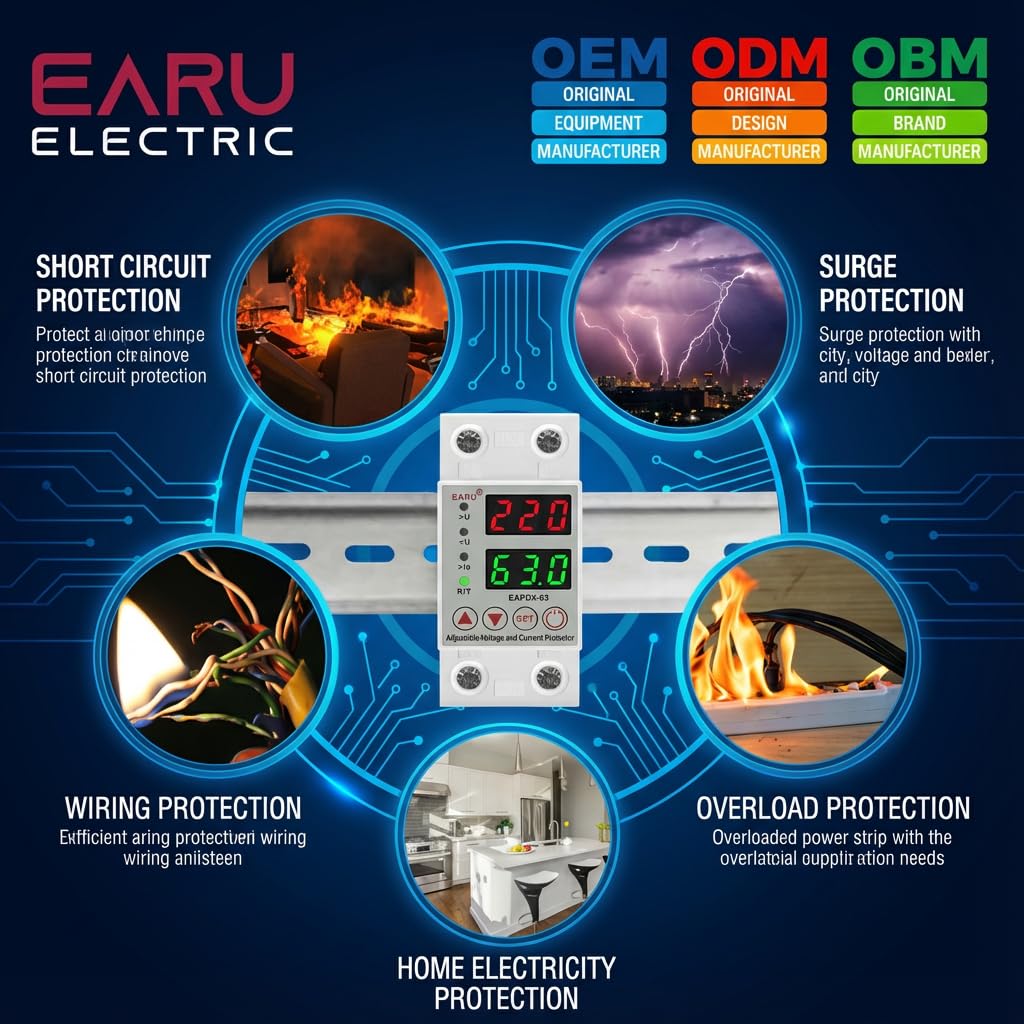
الصورة 2.1: انتهىview of the protection capabilities of the EARU Automatic Voltagهـ الحامي.
3. معلومات السلامة
Please read and understand all safety instructions before installing or operating the device. Failure to do so may result in electric shock, fire, or serious injury.
- يجب أن يتم إجراء التثبيت بواسطة كهربائي مؤهل فقط وفقًا للقوانين واللوائح الكهربائية المحلية.
- Ensure the main power supply is disconnected before any installation or maintenance work.
- لا تقم بتشغيل الجهاز إذا بدا تالفًا أو تعرض للرطوبة.
- Verify correct wiring connections (Line and Neutral) to prevent malfunction or damage.
- الجهاز مصمم للاستخدام الداخلي فقط.
- لا تتجاوز الحد الأقصى للتيار وهو 63 أمبير.
4. انتهى المنتجview
4.1. المكونات والشاشة
The EARU Automatic Voltage Protector features a clear digital display and intuitive control buttons for easy monitoring and adjustment.
- المجلدtagالعرض الإلكتروني: Shows the current line voltage.
- العرض الحالي: Shows the current load in Ampايريس.
- أضواء المؤشر:
>U: الإفراط في المجلدtagالمؤشر الإلكتروني.<U: تحت المجلدtagالمؤشر الإلكتروني.>Ie: Overcurrent indicator.R/T: Reset/Time indicator.
- أزرار التحكم:
- Up Arrow (▲) / Down Arrow (▼): تُستخدم لضبط قيم المعلمات.
- زر SET: Press and hold for 3 seconds to enter setting mode.
- زر التشغيل / الإيقاف: Toggles power to the protected circuit.
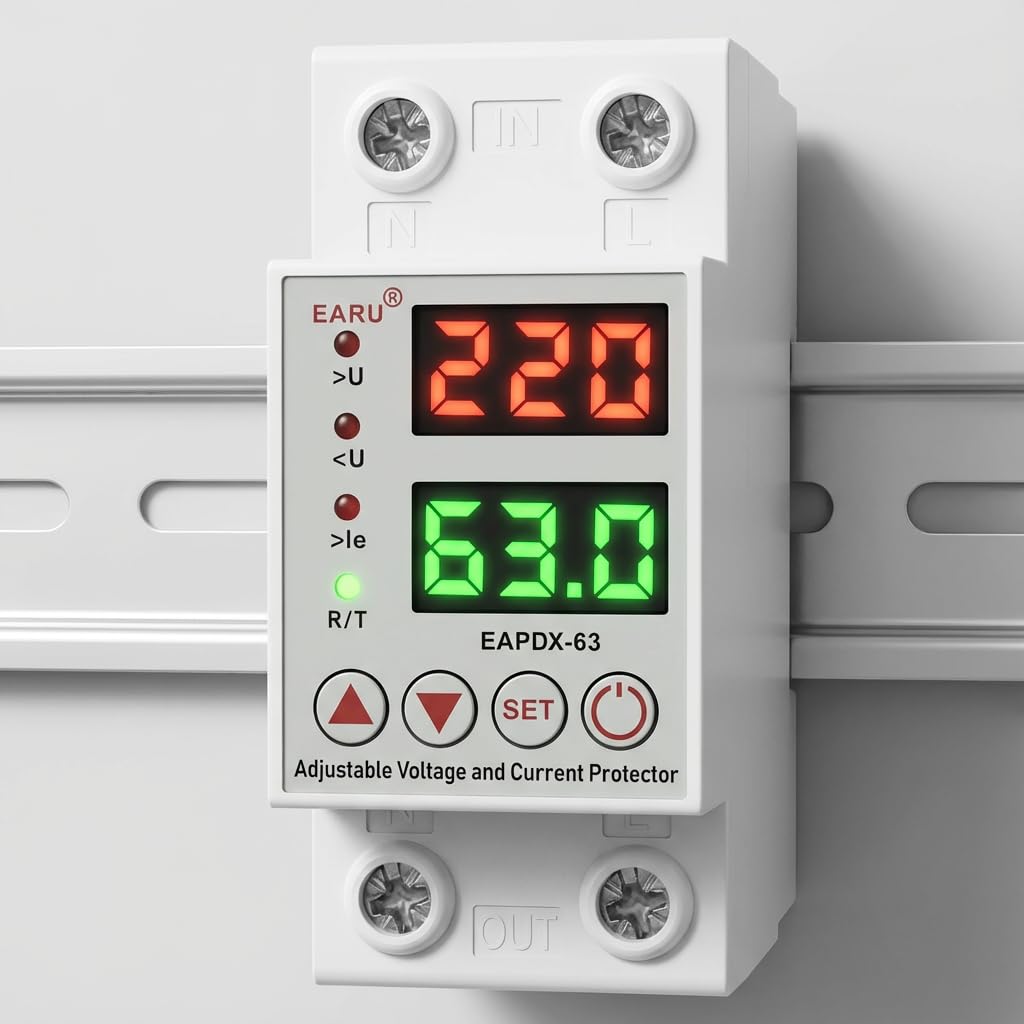
الصورة 4.1: الجبهة view of the EARU Automatic Voltage Protector, highlighting its digital display and control buttons.
5. الإعداد والتثبيت
The EARU Automatic Voltage Protector is designed for DIN Rail mounting. Ensure proper wiring and secure installation.
5.1. التركيب
Mount the device onto a standard 36mm width DIN Rail within your electrical panel. Ensure it is securely clipped into place.
5.2. مخطط الأسلاك
Connect the incoming power supply (Line and Neutral) to the "IN" terminals and the outgoing load to the "OUT" terminals. Refer to the diagram below for correct wiring.

الصورة 5.1: مثالample wiring configuration for DIN Rail installation.

Image 5.2: Device dimensions for installation planning.
6. تعليمات التشغيل
The device allows for precise adjustment of protection parameters. Follow these steps to configure your voltagه الحامي.
6.1. Parameter Setting Mode
- تأكد من تشغيل الجهاز.
- اضغط مع الاستمرار على تعيين button for approximately 3 seconds until the display changes to show "P-1" or a similar setting indicator. This indicates you are in parameter setting mode.
- استخدم السهم لأعلى (▲) و سهم لأسفل (▼) buttons to navigate through the different parameters (P-1 to P-6).
- Once you have selected a parameter, press the تعيين button briefly to enter its adjustment mode.
- استخدم السهم لأعلى (▲) و سهم لأسفل (▼) أزرار لتغيير القيمة.
- اضغط على تعيين button again to confirm the value and move to the next parameter, or wait a few seconds for the device to automatically save and exit the setting mode.
6.2. أوصاف المعلمة
| المعلمة | وصف | المدى قابل للتعديل |
|---|---|---|
| ص-1 | أكثر من المجلدtagالإعداد الإلكتروني | 240V - 300V (or OFF) |
| ص-2 | تحت المجلدtagالإعداد الإلكتروني | 140V - 200V (or OFF) |
| ص-3 | Overcurrent setting | 1A - 40A / 63A / 80A (depending on model) |
| ص-4 | تأخير إعادة الضبط/البدء | 1s - 300s |
| ص-5 | Relay recovery delay | 1s - 300s |
| ص-6 | Overcurrent recovery delay | 1s - 300s |
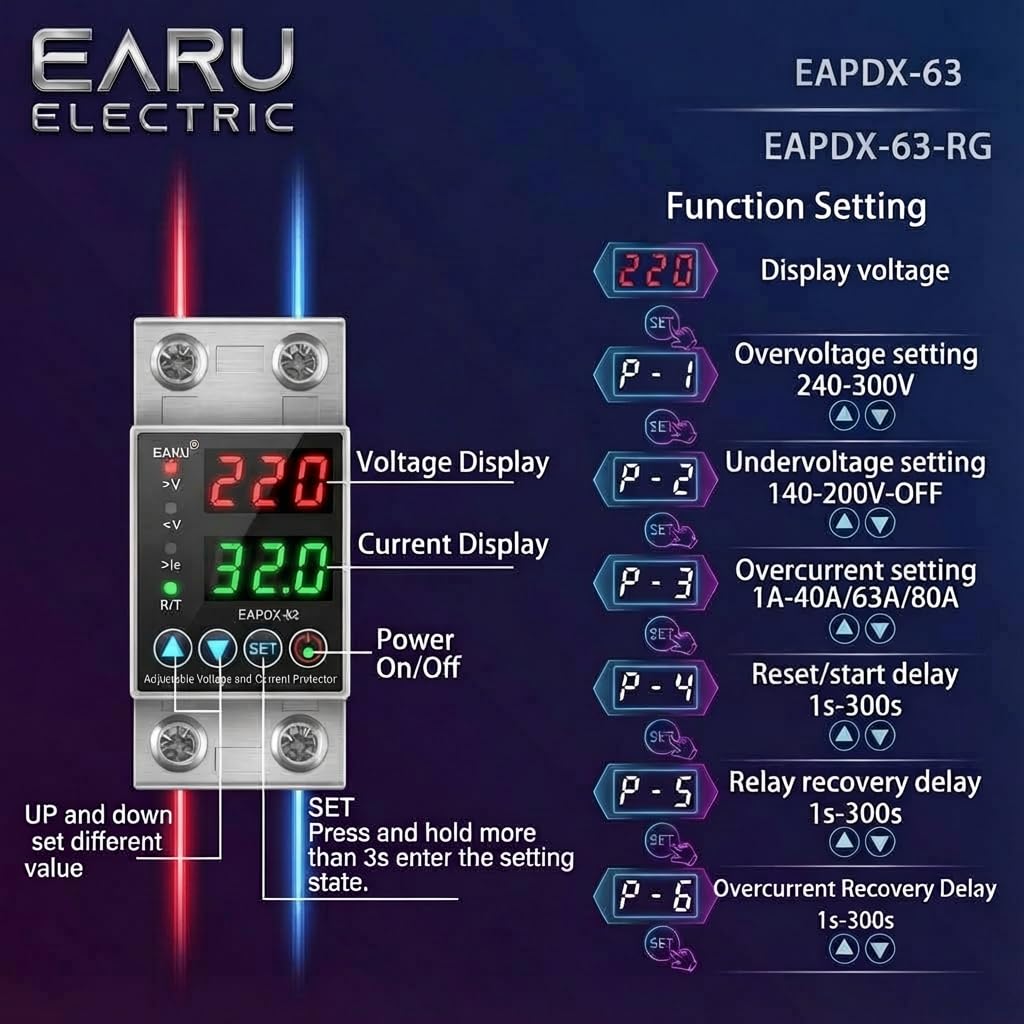
Image 6.1: Function setting guide for the device.
6.3. Video Guide: Setting Parameters
Video 6.1: This video demonstrates how to adjust the over-voltagه ، تحت المجلدtage, overcurrent, and recovery delay settings on the EARU Automatic Voltage Protector. It shows the step-by-step process of entering the setting mode and modifying each parameter.
7. الصيانة
The EARU Automatic Voltage Protector requires minimal maintenance. Regular checks can ensure optimal performance.
- قم بفحص الجهاز بشكل دوري للتأكد من عدم وجود أي تلف مرئي أو وصلات مفكوكة.
- Ensure the ventilation slots are clear of dust and debris to prevent overheating.
- Clean the exterior with a dry, soft cloth. Do not use liquid cleaners or solvents.
- Do not attempt to open or repair the device yourself. Refer to qualified personnel for servicing.
8. استكشاف الأخطاء وإصلاحها
If you encounter issues with your EARU Automatic Voltage Protector, refer to the following common troubleshooting steps:
| مشكلة | السبب المحتمل | حل |
|---|---|---|
| الجهاز لا يعمل | No input power; incorrect wiring; internal fault. | Check main power supply. Verify wiring connections. If problem persists, contact support. |
| Power cuts off frequently | المجلدtage/current outside set thresholds; unstable grid. | Check current voltage/current readings. Adjust P-1, P-2, P-3 settings if necessary. Monitor grid stability. |
| Device does not auto-reconnect | Recovery delay (P-4, P-5, P-6) set too long; persistent fault. | Verify recovery delay settings. Ensure grid conditions have stabilized. Manually reset if safe to do so. |
| حجم غير صحيحtagالقراءة الحالية | Calibration issue; faulty sensor. | اتصل بدعم العملاء للحصول على المساعدة. |
9. المواصفات
| ميزة | التفاصيل |
|---|---|
| ماركة | إيرو |
| نموذج | EARU-1005 |
| أبعاد المنتج (الطول × العرض × الارتفاع) | 7.7 × 3.5 × 6.5 سم |
| وزن العنصر | 450 جرام |
| حجم الإدخالtage | 230 Volts AC |
| ماكس واتtage | 13800 واط |
| الحد الأقصى الحالي | 63 Ampايريس |
| أكثر من المجلدtagنطاق الحماية | Adjustable 200V-275V (Cut-off above 275V default) |
| تحت المجلدtagنطاق الحماية | Adjustable 175V-200V (Cut-off below 175V default) |
| Auto-Reconnect Delay | قابل للتعديل 60-300 ثانية |
| نوع التركيب | DIN Rail (2-Pole, 36mm width) |
| مادة الموصل | 100% Pure Copper |
| بلد المنشأ | الهند |
10. الضمان والدعم
The EARU Automatic Voltage Protector (Model EARU-1005) is backed by a 1-Year Manufacturer Warranty. This warranty covers defects in materials and workmanship under normal use.
- For warranty claims or technical support, please contact EARU customer service.
- احتفظ بإيصال الشراء كإثبات للشراء للتحقق من صحة الضمان.
- ستؤدي الإصلاحات أو التعديلات غير المصرح بها إلى إبطال الضمان.