
1. المقدمة
This manual provides detailed instructions for the setup, operation, and maintenance of your EGate Atom 4X Projector. Please read this manual thoroughly before using the product to ensure proper functionality and to maximize your viewتجربة رائعة.
The EGate Atom 4X is a compact and powerful mini projector designed for home cinema use. It supports 4K Ultra HD content at a native 1080p resolution, offering stunning visuals on screens up to 300 inches. Featuring Android 13, wireless display capabilities, and dual-band WiFi, it provides seamless streaming and a versatile entertainment experience.
2. محتويات العبوة
تأكد من تضمين جميع العناصر المدرجة أدناه في الحزمة الخاصة بك:
- 1x EGate Atom 4X Projector
- 1 × كابل الطاقة
- 1 × جهاز التحكم عن بعد
- 1x User Manual with Warranty Card

الصورة: الجبهة view of the EGate Atom 4X Projector, showing the lens and sensors.
3. انتهى المنتجview
3.1 الميزات الرئيسية
- Native 1080p Resolution with 4K Support: Delivers clear and sharp images, supporting 4K content for enhanced detail.
- أندرويد تي في 13.0: Integrated smart TV operating system with access to numerous apps like Netflix, Prime Video, and YouTube.
- Automatic Focus & Keystone Correction: AI-powered dual camera setup ensures instant, razor-sharp focus and perfect image alignment (4P and 6D correction).
- تصميم قابل للدوران 270 درجة: Allows projection onto walls, ceilings, or floors, offering flexible placement options.
- Dual Band Wi-Fi 6 & Bluetooth 5.0: Provides fast, stable wireless connectivity for streaming and connecting external audio devices.
- Multiple Connectivity Ports: Includes HDMI 2.1 (ARC/eARC/CEC), USB, and 3.5mm Audio Out for versatile device connections.
- High Contrast & Brightness: 6000:1 contrast ratio and 400 ISO lumens with HDR10+/HLG support for vibrant and lifelike colors.
- طويل L.amp حياة: الصمام لamp designed for up to 60,000 hours of operation.
- مكبر صوت مدمج: 7 Watt integrated speaker for audio output.
3.2 مكونات جهاز العرض

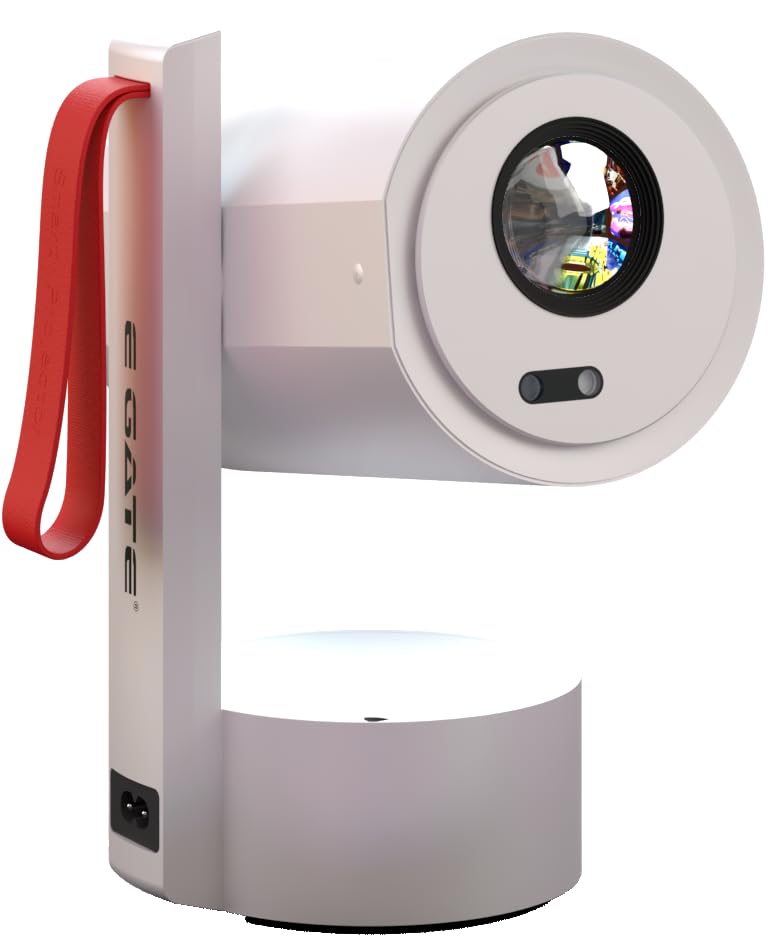
الصورة: الجانب view of the EGate Atom 4X Projector, highlighting its compact design and red strap.

الصورة: الخلفية view of the EGate Atom 4X Projector, showing the power input and ventilation.
The projector features a cylindrical main body housing the lens and internal components, mounted on a stable base. A red strap is integrated for portability. The rear panel includes essential ports for connectivity.
4. الإعداد
4.1 التعيين الأولي
- أفرغ: قم بإزالة جهاز العرض وجميع الملحقات من العبوة بعناية.
- توصيل الطاقة: قم بتوصيل كابل الطاقة بمدخل الطاقة الخاص بالجهاز العرض، ثم بمأخذ الطاقة.
- التمركز: Place the projector on a stable, flat surface. Utilize the 270° rotatable design to adjust the projection angle as needed.

Image: Diagram illustrating the 270-degree rotation capability of the EGate Atom 4X Projector, allowing projection onto various surfaces.
The projector's flexible stand allows for projection onto walls, ceilings, or even the floor. Ensure the projection path is clear of obstructions.
4.2 التركيز التلقائي وتصحيح الانحراف
The EGate Atom 4X features fully automatic focus and keystone correction for a clear, rectangular image without manual adjustments.
- تشغيل الطاقة: قم بتشغيل جهاز العرض باستخدام زر الطاقة أو جهاز التحكم عن بعد.
- الضبط التلقائي: The projector will automatically detect the projection surface and adjust focus and keystone within approximately 5 seconds.
- الضبط اليدوي (اختياري): If minor adjustments are still needed, use the remote control to fine-tune focus or keystone settings in the projector's menu.

Image: The EGate Atom 4X Projector projecting an image, with overlays indicating automatic focus and 4P+4D keystone correction for perfect alignment.
5. تعليمات التشغيل
5.1 تشغيل/إيقاف التشغيل
- لتشغيل: اضغط على زر الطاقة الموجود بجهاز العرض أو جهاز التحكم عن بُعد.
- لإيقاف التشغيل: Press the power button on the remote control once to enter standby mode, or press and hold to fully shut down.
5.2 Navigating Android TV 13.0
Your EGate Atom 4X Projector runs on Android TV 13.0, providing a smart interface for apps and media.
- جهاز التحكم عن بعد: Use the provided remote control to navigate the interface. The directional pad, OK button, Back button, and Home button are essential for navigation.
- اتصال واي فاي: Go to Settings > Network & Internet to connect to your home Wi-Fi network.
- حساب جوجل: Sign in with your Google account to access the Google Play Store and personalize your experience.
- الوصول إلى التطبيق: Pre-loaded apps like Netflix, Prime Video, and YouTube are available. Download more apps from the Google Play Store.

Image: The EGate Atom 4X Projector displaying the Android 13 interface with various streaming app icons like YouTube, Netflix, and Prime Video.
5.3 ضبط إعدادات الصورة والصوت
Access the projector's settings menu to customize picture and sound preferences.
- أوضاع الصورة: Select from various picture modes (e.g., Standard, Vivid, Cinema) or adjust brightness, contrast, and color manually.
- أوضاع الصوت: Choose sound presets or adjust bass and treble for the built-in 7W speaker or connected audio devices.

Image: A split screen comparison showing the superior picture quality of the EGate Atom 4X (1080p) versus a 720p projector, highlighting vibrant colors and sharp details.
6. الاتصال
6.1 الاتصالات السلكية
The projector offers several wired ports for connecting external devices:
- HDMI 2.1 (ARC/eARC/CEC): Connect gaming consoles, Blu-ray players, laptops, or streaming devices. ARC/eARC allows audio return to compatible sound systems, and CEC enables control of connected devices with a single remote.
- USB: Connect USB flash drives for media playback or external hard drives.
- مخرج صوت 3.5 ملم: قم بتوصيل سماعات الرأس أو مكبرات الصوت الخارجية.

Image: The EGate Atom 4X Projector surrounded by various devices (laptop, tablet, game controller, speaker, headphones) illustrating its HDMI, USB, Audio, Wi-Fi 6, and Bluetooth connectivity.
الصورة: عن قرب view of the EGate Atom 4X Projector's rear panel, detailing the HDMI, USB, and Audio ports for universal device compatibility.
6.2 اتصالات لاسلكية
- Dual Band Wi-Fi 6: Connect to 2.4GHz or 5GHz Wi-Fi networks for high-speed internet access and seamless streaming.
- بلوتوث شنومكس: Pair with Bluetooth speakers, headphones, or other compatible audio devices for wireless sound.
- شاشة النسخ المتطابق: Wirelessly cast content from Windows, iOS, and Android devices using Miracast or similar protocols.

Image: A smartphone screen being mirrored wirelessly to the EGate Atom 4X Projector via Dual-Band Wi-Fi 6, showing compatibility with Miracast, Android, iOS, and Windows.

Image: The EGate Atom 4X Projector positioned with Bluetooth headphones and a portable speaker, illustrating seamless Bluetooth 5.0 connectivity for audio.
7. الصيانة
7.1 تنظيف جهاز العرض
- الخارج: Use a soft, dry cloth to wipe the exterior of the projector. Do not use abrasive cleaners or solvents.
- عدسة: Gently clean the projector lens with a lens cleaning cloth or a soft, lint-free cloth specifically designed for optical surfaces. Avoid touching the lens directly with your fingers.
- تهوية: Ensure the ventilation openings are clear of dust and debris to prevent overheating. Use a soft brush or compressed air to clean them periodically.
7.2 التخزين
عند عدم استخدام جهاز العرض لفترات طويلة، يُحفظ في مكان بارد وجاف، بعيدًا عن أشعة الشمس المباشرة ودرجات الحرارة القصوى. يُنصح باستخدام العبوة الأصلية أو حقيبة واقية لمنع تراكم الغبار والتلف.
8. استكشاف الأخطاء وإصلاحها
If you encounter issues with your EGate Atom 4X Projector, refer to the following common problems and solutions:
8.1 لا توجد صورة أو رسالة "لا توجد إشارة"
- التحقق من الطاقة: تأكد من توصيل جهاز العرض بمصدر الطاقة بشكل صحيح وتشغيله.
- مصدر الإدخال: Verify that the correct input source (HDMI, USB, etc.) is selected in the projector's menu.
- اتصال سلكي: Ensure all HDMI or USB cables are securely connected to both the projector and the source device.
- جهاز المصدر: Confirm that the source device (laptop, console) is powered on and outputting a signal.
8.2 صورة ضبابية
- التركيز التلقائي: Allow the projector a few seconds to perform automatic focus. If the image remains blurry, try moving the projector slightly or restarting it.
- تنظيف العدسات: نظف عدسة جهاز العرض بقطعة قماش ناعمة وخالية من الوبر.
- مسافة الإسقاط: تأكد من أن جهاز العرض يقع ضمن مسافة العرض الموصى بها لحجم الشاشة المطلوب.
8.3 Distorted or Tilted Image (Keystone)
- الانحراف التلقائي: The projector should automatically correct keystone. If the image is still distorted, try repositioning the projector.
- دليل كيستون: Access the projector's settings menu to manually adjust keystone correction (4P and 6D options).
8.4 لا يوجد صوت
- مستوى الصوت: تحقق من مستوى الصوت على كل من جهاز العرض وجهاز المصدر.
- وظيفة كتم الصوت: تأكد من عدم كتم صوت جهاز العرض.
- مخرج الصوت: If using external speakers or headphones, ensure they are properly connected and selected as the audio output in the projector's settings.
- اتصال بلوتوث: If using Bluetooth audio, ensure the device is correctly paired and connected.
9. المواصفات
| ميزة | التفاصيل |
|---|---|
| ماركة | البوابة الإلكترونية |
| اسم الموديل | Atom 4X |
| رقم الموديل | بيضة 9027 |
| الدقة الأصلية | 1920 × 1080 (دقة عالية كاملة) |
| الدقة المدعومة | حتى 4K (3840 × 2160) |
| سطوع | 400 لومن ISO |
| نسبة التباين | 6000:1 |
| نوع العرض | شاشة الكريستال السائل |
| نسبة العرض إلى الارتفاع | 16:9 |
| الحد الأقصى لحجم الشاشة | 300 بوصة (762 سم) |
| نظام التشغيل | أندرويد تي في 13.0 |
| المعالج | Amologic T950S Quad Core |
| ذاكرة الوصول العشوائي/الذاكرة للقراءة فقط | 1 جيجا بايت رام / 8 جيجا بايت روم |
| واي فاي | Dual Band Wi-Fi 6 (2.4 + 5 GHz) |
| بلوتوث | بلوتوث 5.0 |
| الاتصال | HDMI 2.1 (ARC/eARC/CEC), USB, 3.5mm Audio Out |
| المميزات الخاصة | Auto Focus, Auto Keystone (4P & 6D), HDR10+/HLG Support, 270° Rotatable Design, Screen Mirroring |
| Lamp حياة | 60,000 ساعة |
| مكبر صوت مدمج | 7 واط |
| أبعاد المنتج | 12.5 × 11 × 22.5 سم |
| وزن العنصر | 990 جرام |
10. الضمان والدعم
The EGate Atom 4X Projector comes with a ضمان لمدة 1 سنوات provided by EGate from the date of purchase. To avail warranty benefits, it is mandatory to register your product.
EGate offers free home pickup and drop service during the warranty period. For more details and product registration, please visit the official EGate webالموقع أو الاتصال بدعم العملاء.
الشركة المصنعة: Egate Infotel Pvt Ltd, 503, SG Alpha Tower II, Sec 9, Vasundhara, Ghaziabad, UP, Optroniq India (Importer)