
1. المقدمة
This manual provides detailed instructions for the setup, operation, maintenance, and troubleshooting of your Yeabomy Smart Bluetooth Glasses E13C. Please read this manual thoroughly before using the product to ensure proper function and longevity.

A pair of black smart Bluetooth sunglasses, viewتم تصويره من زاوية، وعرضهasing the integrated technology in the temples.
2. انتهى المنتجview
2.1 محتويات العبوة
تأكد من وجود جميع العناصر في العبوة:
- Smart Bluetooth Glasses (E13C)
- كابل الشحن المغناطيسي
- قطعة قماش للتنظيف
- Eyeglasses Storage Bag
- حافظة النظارات
- دليل المستخدم (هذا المستند)
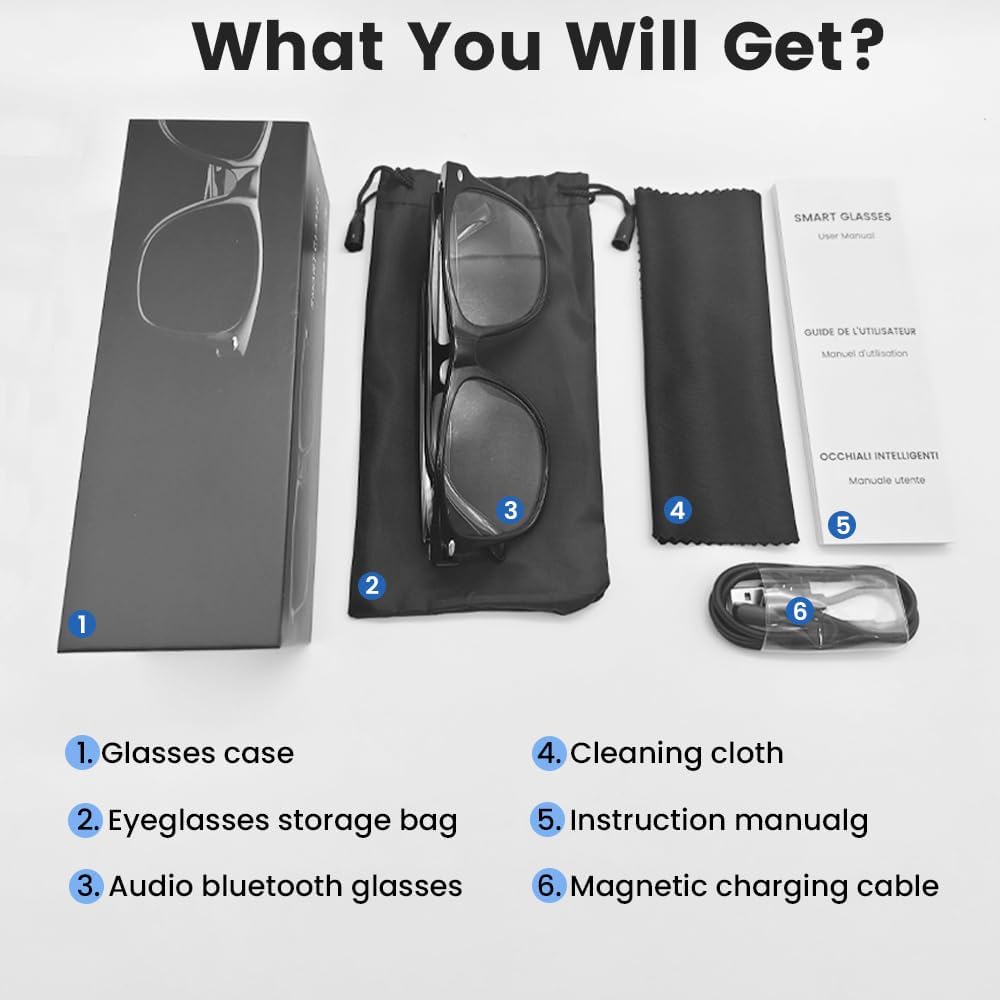
An image displaying the package contents: a glasses case, an eyeglasses storage bag, the audio Bluetooth glasses, a cleaning cloth, an instruction manual, and a magnetic charging cable.
2.2 الميزات الرئيسية
- التحكم الصوتي الذكي: Operate functions using voice commands.
- عدسات بولارايزد: Effective blue light filtering and 100% UV protection. Lenses are replaceable with prescription lenses.
- التوافق الواسع: Connects with various devices including smartphones (Android, iOS) and computers via Bluetooth 5.4.
- الاقتران بخطوة واحدة: Automatic reconnection to the last paired device.
- مقاوم للماء (IPX5): Resistant to sweat and rain.
- تصميم خفيف الوزن: Weighs approximately 27g for comfortable extended wear.
- Dual Magnetic Charging: Efficient and secure charging.
- ضوابط اللمس بديهية: For media playback, calls, and voice assistant activation.
3. الإعداد
3.1 شحن النظارات
Before first use, fully charge the smart glasses. Use the provided magnetic charging cable.
- Connect the magnetic charging cable to the charging contacts on the temple of the glasses.
- قم بتوصيل الطرف USB من الكابل بمحول طاقة USB قياسي (غير متضمن) أو بمنفذ USB الخاص بالكمبيوتر.
- The indicator light will show yellow during charging.
- Charging is complete when the indicator light turns green. A full charge takes approximately 1.5 hours.
The glasses provide approximately 4-6 hours of media playback and over 300 hours of standby time on a full charge.

An illustration showing the magnetic charging cable connecting to the glasses' temple, with indicators for charging (yellow light) and fully charged (green light). Battery capacity, charging time, playback time, and calling time are also displayed.
3.2 اقتران بلوتوث
To connect your smart glasses to a device:
- تأكد من شحن النظارات وتشغيلها.
- قم بتمكين Bluetooth على هاتفك الذكي أو أي جهاز آخر.
- بحث عن available Bluetooth devices. The glasses will appear as "E13".
- Select "E13" to pair. Once paired, the glasses will automatically reconnect to this device when powered on and within range (up to 33 feet).

A person wearing the smart glasses while running, with a smartphone screen showing Bluetooth settings and the glasses (E13) connected. The image highlights the 33ft Bluetooth 5.4 transmission range and voice control functionality.
4. تعليمات التشغيل
4.1 تشغيل/إيقاف التشغيل
- تشغيل الطاقة: Long touch the control area for 5 seconds.
- إيقاف التشغيل: Long touch the control area for 5 seconds.
4.2 الضوابط التي تعمل باللمس
The smart glasses feature intuitive touch controls located on the temples:
- تشغيل/إيقاف الموسيقى: Once-Tap
- المسار التالي: Twice-Tap
- المسار السابق: Twice-Tap
- الرد على المكالمة: Once-Tap
- قطع الاتصال: Once-Tap
- تنشيط مساعد الصوت: Long Touch for 2 seconds
- التصوير عن بعد: Double click to control your smartphone's camera.

A diagram illustrating the touch control gestures on the smart glasses for various functions: pick up calls, turn on music, open navigation, take photos, previous/next track, play/pause, voice assistant, answer/hang up calls, and power on/off.
4.3 التحكم الصوتي
After activating the voice assistant (Long Touch for 2 seconds), you can use voice commands for various functions, such as:
- Making calls (e.g., "Call [Contact Name]")
- Playing music (e.g., "Play [Song Title]")
- إرسال الرسائل
- Opening navigation
5. الصيانة
- تنظيف: استخدم قطعة القماش المخصصة للتنظيف لمسح العدسات والإطار برفق. تجنب استخدام المواد الكيميائية القاسية أو المواد الكاشطة.
- مقاومة الماء: The glasses are IPX5 water-resistant, meaning they can withstand sweat and light rain. Do not submerge them in water or expose them to strong jets of water.
- تخزين: When not in use, store the glasses in the provided eyeglasses storage bag or glasses case to protect them from scratches and dust.
- درجة حرارة: تجنب تعريض النظارات لدرجات حرارة قصوى (ساخنة أو باردة) لأن ذلك قد يؤثر على عمر البطارية والمكونات الإلكترونية.

A pair of smart glasses resting on a surface, emphasizing their lightweight design (27g) and comfort for extended wear. A magnified inset shows the dual magnetic charging contacts.
6. استكشاف الأخطاء وإصلاحها
- لا يمكن تشغيل: Ensure the glasses are fully charged. Connect to the magnetic charging cable and check the indicator light.
- لا يمكن الاقتران بالجهاز:
- تأكد من تمكين البلوتوث على جهازك.
- Make sure the glasses are within the 33-foot Bluetooth range.
- Turn the glasses off and on again, then try pairing.
- قم بحذف الجهاز من إعدادات البلوتوث في هاتفك وحاول الاقتران مرة أخرى.
- لا يوجد صوت/مستوى صوت منخفض:
- Check the volume settings on both the glasses (if applicable via touch control) and your connected device.
- تأكد من توصيل النظارات بشكل صحيح عبر البلوتوث.
- Confirm that the audio output on your device is set to the smart glasses.
- عناصر التحكم باللمس لا تستجيب: Ensure the glasses are powered on and connected. Try restarting the glasses.
7. المواصفات
| نموذج | إي13ج |
| ماركة | Yeabomy |
| تكنولوجيا الاتصال | بلوتوث 5.4 |
| توافق نظام التشغيل | Android, iOS Devices |
| المميزات الخاصة | Music Player, Phone Call, Voice Control, UV Protection, Polarized Lenses, Remote Photography |
| سعة البطارية | 1 Amp Hours (80mAh per temple) |
| وقت الشحن | حوالي 1.5 ساعات |
| Continuous Playback Time (Music) | حوالي 5 ساعات |
| Continuous Calling Time | حوالي 4 ساعات |
| وقت الاستعداد | أكثر من 300 ساعة |
| وزن العنصر | 0.07 رطل (حوالي 27 جرامًا) |
| مقاومة الماء | IPX5 |
| أبعاد الحزمة | 6.65 × 2.4 × 2.24 بوصة |
| حجم الشاشة | 1.96 Inches (Visible screen diagonal) |
| سعة تخزين الذاكرة | 128 ميجا بايت |
| نظام تحديد المواقع العالمي (جي بي اس) | لا يوجد نظام تحديد المواقع العالمي (GPS) |

An image detailing the physical dimensions of the smart glasses, including lens width, frame width, and temple length. It also shows various face shapes (oval, triangle, round, square, diamond) indicating suitability.
8. الضمان والدعم
For warranty information or technical support, please refer to the contact details provided with your purchase documentation or visit the official Yeabomy webالموقع. احتفظ بإثبات الشراء الخاص بك لاستخدامه في أي مطالبات بالضمان.