
ttec KM156
دليل مستخدم سماعات بلوتوث لاسلكية ttec SoundFlow OWS KM156
الموديل: KM156
1. المقدمة
This manual provides instructions for the proper use and maintenance of your ttec SoundFlow OWS Wireless Bluetooth Earphones, model KM156. Please read this manual thoroughly before using the product to ensure optimal performance and longevity.
The ttec SoundFlow OWS earphones feature an open-ear design for situational awareness, dynamic acoustic system for clear sound, and Bluetooth 5.4 for stable wireless connectivity.
2. محتويات العبوة
تأكد من وجود جميع العناصر في عبوة المنتج الخاص بك:
- ttec SoundFlow OWS Wireless Bluetooth Earphones (Left and Right)
- حافظة الشحن
- كابل شحن USB-C
- دليل المستخدم
3. انتهى المنتجview
Familiarize yourself with the components of your ttec SoundFlow OWS earphones.

Image 3.1: ttec SoundFlow OWS Earphones and Charging Case. The image displays the two black earphones with ear hooks, positioned above their open black charging case.
مكونات سماعة الأذن:
- خطاف الأذن: يوفر ملاءمة آمنة ومريحة فوق الأذن.
- وحدة السماعات: يسلم إخراج الصوت.
- ميكروفون: للمكالمات والأوامر الصوتية.
- منطقة مستشعر اللمس: For controlling music, calls, and other functions.
- شحن جهات الاتصال: يتصل بعلبة الشحن لتزويده بالطاقة.

Image 3.2: Close-up of an earbud highlighting the touch sensor area. The image shows a detailed view of the earbud's outer surface, indicating the touch-sensitive zone for controls.
مكونات علبة الشحن:
- فتحات سماعات الأذن: يحفظ سماعات الأذن ويشحنها بشكل آمن.
- منفذ شحن USB-C: لشحن العلبة.
- مؤشر LED: يعرض حالة الشحن ومستوى البطارية.
4. الإعداد
4.1 شحن سماعات الأذن والعلبة
قبل الاستخدام الأول، قم بشحن سماعات الأذن وعلبة الشحن بالكامل.
- ضع سماعات الأذن في علبة الشحن. تأكد من محاذاة نقاط التلامس الخاصة بالشحن.
- قم بتوصيل كابل الشحن USB-C بمنفذ الشحن الموجود على العلبة والطرف الآخر بمصدر الطاقة (على سبيل المثال، محول حائط USB، أو منفذ USB بالكمبيوتر).
- The LED indicator on the case will show the charging status. Once fully charged, the indicator will change or turn off.
A full charge provides up to 6 hours of earphone use, and the charging case provides up to 30 hours of additional battery life. The Charge&Go feature allows 2.5 hours of use from a 15-minute charge.
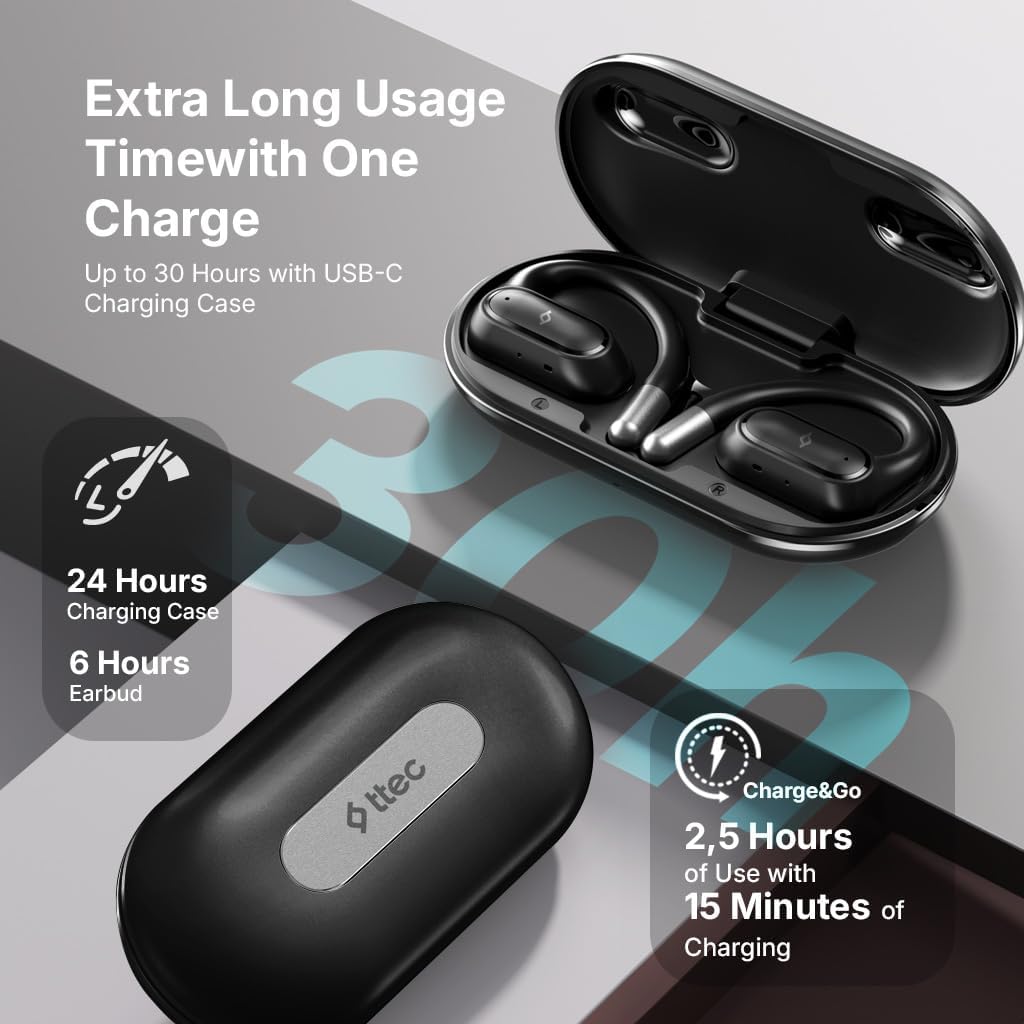
Image 4.1: Charging case displaying battery life. The image illustrates the charging case with text indicating 24 hours from the charging case, 6 hours from earbuds, and 2.5 hours of use from 15 minutes of charging.
4.2 الاقتران بجهاز بلوتوث
To connect your earphones to a smartphone or other Bluetooth-enabled device:
- تأكد من شحن سماعات الأذن ووضعها في علبة الشحن.
- افتح علبة الشحن. ستدخل سماعات الأذن تلقائيًا في وضع الاقتران، وستومض مؤشرات LED الخاصة بها.
- على جهازك، قم بتمكين البلوتوث وابحث عن الأجهزة المتاحة.
- Select "ttec SoundFlow" from the list of found devices.
- Once connected, the earphone LED indicators will stop flashing or turn off, and you will hear a confirmation tone.
ستتصل سماعات الأذن تلقائيًا بالجهاز المقترن الأخير عند إخراجها من العلبة، إذا تم تمكين تقنية البلوتوث على الجهاز.
5. تعليمات التشغيل
5.1 ارتداء سماعات الأذن
Gently place the ear hook over your ear and position the speaker unit comfortably in front of your ear canal. The open-ear design allows you to remain aware of your surroundings.

Image 5.1: A person cycling while wearing the ttec SoundFlow OWS earphones. The image highlights the open-ear design, allowing the user to stay connected to their surroundings.

Image 5.2: A woman wearing a ttec SoundFlow earbud, demonstrating the comfortable and secure fit. The image also indicates the lightweight design: 8.2g per earbud and 52g for the charging case.
5.2 الضوابط التي تعمل باللمس
The earphones feature touch sensors for easy control of various functions:
| فعل | وظيفة |
|---|---|
| صنبور واحد (يسار/يمين) | تشغيل/إيقاف الموسيقى مؤقتًا، الرد على المكالمات |
| النقر المزدوج (L) | المسار السابق |
| النقر المزدوج (R) | المسار التالي |
| صنبور ثلاثي (يسار/يمين) | تفعيل المساعد الصوتي |
| الضغط لفترة طويلة (يسار/يمين) | Reject Call, End Call |
5.3 وضع اللعبة
The earphones feature a low-latency game mode for an enhanced gaming and video experience. This mode reduces audio delay to 50ms.
- To activate Game Mode: Refer to the specific instructions in the quick start guide or product packaging for the exact touch gesture to enable/disable game mode. (Typically a specific tap sequence or long press).
- When Game Mode is active, you may notice a slight change in audio profile, optimized for lower latency.

Image 5.3: ttec SoundFlow earphones and charging case, surrounded by gaming console symbols, highlighting the 50ms low latency feature for an optimized gaming and video experience.
6. الصيانة
6.1 التنظيف
- امسح سماعات الأذن وعلبة الشحن بقطعة قماش ناعمة وجافة وخالية من الوبر.
- لا تستخدم المنظفات الكاشطة أو الكحول أو المذيبات الكيميائية.
- Ensure charging contacts are clean and dry to prevent charging issues.
6.2 مقاومة الماء والعرق
The ttec SoundFlow OWS earphones are IPX6 rated, meaning they are resistant to high-pressure water jets from any direction. This makes them suitable for use during workouts and in light rain.
- لا تغمر سماعات الأذن في الماء.
- Ensure the earphones are dry before placing them back into the charging case to prevent damage.

Image 6.1: A man running outdoors, illustrating the sweat and water-resistant design of the ttec SoundFlow earphones, which are IPX6 rated.
6.3 التخزين
عند عدم الاستخدام، ضع سماعات الأذن في علبة الشحن لحمايتها والحفاظ على شحنها. خزّنها في مكان بارد وجاف بعيدًا عن درجات الحرارة العالية.
7. استكشاف الأخطاء وإصلاحها
إذا واجهت مشاكل مع سماعات الأذن، فراجع الحلول الشائعة التالية:
| مشكلة | حل |
|---|---|
| سماعات الأذن غير مقترنة | Ensure earphones are charged. Turn off and on Bluetooth on your device. Forget the device in your Bluetooth settings and re-pair. |
| سماعة أذن واحدة فقط تعمل | Place both earphones back in the case, close the lid, then open again. Ensure both are charged. |
| لا يوجد صوت | Check device volume. Ensure earphones are connected. Try playing different audio. |
| قضايا الشحن | Ensure charging cable is securely connected. Clean charging contacts on earphones and case. Try a different USB-C cable or power source. |
إذا استمرت المشكلة، يرجى الاتصال بدعم العملاء.
8. المواصفات
| ميزة | التفاصيل |
|---|---|
| اسم الموديل | ساوند فلو |
| رقم الموديل | كم156 |
| تكنولوجيا الاتصال | لاسلكي (بلوتوث 5.4) |
| عامل الشكل | True Wireless, Open-Ear |
| وزن ياربود | 8.2 جرام (كل واحد) |
| وزن علبة الشحن | 52 جرام |
| عمر بطارية سماعة الأذن | حتى 6 ساعات (شحنة واحدة) |
| إجمالي عمر البطارية (مع العلبة) | تصل إلى 30 ساعة |
| الشحن السريع | 15 min charge for 2.5 hours use (Charge&Go) |
| مقاومة الماء | IPX6 Rated (Sweat and Water Resistant) |
| زمن انتقال منخفض | 50 مللي ثانية (وضع اللعبة) |
| الشركة المصنعة | تي تك |
9. الضمان والدعم
Your ttec SoundFlow OWS Wireless Bluetooth Earphones are covered by a manufacturer's warranty. For detailed warranty information, please refer to the warranty card included in your product packaging or visit the official ttec webموقع.
For technical support, troubleshooting assistance, or to inquire about replacement parts, please contact ttec customer service through their official channels. Contact information can typically be found on the product packaging or the official ttec webموقع.
Ask a question about this manual
Ask about setup, troubleshooting, compatibility, parts, safety, or missing instructions. Manuals+ will review the question and use this page’s manual context to help answer it.