
1. المقدمة
The Alcatel XL685 Voice is a DECT cordless phone designed for ease of use, particularly for seniors. It features a large, backlit display, big buttons, audio amplification, and a hands-free function. This manual provides detailed instructions for setting up, operating, and maintaining your phone, ensuring you can utilize all its features effectively.
Please read this manual carefully before using your phone and keep it for future reference.
2. ماذا يوجد في الصندوق
تأكد من وجود جميع العناصر في العبوة:
- Alcatel XL685 Handset
- Base Unit with integrated answering machine
- محول الطاقة
- سلك خط الهاتف
- بطاريتان قابلتان لإعادة الشحن من نوع AAA NiMH
- دليل المستخدم
3. انتهى المنتجview
Familiarize yourself with the main components and controls of your Alcatel XL685 Voice phone.

الصورة 3.1: The Alcatel XL685 Voice cordless phone, showing the handset docked in its base unit. The handset features a large display, clearly visible numeric keypad, and function buttons. The base unit includes controls for the answering machine.
3.1 ميزات الهاتف المحمول
- XL Graphic Display: White backlit screen with large characters for optimal readability.
- Large, Contrasted Buttons: Easy to see and press for dialing and navigation.
- Audio Boost Button: Instantly doubles the earpiece volume by +10dB, up to a maximum of 25dB.
- وظيفة الاستخدام الحر لليدين: Allows conversations without holding the handset, with adjustable volume.
- مؤشر الضوء: Flashes for incoming calls.
- Direct Memory Keys (M1, M2): For quick dialing of favorite contacts.
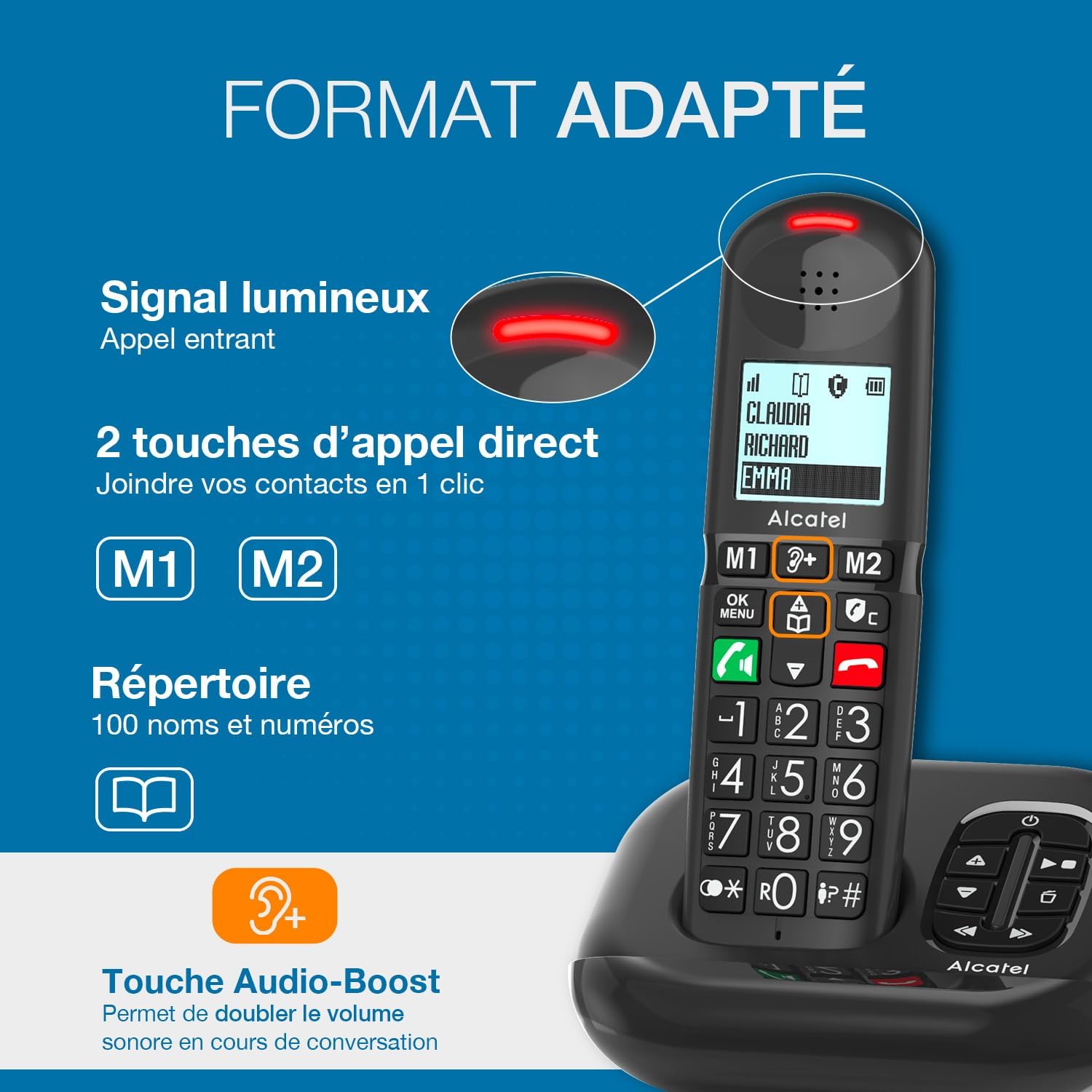
الصورة 3.2: A close-up of the Alcatel XL685 Voice handset, highlighting the large display, direct call keys (M1, M2), and the Audio Boost button. The image also shows the luminous signal for incoming calls and the phonebook icon, indicating its capacity for 100 contacts.
3.2 ميزات الوحدة الأساسية
- جهاز الرد المتكامل: Up to 50 minutes of recording time.
- عداد الرسائل: Digital display on the base unit shows the number of new messages.
- Answering Machine Controls: Play, stop, skip, and delete messages directly from the base.
4. الإعداد
Follow these steps for the initial setup of your Alcatel XL685 Voice phone.
4.1 توصيل الوحدة الأساسية
- Connect the telephone line cord to the socket on the base unit and to your telephone wall socket.
- Connect the power adapter to the base unit and plug it into a mains power outlet.
- Ensure the base unit is placed on a flat, stable surface, away from other electrical appliances to avoid interference.
4.2 تركيب البطاريات وشحنها
- افتح غطاء حجرة البطارية الموجود في الجزء الخلفي من الهاتف.
- Insert the 2 AAA NiMH rechargeable batteries, observing the correct polarity (+ and -).
- أغلق غطاء حجرة البطارية.
- Place the handset on the base unit. The display will show a charging indicator. Allow the handset to charge for at least 15 hours before its first use to ensure optimal battery performance.
4.3 الإعدادات الأولية (التاريخ والوقت)
After the initial charge, the phone may prompt you to set the date and time. Follow the on-screen instructions or refer to the "Settings" section in this manual for detailed steps.
5. تعليمات التشغيل
5.1 إجراء المكالمات
- الاتصال المباشر: أدخل رقم الهاتف باستخدام لوحة المفاتيح، ثم اضغط على زر الاتصال الأخضر.
- من دليل الهاتف: اضغط على زر دليل الهاتف, navigate to the desired contact, then press the زر الاتصال الأخضر.
- Using Direct Memory Keys (M1/M2): اضغط مع الاستمرار على M1 or M2 button for a few seconds to dial the stored number.
5.2 استقبال المكالمات
عندما يرن الهاتف، اضغط على زر الاتصال الأخضر to answer. The indicator light on the handset will flash during an incoming call.
5.3 وظيفة التحدث الحر
أثناء المكالمة ، اضغط على Hands-Free button (speaker icon) to activate or deactivate the speakerphone. Adjust the volume using the navigation keys.
5.4 Audio Boost
For increased listening volume during a call, press the dedicated Audio Boost button (ear icon with '+'). This will amplify the sound by an additional 10dB, up to 25dB total. Press it again to deactivate.
5.5 إدارة دليل الهاتف
Your phone can store up to 100 contacts. Each contact can have a name and number.
- إضافة جهة اتصال: Access the menu, select "Phonebook", then "Add New". Enter the name and number, then save.
- تعديل بيانات جهة اتصال: Navigate to the contact in the phonebook, select "Edit", make changes, and save.
- حذف جهة اتصال: Navigate to the contact, select "Delete", and confirm.
- Assigning Direct Memory Keys (M1/M2): Access the menu, select "Settings", then "Direct Memory". Choose M1 or M2 and assign a contact from your phonebook.
5.6 جهاز الرد الآلي
يمكن لجهاز الرد الآلي المدمج تسجيل ما يصل إلى 50 دقيقة من الرسائل.
- تفعيل/إلغاء التفعيل: اضغط على زر التشغيل/الإيقاف on the base unit or through the handset menu.
- تشغيل الرسائل: اضغط على زر التشغيل on the base unit. Use the skip buttons to move between messages.
- حذف الرسائل: أثناء تشغيل الرسالة، اضغط على زر الحذف على الوحدة الأساسية.
- تسجيل إعلان: يمكنك الوصول إلى إعدادات جهاز الرد الآلي عبر قائمة الهاتف لتسجيل تحيتك الشخصية.
6. Call Blocking Features
The Alcatel XL685 Voice offers advanced call blocking to protect you from unwanted calls.

الصورة 6.1: This image illustrates the call blocking features of the Alcatel XL685 Voice. It shows the dedicated call blocking button on the handset, explaining both manual blocking (up to 100 numbers) and automatic blocking modes, which only allow registered contacts to ring through.
6.1 Manual Call Blocking
You can block up to 100 unwanted numbers manually.
- During an Incoming Call: اضغط على الزر المخصص Call Block button (shield icon) to immediately block the number.
- From Call Log: Access the call log, select the unwanted number, then press the Call Block button to add it to the block list.
6.2 حظر المكالمات التلقائي
Activate the automatic mode to only receive calls from numbers stored in your phonebook or VIP list.
- Access the phone's menu, navigate to "Call Blocking" settings, and select "Automatic Mode".
- In this mode, all anonymous calls will be blocked automatically.
7. الصيانة
Proper care ensures the longevity of your phone.
- تنظيف: استخدمي قطعة قماش ناعمةamp cloth to clean the handset and base unit. Do not use abrasive cleaners or solvents.
- العناية بالبطارية: Only use the supplied rechargeable NiMH batteries. If the phone will not be used for an extended period, remove the batteries.
- الظروف البيئية: Avoid exposing the phone to direct sunlight, extreme temperatures, or high humidity.
8. استكشاف الأخطاء وإصلاحها
فيما يلي حلول للمشاكل الشائعة التي قد تواجهها:
| مشكلة | حل |
|---|---|
| لا يوجد نغمة اتصال | تأكد من توصيل سلك خط الهاتف بإحكام بكل من الوحدة الأساسية ومقبس الحائط. تأكد من توصيل محول الطاقة بالكهرباء. |
| الهاتف لا يشحن | Ensure the handset is correctly placed on the base unit. Check that the power adapter is connected. Verify batteries are inserted correctly. |
| جودة الصوت سيئة | Move the handset closer to the base unit. Check for interference from other electronic devices. Ensure batteries are sufficiently charged. |
| لا يمكن إجراء/استقبال المكالمات | Check the telephone line connection. Ensure call blocking is not preventing desired calls (check automatic mode settings). |
| جهاز الرد الآلي لا يسجل | Ensure the answering machine is activated. Check if the memory is full; delete old messages if necessary. |
9. المواصفات
| ماركة | الكاتيل |
| رقم الموديل | أتل1428407 |
| لون | أسود |
| نوع الهاتف | لاسلكي (DECT) |
| الأجهزة المتوافقة | Standard telephone networks (PSTN, ISDN) |
| نوع البطارية | NiMH (2 AAA included) |
| نوع نظام الرد | رقمي |
| وقت تسجيل جهاز الرد الآلي | 50 دقائق |
| سعة دليل الهاتف | 100 جهة اتصال |
| Call Log Capacity | 50 last calls |
| سعة حظر المكالمات | ما يصل إلى 100 رقم |
| الأبعاد (الطول × العرض × الارتفاع) | 14 × 6.5 × 11.2 سم |
| وزن العنصر | 266 جرام |
| مادة | بلاستيك |
10. الضمان والدعم
Your Alcatel XL685 Voice phone comes with a manufacturer's warranty.
- ضمان الشركة المصنعة: 2 سنوات.
- For technical support or warranty claims, please refer to the contact information provided with your purchase or visit the official Alcatel support webموقع.