
1. المقدمة
This manual provides essential information for the installation, operation, and maintenance of your Sophos XGS 88 (Gen2) Security Appliance. The XGS 88 is a high-performance desktop firewall designed to provide robust network security for small to medium-sized businesses. It features advanced threat protection, high throughput capabilities, and seamless centralized management.
2. معلومات السلامة
Please read all safety instructions carefully before operating the device. Failure to do so may result in injury or damage to the equipment.
- تأكد من وضع الجهاز على سطح ثابت ومستوٍ.
- لا تسد فتحات التهوية.
- استخدم فقط محول الطاقة المرفق مع الجهاز.
- أبقِ الجهاز بعيداً عن الماء والرطوبة والحرارة الزائدة.
- لا تحاول فتح أو إصلاح الجهاز بنفسك. أحل جميع أعمال الصيانة إلى فنيين مؤهلين.
3. محتويات العبوة
تأكد من وجود جميع العناصر في العبوة:
- Sophos XGS 88 (Gen2) Security Appliance
- محول الطاقة
- كابل إيثرنت
- دليل البدء السريع
4. انتهى المنتجview
The Sophos XGS 88 is a compact and powerful security appliance. Familiarize yourself with its components:
4.1 اللوحة الأمامية
The front panel features status indicators and essential ports for initial setup and management.

الشكل 4.1: الجبهة view of the Sophos XGS 88 appliance, showing the COM port, USB port, and LED indicators for LAN/WAN activity and device status.
- منفذ COM: Console port for direct management.
- منفذ USB: For connecting external devices or storage.
- مؤشرات LED: Provide visual feedback on network activity (ACT/LNK, Speed) and overall device status (Status, Alarm).
4.2 اللوحة الخلفية
The rear panel provides connectivity for power, network interfaces, and a reset button.
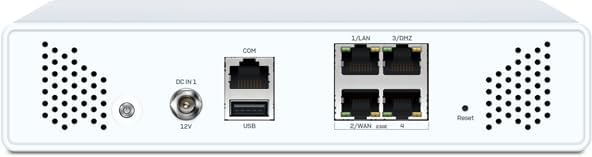
الشكل 4.2: خلفي view of the Sophos XGS 88 appliance, displaying the DC power input, COM port, USB port, four 2.5 GE network ports (LAN/WAN), and a reset button.
- DC في 12V: موصل إدخال الطاقة.
- منفذ COM: منفذ وحدة التحكم.
- منفذ USB: لتوصيل الأجهزة الخارجية.
- LAN/WAN Ports (1-4): Four 2.5 Gigabit Ethernet ports for network connectivity.
- زر إعادة الضبط: يستخدم لاستعادة إعدادات المصنع الافتراضية.
4.3 أعلى View (with labels)
النفقات العامة view highlighting key components and their labels.

الشكل 4.3: الجزء العلوي view of the Sophos XGS 88 appliance, indicating the location of the COM Micro USB port, USB 2.0 port, Port LEDs, and Status LEDs. Note: External antenna ports are for XGS 88w models only.
- COM Micro USB: Alternative console port.
- يو اس بي 2.0: منفذ USB قياسي.
- مصابيح LED للمنفذ: Indicators for individual network port status.
- مؤشرات الحالة: Overall device status indicators.
5. الإعداد
Follow these steps to set up your Sophos XGS 88 appliance:
- الموقع: Choose a cool, dry, and well-ventilated location for the appliance. Ensure adequate space around the device for airflow.
- توصيل كابلات الشبكة:
- Connect your internet modem or upstream network device to the designated WAN port (e.g., Port 2/WAN).
- Connect your internal network switch or a client device to a LAN port (e.g., Port 1/LAN).
- توصيل الطاقة: Connect the supplied power adapter to the DC IN 12V port on the rear panel, then plug the adapter into a power outlet.
- تشغيل الطاقة: The appliance will automatically power on. Observe the LED indicators on the front panel. The Status LED should turn green once the system has booted.
- الترتيب الأولي: الوصول إلى الجهاز web-based management interface from a connected computer. Refer to the Quick Start Guide for the default IP address and login credentials.
6. تعليمات التشغيل
The Sophos XGS 88 operates as a network security gateway. Its primary functions include:
6.1 حماية الشبكة
The appliance provides comprehensive threat protection:
- Advanced AI-Powered Threat Protection: Utilizes deep learning technology to detect and respond to evolving cyber threats like ransomware, malware, and phishing attacks in real-time.
- Intrusion Prevention Systems (IPS): Monitors network traffic for malicious activity and blocks intrusions.
- URL تصفية: يتحكم في الوصول إلى websites based on categories and policies.
- Deep Packet Inspection: Examines the content of network packets for threats.
6.2 Xstream Protection
For enhanced security, the XGS 88 with Xstream Protection offers:
- AI-powered Deep Packet Inspection: Provides superior threat detection.
- Cloud Sandboxing: Analyzes suspicious files in a secure, isolated environment to identify zero-day threats.
- TLS 1.3 Inspection: Inspects encrypted traffic for hidden threats.
6.3 الإدارة المركزية
Manage your XGS 88 effortlessly using Sophos Central, a cloud-based platform. This allows for remote monitoring and configuration, simplifying network security management.
7. الصيانة
تضمن الصيانة المنتظمة الأداء الأمثل وطول العمر لجهاز Sophos XGS 88 الخاص بك:
- تحديثات البرامج الثابتة: Regularly check for and apply the latest firmware updates to ensure you have the most current security features and bug fixes. This can typically be done through the Sophos Central management interface.
- تنظيف: Keep the appliance clean and free of dust. Use a soft, dry cloth to wipe the exterior. Do not use liquid cleaners or aerosols.
- تهوية: تأكد من عدم انسداد فتحات التهوية لمنع ارتفاع درجة الحرارة.
- تكوين النسخ الاحتياطي: Periodically back up your appliance's configuration settings. This will allow for quick restoration in case of an issue or replacement.
8. استكشاف الأخطاء وإصلاحها
This section addresses common issues you might encounter with your Sophos XGS 88 appliance.
| مشكلة | السبب المحتمل | حل |
|---|---|---|
| الجهاز لا يعمل. | No power, faulty power adapter, or power outlet issue. | Check power cable connection. Verify power outlet is functional. Ensure power adapter is correctly connected. |
| لا يوجد اتصال بالشبكة. | Incorrect cable connection, misconfigured network settings, or ISP issue. | Verify Ethernet cables are securely connected to the correct ports. Check network configuration in the management interface. Contact your ISP if the issue persists. |
| أداء الشبكة بطيء. | High network traffic, misconfiguration, or outdated firmware. | Review network usage. Optimize security policies. Ensure firmware is up to date. |
| لا يمكن الوصول إلى واجهة الإدارة. | Incorrect IP address, network issue, or firewall blocking access. | Verify the appliance's IP address. Ensure your computer is on the same network segment. Temporarily disable client-side firewalls. |
If the problem persists after attempting these solutions, please refer to the official Sophos support resources or contact technical support.
9. المواصفات
Key technical specifications for the Sophos XGS 88 (Gen2) Security Appliance:
- اسم الموديل: اكس جي اس 88
- ماركة: سوفوس
- الشركة المصنعة: SOPHOS
- واجهات الشبكة: 4 x 2.5 GE Copper Ports
- الاتصال: USB, COM (Micro USB)
- عامل الشكل: Desktop Appliance
- تبريد: Fanless (for XGS 88 model)
- أول متاح: 3 يناير 2025
10. الضمان والدعم
For detailed information regarding the product warranty, technical support, and service agreements, please refer to the official documentation provided with your Sophos XGS 88 appliance or visit the official Sophos website. Support resources typically include knowledge bases, FAQs, and contact information for technical assistance.
يمكنك زيارة Sophos Store on Amazon للحصول على معلومات إضافية عن المنتج.