
1. المقدمة
Thank you for choosing the Anmite A160W03T 16-inch Portable Touch Monitor. This manual provides essential information for the safe and efficient use of your new monitor. Please read it thoroughly before operation and retain it for future reference.
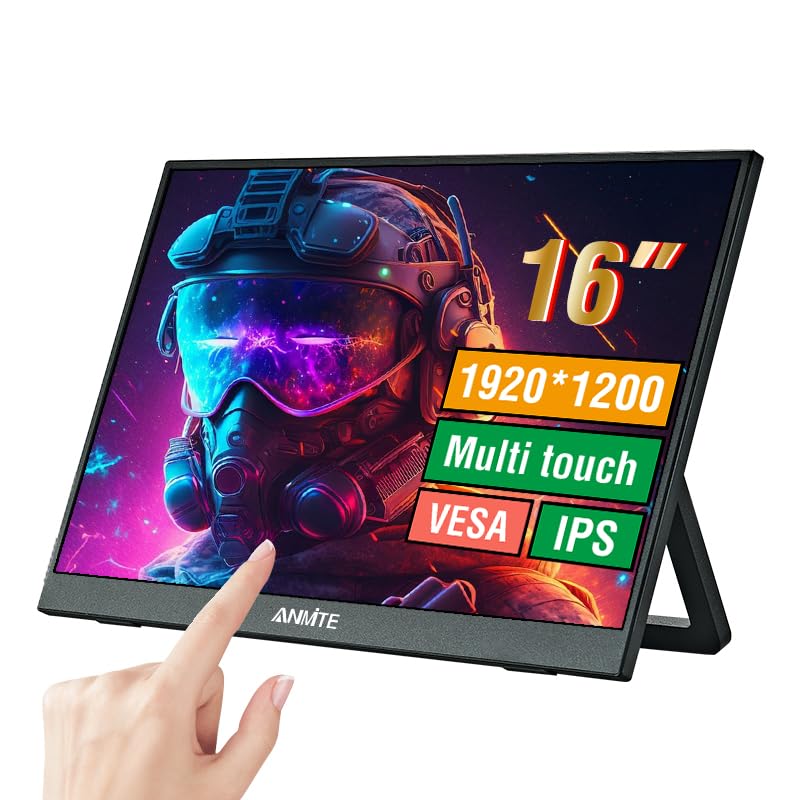
Image 1.1: Anmite 16-inch Portable Touch Monitor. This image displays the monitor's front view, highlighting its 16-inch screen, 1920x1200 resolution, 16:10 aspect ratio, 100% sRGB color gamut, VESA mount compatibility, touch functionality, 1200P resolution, and IPS panel technology. A hand is shown interacting with the touch screen.
2. معلومات هامة حول السلامة
- لا تعرض الشاشة للمطر أو الرطوبة لتجنب الحريق أو الصدمة الكهربائية.
- تجنب وضع الشاشة في ضوء الشمس المباشر أو بالقرب من مصادر الحرارة.
- استخدم فقط محول الطاقة والكابلات التي يوفرها المصنع.
- لا تحاول تفكيك الشاشة أو تعديلها. قم بإحالة جميع أعمال الصيانة إلى فنيين مؤهلين.
- أبقِ الشاشة بعيدة عن المجالات المغناطيسية القوية.
- تأكد من التهوية المناسبة حول الشاشة.
3. محتويات العبوة
يرجى التحقق من محتويات العبوة عند فتحها. في حال وجود أي أغراض مفقودة أو تالفة، يُرجى التواصل مع خدمة العملاء.
- Anmite Portable Monitor x 1
- Mini-HDMI to HDMI cable x 1
- كابل من النوع C إلى النوع C × 1
- Type-C to USB-A cable x 1
- دليل المستخدم × 1

Image 3.1: Contents of the Anmite Portable Monitor package. This image shows the monitor lying next to its retail box, which displays various product labels and certifications.
4. ميزات المنتج والمواصفات
المميزات الرئيسية:
- 16-inch IPS Panel with 1920x1200 Resolution
- نسبة العرض إلى الارتفاع 16:10
- وظيفة شاشة اللمس
- Multiple Connectivity Options: Mini-HDMI, Full-Function Type-C
- Built-in Speakers (1W*2)
- Lightweight Metal Enclosure
المواصفات الفنية:
| مواصفة | قيمة |
|---|---|
| الوزن الصافي | 0.81 كجم (28.57 أوقية) |
| أبعاد | 355 x 237 x 5-13 mm (13.97 x 9.33 x 0.51 inches) |
| حجم الشاشة | 16 بوصة |
| نوع اللوحة | اي بي اس |
| نسبة العرض إلى الارتفاع | 16:10 |
| دقة | 1920 × 1200 |
| لون العرض | 16.7 مليون |
| نسبة التباين | 1000:1 |
| سطوع | 300 شمعة/م² |
| مجموعة الألوان | 100% إس آر جي بي |
| معدل التحديث | 60 هرتز |
| وقت الاستجابة | 5 ميلي ثانية |
| واجهة الإدخال | Mini-HDMI, Type-C (Full Function), Type-C (Power) |
| واجهة الإخراج | 3.5mm واجهة الصوت |
| المتحدثون | Built-in (1W*2) |
| المجلدtage | 5 فولت (تيار مستمر) |

Image 4.1: Product dimensions. This diagram illustrates the physical measurements of the monitor, including width, height, and thickness, in both centimeters and inches.
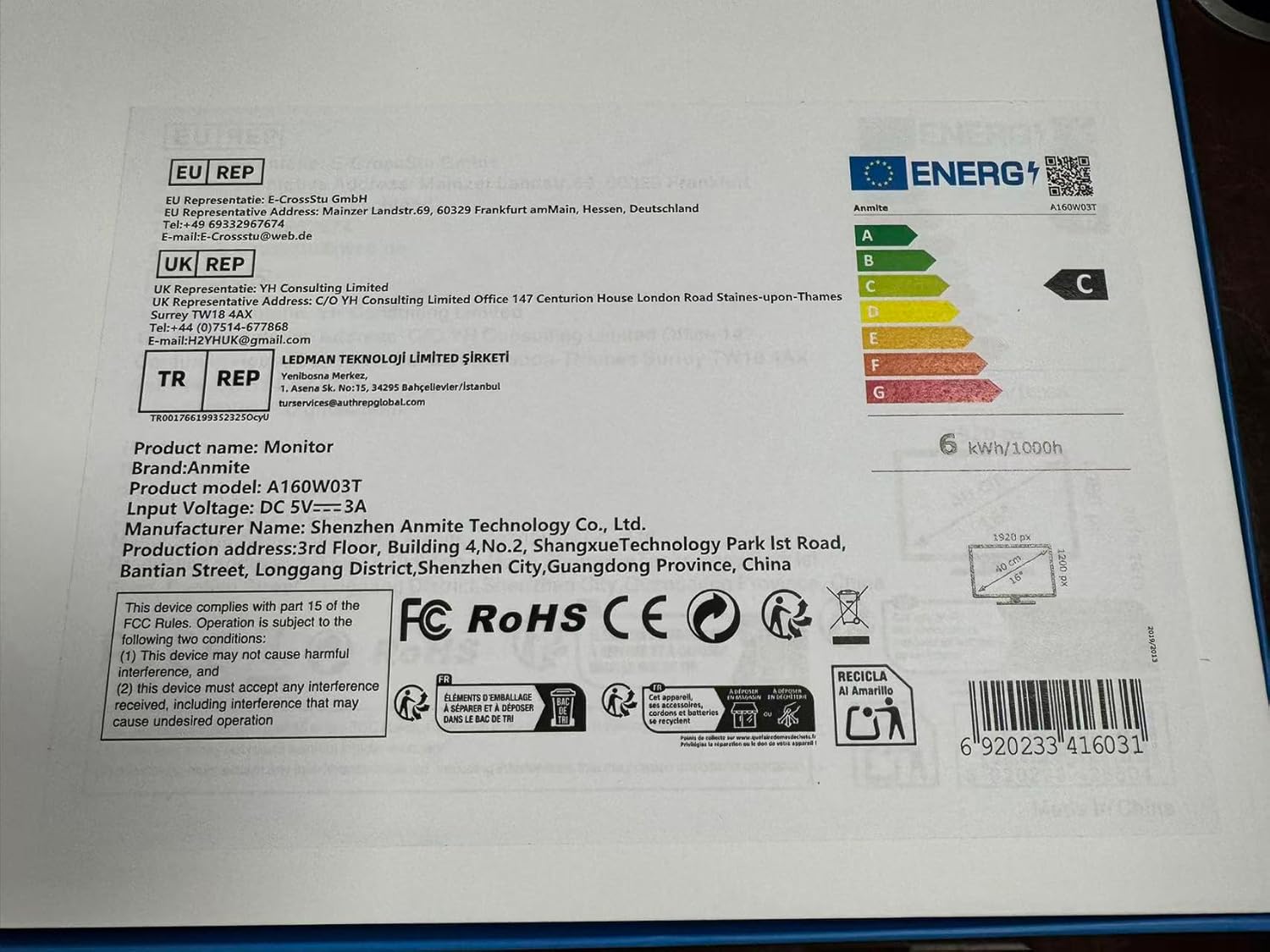
Image 4.2: Product label details. This close-up shows the product name, brand, model number (A160W03T), input voltage (DC 5V-3A), manufacturer information, and various compliance logos.
5. الإعداد
5.1 الاتصال بجهاز
The Anmite A160W03T monitor supports connectivity via Type-C (Full Function) and Mini-HDMI.
- توصيل الطاقة: Connect the monitor to a power source using the provided Type-C to USB-A cable and a compatible power adapter (not always included, typically 5V/3A). Alternatively, if your device provides sufficient power via a full-function Type-C port, a separate power connection may not be needed.
- Type-C Connection (Full Function):
- Ensure your device's Type-C port supports video output (DisplayPort Alternate Mode) and power delivery.
- Connect one end of the Type-C to Type-C cable to your device's full-function Type-C port and the other end to the monitor's full-function Type-C port.
- This single cable can transmit video, audio, touch signals, and power.
- Mini-HDMI Connection:
- Connect one end of the Mini-HDMI to HDMI cable to the monitor's Mini-HDMI port and the other end to your device's HDMI port.
- For power, use the Type-C to USB-A cable connected to the monitor's dedicated power Type-C port and a power adapter.
- For touch functionality with HDMI, an additional USB-A to Type-C cable (provided) must be connected from your device's USB-A port to the monitor's full-function Type-C port.

الصورة 5.1: خلفي view of the monitor. This image shows the integrated stand and the location of the various input/output ports on the side and back of the monitor.
5.2 تعديل الحامل
The monitor features an integrated stand. Gently pull out the stand from the back of the monitor to adjust it to your desired viewing angle. Ensure the stand is stable on a flat surface.
6. تعليمات التشغيل
6.1 تشغيل/إيقاف التشغيل
- To power on the monitor, press the power button located on the side or back of the monitor.
- To power off, press and hold the power button for a few seconds until the screen turns off.
6.2 قائمة العرض على الشاشة (OSD)
The monitor includes an OSD menu for adjusting settings such as brightness, contrast, color, and input source. Use the control buttons (typically located on the side or back) to navigate the menu:
- اضغط على زر القائمة لفتح OSD.
- Use the navigation buttons (up/down or +/-) to select options.
- Press the Enter button to confirm selections.
- اضغط على زر الخروج لإغلاق شاشة العرض على الشاشة (OSD).
6.3 وظيفة شاشة اللمس
The monitor features a 10-point capacitive touch screen. When connected via a full-function Type-C cable or an HDMI + USB-A to Type-C cable, the touch function will be enabled automatically. Ensure your operating system supports touch input.
6.4 إخراج الصوت
The monitor has built-in speakers. You can also connect external headphones or speakers to the 3.5mm audio output interface for private listening or higher quality audio.
7. الصيانة
7.1 تنظيف الشاشة
- Always power off the monitor and unplug all cables before cleaning.
- استخدم قطعة قماش ناعمة وخالية من الوبر برفق دampاغسلها بالماء أو بمنظف شاشة غير كاشط.
- لا تقم برش المنظف مباشرة على الشاشة.
- Avoid using harsh chemicals, alcohol, or abrasive materials.
7.2 التخزين
When not in use for extended periods, store the monitor in a cool, dry place, preferably in its original packaging, to protect it from dust and physical damage.
8. استكشاف الأخطاء وإصلاحها
إذا واجهت مشكلات مع شاشتك، فراجع المشكلات والحلول الشائعة التالية:
- لا توجد تغطية:
- تأكد من توصيل جميع الكابلات (الفيديو والطاقة) بشكل آمن.
- Verify that your device's Type-C port supports video output if using Type-C.
- Try a different cable or port on your device.
- Select the correct input source in the monitor's OSD menu.
- لا يوجد طاقة:
- Check if the power adapter is properly connected and the power outlet is functional.
- Ensure the Type-C power cable is connected to the correct power input port on the monitor.
- Touch Function Not Working:
- For Type-C connection, ensure it's a full-function Type-C port on your device.
- For HDMI connection, ensure the additional USB-A to Type-C cable is connected from your device to the monitor's full-function Type-C port for touch data.
- أعد تشغيل جهازك المتصل.
- لا يوجد صوت:
- تحقق من إعدادات مستوى الصوت على كل من الشاشة والجهاز المتصل.
- تأكد من تحديد جهاز إخراج الصوت الصحيح على جهاز الكمبيوتر الخاص بك.
- If using HDMI, ensure the HDMI cable supports audio transmission.
9. الضمان والدعم
This Anmite portable monitor is manufactured by Shenzhen Anmite Technology Co., Ltd. For warranty information and technical support, please refer to the documentation provided with your purchase or contact your retailer. Please have your model number (A160W03T) and UPC (6920233416031) available when seeking support.