
1. المقدمة
This manual provides detailed instructions for the installation, operation, and maintenance of your SAMA V50 Mid Tower Gaming PC Case. Please read this manual thoroughly before beginning your PC build to ensure proper assembly and optimal performance. Keep this manual for future reference.

Image 1.1: SAMA V50 Mid Tower Gaming PC Case in a typical setup.
2. مواصفات المنتج
The SAMA V50 Mid Tower Gaming PC Case is designed for high-performance systems, offering a blend of aesthetics, cooling efficiency, and user-friendly features.
- 270 درجة بانورامية View: Dual-layer tempered glass panels and a removable front column provide an unobstructed view of internal components. Includes a display compartment for collectibles.
- Exceptional Cooling: Comes with 4 pre-installed ARGB PWM fans. Supports 360mm radiators on the top and side, with CPU cooler clearance up to 181mm.
- مساحة داخلية واسعة: Accommodates GPUs up to 410mm, features 7 PCIe expansion slots, and 4 storage bays. Supports a reverse-ATX layout.
- توافق واسع: Compatible with ATX, Micro-ATX, Mini-ITX, and reverse-ATX motherboards. Supports ATX PSUs up to 265mm.
- Solid Build Quality & Smart Cable Management: Constructed from durable SPCC steel, tempered glass, and ABS. Features magnetic dust filters, a tool-free design, and a dual-chamber layout for clean cable routing. Includes a perforated removable top panel and front USB-C port.
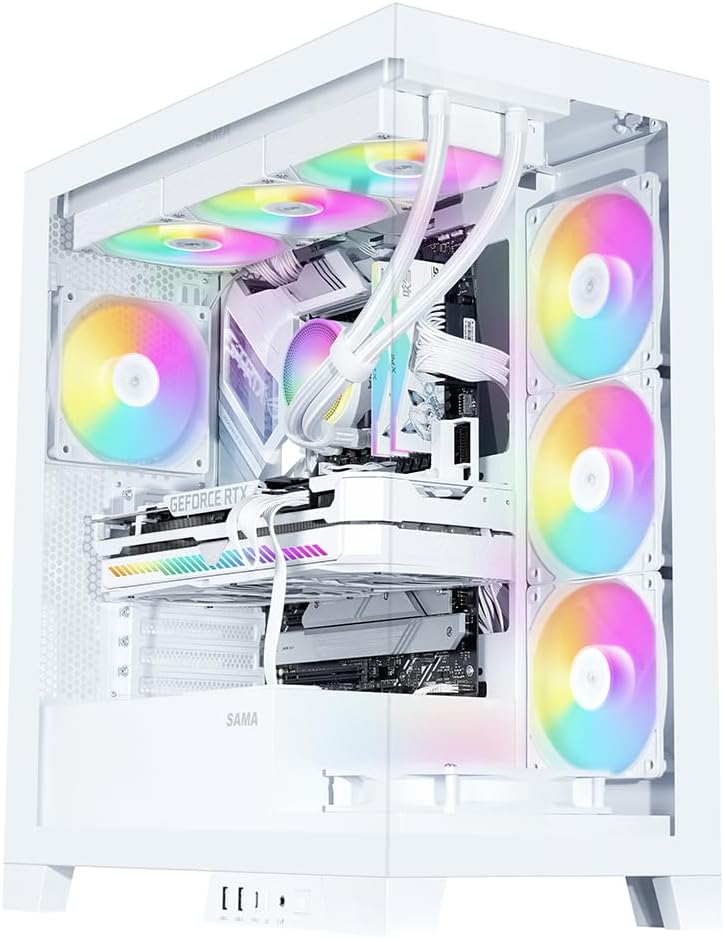
Image 2.1: Fully assembled SAMA V50 case highlighting internal components and RGB lighting.
3. محتويات العبوة
يرجى التأكد من وجود جميع العناصر في الحزمة:
- SAMA V50 Mid Tower PC Case
- 4 x Pre-installed ARGB PWM Fans
- صندوق الملحقات (يحتوي على براغي، وفواصل، وربطات كابلات، وما إلى ذلك)
- دليل المستخدم (هذا المستند)
4. المواصفات
| ميزة | مواصفة |
|---|---|
| اسم الموديل | SAMA Case V50 |
| الأبعاد (الطول × العرض × الارتفاع) | 17.36 × 9.25 × 19.72 بوصة (441 × 235 × 501 مم) |
| نوع الحالة | البرج الاوسط |
| مادة | SPCC Steel, Tempered Glass, ABS Plastic |
| التوافق مع اللوحة الأم | ATX, Micro-ATX, Mini-ITX, Reverse-ATX |
| ارتفاع مبرد وحدة المعالجة المركزية | حتى 181 ملم |
| دعم طول وحدة معالجة الرسومات | حتى 410 ملم |
| PSU Length Support | Up to 265mm (ATX) |
| فتحات التوسعة | 7 فتحات PCIe |
| حجرات القيادة | 3 x 3.5" HDD, 3 x 2.5" SSD (combined with 3.5" mounts) |
| دعم المشجعين | الجزء العلوي: 3 × 120 ملم / 2 × 140 ملم الجانب: 3 × 120 ملم الخلفية: 1 × 120 مم / 1 × 140 مم القاع: 3 × 120 ملم |
| دعم المبرد | الأعلى: 360 مم / 280 مم / 240 مم / 140 مم / 120 مم Side: 360mm / 280mm / 240mm / 140mm / 120mm الخلفية: 140 ملم / 120 ملم |
| منافذ الإدخال / الإخراج الأمامية | 2 x USB 3.0, 1 x USB 3.1 Type-C, HD Audio/Mic, Power Button, LED Control Button |

Image 4.1: Motherboard and cooling compatibility overview.
5. الإعداد والتثبيت
Follow these steps for assembling your PC components within the SAMA V50 case.
5.1. إعداد القضية
- إزالة الألواح الجانبية: Carefully remove the tempered glass side panels. The V50 features an easy-to-disassemble design.
- قم بإزالة اللوحة العلوية: The top panel is mounted with pressure mounts. It can be completely removed for easier hardware installation.
- Detachable Column: The internal column can be optionally disassembled for a cleaner aesthetic without affecting stability.

Image 5.1: Easy-to-disassemble design for convenient access.

Image 5.2: Detachable column for aesthetic customization.
5.2. تركيب اللوحة الأم
- Install the necessary standoffs for your motherboard form factor (ATX, Micro-ATX, Mini-ITX) onto the motherboard tray.
- قم بوضع اللوحة الأم بعناية على الحوامل، مع محاذاة فتحات البراغي.
- قم بتأمين اللوحة الأم باستخدام البراغي المتوفرة.
5.3. GPU and PCIe Card Installation
- Remove the appropriate PCIe slot covers from the rear of the case.
- Insert your graphics card or other PCIe expansion cards into the motherboard's PCIe slots.
- Secure the cards with screws. The V50 supports bulky GPUs with its 7-slot PCIe design.
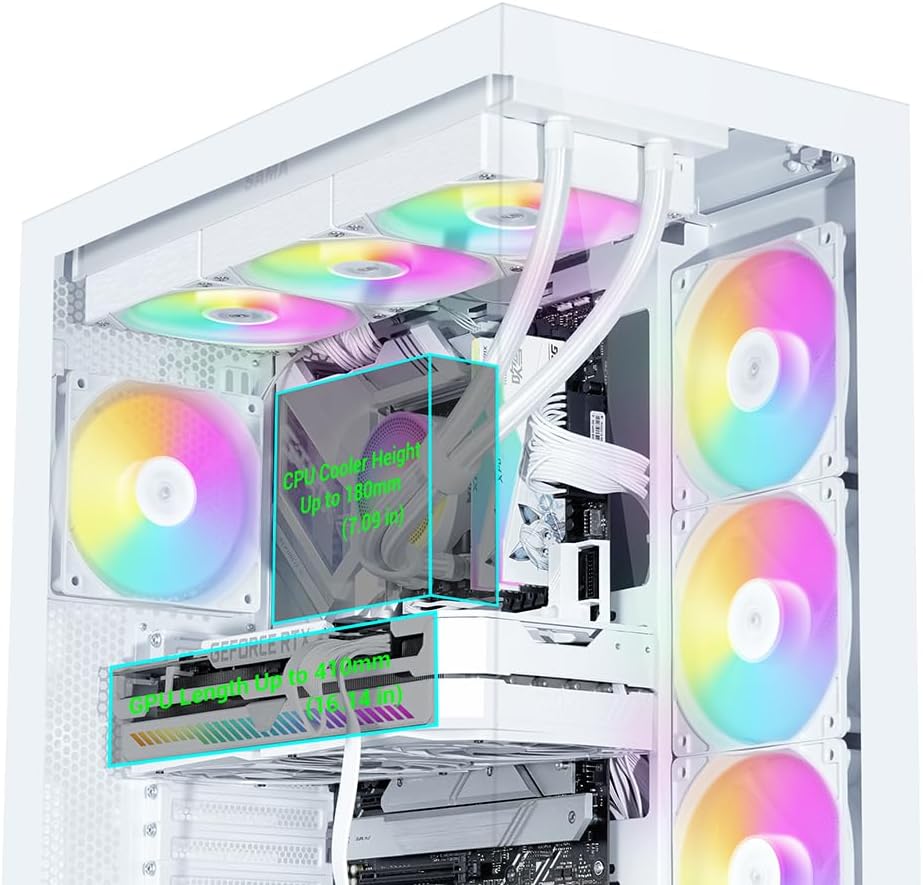
Image 5.3: Clearance for CPU cooler and GPU length.
5.4. تركيب جهاز التخزين
The V50 offers multiple drive bays for 3.5" HDDs and 2.5" SSDs, primarily located behind the motherboard tray and near the PSU shroud.
- Mount your 2.5" SSDs or 3.5" HDDs into the designated drive trays/mounts.
- Secure the drives with the provided screws.

Image 5.4: Drive bay locations for SSDs and HDDs.
5.5. تركيب وحدة إمداد الطاقة (PSU)
- Slide your ATX power supply into the dedicated compartment at the bottom rear of the case.
- قم بتأمين وحدة إمداد الطاقة باستخدام البراغي من الجزء الخلفي للعلبة.
5.6. تركيب المروحة والرادياتير
The SAMA V50 comes with 4 pre-installed ARGB PWM fans. Additional fans or radiators can be installed as follows:
- قمة: يدعم ما يصل إلى 3 مراوح بحجم 120 مم أو مشعاع بحجم 360 مم.
- جانب: يدعم ما يصل إلى 3 مراوح بحجم 120 مم أو مشعاع بحجم 360 مم.
- مؤخرة: Supports 1 x 120mm or 1 x 140mm fan.
- قاع: يدعم ما يصل إلى 3 مراوح بحجم 120 مم.

Image 5.5: Detailed fan and radiator support.
5.7. إدارة الكابلات
The V50 features a dual-chamber layout and ample space behind the motherboard tray for effective cable management.
- Route all power cables and data cables through the designated cutouts to the rear of the motherboard tray.
- Use the included zip ties to bundle and secure cables, ensuring optimal airflow and a clean aesthetic.

Image 5.6: Airflow channel for efficient cooling.
5.8. توصيلات اللوحة الأمامية
Connect the front panel cables (USB, Audio, Power, Reset, LED) to the corresponding headers on your motherboard. The I/O module is relocatable to two locations.

Image 5.7: Relocatable Front I/O Module.
5.9. ARGB Fan Hub Connection
The pre-installed ARGB fans connect to an included ARGB hub. To power the hub, connect a SATA power cable from your PSU to the SATA connector on the hub. Then, connect the ARGB cable from the hub to one of the 3-pin ARGB connectors on your motherboard. This allows for motherboard control of the fan lighting.

Image 5.8: Connecting the fan control board.
6. تعليمات التشغيل
6.1. التحكم في مروحة ARGB
The pre-installed ARGB fans offer flexible lighting control:
- التحكم اليدوي: Use the dedicated LED button on the front control panel to cycle through various lighting modes and colors.
- مزامنة اللوحة الأم: To allow your motherboard to control the fan colors, press and hold the LED button on the front panel for approximately 7-8 seconds. This will switch control to your motherboard's ARGB software (e.g., ASUS Aura Sync, MSI Mystic Light, Gigabyte RGB Fusion).
Note: The included fan hub does not provide fan speed control. Fan speed is controlled via PWM connection to the motherboard.
7. الصيانة
Regular maintenance helps ensure the longevity and optimal performance of your PC case.
- فلاتر الغبار: The V50 features magnetic dust filters. Regularly remove and clean these filters to prevent dust buildup and maintain good airflow.
- تنظيف العلبة: استخدمي قطعة قماش ناعمةamp cloth to clean the exterior surfaces of the case. For tempered glass panels, use a glass cleaner and a microfiber cloth. Avoid abrasive cleaners.
- Internal Dust: Periodically use compressed air to clear dust from internal components and fans. Ensure the system is powered off and unplugged before cleaning.
8. استكشاف الأخطاء وإصلاحها
If you encounter issues with your SAMA V50 case, refer to the following common solutions:
- المراوح لا تدور/لا يوجد إضاءة RGB:
- Ensure the ARGB fan hub is correctly connected to your PSU via a SATA power cable.
- Verify that the ARGB cable from the hub is securely connected to a 3-pin ARGB header on your motherboard.
- If using motherboard software for RGB control, ensure the LED button on the front panel has been held for 7-8 seconds to transfer control.
- Check all fan PWM cables are connected to appropriate fan headers on the motherboard.
- منافذ الإدخال/الإخراج في اللوحة الأمامية لا تعمل:
- Confirm that all front panel cables (USB, Audio, Power, Reset, LED) are correctly connected to their respective headers on the motherboard. Refer to your motherboard manual for header locations.
- ضعف تدفق الهواء/ارتفاع درجات الحرارة:
- قم بتنظيف جميع فلاتر الغبار والمكونات الداخلية.
- Ensure fans are oriented correctly for optimal airflow (intake vs. exhaust).
- Verify that all fans are spinning.
9. الضمان والدعم
SAMA products are manufactured to high-quality standards. For warranty information and technical support, please refer to the official SAMA webالموقع أو تواصل مع التاجر المحلي. احتفظ بإيصال الشراء للمطالبة بالضمان.
لمزيد من المساعدة، يمكنك زيارة SAMA Official Store on Amazon.


