
1. المقدمة
Thank you for choosing the SAMA GT850-White 850W Power Supply. This unit is designed to provide stable and efficient power to your computer system, featuring a fully modular design, 80 PLUS Gold certification, and compatibility with the latest ATX 3.1 and PCIe 5.1 standards. Please read this manual carefully before installation and use to ensure optimal performance and safety.
2. معلومات السلامة
- Always disconnect the AC power cord from the wall outlet before installing or removing the power supply.
- لا تفتح وحدة إمداد الطاقة. مستوى الصوت مرتفعtagتوجد هذه المواد في الداخل، مما قد يتسبب في إصابات خطيرة أو الوفاة.
- Ensure your computer case and components are properly grounded.
- Use only genuine SAMA modular cables. Third-party cables might not be compatible and could cause serious damage to your system.
- Avoid operating the power supply in high humidity or high-temperature environments.
- Do not insert any objects into the fan grille or ventilation openings.
3. محتويات العبوة
تأكد من وجود جميع العناصر في الحزمة الخاصة بك:
- SAMA GT850-White 850W Power Supply Unit
- Modular Cable Set (Flat White Cables)
- سلك الطاقة المتردد
- براغي تركيب (4x)
- دليل المستخدم (هذا المستند)

Figure 1: SAMA GT850-White 850W Power Supply with its fully modular white flat cables.
4. مواصفات المنتج
- Fully Modular Design & Streamlined Cable Management: Connect only the necessary cables, reducing clutter and improving airflow within your PC case. Flat cables further enhance cable management.
- ATX 3.1 & PCIe 5.1 Compatibility: Designed to meet the latest ATX 3.1 standards, featuring native PCIe 5.1 ports and cables for seamless compatibility with high-end GPUs like the RTX 3090 Ti and RTX 40 series.
- 80 PLUS Gold Certification: Achieves up to 91.15% efficiency at 50% load, minimizing energy waste, heat generation, and enhancing system stability.
- ECO Fan with FDB Bearing & Quiet Operation: Equipped with a 120mm ECO fan featuring Fluid Dynamic Bearing (FDB) technology, providing efficient cooling with noise levels as low as ≤20dB-A under heavy loads.
- Premium Japanese Capacitors: Built with high-quality Japanese capacitors for stable power delivery and long-term reliability.
- Compact Body Size: The 140mm compact design allows for greater flexibility in case compatibility.
- الحماية الشاملة: Features multiple power protection circuit designs, including OCP, OVP, UVP, OPP, and SCP.

Figure 2: Key features of the SAMA GT850-White Power Supply, including 80 Plus Gold efficiency and ATX 3.1 / PCIe 5.1 readiness.

Figure 3: The compact 140mm body size of the SAMA GT850-White Power Supply, with dimensions indicated.
5. الإعداد والتثبيت
- قم بتجهيز صندوق جهاز الكمبيوتر الخاص بك: Ensure your PC case has adequate space for the power supply and proper ventilation.
- قم بتركيب وحدة التزويد بالطاقة: Secure the SAMA GT850-White into the designated PSU bay of your PC case using the provided mounting screws.
- توصيل الكابلات المعيارية: Identify the necessary cables for your motherboard, CPU, GPU, and peripherals. Connect these cables to the corresponding modular ports on the power supply. Refer to the labels on the PSU for correct connections.
- الاتصال بالمكونات:
- اللوحة الأم: قم بتوصيل كابل ATX ذو 24 سنًا باللوحة الأم.
- وحدة المعالجة المركزية: Connect the 4+4-pin or 8-pin CPU power cable(s) to your motherboard.
- وحدة معالجة الرسوميات: Connect the appropriate PCIe cables (e.g., 12V-2x6 for RTX 40 series, or 6+2-pin for other GPUs) to your graphics card(s).
- الأجهزة الطرفية: Connect SATA power cables to SSDs, HDDs, and other SATA-powered devices. Connect Molex cables if needed.
- إدارة الكابلات: Route the cables neatly behind the motherboard tray or in designated cable management channels to improve airflow and aesthetics. Use cable ties if necessary.
- توصيل طاقة التيار المتردد: بمجرد التأكد من سلامة جميع التوصيلات الداخلية، قم بتوصيل سلك الطاقة بمصدر الطاقة ثم بمأخذ الحائط.
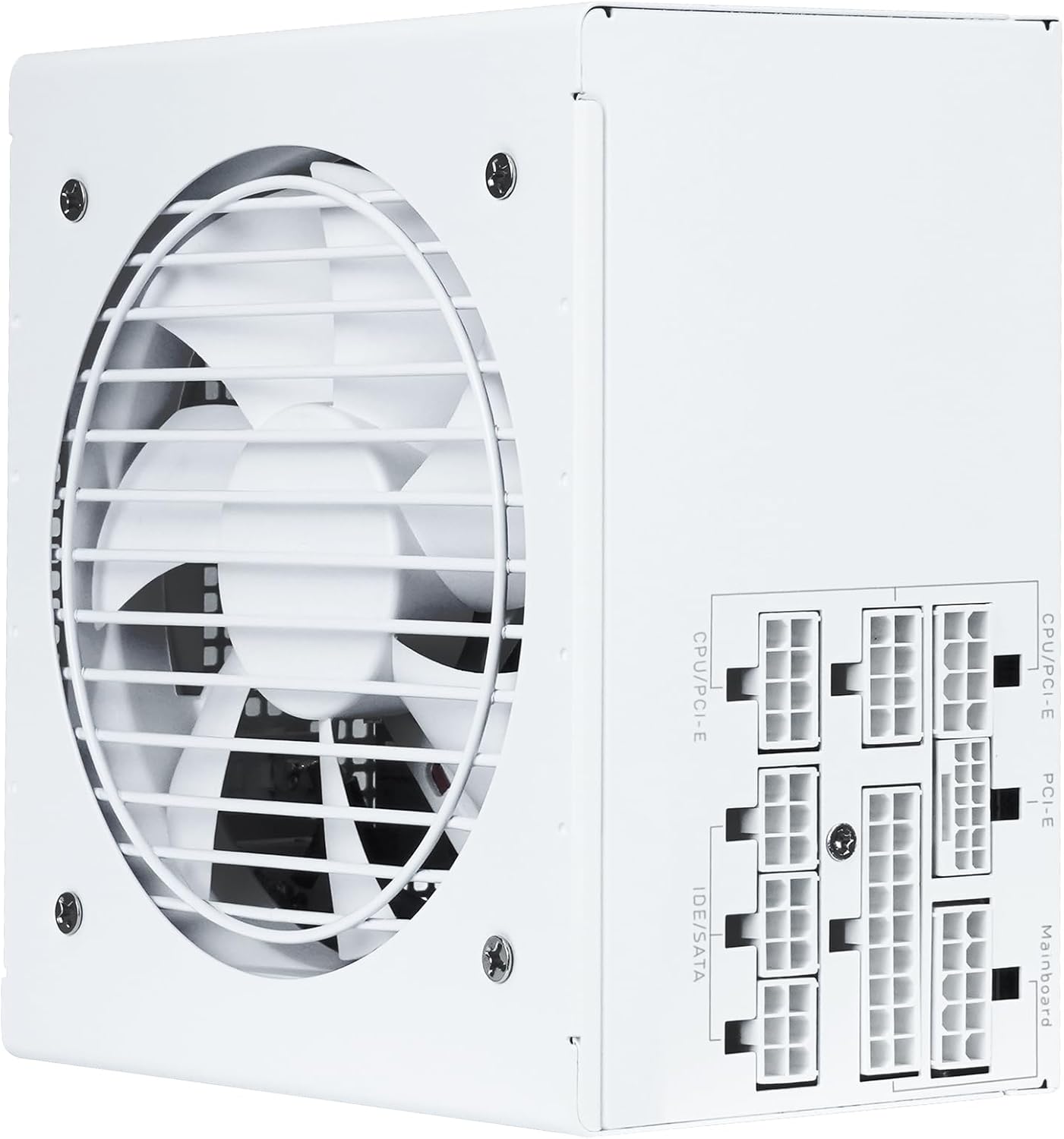
الشكل 4: انتهىview of the modular cable connection ports on the SAMA GT850-White Power Supply.
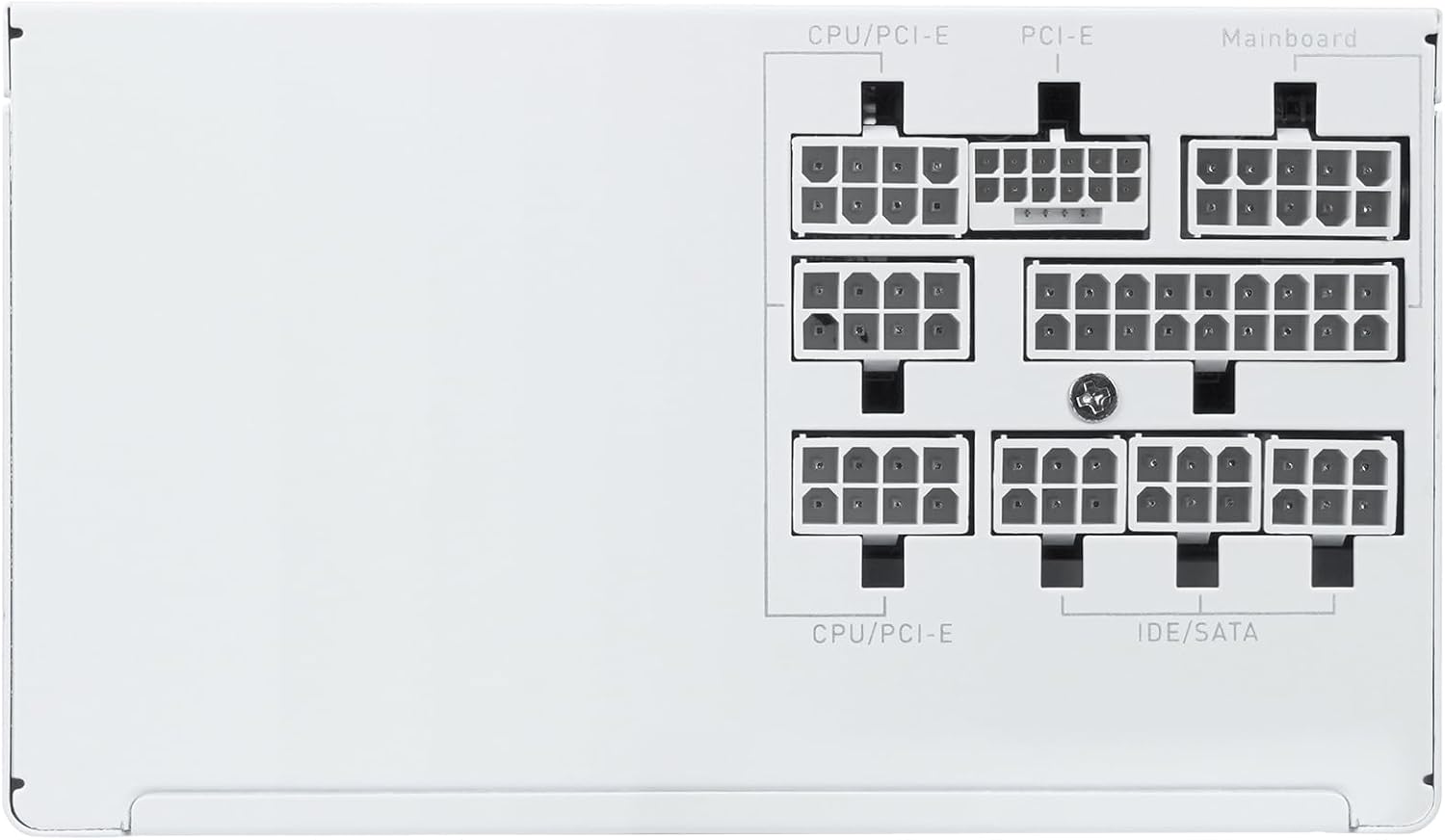
Figure 5: Close-up of the clearly labeled modular ports for organized cable management.
6. تعليمات التشغيل
- تشغيل: After connecting all cables, flip the power switch on the back of the PSU to the 'ON' (I) position. Then, power on your computer using the case's power button.
- إيقاف التشغيل: To shut down your system, use the operating system's shutdown function. For a complete power cycle, flip the power switch on the back of the PSU to the 'OFF' (O) position and disconnect the AC power cord.
- ECO Fan Mode: The 120mm ECO fan operates intelligently. At low loads, the fan may remain off for silent operation. It will automatically activate as the load increases to maintain optimal temperatures.
7. الصيانة
- تنظيف: Periodically clean the exterior of the power supply and its fan grille to prevent dust buildup, which can hinder cooling performance. Use compressed air or a soft, dry cloth. Ensure the power supply is off and disconnected from the AC outlet before cleaning.
- إدارة الكابلات: Regularly check cable connections to ensure they are secure. Re-organize cables if they become dislodged or interfere with airflow.
8. استكشاف الأخطاء وإصلاحها
- لا يوجد طاقة:
- Check if the AC power cord is securely connected to both the wall outlet and the power supply.
- تأكد من أن مفتاح الطاقة الموجود في الجزء الخلفي من وحدة إمداد الطاقة موجود في وضع التشغيل (I).
- Verify all modular cables are correctly and firmly seated in both the power supply and the respective components.
- اختبر منفذ الحائط بجهاز آخر للتأكد من وجود الطاقة فيه.
- عدم استقرار النظام/الإغلاق العشوائي:
- تأكد من أن متطلبات الطاقة الخاصة بنظامك لا تتجاوز سعة وحدة إمداد الطاقة (PSU) البالغة 850 وات.
- تأكد من وجود تهوية مناسبة داخل علبة الكمبيوتر لديك لمنع ارتفاع درجة الحرارة.
- تأكد من أن جميع توصيلات الطاقة آمنة.
- ضوضاء المروحة المفرطة:
- The fan speed adjusts based on load. High load will result in higher fan speed and noise.
- Ensure the fan grille is free from dust and obstructions.
- If the fan is constantly loud even under low load, contact customer support.
9. المواصفات
| ميزة | مواصفة |
|---|---|
| نموذج | GT850-White |
| انتاج واتtage | 850 واط |
| شهادة الكفاءة | 80 PLUS ذهب |
| معيار ATX | متوافق مع ATX 3.1 |
| معيار PCIe | متوافق مع PCIe 5.1 |
| عامل الشكل | ايه تي اكس |
| طريقة التبريد | Air (120mm FDB ECO Fan) |
| أبعاد المنتج (الطول × العرض × الارتفاع) | 5.51 × 5.91 × 3.39 بوصة (140 × 150 × 86 مم) |
| وزن العنصر | 4.66 رطل |
| الحد الأدنى لحجم الإدخالtage | 85 فولت (تيار متردد) |
| المكثفات | المكثفات اليابانية |
10. الضمان والدعم
The SAMA GT850-White Power Supply comes with a 5-year warranty, ensuring long-term reliability and peace of mind. For technical support, warranty claims, or any questions regarding your product, please contact SAMA customer service through their official webالموقع أو بائع التجزئة الذي تم شراء المنتج منه.
يرجى الاحتفاظ بإثبات الشراء للتحقق من صحة الضمان.