
1. المقدمة
Thank you for choosing the Vieta Pro Easy 2 Portable Bluetooth Speaker. This manual provides essential information for setting up, operating, and maintaining your speaker. Please read it carefully before use to ensure optimal performance and longevity of your device.
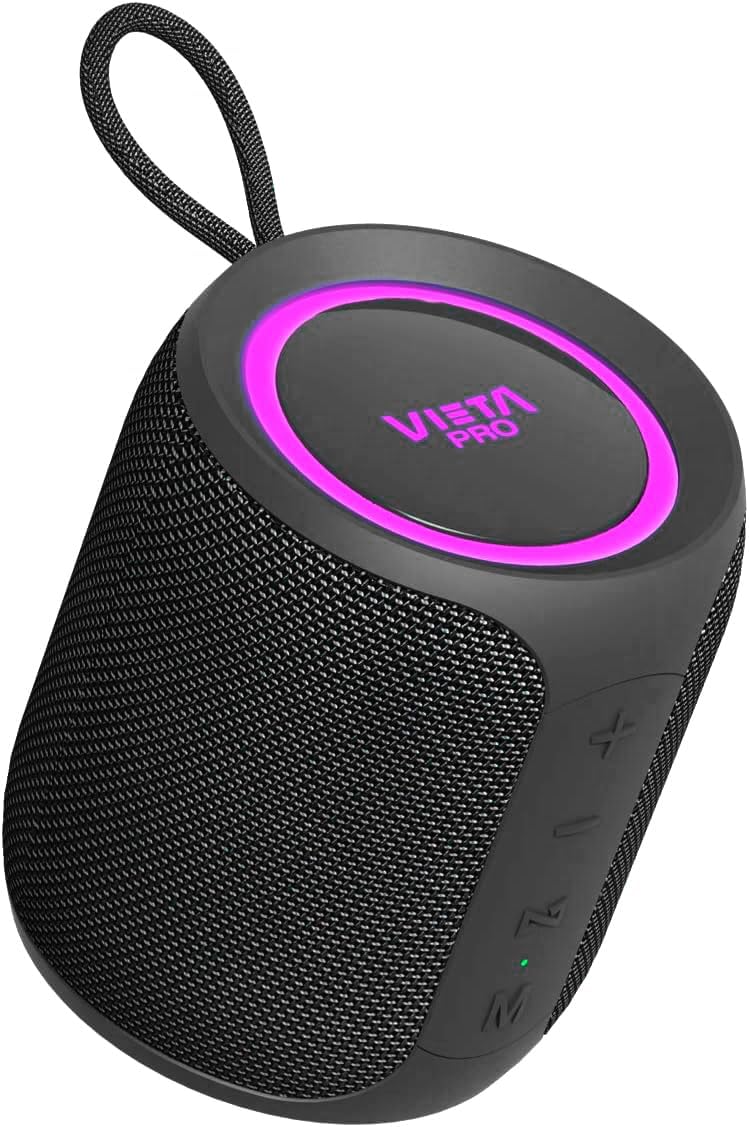
Image 1.1: Vieta Pro Easy 2 Portable Bluetooth Speaker
The Vieta Pro Easy 2 is a versatile portable speaker designed for high-quality audio on the go. It features 20W powerful sound, FM Radio, IPX7 water resistance, a 12-hour battery life, a built-in microphone for hands-free calls, stereo sound capabilities, USB-C charging, and True Wireless Stereo (TWS) functionality.
2. محتويات العبوة
يرجى تحديد المربع للعناصر التالية:
- 1x Vieta Pro Easy 2 Portable Bluetooth Speaker
- 1x USB-C شحن كابل
- 1x 3.5mm Jack Audio Cable
- 1x دليل المستخدم (هذه الوثيقة)
3. انتهى المنتجview
3.1. مكونات السماعة

الصورة 3.1: خلفي view of the speaker with controls
- زر الطاقة: Long press to power on/off. Short press to change playback mode.
- رفع مستوى الصوت (+) / المقطع التالي: اضغط ضغطة قصيرة للانتقال إلى المقطع التالي. اضغط ضغطة طويلة لزيادة مستوى الصوت.
- خفض مستوى الصوت (-) / المقطع السابق: اضغط ضغطة قصيرة للانتقال إلى المقطع السابق. اضغط ضغطة طويلة لخفض مستوى الصوت.
- Play/Pause / Call / Voice Assistant (M): Short press to play/pause music or answer/end calls. Long press to activate voice assistant.
- زر الوضع (M): Short press to switch between Bluetooth, FM Radio, USB, and Aux-In modes.
- مؤشر LED: Shows charging status, Bluetooth pairing status, and mode.
3.2. المنافذ
- منفذ USB-C: لشحن مكبر الصوت.
- منفذ USB: لتشغيل الموسيقى من ذاكرة فلاش USB.
- Aux-In Port (3.5mm): لتوصيل أجهزة الصوت الخارجية عبر الكابل.
4. الإعداد
4.1. شحن مكبر الصوت
Before first use, fully charge the speaker. Connect the supplied USB-C cable to the speaker's USB-C port and the other end to a USB power adapter (not included) or a computer's USB port. The LED indicator will show charging status and turn off when fully charged.
4.2. تشغيل/إيقاف التشغيل
- To power on: Long press the Power button. The speaker will emit an audible prompt and the LED indicator will light up.
- To power off: Long press the Power button again. The speaker will emit an audible prompt and the LED indicator will turn off.
4.3. اقتران بلوتوث
لتوصيل مكبر الصوت بجهاز يدعم تقنية البلوتوث:
- Ensure the speaker is powered on and in Bluetooth mode. If not, short press the Mode button until you hear the "Bluetooth mode" prompt. The LED indicator will flash, indicating it's in pairing mode.
- قم بتفعيل البلوتوث على هاتفك الذكي أو جهازك اللوحي أو أي جهاز آخر.
- بحث عن available Bluetooth devices and select "Vieta Pro Easy 2" from the list.
- Once connected, the speaker will confirm with an audible prompt, and the LED indicator will stop flashing and remain solid.
4.4. إقران ستيريو لاسلكي حقيقي (TWS)
TWS allows you to connect two Vieta Pro Easy 2 speakers for a stereo sound experience.
- Ensure both Easy 2 speakers are powered on and not connected to any Bluetooth device.
- On one speaker (this will be the primary speaker), long press the Play/Pause button until you hear a pairing tone.
- سيتم توصيل السماعتين تلقائيًا. بعد الاتصال، ستسمع نغمة تأكيد.
- Now, connect your Bluetooth device to the primary speaker as described in section 4.3. Both speakers will play audio in stereo.
5. تعليمات التشغيل
5.1. Music Playback (Bluetooth/USB/Aux-In)
- تشغيل/إيقاف مؤقت: اضغط قصيرًا على زر التشغيل / الإيقاف المؤقت.
- المسار التالي: اضغط لفترة قصيرة على زر رفع الصوت (+).
- المسار السابق: اضغط لفترة قصيرة على زر خفض الصوت (-).
- التحكم في مستوى الصوت: Long press the Volume Up (+) button to increase volume. Long press the Volume Down (-) button to decrease volume.
5.2. راديو FM
لاستخدام وظيفة راديو FM:
- Short press the Mode button to switch to FM Radio mode.
- اضغط مطولاً على زر التشغيل/الإيقاف المؤقت لمسح وحفظ محطات FM المتاحة تلقائيًا.
- Short press the Volume Up (+) or Volume Down (-) buttons to switch between saved stations.
Note: The FM radio functionality is basic and does not display the frequency. Station selection is sequential through saved channels.
5.3. تشغيل USB
أدخل محرك أقراص فلاش USB يحتوي على ملف صوتي MP3 files into the USB port. The speaker will automatically switch to USB mode and begin playback. Use the music playback controls as described in section 5.1.
5.4. Aux-In Mode
Connect an external audio device (e.g., MP3 player, computer) to the speaker's 3.5mm Aux-In port using the provided audio cable. The speaker will automatically switch to Aux-In mode. Control playback from your connected device.
5.5. المكالمات بدون استخدام اليدين
عند توصيل مكبر الصوت بالهاتف الذكي عبر البلوتوث، يمكنك استخدامه لإجراء مكالمات بدون استخدام اليدين:
- الرد على المكالمة: اضغط قصيرًا على زر التشغيل / الإيقاف المؤقت.
- إنهاء المكالمة: اضغط لفترة قصيرة على زر التشغيل/الإيقاف المؤقت أثناء المكالمة.
- رفض المكالمة: اضغط لفترة طويلة على زر التشغيل/الإيقاف المؤقت.
5.6. مساعد صوتي
The speaker supports voice assistants like Alexa, Google Assistant, and Siri.
- تنشيط مساعد الصوت: Long press the Play/Pause button. The speaker will activate the voice assistant on your connected smartphone.
6. الصيانة
- تنظيف: استخدم قطعة قماش ناعمة وجافة لتنظيف مكبر الصوت. لا تستخدم منظفات أو مذيبات كاشطة.
- مقاومة الماء (IPX7): The speaker is IPX7 water-resistant, meaning it can be submerged in up to 1 meter of water for 30 minutes. Ensure all port covers are securely closed before exposure to water. After exposure to water, dry the speaker thoroughly before charging.

Image 6.1: Speaker demonstrating IPX7 water resistance
7. استكشاف الأخطاء وإصلاحها
| مشكلة | السبب المحتمل | حل |
|---|---|---|
| مكبر الصوت لا يعمل | بطارية منخفضة | اشحن السماعة بالكامل. |
| لا يوجد صوت | مستوى الصوت منخفض جدًا أو مكتوم | Increase volume on speaker and connected device. Check if device is muted. |
| فشل اقتران البلوتوث | Speaker not in pairing mode or device too far | Ensure speaker is in Bluetooth pairing mode (flashing LED). Move device closer to speaker. Forget speaker from device's Bluetooth list and re-pair. |
| استقبال راديو FM ضعيف | إشارة ضعيفة | Move speaker to a location with better signal. Re-scan for stations. |
| فشل الاقتران TWS | مكبرات الصوت متصلة بالفعل بأجهزة أخرى | Ensure both speakers are disconnected from other Bluetooth devices before initiating TWS pairing. |
8. المواصفات
- ماركة: فييتا برو
- اسم الموديل: سهل 2
- رقم الموديل: FBM-VM-BS36BK
- نوع السماعة: مكبر صوت بلوتوث محمول
- تقنية الاتصال: بلوتوث 5.0
- طاقة الإخراج: 20 واط
- وضع إخراج الصوت: ستيريو
- استجابة التردد: 80.2 هرتز
- عمر البطارية: حتى ساعتين
- منفذ الشحن: يو اس بي-سي
- مقاومة الماء: IPX7
- المميزات الخاصة: True Wireless Stereo (TWS), Built-in Microphone, Voice Assistant Button, FM Radio, USB Playback, Aux-In
- الأبعاد (الطول × العرض × الارتفاع): 8.4 سم × 9.5 سم × 8.4 سم
- وزن: 550 جرام
- مادة: Silicone or Rubber

Image 8.1: Speaker dimensions
9. الضمان والدعم
The Vieta Pro Easy 2 Portable Bluetooth Speaker comes with a limited warranty. For specific warranty terms and conditions, please refer to the warranty card included in your package or contact Vieta Pro customer support.
For technical assistance, troubleshooting, or any other inquiries, please visit the official Vieta Pro webالموقع أو الاتصال بقسم خدمة العملاء.