
1. المقدمة
Thank you for choosing the Anmite 24-inch IPS 100Hz Full HD Gaming Monitor, model AN-238W02. This manual provides essential information for setting up, operating, and maintaining your new monitor. Please read this manual thoroughly before use to ensure proper functionality and to maximize your viewتجربة رائعة.
This monitor features a 24-inch IPS panel with a 1920 x 1080 Full HD resolution, a 100Hz refresh rate, and a 1ms response time, designed to deliver smooth and vibrant visuals for gaming and multimedia. It also includes AMD FreeSync Premium technology for tear-free gameplay and specialized FPS/RTS game modes.
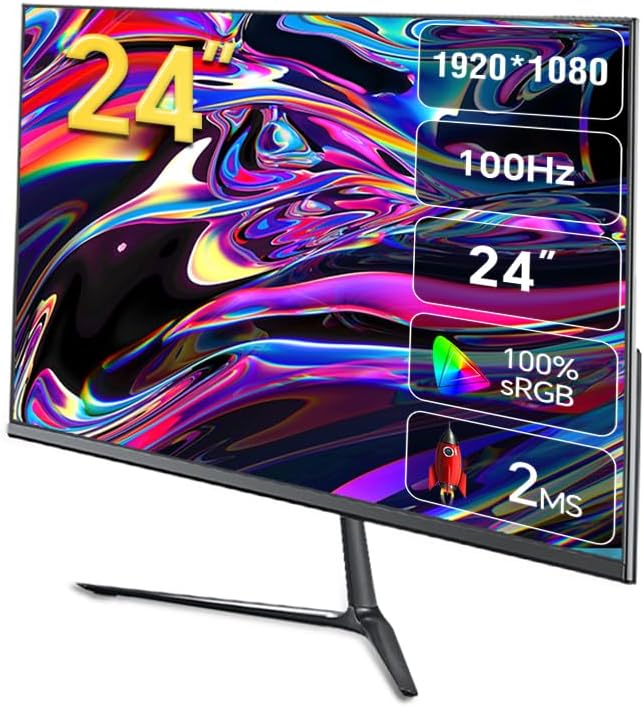
الصورة 1.1: الجبهة view of the Anmite AN-238W02 monitor, showcasing its 24-inch display, 1920x1080 resolution, 100Hz refresh rate, and 1ms response time.
2. معلومات السلامة
- ضع الشاشة دائمًا على سطح ثابت ومستوٍ لمنعها من السقوط.
- لا تسد فتحات التهوية. تأكد من وجود مساحة كافية حول الشاشة لضمان تدفق الهواء بشكل صحيح.
- استخدم فقط محول الطاقة المرفق مع الشاشة.
- Keep the monitor away from water, moisture, and direct sunlight.
- لا تحاول فتح الشاشة جasinز. إحالة جميع أعمال الصيانة إلى موظفين مؤهلين.
- افصل الشاشة عن مأخذ الطاقة أثناء العواصف الرعدية أو عند عدم استخدامها لفترات طويلة.
3. محتويات العبوة
يرجى التحقق من محتويات العبوة عند فتحها. في حال وجود أي نقص أو تلف في المنتجات، يرجى الاتصال بالبائع.
- Anmite 24" IPS 100Hz Full HD Gaming Monitor (AN-238W02)
- حامل الشاشة (القاعدة والرقبة)
- محول الطاقة وكابل الطاقة
- كابل HDMI
- دليل المستخدم (هذا المستند)
4. الإعداد
4.1 تجميع حامل الشاشة
- قم بإزالة الشاشة بعناية من عبوتها، مع الحفاظ على الشاشة محمية.
- Attach the stand neck to the back of the monitor by aligning the mounting points and securing with screws (if provided).
- Connect the stand base to the stand neck, ensuring it clicks into place or is secured with the provided screw.
- ضع الشاشة المجمعة على سطح ثابت ومستوٍ.
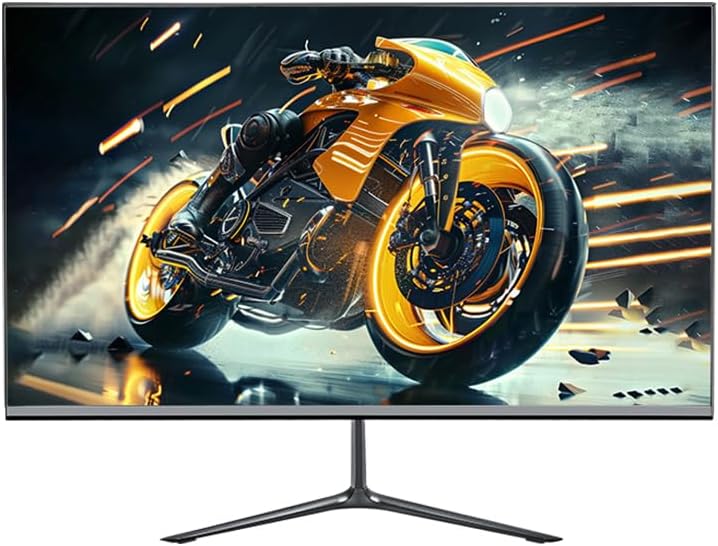
Image 4.1: The Anmite AN-238W02 monitor fully assembled with its stand, ready for connection.
4.2 توصيل الشاشة
تأكد من إيقاف تشغيل جميع الأجهزة قبل إجراء أي اتصالات.
- توصيل الطاقة: قم بتوصيل محول الطاقة بمدخل الطاقة الخاص بالشاشة، ثم قم بتوصيل كابل الطاقة بمأخذ الحائط.
- اتصال الفيديو: Connect one end of the HDMI cable (or VGA cable) to the corresponding port on your computer's graphics card and the other end to the HDMI (or VGA) input on the monitor. For optimal performance and 100Hz refresh rate, HDMI is recommended.
- مخرج الصوت: If you wish to connect external speakers or headphones, plug them into the Audio Out Jack on the monitor.
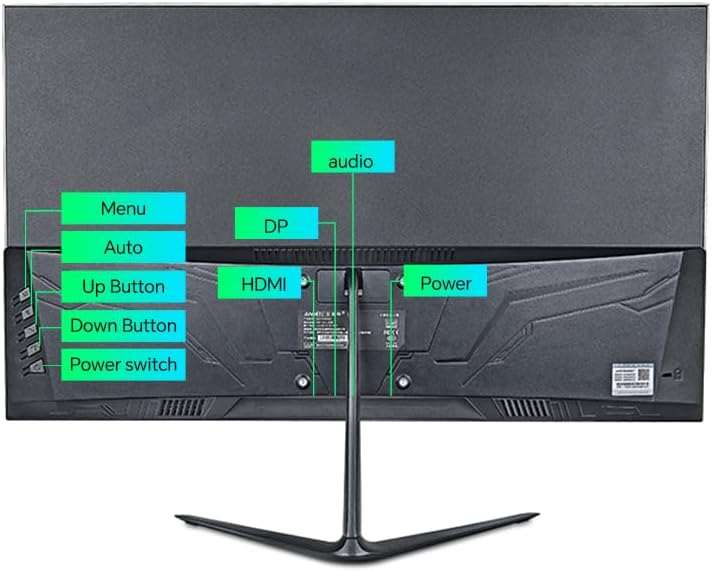
الصورة 4.2: خلفي view of the monitor, highlighting the power input, HDMI, DP (DisplayPort, if available), VGA, and audio ports, along with the control buttons.
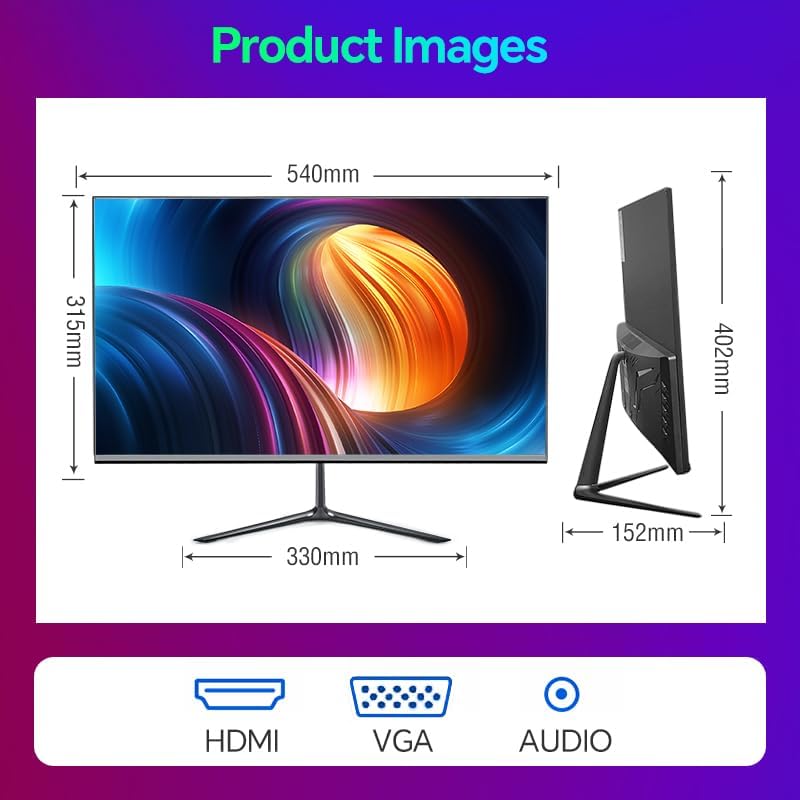
Image 4.3: Diagram illustrating the monitor's physical dimensions and the types of input ports available: HDMI, VGA, and Audio Out.
5. تعليمات التشغيل
5.1 تشغيل/إيقاف التشغيل
اضغط على مفتاح الطاقة button located on the back of the monitor to turn it on or off. The power indicator light will illuminate when the monitor is on.
5.2 قائمة العرض على الشاشة (OSD)
The OSD menu allows you to adjust various monitor settings. Use the buttons on the back of the monitor to navigate:
- قائمة طعام: اضغط لفتح قائمة العرض على الشاشة أو للدخول إلى قائمة فرعية.
- زر لأعلى: Navigate up or increase a value.
- زر لأسفل: Navigate down or decrease a value.
- Auto (or Exit): Automatically adjust image settings (VGA only) or exit the current menu.
5.3 الميزات والإعدادات الرئيسية
- معدل تحديث 100 هرتز: This monitor supports a 100Hz refresh rate, providing smoother motion and reduced input lag compared to standard 60Hz monitors. Ensure your graphics card and connection cable (HDMI recommended) support this refresh rate, and set it in your operating system's display settings.
- AMD FreeSync بريميوم: This technology synchronizes the monitor's refresh rate with your AMD graphics card's frame rate, eliminating screen tearing and stuttering. Enable FreeSync in your graphics card's control panel and ensure it is active in the monitor's OSD settings (if applicable).
- أنماط ألعاب التصويب من منظور الشخص الأول/الاستراتيجية في الوقت الحقيقي: The monitor includes pre-calibrated display settings optimized for First-Person Shooter (FPS) and Real-Time Strategy (RTS) games. Access these modes through the OSD menu to enhance visibility and color profiles for specific game genres.
- مكافحة الوميض: This feature reduces screen flickering, which can cause eye strain during prolonged use. It operates by preventing the backlight from flickering periodically, providing a more comfortable viewتجربة رائعة.
- Micro-Bezel Design: The monitor features a micro-bezel on three sides, maximizing the visible screen area and providing an immersive viewتجربة رائعة.

Image 5.1: The monitor displaying a high-refresh-rate gaming experience, emphasizing smooth visuals.

الصورة 5.2: تفصيلية view of the monitor's micro-bezel design, illustrating the minimal border around the display.
6. الصيانة
6.1 تنظيف الشاشة
- افصل الشاشة دائمًا قبل التنظيف.
- استخدم قطعة قماش ناعمة وخالية من الوبر برفق دampاشطف الشاشة بالماء أو بمنظف شاشة غير كاشط لمسحها.
- للشاشة جasinاستخدم قطعة قماش ناعمة وجافة. تجنب استخدام المواد الكيميائية القاسية أو المواد الكاشطة.
6.2 التخزين
إذا كنت ستخزن الشاشة لفترة طويلة، فافصلها عن الكهرباء، وقم بتغطيتها لحمايتها من الغبار، وخزنها في مكان بارد وجاف.
7. استكشاف الأخطاء وإصلاحها
| مشكلة | السبب المحتمل | حل |
|---|---|---|
| لا يوجد طاقة | كابل الطاقة غير متصل؛ منفذ الطاقة لا يعمل | تأكد من توصيل كابل الطاقة بشكل آمن بالشاشة والمقبس؛ اختبر المقبس بجهاز آخر. |
| لا يوجد إشارة | كابل الفيديو غير موصول؛ تم تحديد مصدر إدخال غير صحيح | Check video cable connections (HDMI/VGA); Use OSD menu to select correct input source. |
| الصورة ضبابية أو مشوهة | دقة غير صحيحة؛ مشكلة في الكابل | Set display resolution to 1920 x 1080 in your computer's display settings; Try a different video cable. |
| وميض الشاشة | عدم تطابق معدل التحديث؛ مشكلة في الكابل | Ensure refresh rate is set to 100Hz in display settings; Check for Anti-Flicker setting in OSD; Try a different video cable. |
8. المواصفات
| ميزة | مواصفة |
|---|---|
| رقم الموديل | AN-238W02 |
| حجم الشاشة | 23.8 بوصة |
| نوع اللوحة | اي بي اس |
| دقة | 1920 × 1080 (دقة عالية كاملة) |
| معدل التحديث | حتى 100 هرتز |
| وقت الاستجابة | 1 مللي ثانية |
| الاتصال | VGA, HDMI, Audio Out Jack |
| تقنية AMD FreeSync | Yes (Premium Compatible) |
| مضاد للوميض | نعم |
| أبعاد المنتج (مع الحامل) | 21 × 38 × 49 بوصة |
| وزن العنصر | 5.5 رطل |
| الشركة المصنعة | Shenzhen Anmite Technology Co.,Ltd. |
9. الضمان والدعم
Anmite monitors are designed for reliability and performance. For information regarding warranty coverage, please refer to the warranty card included with your purchase or the retailer's policy where the product was acquired.
For technical support, troubleshooting assistance beyond this manual, or service inquiries, please contact Anmite customer support through the contact information provided with your product documentation or visit the official Anmite webموقع.