
1. المقدمة
Thank you for choosing the Kaschun CT120S Professional Audio Mixer. This 12-channel mixer is designed for a wide range of audio applications, including DJing, studio recording, live streaming, and stage performances. It features 48V phantom power, USB recording, Bluetooth connectivity, and a built-in MP3 player, offering versatile control over your audio. This manual provides essential information for the proper setup, operation, and maintenance of your mixer to ensure optimal performance and longevity.
2. معلومات السلامة
- مزود الطاقة: Ensure the mixer is connected to a 110V AC power source with an American plug. Do not use incompatible power adapters.
- تهوية: Place the mixer in a well-ventilated area. Do not block ventilation openings.
- رُطُوبَة: Keep the mixer away from water, moisture, and high humidity. Do not operate with wet hands.
- حرارة: تجنب وضع الخلاط بالقرب من مصادر الحرارة مثل المشعاعات، أو أجهزة تسجيل الحرارة، أو المواقد، أو غيرها من الأجهزة المنتجة للحرارة.
- تنظيف: Disconnect power before cleaning. Use a dry, soft cloth. Do not use liquid cleaners or aerosol sprays.
- الخدمة: لا تحاول خدمة هذا المنتج بنفسك. قم بإحالة جميع أعمال الصيانة إلى أفراد الخدمة المؤهلين.
- السلطة الوهمية: When using 48V phantom power for condenser microphones, ensure the microphone is connected before activating phantom power to prevent damage.
3. انتهى المنتجview
The Kaschun CT120S is a professional 12-channel audio mixer designed for clarity and control. Its ultra-thin metal body ensures durability and portability. Key features include:
- 12 قنوات الإدخال: Multiple microphone (XLR) and line inputs for diverse audio sources.
- معادلة ثلاثية النطاقات: Dedicated knobs for high, mid, and low frequencies on each channel for precise tone shaping.
- طاقة فانتوم 48 فولت: Essential for condenser microphones, available on XLR inputs.
- اتصال بلوتوث 5.0: بث صوتي لاسلكي سلس من الأجهزة المتوافقة.
- USB Recording & MP3 Player: Direct recording to USB and playback of MP3 files with an LED display.
- معالج المؤثرات: Built-in effects for enhancing vocals and instruments.

الشكل 3.1: الجبهة view of the Kaschun CT120S Professional Audio Mixer, showcasing its 12 channels and control layout.
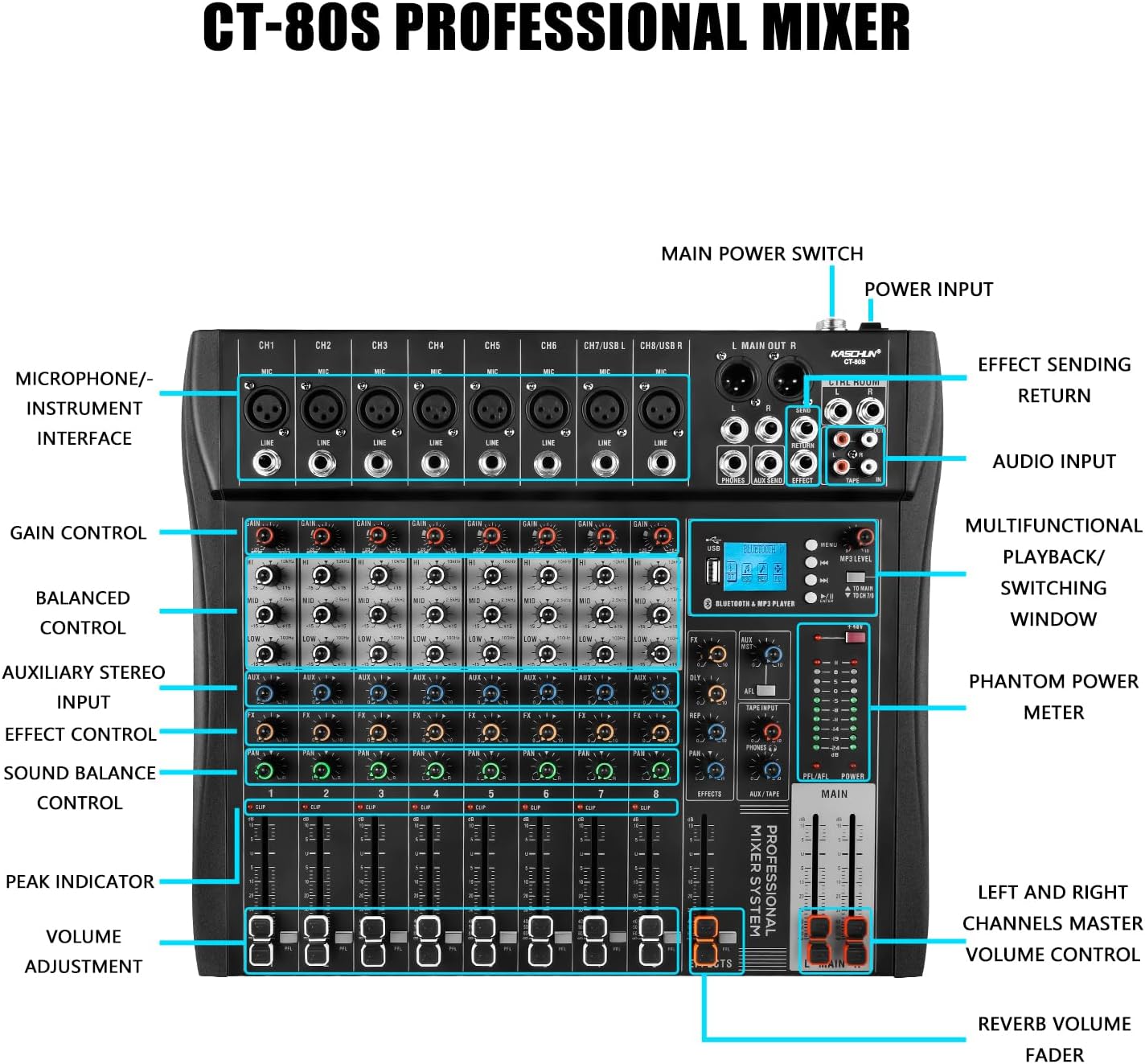
Figure 3.2: Detailed labeled diagram of the CT120S mixer, indicating the function of each control and input/output port.
4. الإعداد
Follow these steps to set up your Kaschun CT120S mixer:
- فك التعبئة: Carefully remove the mixer from its packaging. Inspect for any signs of damage.
- الموقع: ضع الخلاط على سطح مستوٍ وثابت، مع ضمان وجود تهوية كافية حول الوحدة.
- توصيل الطاقة: Connect the provided power cord to the mixer's power input and then to a standard 110V AC wall outlet. Do not power on yet.
- توصيلات الإدخال:
- الميكروفونات: Connect XLR microphones to the MIC inputs (CH1-CH12). If using condenser microphones, ensure 48V phantom power is off before connecting, then activate it once connected.
- الأجهزة ذات مستوى الخط: Connect instruments, keyboards, or other line-level devices to the LINE inputs using 1/4-inch TRS or TS cables.
- اتصالات الإخراج: Connect the MAIN OUT (XLR or 1/4-inch) to your amplifier, powered speakers, or recording interface. Connect headphones to the PHONES output for monitoring.
- التشغيل الأولي: Once all connections are secure, turn on the mixer's main power switch.
5. تعليمات التشغيل
This section details the primary functions and controls of your CT120S mixer.
5.1 ضوابط القناة
- احصل على التحكم: Adjusts the input sensitivity for each channel. Set this to achieve a strong signal without clipping (indicated by the PEAK indicator).
- معادل صوت ثلاثي النطاقات (عالي، متوسط، منخفض): Fine-tune the tonal characteristics of each channel. High controls frequencies above 10kHz, Mid around 2.5kHz, and Low below 100Hz. Adjust these to shape your sound.
- التحكم في ايه يو اكس: Sends a portion of the channel signal to the auxiliary output, typically used for monitor mixes or external effects.
- التحكم في العملات الأجنبية: يرسل جزءًا من إشارة القناة إلى معالج المؤثرات الداخلية.
- التحكم في المقلاة: Adjusts the stereo position of the channel signal (left to right).
- VOLUME Adjustment (Fader): Controls the output level of each individual channel to the main mix.
- CLIP/PEAK Indicator: Lights up when the input signal is too high, indicating potential distortion. Reduce the GAIN if this light illuminates frequently.
5.2 اتصال البلوتوث
The CT120S features built-in Bluetooth 5.0 for wireless audio playback.

Figure 5.1: Illustration of Bluetooth wireless connection to the CT120S mixer from a mobile device.
- قم بتفعيل البلوتوث على جهازك المحمول (الهاتف الذكي، الجهاز اللوحي، إلخ).
- On the mixer's MP3 player section, select the Bluetooth mode. The LED display will show 'BT' or a similar indicator.
- On your device, search for available Bluetooth devices and select 'CT120S' (or similar name).
- Once paired, you can play audio from your device through the mixer. Adjust the MP3/USB channel volume on the mixer.
5.3 USB Recording and MP3 Playback
The mixer supports direct USB recording and MP3 playback.
- تشغيل MP3: أدخل محرك أقراص فلاش USB يحتوي على MP3 files into the USB port. The mixer will automatically detect and begin playing. Use the controls on the MP3 player section to navigate tracks and adjust volume. The LED display shows song names.
- تسجيل يو اس بي: To record your mix, ensure a USB flash drive is inserted. Press the 'REC' button on the MP3 player section. The mixer will record the main stereo output directly to the USB drive. Press 'REC' again to stop recording.
5.4 48V Phantom Power
The mixer provides 48V phantom power for condenser microphones.

Figure 5.2: Close-up of the 48V phantom power switch and graphical representation of the 3-stage adjustable balance (EQ curves).
- Locate the '+48V' switch on the mixer.
- Before activating, ensure all condenser microphones are properly connected to their respective XLR inputs.
- Flip the '+48V' switch to the ON position. An indicator light will confirm activation.
- Always turn off phantom power before disconnecting condenser microphones or connecting dynamic microphones.
6. الصيانة
تضمن الصيانة المناسبة طول عمر الخلاط وأدائه الأمثل.
- تنظيف: Regularly wipe the mixer's surface with a soft, dry, lint-free cloth. For stubborn dirt, slightly dampانقع قطعة القماش في الماء. تجنب استخدام المنظفات أو المذيبات الكاشطة.
- حماية الغبار: When not in use, cover the mixer with a dust cover to prevent dust accumulation, especially in faders and knobs.
- تخزين: قم بتخزين الخلاط في مكان بارد وجاف بعيدًا عن أشعة الشمس المباشرة ودرجات الحرارة القصوى.
- إدارة الكابلات: تأكد من تنظيم الكابلات بشكل أنيق وعدم تعرضها للضغط لمنع تلف الموصلات والمنافذ.
7. استكشاف الأخطاء وإصلاحها
يتناول هذا القسم المشكلات الشائعة التي قد تواجهها.
| مشكلة | السبب المحتمل | حل |
|---|---|---|
| لا يوجد مخرج صوت | Main volume fader is down; input gain too low; output cables disconnected or faulty; speakers/amplifier off or muted. | Increase MAIN fader; adjust channel GAIN; check all cable connections; ensure speakers/ampمكبرات الصوت قيد التشغيل وغير مكتومة الصوت. |
| صوت مشوه | Input signal too high (CLIP indicator on); output level too high; faulty cable. | Reduce channel GAIN; lower MAIN output level; try a different cable. |
| مشاكل اتصال البلوتوث | Device not in pairing mode; mixer not in Bluetooth mode; interference. | Ensure both devices are in pairing mode; select Bluetooth mode on mixer; move closer to mixer; restart both devices. |
| الميكروفون لا يعمل (ميكروفون مكثف) | 48V phantom power not activated; faulty microphone or cable. | Activate +48V phantom power; test with a different microphone or cable. |
| التسجيل عبر منفذ USB لا يعمل | USB drive not inserted or formatted incorrectly; drive full. | Ensure USB drive is properly inserted; check drive format (FAT32 recommended); delete old files or use a new drive. |
8. المواصفات
| ميزة | مواصفة |
|---|---|
| رقم الموديل | CT120S |
| عدد القنوات | 12 |
| وزن العنصر | 5.99 رطل |
| أبعاد الحزمة | 22 × 17.27 × 4.5 بوصة |
| مصدر الطاقة | كهرباء سلكية |
| المجلدtage | 110 فولت (تيار متردد) |
| تكنولوجيا الاتصال | يو اس بي، بلوتوث |
| نوع موصل الإخراج | إكس إل آر |
| السلطة الوهمية | 48 فولت |
9. الضمان والدعم
For any issues encountered before purchase or during product usage, please do not hesitate to contact Kaschun customer service for assistance. We are committed to providing a response within 24 hours. Please refer to your purchase documentation for specific warranty terms and conditions.
For further support, visit the official Kaschun store or contact your retailer.