
مقدمة
This manual provides essential instructions for setting up, operating, maintaining, and troubleshooting your OPPO Reno 12 F 5G CPH2637 smartphone. Please read this guide thoroughly to ensure proper use and to maximize the device's capabilities.
1. الإعداد
1.1 فك الصندوق والفحص الأولي
أزل جميع العناصر من العبوة بعناية. تأكد من وجود المكونات التالية:
- OPPO Reno 12 F 5G CPH2637 Smartphone
- كابل USB Type-C
- محول الطاقة
- أداة قاذف SIM
- دليل البدء السريع (هذه الوثيقة)
قم بفحص الجهاز بحثًا عن أي ضرر مادي قبل المتابعة.
1.2 إدخال بطاقات SIM
The OPPO Reno 12 F 5G CPH2637 supports Dual SIM functionality.
- حدد مكان درج بطاقة SIM على جانب الجهاز.
- قم بإدخال أداة إخراج بطاقة SIM في الفتحة الصغيرة الموجودة بجوار الدرج واضغط برفق حتى يخرج الدرج.
- ضع بطاقات Nano-SIM الخاصة بك في الفتحات المخصصة لها على الدرج، مع التأكد من أن الموصلات الذهبية متجهة للأسفل.
- قم بدفع الدرج بعناية إلى داخل الجهاز حتى يصبح مستويًا مع الجانب.
1.3 شحن الجهاز
قبل الاستخدام الأول، يُنصح بشحن الجهاز بالكامل.
- قم بتوصيل كابل USB Type-C بمنفذ الشحن الموجود في الجزء السفلي من الهاتف.
- قم بتوصيل الطرف الآخر للكابل بمحول الطاقة.
- قم بتوصيل محول الطاقة بمأخذ الحائط.
- سيظهر مؤشر الشحن على الشاشة.
1.4 التشغيل والتكوين الأولي
To power on the device, press and hold the Power button located on the side until the OPPO logo appears. Follow the on-screen instructions to complete the initial setup, including language selection, Wi-Fi connection, Google account setup, and security settings.
2. تعليمات التشغيل
2.1 الملاحة الأساسية
The OPPO Reno 12 F 5G CPH2637 features a touchscreen interface. Use gestures such as tapping, swiping, pinching, and spreading to interact with the device. The navigation bar at the bottom of the screen typically includes Back, Home, and Recent Apps buttons.
2.2 إجراء المكالمات وإرسال الرسائل
لإجراء مكالمة، افتح هاتف أدخل الرقم، ثم انقر على أيقونة الاتصال. لإرسال رسالة، افتح التطبيق رسائل انتقل إلى التطبيق، ثم انقر فوق أيقونة الرسالة الجديدة، وأدخل المستلم ورسالتك، ثم انقر فوق إرسال.
2.3 الاتصال بالشبكات
Your device supports both Wi-Fi and 5G cellular networks.
- واي فاي: اذهب الى الإعدادات > Wi-Fi, turn on Wi-Fi, select your desired network, and enter the password if required.
- بيانات الجيل الخامس الخلوية: Ensure your SIM card has an active 5G plan. Go to Settings > Mobile Network > Data usage to manage your cellular data.
2.4 استخدام الكاميرا
افتح آلة تصوير app from your home screen or app drawer. Tap the shutter button to take a photo. Swipe left or right to switch between different camera modes such as Photo, Video, Portrait, and Night. Tap on the screen to focus on a specific area.
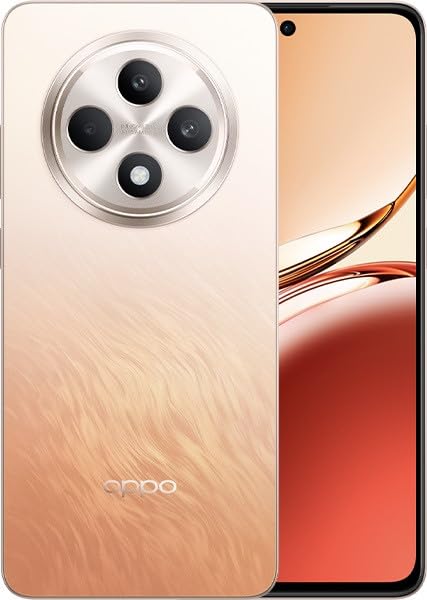
Image: OPPO Reno 12 F 5G CPH2637 smartphone in Amber Orange. This image displays the front and back of the device, highlighting its design and camera module.
2.5 ميزات الأمان
The device offers various security options to protect your data:
- فتح بصمة: سجل بصمات أصابعك في Settings > Password & Biometrics > Fingerprint.
- فتح الوجه: قم بإعداد خاصية التعرف على الوجه في Settings > Password & Biometrics > Face.
- قفل الشاشة: Choose a PIN, pattern, or password for screen lock in Settings > Password & Biometrics > Lock screen password.
3. الصيانة
3.1 تنظيف الجهاز
Use a soft, lint-free cloth to clean the screen and body of your phone. Avoid using harsh chemicals, abrasive materials, or aerosol sprays, as these can damage the device's finish and coatings. For stubborn smudges, slightly dampفي القماش مع الماء.
3.2 تحديثات البرامج
تحقق بانتظام من تحديثات البرامج وثبّتها لضمان الأداء الأمثل والأمان والوصول إلى الميزات الجديدة. انتقل إلى الإعدادات > حول الجهاز > محدّث للتحقق من التحديثات المتاحة.
3.3 العناية بالبطارية
To prolong battery life, avoid exposing the device to extreme temperatures. It is recommended to keep the battery charge between 20% and 80% for daily use. Avoid leaving the phone plugged in for extended periods after it is fully charged.
3.4 إدارة التخزين
إعادة بشكل دوريview وحذف غير الضروري fileقم بتحرير مساحة التخزين عن طريق حذف الملفات والتطبيقات والوسائط. يمكنك التحقق من استخدام مساحة التخزين في الإعدادات > حول الجهاز > التخزين.
4. استكشاف الأخطاء وإصلاحها
4.1 الجهاز لا يعمل
If your device does not turn on, ensure it is sufficiently charged. Connect it to the charger for at least 15 minutes, then try pressing and holding the Power button again for 10-15 seconds.
4.2 مشاكل الاتصال بالشبكة
If you experience issues with cellular data or Wi-Fi:
- قم بتشغيل وضع الطيران وإيقاف تشغيله.
- أعد تشغيل الجهاز.
- For cellular issues, ensure your SIM card is properly inserted and your plan is active.
- For Wi-Fi issues, restart your router and ensure you are within range.
4.3 تعطل التطبيقات أو تجميدها
If an app is not responding, try force-closing it from the Recent Apps screen. If the issue persists, clear the app's cache and data in Settings > Apps > [App Name] > Storage usageكحل أخير، قم بإلغاء تثبيت التطبيق ثم أعد تثبيته.
4.4 إعادة ضبط المصنع
A factory reset will erase all data on your device and restore it to its original factory settings. Back up all important data before performing a factory reset. اذهب الى الإعدادات > إعدادات النظام > النسخ الاحتياطي وإعادة الضبط > إعادة ضبط الهاتف > مسح جميع البيانات.
5. المواصفات
| ميزة | مواصفة |
|---|---|
| ماركة | اوبو |
| اسم الموديل | Reno 12 F 5G |
| رقم الموديل | سي بي اتش 2637 |
| سعة تخزين الذاكرة | 256 جيجا بايت |
| حجم ذاكرة الوصول العشوائي المثبتة | 12 جيجا بايت |
| تكنولوجيا الخلوية | 5G |
| تكنولوجيا الاتصال | 5G |
| عدد فتحات بطاقة SIM | شريحتين اتصال |
| لون | برتقالي كهرماني |
| مدخلات واجهة الإنسان | شاشة تعمل باللمس |
| عامل الشكل | حجر الأردواز |
6. الضمان والدعم
Your OPPO Reno 12 F 5G CPH2637 is covered by a limited warranty. Please refer to the warranty card included in your product packaging for specific terms and conditions, including warranty period and coverage details. For technical support, service inquiries, or further assistance, please visit the official OPPO support webيمكنك زيارة الموقع الإلكتروني أو الاتصال بخط خدمة العملاء الخاص بهم في منطقتك.


