1. المقدمة
Welcome to the user manual for your new KEQIWEAR KW29 MAX Smartwatch. This guide provides comprehensive instructions on how to set up, operate, and maintain your device, ensuring you get the most out of its features, including Bluetooth calls, multiple sports modes, and dynamic watch faces. Your smartwatch comes with a versatile collection of ten watch straps, allowing for personalized style and comfort.
2. محتويات العبوة
يرجى التأكد من وجود جميع العناصر في الحزمة الخاصة بك:
- KEQIWEAR KW29 MAX Smartwatch Unit
- 10 x Interchangeable Watch Straps
- كابل شحن لاسلكي
- دليل المستخدم (هذا المستند)

Image: The KEQIWEAR KW29 MAX Smartwatch packaging, displaying the smartwatch unit alongside a variety of ten colorful interchangeable watch bands and the wireless charging cable.
3. مواصفات المنتج
The KEQIWEAR KW29 MAX Smartwatch is designed with user convenience and versatility in mind:
- 10 Watch Straps: Customize your look for any occasion with a wide selection of interchangeable bands.
- 45mm Case Size: A comfortable and visible display for all your notifications and data.
- الشحن اللاسلكي: Convenient and cable-free power replenishment.
- أوضاع رياضية متعددة: Track various physical activities with dedicated modes.
- مكالمات بلوتوث: قم بإجراء واستقبال المكالمات مباشرة من معصمك عند توصيله بهاتفك الذكي.
- New Dynamic Dial: Enjoy a range of vibrant and interactive watch faces.
- Skin-friendly Material: Watch bands made from environmental-friendly and soft silicone for comfort during extended wear and high-intensity activities.

Image: The KEQIWEAR KW29 MAX Smartwatch, featuring a vibrant digital watch face with large numbers '09' and '35', encased in a metallic frame with a dark green silicone strap, presented on a white display stand.
4. دليل الإعداد
4.1 شحن الساعة الذكية
- Place the back of your KEQIWEAR KW29 MAX Smartwatch onto the wireless charging pad.
- Ensure the charging cable is connected to a compatible USB power adapter (not included) and plugged into a power source.
- سيُظهر عرض الساعة حالة الشحن. يستغرق الشحن الكامل عادةً ساعتين تقريبًا.
4.2 تشغيل/إيقاف التشغيل
- لتشغيل: Press and hold the side button until the KEQIWEAR logo appears.
- لإيقاف التشغيل: اضغط مع الاستمرار على الزر الجانبي، ثم حدد "إيقاف التشغيل" من الخيارات الموجودة على الشاشة.
4.3 Installing Watch Straps
Your smartwatch comes with 10 interchangeable straps. To install or change a strap:
- Locate the quick-release pins on the back of each strap.
- Slide the pin inwards and align the strap with the lug on the watch case.
- Release the pin to secure the strap. Gently pull on the strap to ensure it is locked in place.
4.4 الاقتران بهاتفك الذكي
To utilize all features, including Bluetooth calls and notifications, pair your smartwatch with your smartphone:
- Download the official KEQIWEAR companion app from your smartphone's app store (iOS App Store or Google Play Store).
- تأكد من تمكين Bluetooth على هاتفك الذكي.
- Open the KEQIWEAR app and follow the on-screen instructions to add a new device.
- Select "KW29 MAX" from the list of available devices.
- قم بتأكيد طلب الاقتران على كل من هاتفك الذكي والساعة الذكية.
5. تعليمات التشغيل
5.1 الملاحة الأساسية
- اسحب للاعلى: الوصول إلى الإعدادات السريعة أو الإشعارات.
- انتقد أسفل: View الإشعارات أو الإعدادات السريعة.
- اسحب لليسار/اليمين: Navigate through widgets, apps, or different watch faces.
- مقبض: حدد عنصرًا أو افتح تطبيقًا.
- زر جانبي: Press to return to the home screen, or press and hold for power options.
5.2 مكالمات البلوتوث
Once paired with your smartphone, you can make and receive calls directly from your smartwatch:
- إجراء مكالمة: Access the dialer or contacts list on your watch, then tap to initiate a call.
- استقبال مكالمة: When a call comes in, tap the green icon on your watch to answer, or the red icon to decline.
5.3 وضعًا رياضيًا
The KW29 MAX offers multiple sports modes to track your workouts:
- From the main screen, swipe to find the "Sports" or "Workout" app.
- Select your desired activity (e.g., Running, Cycling, Walking).
- Tap to start tracking. The watch will display real-time data such as heart rate, calories burned, and duration.
- انقر لإيقاف التمرين مؤقتًا أو إنهائه.
5.4 تغيير وجوه الساعة
Personalize your smartwatch with dynamic watch faces:
- تحت المراقبة: From the home screen, press and hold the display. Swipe left or right to browse available watch faces and tap to select.
- عبر التطبيق: Open the KEQIWEAR app on your smartphone, navigate to the "Watch Face" section, and download or customize new dynamic dials.
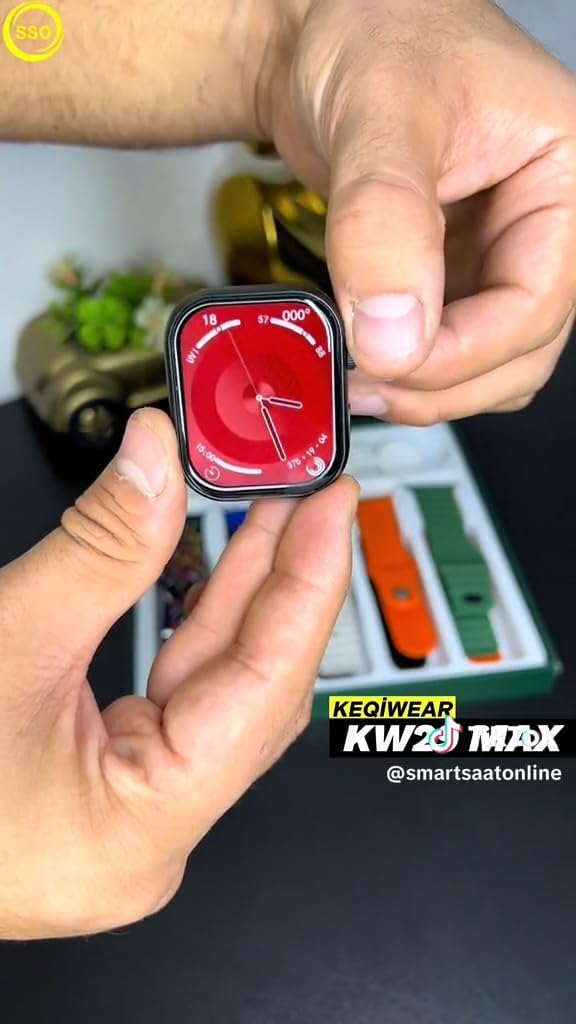
Image: A close-up of the KEQIWEAR KW29 MAX Smartwatch display, showing a red-themed watch face with analog-style hands and digital readouts for heart rate, steps, and other health metrics.
6. الصيانة
6.1 تنظيف ساعتك الذكية
- امسح الشاشة وجسم الساعة بقطعة قماش ناعمة وخالية من الوبر.
- بالنسبة للبقع العنيدة، استخدمي القليل منampاغسل قطعة القماش بالماء. تجنب استخدام المواد الكيميائية القاسية أو المواد الكاشطة.
- Clean the watch straps regularly, especially after intense workouts, using mild soap and water if necessary, then rinse and dry thoroughly.
6.2 العناية بالبطارية
- تجنب تفريغ البطارية بالكامل بشكل متكرر.
- قم بشحن الجهاز بانتظام، حتى لو لم يكن قيد الاستخدام، للحفاظ على صحة البطارية.
- لا تعرض الساعة لدرجات الحرارة القصوى.
6.3 تحديثات البرامج
Periodically check for software updates via the KEQIWEAR companion app. Updates often include performance improvements, new features, and bug fixes.
7. استكشاف الأخطاء وإصلاحها
| مشكلة | الحل المحتمل |
|---|---|
| مشاهدة عدم التشغيل | Ensure the watch is fully charged. Try pressing and holding the side button for at least 10 seconds to force a restart. |
| لا يمكن الاقتران بالهاتف الذكي |
|
| تتبع النشاط غير الدقيق | Ensure the watch is worn snugly on your wrist. Check for software updates. Calibrate sensors via the app if available. |
| عدم ظهور الإشعارات |
|
8. المواصفات
| ميزة | التفاصيل |
|---|---|
| رقم الموديل | KW29 MAX |
| الشركة المصنعة | Keqiwear Germany |
| ASIN | B0CVTSQJRM |
| قطري الشاشة المرئية | 2 بوصة / 6 سم |
| الاتصال | بلوتوث |
| نوع الشحن | الشحن اللاسلكي |
9. الضمان والدعم
For warranty information and technical support, please refer to the documentation provided with your purchase or contact the manufacturer, Keqiwear Germany, directly. You may also visit their official webالموقع للحصول على أحدث موارد الدعم.
Note: Specific warranty terms may vary by region and retailer. Please retain your proof of purchase for warranty claims.